Welcome Guest ( Log In | Register )

Bump Topic Topic Closed RSS Feed
18 Pages  1 2 3 > » Bottom

Outline · [ Standard ] · Linear+

 Samsung Galaxy S Plus Official Thread V2, looking for new TS

views
     
TSannoymous1234
post Nov 20 2011, 08:57 PM, updated 13y ago

Look at all my stars!!
*******
Senior Member
7,617 posts

Joined: Mar 2009

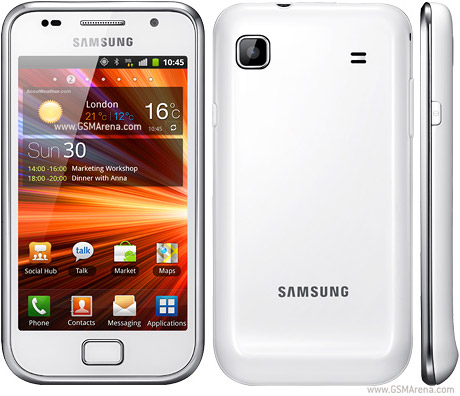
Welcome to the Samsung Galaxy S Plus official thread V2! V1 can be found here

user posted image

Awesome features of S Plus
•4" 16M-color Super AMOLED capacitive touchscreen of WVGA (480 x 800 pixel) resolution, PenTile matrix
•Super slim at 9.9mm
•Android 2.3.3 with TouchWiz 3.0 UI (upgradable to 2.3.6 with TouchWiz 4.0)
•1.4GHz Scorpion processor, Adreno 205 GPU, Qualcomm MSM8255T chipset
•512 MB of RAM
•8GB internal storage, microSD slot (expandable to 32GB)
•5 MP autofocus camera with face, smile and blink detection
•720p HD video recording at 30fps
•Wi-Fi 802.11 b, g and n support
•GPS with A-GPS connectivity; Digital compass
•microUSB port (charging) and stereo Bluetooth v3.0
•Great audio quality
•FM radio with RDS
•1650 mAh Li-Ion battery
•Accelerometer and proximity sensor
•Document editor and file manager come preinstalled
•Secondary video-call camera
•Swype predictive text input
•Full Flash support for the web browser

Customization:
- Useful Widgets are available around. You can email, sms, twitter updates, facebook, toggle wifi without opening each app. Each widgets can be moved around the screen to your liking.
- Live wallpaper. Impress your friends with rain and snowing wallpapers.
- Choice of launchers. Can choose between LauncherPro, ADW Launcher, GO Launcher Ex, SPB shell and others.

Browser test


More test:
UI demo
Benchmark test
Gaming test

Rooting, FAQ & tips
How do I root my phone?
» Click to show Spoiler - click again to hide... «


What can I do after rooting? What are the benefits of rooting?
With rooting you can backup your application and data, get rid of in-app advertisement, improve battery life by undervolt your phone, fix GPS signal, restrict certain apps from accesing internet, remove pre-install bloatware such as allshare, e-book and many more.

Need some cool apps and wallpapers?
Click me, me & me

How to Set Ringtone/Notification/alarm tone
Please refer here http://forum.lowyat.net/topic/1213449

Need some games recommendation?
See what they have here http://androidforums.com/android-games/

Why does internal memory shows 4.99GB instead of 8GB and 358MB instead of 512MB RAM
This is because the remaining space is reserved for the system that are required to run in your phone, thus you only get 4.99GB. That goes the same for RAM.

My GPS takes a very long time to lock my position
Download this: [attachmentid=3370590] extract it and replace it in systems/etc and set permission to rw-r-r and then reboot. root is required.

I'm on limited data plan, how can I block certain apps to access internet?
Get android firewall from market, you can set which app to allow 3G access, etc..

Are there any good file manager other than My File?
Root explorer is recommended. However if you don't want to purchase it there are other alternative such as ES File Explorer and astro file manager.

Some apps are requesting to read my sms and make calls
use LBE Privacy Guard to block those apps.

New to android? some battery saving tips.
-Disable Background Data syncing: Settings > Accounts & sync > Untick Background data.
-Disable Mobile Data: Disable the Mobile Data option from Settings > Wireless & networks > Mobile networks > mobile data
-If Your Phone struggles to find a 3G Connection, Disable 3G: Settings > Wireless & networks > Mobile networks > Network mode > GSM only. NOTE: this will disable 3G and your phone will only use 2G for data (Eg: EDGE)
-Use the “BACK” button to exit apps rather than just hitting “HOME”. Using “BACK” appears to store them as “inactive” apps, whereas “HOME” just leaves the app as “Background” task which appears to use more CPU.
-THIS IS VERY IMPORTANT! If you log in to the application latitude, make sure you sign out after that, leaving it sign in will keep the app alive the whole time.
More tips please refer to Androinica

Why is my battery life is poor?
It can be cause by many reasons, as well as usage. Just make sure no apps that is causing wakelock. Some apps will prevent your phone from entering deep sleep mode, to know which apps is causing this, download "BetterBatteryStats" from XDA, donate version is available in market.

Will S Plus receive future updates from Samsung?
No. However, Samsung has released an update that includes some features from android version 4.0. Alternatively, there are a lot of custom rom which are based on the latest version of android that you can flash.

Android hidden "secret"
Go to settings, about phone, and click on "firmware version" many times. something will appear. If it doesn't, try again other time.

TIP: if you want to remove those apps installed by Samsung, you need to Root your phone, then get Titanium Backup Pro and freeze those apps, this way if anything goes wrong you can reverse the process without having to re-flash. WARNING: make sure the apps you want to disable is safe to do so, otherwise it might cause problem. You can refer here to see which apps is safe to remove https://spreadsheets.google.com/spreadsheet...QXc&output=html

APN settings
» Click to show Spoiler - click again to hide... «


What about accessories?
Galaxy S casing and screen protector can be use for S Plus as they both have the same size and dimension.
As for accessories like external battery and SD card, you can search at garage sales section

This post has been edited by annoymous1234: Mar 30 2013, 11:27 PM
TSannoymous1234
post Nov 20 2011, 08:58 PM

Look at all my stars!!
*******
Senior Member
7,617 posts

Joined: Mar 2009

Recovery, tweaks
S Plus wiki guide: http://forum.xda-developers.com/wiki/Samsu...S_Plus/GT-I9001
All customization can be found here: http://forum.xda-developers.com/forumdisplay.php?f=1270

Our region firmware (2.3.6) is available here http://forum.xda-developers.com/showthread.php?t=1644215
If you are on a lower version you have 2 ways to upgrade:
1) upgrade using KIES.
2) flash using Odin.
Note: After flashing DXLD3 firmware, enter *#272*YOUR IMEI# from your phone, you will see a list of CSC code, select the XME and you're done.

What is Odin?
Odin allows you to flash any ROM that you like, you can flash ROM from other regions such as europe or even taiwan. With odin you can also flash one package file. Note: If you are using SEM set, be sure you flash back to our region ROM before sending it back to warranty. Refer the link above for files.

How do I flash with Odin?
» Click to show Spoiler - click again to hide... «


HELP! my phone won't boot!
» Click to show Spoiler - click again to hide... «


Stuck in Galaxy S plus logo/android logo/bootloop?
First wipe data/cache/dalvik cache in recovery, then follow niesma84 instruction in page 66 of this thread Post #1316. If that still doesn't work then you have to restore your nandroid backup (if you have one) or reflash your ROM again.

What is recovery or CWM 5/6/TWRP?
A custom recovery that allows you to backup your entire ROM, flashing certain rom, appyling tweaks, wiping data, etc. Very useful if you always flash different ROM.
Note 1: You do not need to root your phone to install a custom recovery.
Note 2: ICS/JB rom requires a specific recovery, so if you are using stock recovery and wish to flash to those rom, you need to first install this.
1. Download the file: http://forum.xda-developers.com/showthread.php?t=1694617
2. Place it in your phone, switch it off and go to recovery mode (vol up + power button)
3. Choose install update from zip.
Now you can backup your ROM through recovery and install any ROM that you like.

Bored of the same icons? Want to turn battery icon to percentage?
With this tweak, you can change your phone animations and icons.
All you need is 2 files from your phone. ROOT IS NEEDED FOR THIS
» Click to show Spoiler - click again to hide... «


This post has been edited by annoymous1234: Mar 30 2013, 11:29 PM
TSannoymous1234
post Nov 20 2011, 08:59 PM

Look at all my stars!!
*******
Senior Member
7,617 posts

Joined: Mar 2009

s plus user
unequalteck
mynewuser
niesma84
kllam
Rainings
nudin89
wangdu
shadow_dweller
orpheuslim
amad^77
stanley.m
3haikal
Bjan515
stevenryl86
shredder90
opicity
Kent89
xXDeaDXR3dDXx
musteck
nazman
warpats
nonstopps3
haziqmck7
faidz85
alam_shahbana
shadowlove
leon898
kayro
dashisiong
g30ccc
mbf584
jonn zee
sora90
lifrosak
Prg
ranc79
Peculator
mokhaz
sumoshaman
meowbig
dante10
meced
greenmiks
emperor_o4118
samwongjyhhorng
shahraziman
psyduck89
howeisheong
mlinda
nawkaz
terradrive
bluraypirate
CGLegacy
funnyboy101
moorish
alisyalin
2046
nazman88
darkripper214
wanz_delpiero
shahzan99
green_algae
gen1
jacktay94
gambarlogy
chunyeong
mccy118
ian_9
andyng
mizi353
broik14
AveoHzq
donny
zaxxshoxx
BlowYOurMInd
amad108

This post has been edited by annoymous1234: Mar 30 2013, 11:29 PM
TSannoymous1234
post Nov 20 2011, 11:50 PM

Look at all my stars!!
*******
Senior Member
7,617 posts

Joined: Mar 2009

QUOTE(unequalteck @ Nov 20 2011, 09:11 PM)
good job man!! keep it up!
*
QUOTE(mynewuser @ Nov 20 2011, 10:22 PM)
I support you. Keep up the good job.
*
thanks biggrin.gif

QUOTE(niesma84 @ Nov 20 2011, 11:15 PM)
i'm 3rd.... 
yeah...congratz v2 oredi... rclxms.gif
me too will support you in this thread

@annoymous
BTW...i thinking you should update lists of user section  laugh.gif
*
done. will also more info when i have the time smile.gif

This post has been edited by annoymous1234: Nov 20 2011, 11:50 PM
TSannoymous1234
post Nov 21 2011, 12:29 AM

Look at all my stars!!
*******
Senior Member
7,617 posts

Joined: Mar 2009

QUOTE(killerloop81 @ Nov 21 2011, 12:13 AM)
samsung galaxy s plus vs samsung galaxy w,which 1 is better? i mean the spec
*
processor and chipset is the same..
only difference is screen size, display and internal storage 4gb (w) and 8gb (S+)
TSannoymous1234
post Nov 21 2011, 08:56 AM

Look at all my stars!!
*******
Senior Member
7,617 posts

Joined: Mar 2009

QUOTE(Rainings @ Nov 21 2011, 12:50 AM)
congraz v2...
hey bro.. i still cant find how to change the battery icon to percentage =.=
*
which part u stuck at?

This post has been edited by annoymous1234: Nov 21 2011, 10:53 AM
TSannoymous1234
post Nov 21 2011, 08:15 PM

Look at all my stars!!
*******
Senior Member
7,617 posts

Joined: Mar 2009

QUOTE(Rainings @ Nov 21 2011, 07:25 PM)
i found the zip to update...
but when in the recovery mode.. the update abort..
my version is 2.3.5 gingerbread
which file u use to flash ur icon?
*
u try follow my steps above. the way i did it no need to enter recovery mode, just need to copy and replace system files only
TSannoymous1234
post Nov 21 2011, 08:17 PM

Look at all my stars!!
*******
Senior Member
7,617 posts

Joined: Mar 2009

QUOTE(unequalteck @ Nov 21 2011, 01:43 PM)
hey. any risk for rooting the phone?
will it become bricked?
im scared after experienced once
*
maybe has done it and so far nobody brick their phone by rooting. so don't worry laugh.gif

This post has been edited by annoymous1234: Nov 21 2011, 08:18 PM
TSannoymous1234
post Nov 21 2011, 08:37 PM

Look at all my stars!!
*******
Senior Member
7,617 posts

Joined: Mar 2009

QUOTE(Rainings @ Nov 21 2011, 08:25 PM)
i cant find ur post -,-
*
LOL its under "Bored of the same old icons? Want to have nicer looking icons and battery in percentage?" that's the one..
TSannoymous1234
post Nov 21 2011, 10:51 PM

Look at all my stars!!
*******
Senior Member
7,617 posts

Joined: Mar 2009

QUOTE(unequalteck @ Nov 21 2011, 09:35 PM)
Q: What benefits does rooting gives?
A: Quite a lot, some market apps depend on root.
Currently rooting gives you the following:
Bluetooth File Transfer(OBEX)
Put apps folder on SD card (app2SD)
Full Backup
Full control over the phone

Found this on android faq and tutorial
So after i rooted i can move all the apps to memory card?
And lets say if sgs+ cant turn back on how can i unroot before sending back for warranty?
*
yes after u root u can move to mem card.
if ur phone ca'nt turn on then i think no way u can unroot it.
but, if im not mistaken if ur phone cant turn on means mobo spoil edi, in which case u no need to worry they find out u root ur phone as the whole mobo need to change
TSannoymous1234
post Nov 22 2011, 12:49 AM

Look at all my stars!!
*******
Senior Member
7,617 posts

Joined: Mar 2009

QUOTE(g30ccc @ Nov 22 2011, 12:45 AM)
I got my sgs+ last friday .. ^^

So far it function well and battery life quite good.
*
added u to the list thumbup.gif


Added on November 22, 2011, 8:32 amthose who just got this phone.. quickly upgrade to 2.3.5
better battery life yo

This post has been edited by annoymous1234: Nov 22 2011, 08:32 AM
TSannoymous1234
post Nov 23 2011, 09:30 AM

Look at all my stars!!
*******
Senior Member
7,617 posts

Joined: Mar 2009

Use volume button to zoom or pinch the screen like how u zoom in ur browser
TSannoymous1234
post Nov 23 2011, 03:10 PM

Look at all my stars!!
*******
Senior Member
7,617 posts

Joined: Mar 2009

QUOTE(Rainings @ Nov 23 2011, 01:08 AM)
annoymous1234
thx i juz found ur post..
hey i suggest tat u should post it at the 1st page.. for how to change the battery icon.. hehe
btw.. any source to find some nice wallpaper?
*
its at the first page all along
TSannoymous1234
post Nov 23 2011, 10:28 PM

Look at all my stars!!
*******
Senior Member
7,617 posts

Joined: Mar 2009

QUOTE(warpats @ Nov 23 2011, 05:31 PM)
Why that Im unable to move apps to sd card as it just show me the usb storage which is the phone internal storage. I got 16gb slotted in yesterday though...but the phone can detect it.
*
have u try this? https://market.android.com/details?id=com.a...ne.app2sd&hl=en
i haven't test it myself so if it works post here and i'll put it in 1st page smile.gif
TSannoymous1234
post Nov 23 2011, 11:23 PM

Look at all my stars!!
*******
Senior Member
7,617 posts

Joined: Mar 2009

that's strange, i just check mine and all my apps has the option to "move to SD card"
u sure ur apps is not already install in SD card?
TSannoymous1234
post Nov 25 2011, 08:38 PM

Look at all my stars!!
*******
Senior Member
7,617 posts

Joined: Mar 2009

QUOTE(3haikal @ Nov 25 2011, 03:14 PM)
My GPS takes a very long time to lock my position
Download this: Attached File  gps.zip ( 275bytes ) Number of downloads: 32
and replace it in systems/etc and reboot.

can paste the file . ready only ... why ya ?
*
u need to change it to r/w first
TSannoymous1234
post Nov 25 2011, 11:40 PM

Look at all my stars!!
*******
Senior Member
7,617 posts

Joined: Mar 2009

QUOTE(danielcmugen @ Nov 25 2011, 11:36 PM)
1) this phone can put gameloft/EA hd games into external sd card without patching/rooting?
2) how much user available internal storage is left to install apps?
*
GL yes. no need to root but u need to dl a patch. EA i dont think so..
internal storage depends. by default u have 5GB. depends on games size
TSannoymous1234
post Nov 28 2011, 09:37 AM

Look at all my stars!!
*******
Senior Member
7,617 posts

Joined: Mar 2009

QUOTE(ArepAltair @ Nov 28 2011, 02:38 AM)
anyone.... pleasee..... any suggestion about my sgs plus problems? 1)annoyed ascending tone..2)mms sending and receiving problem... 3)cant send 2pages sms.... sad.gif please..... my feelings for this smartphone is down below.... pleasee.... i even thinking about to sell my sgs plus... sad.gif
*
1) i dont think u can do anything bout ascending tone, samsung made it this way, even sgs2 is like this. but there are ways u might be able to fix it, 1 is to flash a custom rom (provided the developer modify the script). 2 u try to google patch or something, maybe they have it.
2) is ur APN correct set? see first post. make sure u on packat data
3) try changing network to GSM

what is ur firmware version? what baseband?
QUOTE(shredder90 @ Nov 28 2011, 09:31 AM)
just want to ask..if my phone is rooted, then i flash a new rom..
will it be unrooted back?
how bout hard reset, will it also be unrooted back?
still new in rooting..
*
yup. if flash new rom u need to root it back

This post has been edited by annoymous1234: Nov 28 2011, 09:52 AM
TSannoymous1234
post Nov 28 2011, 07:56 PM

Look at all my stars!!
*******
Senior Member
7,617 posts

Joined: Mar 2009

QUOTE(ranc79 @ Nov 28 2011, 06:38 PM)
tried to cook battery status from kitchen... uploaded the two apk files.. but when downloaded.. it's with all the folder and meta-inf inside...
can i just extract it and update the two apk files.. or i need to go into recovery mode and update the zip file..?

Thanks
*
extract and replace back the 2 apk files only. the rest u can ignore it
TSannoymous1234
post Nov 28 2011, 08:23 PM

Look at all my stars!!
*******
Senior Member
7,617 posts

Joined: Mar 2009

QUOTE(shredder90 @ Nov 28 2011, 08:00 PM)
i've already rooted my phone..
but then i don't know what to do..
can someone give me a guideline..
very noob in rooting..
*
get titanium backup to backup all ur data.. u'll never know when shit happens laugh.gif

18 Pages  1 2 3 > » Top
Topic ClosedOptions
 

Change to:
| Lo-Fi Version
0.0600sec    0.44    7 queries    GZIP Disabled
Time is now: 12th December 2025 - 03:29 AM