Welcome Guest ( Log In | Register )

Bump Topic Topic Closed RSS Feed

Outline · [ Standard ] · Linear+

 Astro B.yond Episode IV (Version 9.0), The New World of Entertainment

views
     
Fubar20
post Jun 18 2012, 02:52 PM

Regular
******
Senior Member
1,187 posts

Joined: Apr 2011
From: Nowhere


QUOTE(gtiwtks @ Jun 18 2012, 01:54 PM)
HI Guyz,

Anyone facing recorded SD programs (AOD) missing from time to time? Other recorded HD programs no problem. How to solve it? Any solution?

Thanks.
*
SD and HD. Recorded not even halfway and stop even though still have freespace. mad.gif
Fubar20
post Jul 3 2012, 03:32 PM

Regular
******
Senior Member
1,187 posts

Joined: Apr 2011
From: Nowhere


QUOTE(-kytz- @ Jul 3 2012, 10:08 AM)
One more thing about Astro Beyond HD ah, is there an option to just play stereo 2.1? (turning off 5.1)
*
hmm.gif Not sure about 2.1 but the default audio setting is stereo as opposed to the other setting which is digital audio 5.1.


Added on July 3, 2012, 3:33 pm
QUOTE(enriquelee @ Jul 3 2012, 11:23 AM)
Re post.
Anyone could advise? Thank you
*
biggrin.gif It is up to your viewing comfort. Some like to see the picture in the correct ratio and some don't mind.

This post has been edited by Fubar20: Jul 3 2012, 03:33 PM
Fubar20
post Jul 4 2012, 12:37 AM

Regular
******
Senior Member
1,187 posts

Joined: Apr 2011
From: Nowhere


QUOTE(jamesleetech @ Jul 4 2012, 12:27 AM)
» Click to show Spoiler - click again to hide... «

*
unsure.gif I think you forgot about the coaxial output. Anyway, nice detailed comments. thumbup.gif
Fubar20
post Jul 4 2012, 02:55 PM

Regular
******
Senior Member
1,187 posts

Joined: Apr 2011
From: Nowhere


QUOTE(-kytz- @ Jul 4 2012, 02:41 PM)
Is Beyond HD's Sound Quality that good? Let's say how many percent of a blu ray movie...70%?

If lets sat the optical in doesn't support 5.1, can I like buy another blu ray player and connect my speakers to it? Lol
*
Good but not as good as in bluray (some said) because it use DTS HD Master Audio or Dolby TrueHD which is superior.
Your optical input should support 5.1 but your problem is connecting from Byond coaxial output to it. Nothing to do with bluray player.

This post has been edited by Fubar20: Jul 4 2012, 04:09 PM
Fubar20
post Jul 5 2012, 01:41 PM

Regular
******
Senior Member
1,187 posts

Joined: Apr 2011
From: Nowhere


QUOTE(-kytz- @ Jul 5 2012, 01:38 PM)
@jamesleetech: I just got my Astro Beyond just now. I saw a digital audio port. I can get a Co-Axial-To-Optical Converter (like you mentioned) to connect to my BD player to play full 5.1 surround sound?
*
nod.gif Correcto.
Fubar20
post Jul 6 2012, 08:45 AM

Regular
******
Senior Member
1,187 posts

Joined: Apr 2011
From: Nowhere


QUOTE(-kytz- @ Jul 6 2012, 02:36 AM)
Thanks. So all I need is this?
» Click to show Spoiler - click again to hide... «

Then what is this?

user posted image
*
The picture with the Gefen logo is the converter which you need to make the connection from Byond coaxial output to your HTIB optical input.
Of course, you can select other brand of it and also get the coaxial and optical cables too.
Fubar20
post Jul 6 2012, 10:47 AM

Regular
******
Senior Member
1,187 posts

Joined: Apr 2011
From: Nowhere


QUOTE(zepple @ Jul 6 2012, 10:43 AM)
hey guys, not sure this been asked before, I've managed to split Astro Beyond into 2 TVs, however, I've just changed to Beyond PVR. Can this Beyond PVR decoder be split into TVs as the normal Beyond?

Thanks!

p/s I've yet to go back and see the PVR decoder
*
Same concept, same method. See post #2164 by jamesleetech at above.

This post has been edited by Fubar20: Jul 6 2012, 10:47 AM
Fubar20
post Jul 6 2012, 12:39 PM

Regular
******
Senior Member
1,187 posts

Joined: Apr 2011
From: Nowhere


QUOTE(jamesleetech @ Jul 6 2012, 12:19 PM)
» Click to show Spoiler - click again to hide... «

ADDITION
By the way, I think most people chose to use "Fit to screen" and don't care about watching "fat people, fat everything" for SD channels. Just go to any open air kedai kopi, mamak shops, food courts, etc... which shows Astro channels... most will never subscribe to HD service... you will see the SD channels shown as "fat" 16:9. I may be wrong ...mmm... I believe almost everyone already got used to "fat" 16:9 !!! You and I are among the only few people left in Malaysia who don't like to see beautiful slim sexy girls changing into fat ones in SD channels !
*
Malaysia got a lot of overweight people. Normal already. laugh.gif
Fubar20
post Jul 6 2012, 02:16 PM

Regular
******
Senior Member
1,187 posts

Joined: Apr 2011
From: Nowhere


QUOTE(-kytz- @ Jul 6 2012, 02:05 PM)
Jamesleetech, my friend recommended me to use optical out from my TV and optical in to my BD player?

Can it work this way?

For 5.1 sound:

Beyond --------HDTV via HDMI
HDTV -------HTiB via optical for 5.1


Or

Beyond -------HDTV via HDMI
Beyond coaxial --------- optical HTiB via coaxial-optical converter

icon_question.gif
*
What is your TV brand and model? Normally, for bolded statement the audio output from TV should be stereo only.
Fubar20
post Jul 6 2012, 03:24 PM

Regular
******
Senior Member
1,187 posts

Joined: Apr 2011
From: Nowhere


QUOTE(-kytz- @ Jul 6 2012, 02:25 PM)
Panasonic P50ST50k 50" Plasma 3DTV
*
From what I can see from manual and search from internet, it cannot connect like that. Maybe others with the same TV can comment further since I am not familiar with it.
Fubar20
post Jul 10 2012, 06:35 PM

Regular
******
Senior Member
1,187 posts

Joined: Apr 2011
From: Nowhere


QUOTE(Milky b0Y @ Jul 10 2012, 06:32 PM)
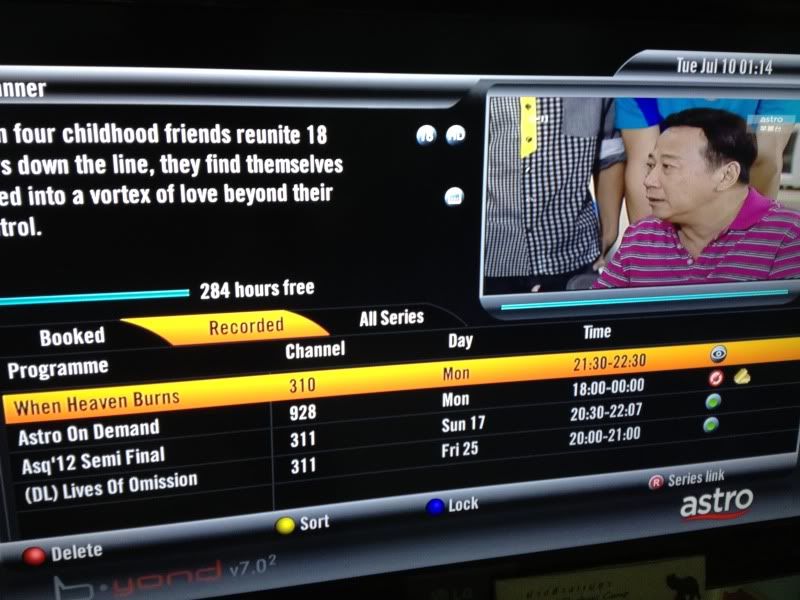
My Astro PVR have been self-deleting all my Astro On Demand recorded shows after 4-5 days I recorded the show. I have recorded other shows on other channels and this shows have been recorded more than 1 month and its still there. I have also adjusted my PVR settings for deleting shows to "Manual". However my Astro PVR still deletes the shows.

The picture as per below:
» Click to show Spoiler - click again to hide... «

I have called Astro before and they ask me to reset my decoder and I have done that. However my Astro On Demand shows are still being self deleted. Anyone encounter this case before? Any steps to rectify this?
*
hmm.gif How come the show recorded is shown as "Astro on Demand" instead of the TV series name?
Fubar20
post Jul 10 2012, 07:30 PM

Regular
******
Senior Member
1,187 posts

Joined: Apr 2011
From: Nowhere


QUOTE(Milky b0Y @ Jul 10 2012, 07:27 PM)
Because they deleted the show I recorded previously so left that title only
*
blink.gif Deleted show also still have title? rclxub.gif
Have you use Series Link to record the series? Or try this feature with other series in other channels (not AOD) and see if the same thing happen again.
Fubar20
post Jul 11 2012, 11:38 AM

Regular
******
Senior Member
1,187 posts

Joined: Apr 2011
From: Nowhere


QUOTE(jamesleetech @ Apr 28 2012, 10:45 PM)
» Click to show Spoiler - click again to hide... «

*
QUOTE(Auwen @ Jul 11 2012, 11:27 AM)
hello, new to here. i had some problems. coz i had realize lately when i wanna to install astro beyond PVR which require two cable and there need to make another hole n conceal the cable. i had prepare only one cable. so i would like to change to ASTRO beyond HD. which is normal. and after i seek some advice, there had a product call ASTRO PVR EASY, which is external hard drive and provide thje recorded services.
so far , if astro dun had this stock, where can i get it? coz i got some info. from contractor which saying tat the product is similar to the Western DIgital product.
anyone know the model???

thx...
*
Always search for jamesleetech post regarding this. wink.gif
Fubar20
post Jul 11 2012, 08:15 PM

Regular
******
Senior Member
1,187 posts

Joined: Apr 2011
From: Nowhere


QUOTE(chikana @ Jun 7 2012, 10:39 PM)
Nope. With the new version seems they want to promote more on VOD that is why everytime you switch off or go to standby, once turn it on back, it goes to home screen.
*
QUOTE(xenoGears @ Jul 11 2012, 07:27 PM)
Sorry if been asking before but searching with no result.

I've a problem, every time turn ON the astro it goes to "Home" page first instead of last channels in full screen. Is this default? Because I remember last time it not like this. This happen either I turn ON from standby mode or power-off mode.
*
hmm.gif Seems like your search engine not strong enough. tongue.gif
Fubar20
post Jul 16 2012, 09:22 AM

Regular
******
Senior Member
1,187 posts

Joined: Apr 2011
From: Nowhere


QUOTE(jalsrix @ Jul 16 2012, 08:27 AM)
I have asked this question to so-called 'speaker salesmen' in shops and they don't know the answer.

Hopefully, someone smart can answer me here.

I want to connect my astro byond box to a pair of speaker.

But I don't want to buy an amplifier because I don't have much space.

Can anyone recommend a good clear pair of PORTABLE speaker mainly for clear voice.

It must have direct connection cable to astro byond.
*
That one you have to survey yourself since you need those criteria. Why you need speakers that are portable? Don't see anyone walking around with speakers nowaday. Boombox ? hmm.gif

QUOTE(jalsrix @ Jul 16 2012, 08:29 AM)
HDMI port is ON when you pay extra rm 20. Even though you don't subscribe to HD channels it is still OFF.

Daylight robbery. vmad.gif
*
More like misinformation. HDMI is for HD service. You don't subscribe, you don't get it.
Fubar20
post Jul 19 2012, 10:11 AM

Regular
******
Senior Member
1,187 posts

Joined: Apr 2011
From: Nowhere


QUOTE(RAMChYLD @ Jul 19 2012, 10:00 AM)
If you can get your hands on a DMB-T receiver, then can receive digital radio. It's all gomen RTM stations only at the moment, but there's about 10 channels. Though, that was last year. Need to dust off the old Pontus handheld DMB-T and try it again to see if the situation's changed.
I am disappointed that TM did not fight to get the channel. Assteruk... I will not go back to assteruk, ever. Have the guts to accuse me of not returning smartcard and want to sue me RM80 over the matter when that card isn't even worth a cent anyway because it's deactivated. Sumore rain fade...  vmad.gif  vmad.gif  vmad.gif  vmad.gif  vmad.gif  vmad.gif  vmad.gif  vmad.gif  vmad.gif  vmad.gif
*
So long the furious emoticon. Just drop it lah, since it settled already.
Fubar20
post Jul 19 2012, 10:19 AM

Regular
******
Senior Member
1,187 posts

Joined: Apr 2011
From: Nowhere


QUOTE(RAMChYLD @ Jul 19 2012, 10:17 AM)
Settled, but the bad memory already there. Plus, that's not the only bad thing they've done though it's the worst.
*
Since it was in the past, just drop the anger. You can just continue to highlight it to remind others.
No point getting angry while Assteruk still making money. icon_rolleyes.gif
Fubar20
post Jul 20 2012, 04:19 PM

Regular
******
Senior Member
1,187 posts

Joined: Apr 2011
From: Nowhere


QUOTE(vandread86 @ Jul 20 2012, 04:03 PM)
Hi all

Already ordering the RM125 astro package PVR.

Questions, now i dont have HDTV,

But i got a monitor (Samsung P2770H) that can support Byond but curious about the audio. (my monitor dont have speaker)

Can PVR output its audio to this red and white cable on my speaker?

» Click to show Spoiler - click again to hide... «

*
Can but you will have stereo sound only.
Fubar20
post Jul 26 2012, 06:58 PM

Regular
******
Senior Member
1,187 posts

Joined: Apr 2011
From: Nowhere


QUOTE(ben3003 @ Jul 26 2012, 06:57 PM)
Oh haha.. no problem.. how about code to get in installation setting?
*
0000.
Fubar20
post Jul 27 2012, 08:57 PM

Regular
******
Senior Member
1,187 posts

Joined: Apr 2011
From: Nowhere


QUOTE(jamesleetech @ Jul 21 2012, 08:47 PM)
» Click to show Spoiler - click again to hide... «

cool.gif
*
QUOTE(horseman @ Jul 27 2012, 06:48 PM)
Hi all the sifu out there.... I got some problem regarding to my home theater system....my problem is... My system sounds doesn't come out when I switch my Astro Beyond's audio settings to Dolby 5.1 on all the HD channels....for your information, I connect my Beyond decoder using hdmi direct to the TV and my home theater systems are also connected to TV through hdmi.....what is the main problem here?..I connect the red/white cable direct from TV to system also as when I didn't connect it, no sounds come out at all... Please help....
*
Read.

3 Pages < 1 2 3 >Top
Topic ClosedOptions
 

Change to:
| Lo-Fi Version
0.0252sec    0.40    7 queries    GZIP Disabled
Time is now: 3rd December 2025 - 08:33 PM