Welcome Guest ( Log In | Register )

Bump Topic Topic Closed RSS Feed

Outline · [ Standard ] · Linear+

 SAMSUNG GALAXY NOTE™ | V2, RRP RM2299

views
     
brainpower
post Nov 12 2011, 06:56 PM

Getting Started
**
Junior Member
141 posts

Joined: Mar 2009
QUOTE(waveweaver @ Nov 12 2011, 06:16 PM)
Just back from Pavillion. Samsung promoter confirmed that my S Pen/phone is unaccurate. But they advice me to go to service centre first as they might help with the adjustment/calibration which i agreed as my phone dont have any other problem.
If this monday still the S Pen/phone cant be adjusted then i will claim 1 to 1 exchange.
- to those who want to know whether their S Pen and the phone adjust/ calibration is correct.
1) Go to S Memo
2) Open a page that have small/tiny square.
3) Point you S Pen on one of the small square and try to mark that square.
4) If you miss that mark (intended square) then most probably you need to go to service centre for calibration.
Try to do this test within this 7 days as you still have a chance to make a 1 to 1 phone exchange.
~~happy testing and good luck guys~~
*
Mine one also not that accurate.. slightly off the "cross point" at where i intend to point. Hopefully with the new screen this will be solved too.
brainpower
post Nov 12 2011, 09:14 PM

Getting Started
**
Junior Member
141 posts

Joined: Mar 2009
QUOTE(benny888 @ Nov 12 2011, 07:01 PM)
Hope this article will help you in your task to update your stuffs:

http://android.appstorm.net/how-to/synchro...ithout-rooting/
*
Good article smile.gif thanks Benny. notworthy.gif
brainpower
post Nov 12 2011, 09:28 PM

Getting Started
**
Junior Member
141 posts

Joined: Mar 2009
QUOTE(vincent829 @ Nov 12 2011, 09:22 PM)
The firmware is huge. Approximate 590MB. I connect my YES4G and download it, also need ~10 mins... @_@
*
Got so big meh? i use the wireless update i only see it downloaded 3.xxmb??? and i try again over the software update and it mention no update available. It means i'm on the latest firmware?
brainpower
post Nov 12 2011, 09:38 PM

Getting Started
**
Junior Member
141 posts

Joined: Mar 2009
QUOTE(waveweaver @ Nov 12 2011, 03:27 PM)
No rooting needed. instal the 1.3.1 version (latest)
*
Waveweaver or any sifus here. Those downloaded apps in zip how to install it into the phone? can give some guidance here? thanks...
brainpower
post Nov 12 2011, 10:20 PM

Getting Started
**
Junior Member
141 posts

Joined: Mar 2009
QUOTE(vincent829 @ Nov 12 2011, 10:06 PM)
I am starting to doubt is that you too choosy? Haha...
Because two photos I don't see anything.
*
Bro as i have said, the line in the photo doesn't looks clear. But i've showed to the samsung guy and they acknoledge that. That's mroe important. Can we just drop that topic off? If you want to see how it looks like, come to my house i show you lol... let's just say this case is closed notworthy.gif
brainpower
post Nov 12 2011, 10:38 PM

Getting Started
**
Junior Member
141 posts

Joined: Mar 2009
QUOTE(vincent829 @ Nov 12 2011, 10:24 PM)
I use Samsung Kies, before download check my Yes balance and after download again the balance. Not sure exactly how much, but at least this is what Yes charge me. @_@
Why not connect to Samsung Kies and check?
*
When i downloaded on Kies, the download was very fast! within 2-3 mins it's done but it only can't install. But after using wifi, all is done within 5 min.
brainpower
post Nov 12 2011, 10:41 PM

Getting Started
**
Junior Member
141 posts

Joined: Mar 2009
QUOTE(vincent829 @ Nov 12 2011, 10:31 PM)
Ok, finally now come to the last page. Sorry ya, was on the way from page 40+ to now page 64.
As some had suggest, you should demand a 1 to 1 exchange since it is within 7 days of purchase.
Anyway, wish you get your baby back to the right path and join us for the party!
*
My concern is the backing up of the files, contacts etc... hassle. But come to think of the solution uncle benny suggested for the Mybackup Pro, that will cost $$ lol... let me think about it again. But if they can change the screen why not. I still get the body of the beaty, some more now samsung willing to do plastic surgery for me to get a perfect beauty.. why not? lol...


Added on November 12, 2011, 10:43 pm
QUOTE(Innovation @ Nov 12 2011, 10:35 PM)
ok...after press edit, gt 2 option,either add folder/add page.
when i select add folder, it show a black box(folder)...but i cant do drag n drop as u said...the apps at the bck, all grey out.. rclxub.gif  rclxub.gif ...
*
Ok new android user too here... but after you play around, like previous post mentioned, it's like iOs. Press and hold the icon, then move the icon to the folder... walla, it's done. give it a try.

This post has been edited by brainpower: Nov 12 2011, 10:43 PM
brainpower
post Nov 13 2011, 02:20 PM

Getting Started
**
Junior Member
141 posts

Joined: Mar 2009
QUOTE(onibaru @ Nov 13 2011, 12:59 PM)
so there r 2 people having this touch problem so far...
berbaloi tak go to samsung service center for rectification...?
*
No such problem on my phone though..


Added on November 13, 2011, 2:22 pm
QUOTE(fit @ Nov 13 2011, 01:05 PM)
Use my new toy for 2 days now.... my verdict : worth upgrade from SGS2  ... drool.gif  drool.gif  drool.gif
Some teasing pics  to share ..buy buy buy  rclxms.gif  rclxms.gif  rclxms.gif

[attachmentid=2533277][attachmentid=2533278][attachmentid=2533279][attachmentid=2533281][attachmentid=2533282][attachmentid=2533283]
*
I see bling bling!! brows.gif

This post has been edited by brainpower: Nov 13 2011, 02:22 PM
brainpower
post Nov 13 2011, 02:30 PM

Getting Started
**
Junior Member
141 posts

Joined: Mar 2009
QUOTE(Cynox @ Nov 13 2011, 02:22 PM)
need some confirmations:
1. so our local sets does not come with chinese input?  can't find it.
2. how to restart the phone?  I can only shut down and turn it on again now.
*
I tried typing chinese using pin yin. it works

press and hold on the "tap to enter message" area
choose input method>dio pen chinese ime
then at the bottom of the keyboard, next to "." the Ab button press it and there you'll get Pinyin to type chinese words
brainpower
post Nov 13 2011, 02:47 PM

Getting Started
**
Junior Member
141 posts

Joined: Mar 2009
QUOTE(Cynox @ Nov 13 2011, 02:40 PM)
thanks for the fast reply.
thanks a million.  Dun know how i miss that at the input method setting.
*
Don't mention... that's what forum are for. you scratch my back i scratch yours..
brainpower
post Nov 13 2011, 04:53 PM

Getting Started
**
Junior Member
141 posts

Joined: Mar 2009
QUOTE(rayzrblade @ Nov 13 2011, 04:39 PM)
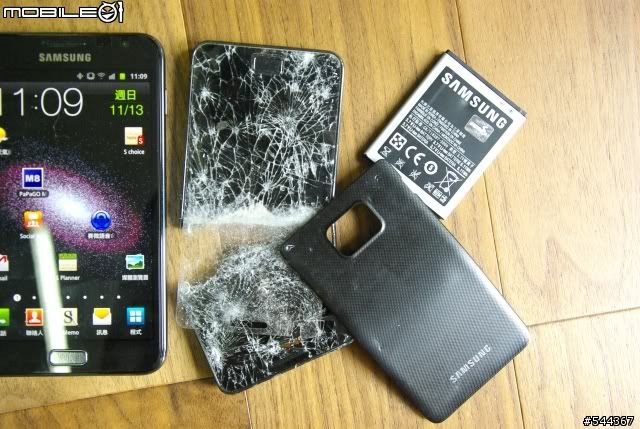
this is what happens when u dump your S2 for your New Note.
It will take it very personally and commit suicide. haha

user posted image
*
Wah lao eh~!! shocking.gif
brainpower
post Nov 13 2011, 09:09 PM

Getting Started
**
Junior Member
141 posts

Joined: Mar 2009
QUOTE(huntedz @ Nov 13 2011, 08:23 PM)
hi guys.. how long did u charging your Note until fully charges. Mine it takes about 2hours 30min something..
*
Yours one is charge from empty batt? My first charge from almost 0% (critical low) took me about 2.5 hours to 3 hours too

Just now charge from 38% took me about 1hour - 1.5 hours too...

brainpower
post Nov 13 2011, 09:15 PM

Getting Started
**
Junior Member
141 posts

Joined: Mar 2009
someone tested its camera? I dont' know i tested the camera and compare with my old phone Samsung Omnia HD, both 8m camera, my old phone colour looks more vivid and sharper compare to the Note...

Yesterday night i test out the stock browser and i don't know what happen, until certain extend, when scrolling, it scroll all the way to top/down without stop with just a small flick... does this happen to anyone here?
brainpower
post Nov 14 2011, 05:13 PM

Getting Started
**
Junior Member
141 posts

Joined: Mar 2009
Hi guys, i just realise one thing, is it my screen problem or it's normal. When i'm in call i just look at the screen and browse back to the main screen, the top part colour look very funny, but after browse a few page different then it returns to black colour and it goes back to this green colour again. Is this normal? Please refer to the photo:


Attached thumbnail(s)
Attached Image
brainpower
post Nov 14 2011, 09:09 PM

Getting Started
**
Junior Member
141 posts

Joined: Mar 2009
QUOTE(un_id @ Nov 14 2011, 04:07 PM)
mine also havn't got SMS for registration.. man is Celcom f***ing doing business??  mad.gif


Added on November 14, 2011, 4:09 pm
demo set u know la usually spoilt due to thousand hands.  biggrin.gif

yes after having Note side by side with my S2, S2 looks like a very normal sized phone (which used to having the largest screen sized among peers) ..haha
*
Mine also register with Celcom and sign up the 88 plan. The Blue Cube guy ask me to call Celcom cs to confirm before use the data plan otherwise will kena charge kaw kaw... and i tried call today (sign up friday) and they said the line service is not register yet... don't even say help us register phone, their own service also not activate shakehead.gif
brainpower
post Nov 14 2011, 09:19 PM

Getting Started
**
Junior Member
141 posts

Joined: Mar 2009
QUOTE(entaro @ Nov 14 2011, 05:15 PM)
I think tat shows u r in an active call...
*
Oh is it? hm.. i didn't notice that tongue.gif haha... i hope it's not the screen problem because 2 days ago while it's charging the screen colour suddenly turn different colour and cause the whole screen colour look funny, the picture everything is still there just the colour is funny. Can't recall what colour hmm.gif


Added on November 14, 2011, 9:21 pm
QUOTE(edison1437 @ Nov 14 2011, 05:16 PM)
this is normal for andriod meaning ur call is active
*
Ok thanks for the info.. android noob here blush.gif

This post has been edited by brainpower: Nov 14 2011, 09:21 PM
brainpower
post Nov 14 2011, 09:47 PM

Getting Started
**
Junior Member
141 posts

Joined: Mar 2009
QUOTE(nicholaslbc @ Nov 14 2011, 08:19 PM)
Anyone done MNP from Maxis prepaid to Celcom before?
I submit the form and get the celcom sim card already.
Pending Celcom porting then will be a SGN user..

Agrhhh...
Anyone know how fast porting can be done?
Roadshow guy told me 1-5 days.
Cant wait to collect my SGN once Celcom line activated.
*
I did my porting last month and within 3 working days my line is up
brainpower
post Nov 15 2011, 09:01 AM

Getting Started
**
Junior Member
141 posts

Joined: Mar 2009
Guys, i tried to call up the service centre guy to remind him about my screen issue so that he can order the screen for me and to my surprise he remembered and already ordered. So i tried my luck and asked him whether can i get a 1 to 1 swap since it's within 1 week, he said, that will depend. Need to bring the phone over, let them check and then they need to get their boss approval first then only can do 1 to 1 exchange. Otherwise, need to put there for 2 weeks. So what's the point? I rather wait for the screen exchange to come then go there and let them change the screen. He said changing the screen, most will take 2-4 hours max and most of the time can collect on the same day.
brainpower
post Nov 15 2011, 12:53 PM

Getting Started
**
Junior Member
141 posts

Joined: Mar 2009
QUOTE(waveweaver @ Nov 15 2011, 09:18 AM)
Latest screenshots with 10% battery juice left
*
hi waveweaver, regarding the betterbattery you suggested i've downloaded but have no idea how it works. Can teach noobie here?

Secondly, i realise my Android OS is utilising more batter % compare to my screen. Any idea/suggestion? My phone can't last me a complete 24 hours with moderate phone call, sms with wifi connected (always on). Any suggestion?
brainpower
post Nov 15 2011, 01:50 PM

Getting Started
**
Junior Member
141 posts

Joined: Mar 2009
QUOTE(KKW @ Nov 15 2011, 01:33 PM)
Try turn it off..
Whenever you wanna use just turn it on back.


Added on November 15, 2011, 1:34 pm

Yes. Very annoying case doh.gif
No choice. There is no other case in malaysia market yet.
Planning to order from hong kong but it will take 12-21 business day to reach here doh.gif
*
How to turn it off? There are few apps that is running when i check inside settings>application>manage application.

After turn off it still turns on automatically. Also, i realise that the wifi is keep scanning non stop even though it's connected. Isn't that will take up more battery? If it's connected, any way can stop the scanning again?

3 Pages < 1 2 3 >Top
Topic ClosedOptions
 

Change to:
| Lo-Fi Version
0.0200sec    0.61    7 queries    GZIP Disabled
Time is now: 16th December 2025 - 10:50 AM