Product 1:***************************************************
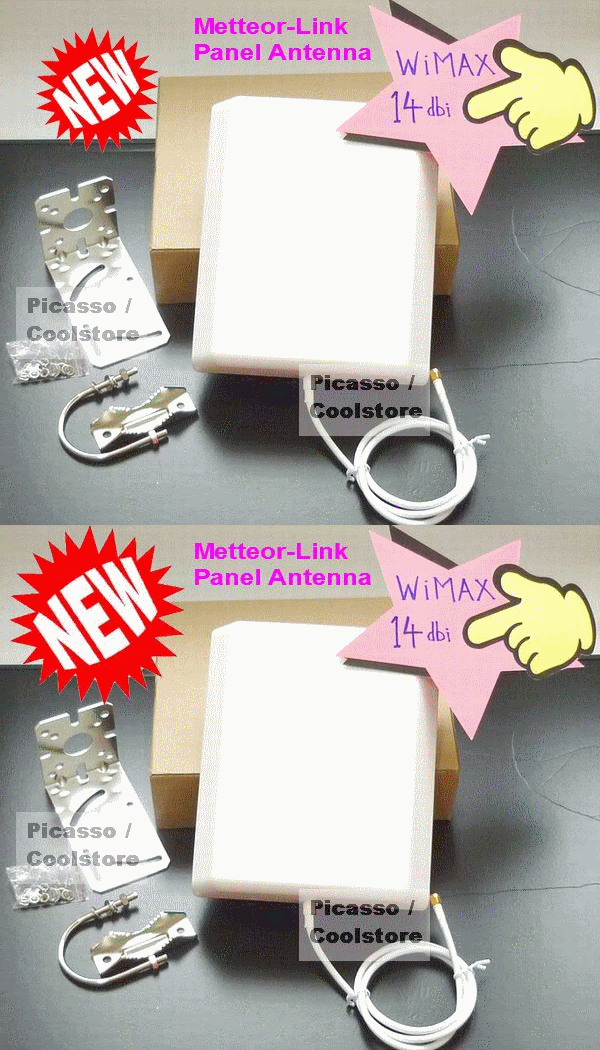
Metteor-Link WIMAX directional panel antenna TRUE High Gain 14dbi
***************************************************Boosting 14dbi high gain for
Malaysia WIMAX frequency 2.3GHz!
Support
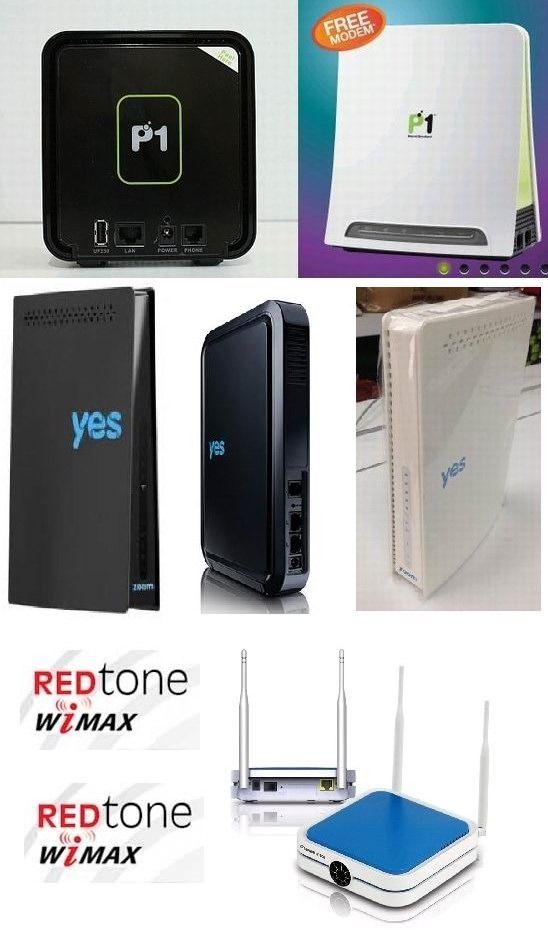
P1, YES and Redtone wimax modem device!
Replacing modem internal antenna to achieve better results!
Premium Grade antenna quality.
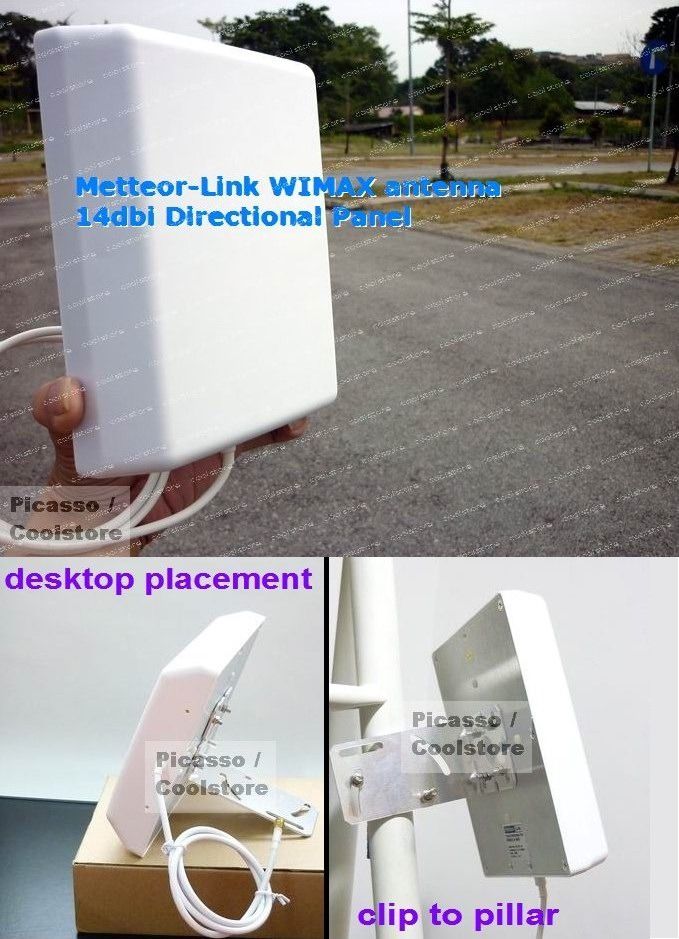
Can put
indoor or outdoor. (Let this external antenna face outside harsh weather conditions from now on, not the modem, protect the modem!)
 =======================================
Wimax modem to work with Metteor-Link wimax antenna:
=======================================P1 modem DV-230, DX-230
YES modem Zoom
Redtone modem
How setup?
Attaching external antenna into modem via a converter cable, plug and play, no soldering job needed.
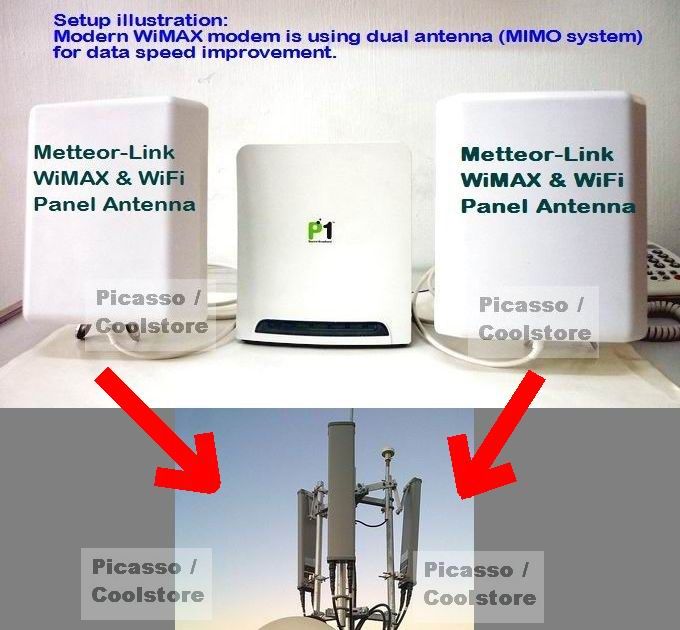
After successfully attaching external wimax directional antenna, point the panel antenna towards / closer to the direction of wimax base station location and it will yields better result. (see sample of wimax base station on building roof in picture)
Tips:
(1) no need knowing exact where base station is, just adjust your panel up right <> up left, changing direction will see fluctuating signal result, when seeing better signal level from a direction, then the base station is located at that way.
(2) WiMAX modem are using 2 antenna system for running MIMO mode (multi-in multi-out at same time) for doubling data speed, not 1 antenna old technology.
=====
Note:
=====1) Panel antenna is a kind of 'Directional antenna', which means it works in 1 straight line to receive & transmit signal data (much like the way how a torch light illuminate).
Thus directional antenna capable of achiving long range connection.
2) This specific Metteor-Link panel antenna
support dual frequency band WIMAX 2.3GHz and WIFI 2.4GHz. So can apply on both WIMAX & WIFI. While other dedicated WIFI panel antenna works only on 2.4GHz so only for wifi usage! Don't get wrong one!
======================
Why pick Metteor-Link antenna?
======================Premium grade antenna made by tier 1 antenna pro factory. Not made by 2nd or 3rd class small factory in china.
Most local dealers sourcing overseas antenna stock by online purchasing without really been to the exact factory to survey:
a) quality of factory: small factory or large factory?
b) do they really have wireless engineers? how many workers there?
c) do they really equipped with advanced antenna making and testing pro machinery?
d) what are their standard Quality Control process?
d) do they ever manage to get western countries orders which require stringent antenna quality?
================
Antenna Specifications:
================Updates: From March 2015 onwards, new stock Metteor-Link panel antenna 2.3-2.5GHz is shipped in upgraded Version 2!
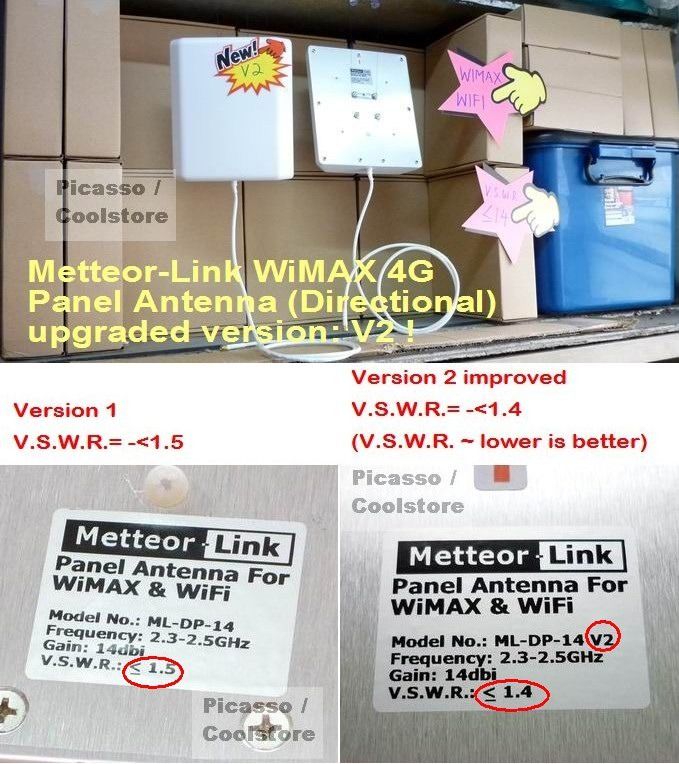 The difference between Version 1 and Version 2 is in V.S.W.R. value.
Version 1 is ≤.15, Version 2 is ≤1.4.
#The VSWR is always a real and positive number for antennas. The smaller the VSWR is, the better the antenna is matched to the transmission line and the more power is delivered to the antenna.#Brand: Metteor-Link
Model No.: ML-DP-14 (this model support both wimax & wifi) V2
Gain: 14dbi (distance - how long)
Horizontal beamwidth: 30 degree (coverage area - how wide)
Vertical beamwidth: 30 degree (coverage area - how wide)
V.S.W.R.= ≤ 1.4
Size: ~ 20cm x 19cm
Weight: ~ 800g
Accessories: steel mounting clip provided
Cable: RG58 1 meter (minimising signal loss - longer cable more signal loss)
========
Reviews
========### Testing of external antenna on WiMAX modem. ###
This reviews will be covering:
i) is it really more effective & helpful by using external antenna?
ii) performance testing among different type/manufacturer's antenna product.This reviews starts with:
Testing (1) - Modem alone (with internal antenna)
~~~~~~~~~~~~~~~~~~~~~~~~~~~~~~~~~~~Conditions:
Wheather: sunny, no rain.
Location: indoor, in a room.
Tips for U: this is not ideal position for wimax modem, just for testing illustration purpose. WiMAX Malaysia is using 2.3GHz frequency band (2375000 showned in picture), you need 2.3GHz antenna for it, not WiFi 2.4GHz antenna.
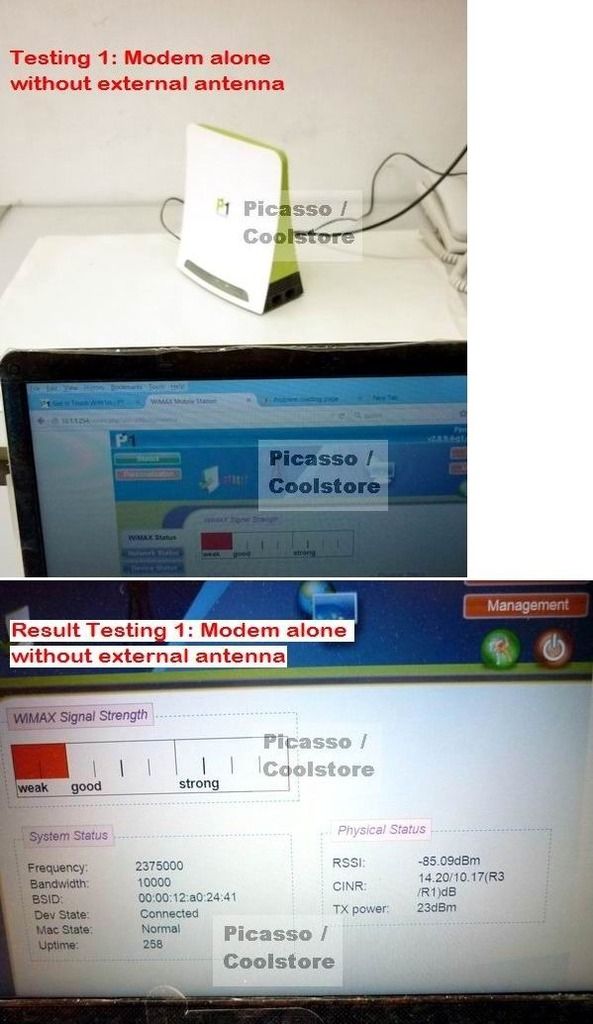 Results of Testing (1):Signal Level:
 RSSI: -85dBm
Bar chart: Weak
Tips for U: RSSI number is signal level, it is accurate signal level measurement against bar chart indicator. RSSI with lower number means higher signal level, RSSI with higher number means lower signal level. User should always refers to this information when available.
Conclusion of Testing (1):Weak signal reception level at this spot with modem alone.
Testing (2) (Part A) - Modem with fancy design non-tradisional external directional antenna
~~~~~~~~~~~~~~~~~~~~~~~~~~~~~~~~~~~~~~~~~~~~~~~~~~~~~~~~~~~~~~~Antenna tested: brand W directional panel antenna - self-claimed MIMO antenna (2 antenna inside & 2 cable output) + High Gain 35dbi AT all frequency band from 700MHz to 2700MHz.
Antenna is positioned in a slope way as seen in picture, as that is the best direction I tested to get outdoor signal.
Tips for U: Why pick this antenna for testing? Because this is the TOP MODEL among those china fancy design non-tradisional antenna flooded into market that self-claiming superb high gain XXdbi AT all frequency band... If this not doing well, no need test others.
 Results of Testing (2) (Part A):Signal Level:
 RSSI: -90dBm
Bar chart: Weak
Conclusion of Testing (2) (Part A):Signal reception level is weaker than modem original internal antenna. RSSI -90dBm is weaker signal than RSSI -85dBm.
By viewing their inner antenna component, P1 modem's internal antenna is no doubt of better quality than this so-called 35dbi high gain MIMO antenna. (open up casing and see, you would know).
Tips for U: if you heard some one said after applying external antenna and getting no result or poorer, albeit from user wrong setup, he might already bought himself an inferior quality antenna.
Testing (2) (Part B) - Modem with tradisional panel directional antenna Metteor-Link
~~~~~~~~~~~~~~~~~~~~~~~~~~~~~~~~~~~~~~~~~~~~~~~~~~~~~~~~~~Antenna tested: Metteor-Link panel directional antenna 14dbi
Antenna is positioned in similar slope way as seen in picture.
Tips for U: 2 antenna is applied because 1 antenna with 1 cable output, 2 antenna needed to run in MIMO mode.
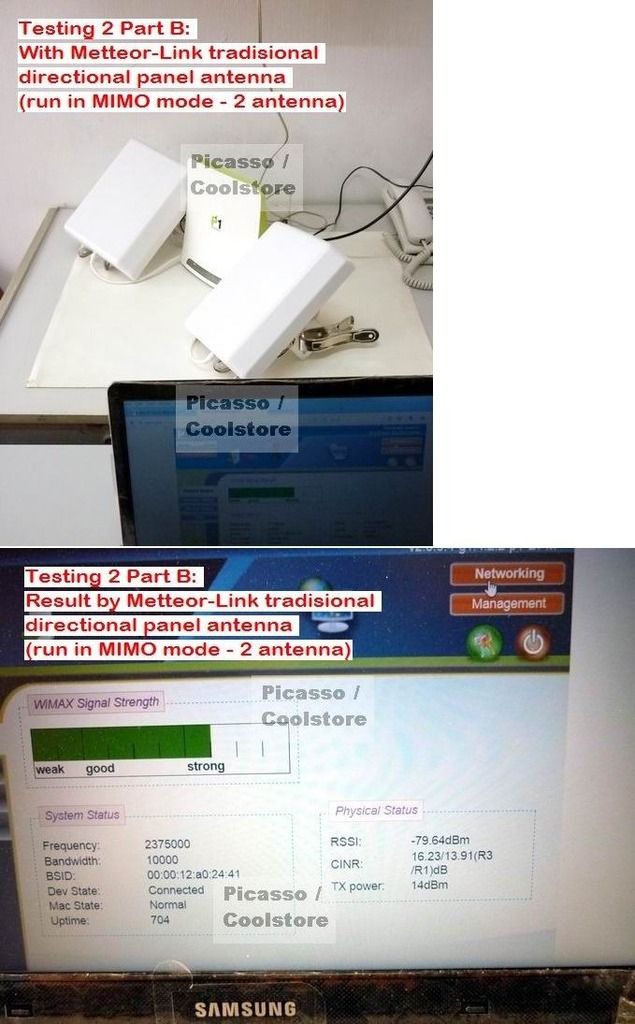 Results of Testing (2) (Part B):Signal Level:
 RSSI: -79dBm
Bar chart: Strong
TX power: 14dBm
Conclusion of Testing (2) (Part B):Now you can see true capability of tradisional panel antenna, it works far better than those good looking toy antenna in market.
Tips for U: When signal reception turns good, you can also see the modem TX power (wireless transimission power) saving energy from previous 23dBm (100mW) to now mere 14dBm (25mW). Lower TX power means modem no longer need to load high wireless radiation power to connect to remote base station. Hense lower TX power is better for user safety and use less electric power. Thats similar to what professionals always advise people don't turn on 3G or 4G of smartphone at indoor when signal is very poor because the phone will load high TX power in order to connect to 3G/4G network.
Testing (3) - Modem with tradisional parabolic directional antenna
~~~~~~~~~~~~~~~~~~~~~~~~~~~~~~~~~~~~~~~~~~~~~~~Antenna tested: tradisional parabolic directional antenna 2.3GHz-2.7GHz gain 25dbi made by KBT antenna manufacturer
Now I even go further to bring test on this giant size parabolic antenna.
Antenna is positioned in closest similar slope way as seen in picture. Since it too big (like a 40 inch LED TV), quite hassle to fine tune it.
Tips for U: parabolic and dish antenna are reckoned as highest gain antenna, but also got limitations. 1 antenna is connected here because no space to put on 2nd parabolic.

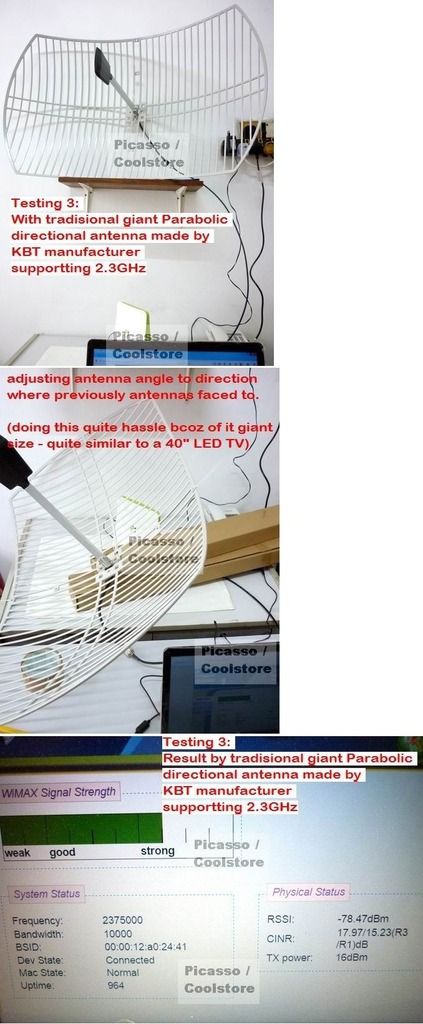 Results of Testing (3):Signal Level:
 RSSI: -78dBm
Bar chart: Strong
Conclusion of Testing (3):It perform slightly better than panel Metteor-Link at that testing spot, due to limitations of:
i) size does matter - they are bulky and heavy
ii) narrow direction angle - 10 degree or less, which means u need to tune into precise direction then only get optimum result.
iii) therefore it need professional mounting at outdoor with ample space in order to do direction adjustment.
iv) costly
v) eye-catching stuff
If above limitations are not your concern, then parabolic antenna is a good choice. Else it is more wiser using tradisional panel directional antenna which is more convenient, cost saving and space saving for end user.
SUMMARY OF THIS REVIEWS:
~~~~~~~~~~~~~~~~~~~1. If you want performance antenna, stick with TRADISIONAL panel, yagi, parabolic or dish antenna, PROVEN RESULT! They are no good looking, but serious antenna! Don't waste money on others.
2. Basics knowledge for end user to identiy fake antenna product:
a) Antenna gain (dbi) is commensurate with SIZE OF ANTENNA COMPONENT. Bigger/longer size = higher dbi, smaller/shorter size = lower dbi. (It is physics)
(# that aluminium parabolic with giant 40inch TV size ~ 100cm x 60cm only can achieve 25dbi, how can a toy size antenna 15cm x 15cm claim itself 35dbi, it is shameful and with obvious intention of cheating end user)
b) Antenna gain (dbi) is also commensurate with COVERAGE ANGLE (HOW MANY DEGREE) of antenna. Wide angle = lower dbi, Narrow angle = higher dbi. (same theory of torch light)
c) Focus-band/Dedicated antenna (for a certain frequency band only) can achieve high dbi. Wide band antenna (supporting from xxxMHz until xxxxMHz) are not able to make it high dbi.
These tips help you stay away from china made fake antenna in market.
============
Common Q&A:
============Q1: Why cannot use TV or wifi antenna for wimax?
A1: Because they are running at different radio frequancy. TV below 1000MHz, WIFI is using 2400MHz, WIMAX here is using 2300MHz. So must use correct frequency antenna. Just like if u want listen to radio Mix FM in klang valley, u must tune to correct frequency 94.5MHz FM.
Q2: I want longer cable, can?
A2: Wireless users must first understand cables basics before extending:
i) Cables ('coaxial cable') DOES NOT ADD VALUE to the wireless performance, but CAUSING SIGNAL LOSS ('signal attenuation'), i.e. it makes dbi loss.
ii) Longer cable causes more signal loss, shorter cable causes less signal loss, no cable no loss.
iii) Different grade of cable (thin/thick cable?) will cause different signal loss level (how many dbi loss per meter?) at different frequency (at low or high MHz?).
(these technical data that can be found at cable manufacturer technical data sheet)
iv) If total signal loss caused by cables is over 3db, the wireless transmission (TX) power of modem/wireless device will drop half which return an obvious poor performance.
more details:
thin/thick cable?
thin cable = more signal loss; thick cable = less signal loss.
RG174/178/316 are thin cables; RG58, LMR200 thicker; LMR400, RG8 are thickest.
so a 1 meter of RG174 will cause higher signal loss than RG58/LMR200, LMR400/RG8 will be least loss, regardless at what MHz frequency.
how many dbi loss per meter?
This got to read together with at low or high radio frequency (MHz).
low or high radio frequency?
At low frequency below 1000MHz, less signal loss per meter. At high frequency like 2xxxMHz, greater signal loss.
e.g.
Take RG58 cable as example, at 2400MHz (WIFI) it lose 0.77dbi per meter. If using 4 meter, it is over 3db loss already.
LMR400/RG8 at 2400MHz (WIFI) lose 0.22dbi per meter. Even using 10 meter, still not exceeding 3db loss, so these cable very expensive.
IN SHORT, FOR BEST RESULT, ALWAYS KEEP CABLE AS SHORT AS POSSIBLE, REGARDLESS WHAT CABLE.
Q3: Can use TV or Astro cable to extend?
A3: No. TV (RG59) and Astro (RG6) are different spec cable. They are 75ohm impedance. Where as here need 50ohm impedance cables.
===========
Price & Dealing:
===========1 Antenna: RM80 each
2 Antenna: RM75 each
Adapter cable: RM8 each
note: Yes/P1 modem is using 2 antenna system for MIMO operation (double up speed) Poslaju:
1 antenna: RM8 peninsular / RM11 sarawak / RM13 sabah
2 antenna: RM11 peninsular / RM18 sarawak / RM20 sabah.
COD available in KL at my preferred location only (free of charge).
Call/SMS/Whatsapp: ZERO ONE SIX - 9963861This post has been edited by coolstore: Sep 7 2016, 10:24 PM 


 Oct 27 2011, 12:21 PM, updated 9y ago


 Quote
Quote


 Thanx.





 0.0226sec
 0.45
0.45
 6 queries
 GZIP Disabled