Welcome Guest ( Log In | Register )

Bump Topic Topic Closed RSS Feed

Outline · [ Standard ] · Linear+

 <<@>> (M)otorola *RAZR* <<@>>, Too powerful to fall in the wrong hands

views
     
azume
post Nov 20 2011, 10:58 AM

New Member
*
Junior Member
29 posts

Joined: Aug 2006


I just grab Razr yesterday, just got one issue. My voice command not working anymore, it after icon clicked it goes back to main menu...
Is it clash with other voice application? (ex. google voice search) How should i do to reign back voice command to be work?
azume
post Nov 22 2011, 11:32 AM

New Member
*
Junior Member
29 posts

Joined: Aug 2006


QUOTE(nonexno @ Nov 22 2011, 10:38 AM)
Anyone found a phone cover yet?
*
Already pusing MINES2, not found any....

Side of the phone should design same as back cover, quite slippery...
blush.gif blush.gif blush.gif

But overall mengancam.....
azume
post Nov 23 2011, 09:35 AM

New Member
*
Junior Member
29 posts

Joined: Aug 2006


QUOTE(lingch @ Nov 22 2011, 11:28 PM)
What if I bought the phone from you before will the price be rm50 still? tongue.gif Return customer ^^


Added on November 22, 2011, 11:30 pmYeah thank god the service centre in Sarawak also do 1 to 1 exchange biggrin.gif
*
Yup me too... (bought from MINES2)

Does anyone able to install GPS navigation system???
azume
post Nov 23 2011, 10:22 AM

New Member
*
Junior Member
29 posts

Joined: Aug 2006


QUOTE(lingch @ Nov 23 2011, 09:40 AM)
I use papago. Working fine
*
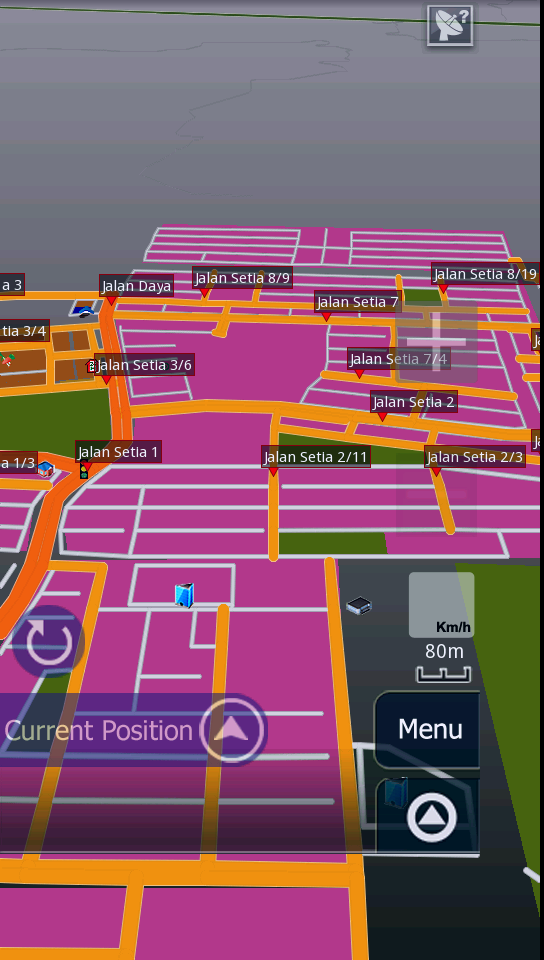
I'm also using papago, but My display cut short (not in full view). How to solve it? Already created 540X960 in organic folder.
azume
post Nov 23 2011, 12:11 PM

New Member
*
Junior Member
29 posts

Joined: Aug 2006


QUOTE(lingch @ Nov 23 2011, 12:00 PM)
Is it cut short on the right and bottom side of the screen? Yeah that's normal due to incompatibility of qHD screen
*
Oh ho, ok.

azume
post Nov 23 2011, 08:12 PM

New Member
*
Junior Member
29 posts

Joined: Aug 2006


QUOTE(KLlee @ Nov 23 2011, 08:00 PM)
I mean locally in Malaysia hehe
*
Me also want too.
azume
post Nov 24 2011, 09:12 AM

New Member
*
Junior Member
29 posts

Joined: Aug 2006


QUOTE(gajahwhite @ Nov 24 2011, 04:13 AM)
can this beast do normal video call?
*
I'm also looking out for this function too. Not found yet.
azume
post Nov 24 2011, 12:37 PM

New Member
*
Junior Member
29 posts

Joined: Aug 2006


QUOTE(x132755 @ Nov 24 2011, 11:58 AM)
Yes, by 3rd party software
*
Which one???
drool.gif drool.gif drool.gif
azume
post Dec 5 2011, 12:36 PM

New Member
*
Junior Member
29 posts

Joined: Aug 2006


QUOTE(choonwai11 @ Nov 30 2011, 08:17 PM)
i assume u have all the necessary app and data/maps.

for map : it should be ok if you put it at the correct folder, Papago X5, navisea folder in "internal storage", not Ur external SD card.

for resolution:
-1st download spare parts from market, untick Compatibility mode and reboot(must reboot).
                   
-change the 480x854 folder to 540X960 in "organic" folder AND the "EN" folder. this enable the map in full screen but the menu interface is still in 480x854, this one i still not find any solution online yet.
user posted image

*if you not using spare parts app, then you need to rename folder to 480X720, but will have problem the half of the  bottom button in papago cannot see.
*
Voice command PAPAGO not available??
icon volume also appeared on right top display....
How to solve it??

My papago display still cut short (even using both ways above), argh maybe i mix up both ways....


azume
post Dec 5 2011, 04:07 PM

New Member
*
Junior Member
29 posts

Joined: Aug 2006


[quote=choonwai11,Dec 5 2011, 01:09 PM]
that icon is not voice command, is the GPS locking signal, if the icon show up, means GPS location/signal not lock yet.
try again in outdoor,where ur phone GPS can easily lock your location.

if you not using spare part, u will nv get full screen. for 480X720 sure will have smaller display and half button issue. if you put in 540x960 using spare part, dun put 480x720 folder anymore.


Added on December 5, 2011, 1:13 pm

Ok, i'll delete folder first 480X720...
After deleted folder 480X720, and performing spare parts (check and uncheck with reboot for both action), Papago! warning displayed "Unsupported resolution:480X720"
Plez help!!!! cry.gif cry.gif cry.gif


Sorry wrong description for voice command...
Papago voice direction actually, when navigate no voice heard from application and disable icon volume appeared...

This post has been edited by azume: Dec 5 2011, 04:28 PM

azume
post Dec 5 2011, 08:55 PM

New Member
*
Junior Member
29 posts

Joined: Aug 2006


QUOTE(choonwai11 @ Dec 5 2011, 07:10 PM)
try these steps, i found in the other forum:

reinstall spare parts and try

Open Spare Parts (download the blue color one and not the brown one);
- Launch “Spare Parts” and scroll down to “Compability Mode”. Un-tick the box and tick it back.
- Reboot the phone.
- Launch “Spare Parts” again, scroll down to “Compatibility Mode” and un-tick the box.
- Reboot the phone again.
- DONE


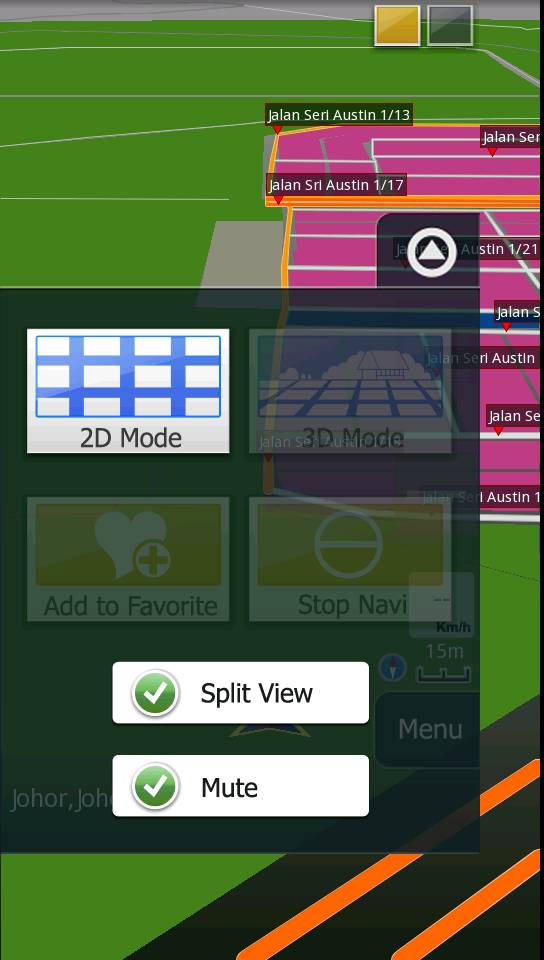
for the voice navigation, did you accidently "mute" the system?
user posted image
*
With instruction given, PAPAGO ready to serve with full view. Mute icon is now visible on menu hehehe
rclxms.gif rclxms.gif rclxms.gif rclxms.gif

Tq..

This post has been edited by azume: Dec 5 2011, 11:51 PM
azume
post Dec 6 2011, 07:22 AM

New Member
*
Junior Member
29 posts

Joined: Aug 2006


QUOTE(mrkopi @ Dec 6 2011, 12:02 AM)
any picture ?  notworthy.gif
*
Page 54 or 55 if i not mistaken.

azume
post Dec 8 2011, 11:10 PM

New Member
*
Junior Member
29 posts

Joined: Aug 2006


Picture taken from my Razr
user posted image

But very hard to get a good picture under low light.
azume
post Dec 9 2011, 07:58 AM

New Member
*
Junior Member
29 posts

Joined: Aug 2006


QUOTE(mdnurman @ Dec 9 2011, 12:05 AM)
did u do any photoshop on the pic? seems too good to be true. if it is untouched... WoW!!!
*
Original picture, yes it true
azume
post Dec 9 2011, 09:24 PM

New Member
*
Junior Member
29 posts

Joined: Aug 2006


QUOTE(more69 @ Dec 9 2011, 04:34 PM)
Just got my razr. still checking got dark splotches or not
*
Hehe go browsing apps @market is better lor..
azume
post Dec 15 2011, 04:39 PM

New Member
*
Junior Member
29 posts

Joined: Aug 2006


QUOTE(incognito @ Dec 14 2011, 10:32 AM)
hi hezda,

how's ur battery life so far? i'm currently using smart actions a lot, and it helps in conserving power. when i'm in the office i utilise wifi and disable 3g data. i'm also using the 2x battery extender app and it does help extend my battery life somewhat:

https://market.android.com/details?id=com.a...DataOnOff&hl=en

so far my razr can last me about 24 - 26 hours on one charge, not sure if this is a good figure? on average i do around 1 hour surfing, 30 min games, 30 min video/picture/etc, 1 hour talk on a daily basis.
*
Smart Action + 2X Battery wah, i'll try also this combo...

Got new Nilkin Case + new screen protector, mush more clear than previous protector
rclxm9.gif rclxm9.gif rclxm9.gif

This post has been edited by azume: Dec 15 2011, 05:10 PM
azume
post Jan 10 2012, 08:55 AM

New Member
*
Junior Member
29 posts

Joined: Aug 2006


QUOTE(xDjWanNabex @ Jan 9 2012, 09:12 PM)
anyway? just download it and install it. works fine on mine!


Added on January 10, 2012, 12:44 amhttp://www.engadget.com/2012/01/09/huawei-outs-super-thin-ascend-p1-s-raised-entirely-on-fruit-and/

razr, no more the thinnest dual core sad.gif
*
Work fine also for mine...
With very shiny game installed rclxms.gif rclxms.gif rclxms.gif rclxms.gif


azume
post Jan 17 2012, 03:19 PM

New Member
*
Junior Member
29 posts

Joined: Aug 2006


QUOTE(teej @ Jan 16 2012, 11:10 AM)
new RAZR user here too~ awesome phone but I have some questions:

Any good GPS apps to recommend? so far I've found a few but most of them would require me to be online to use them. =(

then when I'm charging the phone with my charger the touch screen seems to act really, REALLY weird, the SWYPE keyboard becomes barely usable, and the whole touch screen becomes inaccurate... but when I'm charging USB with my computer then there's no problem.. anyone facing similar issues?? 

Didn't have this problem before, wonder if it's the update that caused it to act weird??
*
GPS, i'm using Papago w/ Spareparts (to correct display)
Yup, also facing same problem during charging... even before updating icon_question.gif icon_question.gif icon_question.gif


azume
post Mar 8 2012, 11:36 PM

New Member
*
Junior Member
29 posts

Joined: Aug 2006


2nd time My RAZR freezed during charging & gaming...
First one freeze about 7hours until battery run out.
Secondly tonight for 4hours, pushed Power & volume button but No response. Ask My wife to misscall My Razr, and screen came back alive (at 37% battery Power).

Any one face same problem?

azume
post Mar 9 2012, 11:36 AM

New Member
*
Junior Member
29 posts

Joined: Aug 2006


QUOTE(E71s @ Mar 9 2012, 11:07 AM)
Oh mai just downloaded the 2.3.6 and the lock screen actually looks weird,or ugly.
*
Others improvement/miss achievement????

2 Pages  1 2 >Top
Topic ClosedOptions
 

Change to:
| Lo-Fi Version
0.0501sec    0.58    7 queries    GZIP Disabled
Time is now: 10th December 2025 - 08:08 PM