Welcome Guest ( Log In | Register )

Bump Topic Topic Closed RSS Feed

Outline · [ Standard ] · Linear+

 Tp Link TL-MR3420 3G/3.75G router owner club V1

views
     
ibnuasad
post Jul 22 2012, 01:23 AM

A screw is not a screw until you screw it!
****
Senior Member
558 posts

Joined: Jun 2006
From: Lowyat.Net


The router gets pretty damn hot which might be causing slow speeds with my e353. I consistently get 1Mbps extra if used directly with my pc.

I'll try orienting the router vertically to see if it helps with the temperatures....if not, I may get a router cooler @ http://www.evercool.com.tw/categories/glob...01/dr_cool.html
ibnuasad
post Jul 29 2012, 09:39 PM

A screw is not a screw until you screw it!
****
Senior Member
558 posts

Joined: Jun 2006
From: Lowyat.Net


QUOTE(blacktubi @ Jul 29 2012, 06:04 PM)
I don't care about heat if it doesn't affect performance
The problem is poor wifi performance which keep D/C, open the casing and found out really bad wifi cable soldering.
*
I've done some *unscientific* tests a while back and found that heat does affect performance. hmm.gif

I used to place the modem horizontally (as per default) and it gets very hot. Now I place it vertically and the heat was significantly reduced which lead to getting about 1mbps higher than usual smile.gif
ibnuasad
post Jul 30 2012, 01:52 AM

A screw is not a screw until you screw it!
****
Senior Member
558 posts

Joined: Jun 2006
From: Lowyat.Net


QUOTE(totally_skint @ Jul 30 2012, 01:47 AM)
Is that wired or wireless speed?
*
3G Modem to Router & Wired to PC
ibnuasad
post Aug 3 2012, 11:05 PM

A screw is not a screw until you screw it!
****
Senior Member
558 posts

Joined: Jun 2006
From: Lowyat.Net


QUOTE(blacktubi @ Aug 3 2012, 10:51 PM)
Wrong thread, this is Maxis thread

TM DIR-615 known for performance issue, consider upgrade to 1043ND / Asus Unifi Series / Mikrotik
*
This is definitely not a Maxis thread. See the title doh.gif
ibnuasad
post Aug 3 2012, 11:23 PM

A screw is not a screw until you screw it!
****
Senior Member
558 posts

Joined: Jun 2006
From: Lowyat.Net


QUOTE(longterm @ Aug 3 2012, 11:13 PM)
huhuhuhu TP Link MR3420...MR3220 also can join biggrin.gif
*
Terms & Conditions Apply whistling.gif
ibnuasad
post Sep 24 2012, 12:42 PM

A screw is not a screw until you screw it!
****
Senior Member
558 posts

Joined: Jun 2006
From: Lowyat.Net


Just bought another unit smile.gif

I'm experiencing the "limited connectivity" problem when using bgn or n only. I can connect via wireless for about 5-10 minutes, after that, I get "limited connectivity". This happens for both my laptop and smartphone.

I've switched the router to use "g" only and everything works just fine.
ibnuasad
post Sep 26 2012, 02:38 AM

A screw is not a screw until you screw it!
****
Senior Member
558 posts

Joined: Jun 2006
From: Lowyat.Net


QUOTE(fruitie @ Sep 24 2012, 01:59 PM)
Common problem with TP Link MR3420. So, just switch it to B&G only and use channel 1,6 and 11.
*
QUOTE(digilife @ Sep 24 2012, 06:26 PM)
I use g only on Channel 11, works fine.......no issue on both my Hw550 and Mr3420
*
Yup, this works thumbup.gif

QUOTE(blacktubi @ Sep 24 2012, 02:17 PM)
I bought my second unit of MR3420

Same issue as well doh.gif

Have to set it "N" only, switch country to Japan and use channel 14
*
Tried this but not working for me. My Nexus can't even see the SSID with channel 14 doh.gif
ibnuasad
post Nov 11 2012, 10:10 PM

A screw is not a screw until you screw it!
****
Senior Member
558 posts

Joined: Jun 2006
From: Lowyat.Net


Just flashed OpenWRT smile.gif

No more waiting 1~2+ mins to detect the e353 modem rclxm9.gif

Thanks for the GUIDES notworthy.gif
ibnuasad
post Nov 11 2012, 11:17 PM

A screw is not a screw until you screw it!
****
Senior Member
558 posts

Joined: Jun 2006
From: Lowyat.Net


QUOTE(chuahcs79 @ Nov 11 2012, 11:08 PM)
glad finally someone also appreciate openwrt more than stock firmware.
*
Now with OpenWRT, I can also use Tunlr.net with the DNSMasq (DNS Forwarding) function so I can stream video or audio from U.S.-based on-demand Internet streaming media providers icon_idea.gif
ibnuasad
post Nov 12 2012, 12:36 AM

A screw is not a screw until you screw it!
****
Senior Member
558 posts

Joined: Jun 2006
From: Lowyat.Net


QUOTE(chuahcs79 @ Nov 11 2012, 11:37 PM)
i think you should explain more detail why openwrt is better than stock firmware. Some user just don't get it. And most router stock firmware really doh.gif anyway.openwrt is a very good firmware. It is like diy. You add what function you need.
*
Stock firmware can be good but its limited. The manufacturers decide the price point based on what router you buy and a lot of them have the same hardware but they'll limit them via the firmware. Cheaper router, crappier firmware. icon_rolleyes.gif

Third party firmware such as OpenWRT or DD-WRT unlocks the full potential of a router by utilizing every aspect of the hardware capabilities.

The first time I thought of flashing to another firmware is when I wanted to stream US Only content easier using DNS Forwarding. Without DNSMasq, I would have to change my DNS every time I wanted to stream the content rclxub.gif

QUOTE(n0v1ce @ Nov 11 2012, 11:44 PM)
haha , last time I also flashed my linksys router to dd-wrt although I don't really utilize the feature , just follow suit nia
*
Tried DDWRT but at that time, it wasn't really working with e353...or maybe I was just too lazy to troubleshoot sweat.gif
ibnuasad
post Nov 12 2012, 01:54 AM

A screw is not a screw until you screw it!
****
Senior Member
558 posts

Joined: Jun 2006
From: Lowyat.Net


QUOTE(azim61 @ Nov 12 2012, 01:43 AM)
kindly teach us on how to use DNSMasq on openwrt
i also want to use tulnr service
we can use both google dns and tulnr dns simultaneously?
*
Assuming you're using OpenWRT like in the #1 post,

1) Login to 192.168.1.1
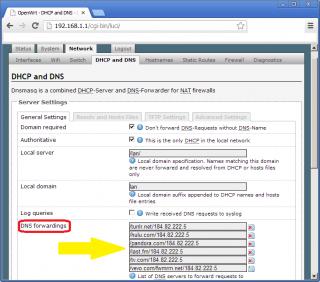
2) Go to Network > DHCP & DNS > DNS Forwardings
3) Attached Image
4) Save & Apply
5) Reboot router
6) Check status @ http://tunlr.net/status/ (make sure you added /tunlr.net/184.82.222.5 @ Step #3)
Source: Tunlr Forums

EDIT:
With DNSMasq, dns queries to the specified domains will go through Tunlr. All other non-specified domains will go through your default dns service.

This post has been edited by ibnuasad: Nov 12 2012, 03:28 AM
ibnuasad
post Nov 12 2012, 01:53 PM

A screw is not a screw until you screw it!
****
Senior Member
558 posts

Joined: Jun 2006
From: Lowyat.Net


QUOTE(chuahcs79 @ Nov 12 2012, 02:46 AM)
now this is one of the big perks for user who flash openwrt,..  thumbup.gif

works like a charm, streaming hulu.com now  thumbup.gif

[attachmentid=3151217]
*
QUOTE(azim61 @ Nov 12 2012, 07:09 AM)
thx  rclxms.gif
test and confirm working for me
chuahcs79 can put it in the 1st page  icon_idea.gif
*
Enjoy thumbup.gif

QUOTE(chuahcs79 @ Nov 12 2012, 12:01 PM)
already pin it to first post below openwrt this morning,  brows.gif

watching tons of hulu.com this morning too  rclxm9.gif
*
notworthy.gif

--------
Signal Strength
Without panel antenna
Signal Quality: 18,99

WITH panel antenna
Signal Quality: 29,99

» Click to show Spoiler - click again to hide... «


This post has been edited by ibnuasad: Nov 12 2012, 01:53 PM
ibnuasad
post Nov 12 2012, 01:57 PM

A screw is not a screw until you screw it!
****
Senior Member
558 posts

Joined: Jun 2006
From: Lowyat.Net


QUOTE(twhong_91 @ Nov 12 2012, 01:53 PM)
hello~ i need some help here!
My relative is using TP LINK TD-W8961ND model and now the password is gone because I pressed the QSS button. So how to set back the password now guys? any ideas?
*
Refer here: How to hard reset TP-LINK products to factory default settings (Wireless Router)


QUOTE(digilife @ Nov 12 2012, 01:55 PM)
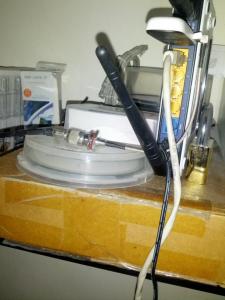
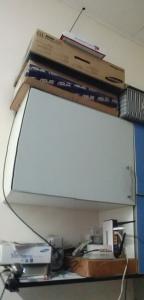
Your antenna position is AWESOME, Chuah also no fight

notworthy.gif  notworthy.gif  notworthy.gif
*
Hehe brows.gif laugh.gif
ibnuasad
post Nov 13 2012, 05:10 PM

A screw is not a screw until you screw it!
****
Senior Member
558 posts

Joined: Jun 2006
From: Lowyat.Net


QUOTE(fruitie @ Nov 13 2012, 05:01 PM)
Will this cause any unnecessary danger like being hacked? unsure.gif


Added on November 13, 2012, 5:02 pmI finally threw my FF for good. Cannot tahan the lagginess. Now on Chrome, feel so good. laugh.gif
*
If only connected via Lan Cable, disable wifi should be ok already unless somone else has physical access to the router.

If you're also using the WiFi, make sure it's password protected with at least WPA2-PSK.

For tighter Wifi security, enable Mac Address filtering icon_rolleyes.gif


Chrome FTW thumbup.gif


Added on November 13, 2012, 5:11 pmBtw, I just use the LastPass extension and set it to AutoLogin smile.gif

This post has been edited by ibnuasad: Nov 13 2012, 05:11 PM
ibnuasad
post Nov 13 2012, 06:14 PM

A screw is not a screw until you screw it!
****
Senior Member
558 posts

Joined: Jun 2006
From: Lowyat.Net


QUOTE(chuahcs79 @ Nov 13 2012, 06:01 PM)
The last pass extension is available for chrome or firefox?
*
Both. Can also use with IE sweat.gif
ibnuasad
post Nov 15 2012, 04:35 AM

A screw is not a screw until you screw it!
****
Senior Member
558 posts

Joined: Jun 2006
From: Lowyat.Net


Just finished flashing OpenWRT to the other mr3420 v1.3 thumbup.gif

Will probably get another smaller 3020 or 3220 as a print server soon icon_idea.gif

Catching up with some old shows @ Hulu brows.gif

Topic ClosedOptions
 

Change to:
| Lo-Fi Version
0.0526sec    0.43    7 queries    GZIP Disabled
Time is now: 10th December 2025 - 08:00 PM