Outline ·
[ Standard ] ·
Linear+
Enterprise Networking Mikrotik Routers (RouterBoard & RouterOS), User and owner discussion group
|
kenzo420
|
 Mar 5 2024, 10:05 PM Mar 5 2024, 10:05 PM
|
New Member


|
Hi, I need help with configuring mikrotik hex lite to work with time fibre. I've tried with vlan 499 and without. Still no luck. Any idea? I've done setups for unifi and maxis with lte failover. So I'm not a complete noob haha. But for some reason I'm not able to get it working with time fibre.
|
|
|
|
|
|
kenzo420
|
Mar 6 2024, 11:34 AM
|
New Member
|
QUOTE(jusbella @ Mar 5 2024, 10:41 PM) Some TIME Fibre no vlan required. You may try without vlan. I've tried with and without vlan tagging. Still no luck. The supplied time units are those Huawei 3-in-1 devices. Modem, router and AP. Time said they can set it to bridge mode to disable the router and AP function. So setting up my Hex router using just PPOE credentials, I still cant get an internet connection. Actually abit lost on why. I've seen a post back in 2016 to not set MTU values etc, so all those are blanked out. |
|
|
|
|
|
kenzo420
|
Mar 6 2024, 11:36 AM
|
New Member
|
QUOTE(Anime4000 @ Mar 6 2024, 01:45 AM) if you using PON Stick, you do need bridge VLAN 499 as MIB 84 (VLAN Tagging) shown below 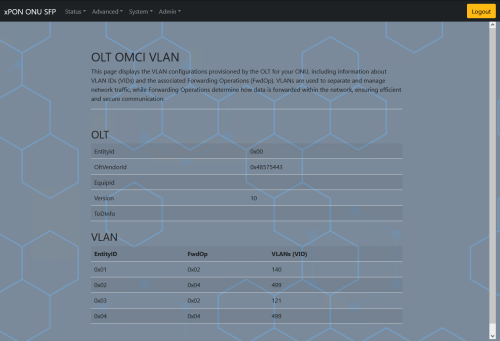 TIME did not using MIB 171 (Extended VLAN Tagging) like Unifi did: MIB 171 are responsible how VLAN from PON are mapped to Ethernet (AssociatedMePoint) LAN 1: 0x101, LAN 2: 0x102, ...TIME 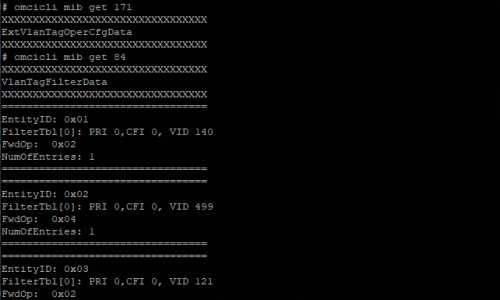 Unifi 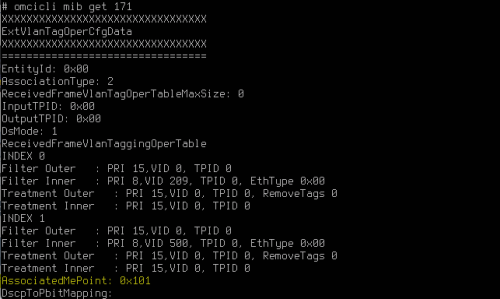 Actually, OMCI is very robust, if you plan to make Public WiFi for whole town, you can use OMCI to manage those AP, by using MIB 84 (VLAN) and MIB 171 (manage VLAN) and use AssociatedMePointEven xDSL also use OMCI, check MIB 102-127, 117, 165, 427 Im not using a PON stick, just connecting my router to their device functioning in bridge mode. I've tried hard resetting the configs and only setting up PPOE with vlan and without. Still cant seem to establish a connection. |
|
|
|
|
|
kenzo420
|
Mar 6 2024, 04:04 PM
|
New Member
|
QUOTE(Anime4000 @ Mar 6 2024, 03:45 PM) have you tried using TIME PLOAM/ONU Password as PPPoE Password? I did this with my friend and it worked You're referring to the password that's printed on the Time ONU? |
|
|
|
|
|
kenzo420
|
Mar 6 2024, 04:12 PM
|
New Member
|
QUOTE(PRSXFENG @ Mar 6 2024, 04:09 PM) No PPPoE credentials can be obtained from the time portal website Yes, I have those credentials. Tried it and it didnt work. Wondering what Anime4000 means by ONU password |
|
|
|
|
|
kenzo420
|
Mar 6 2024, 05:47 PM
|
New Member
|
QUOTE(Anime4000 @ Mar 6 2024, 05:41 PM) my friend use ONU Password same as PPPoE ONU Password: 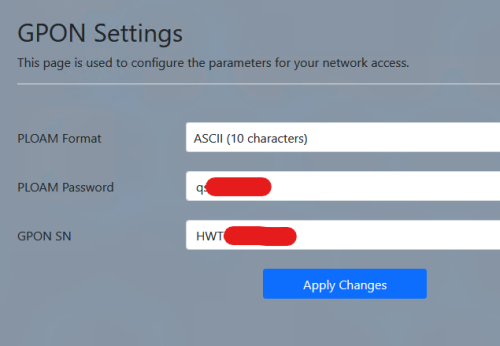 PPPoE 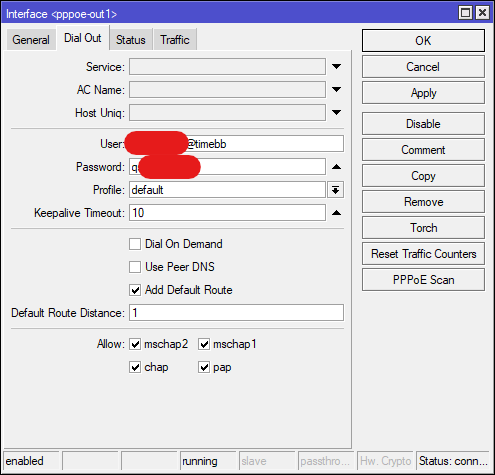 How do I get this password? Also, your friend has setup with vlan499 or without? Thanks for your help. |
|
|
|
|
|
kenzo420
|
Mar 7 2024, 11:31 AM
|
New Member
|
QUOTE(Anime4000 @ Mar 6 2024, 07:20 PM) he using PON Stick, so, need VLAN499. I guess im getting a pon stick too then hahaha. Any recommendations? Thanks |
|
|
|
|



 Quote
Quote

 0.0798sec
 0.48
0.48
 7 queries
 GZIP Disabled