Welcome Guest ( Log In | Register )

Outline · [ Standard ] · Linear+

Enterprise Networking Mikrotik Routers (RouterBoard & RouterOS), User and owner discussion group

views
     
Quanta
post Jan 13 2017, 11:13 AM

Idiot member
******
Senior Member
1,425 posts

Joined: Jan 2003
From: Pearl 14000 + Kayangan 01000


QUOTE(Chongky @ Jan 5 2017, 12:30 AM)
hi, bro, thanks.

already get hAP AC from lelong.
it's great router, still have a lot of thing to figure out and play around.
*
how's the wifi performance?
Quanta
post Jan 6 2024, 04:29 PM

Idiot member
******
Senior Member
1,425 posts

Joined: Jan 2003
From: Pearl 14000 + Kayangan 01000


My RB750Gr3 is not able to keep up to IPV6 speed. Not able get 100% BW and always lingering around 300-333Mbps. My IPV4 is able to get 510Mbps easily.

Also, the Maxis Koan router has no problem on both IPV6 and IPV4. Able to get 510/106Mbps.

Is there any solution to boost RB750Gr3 IPV6's speed to 500Mbps?
Quanta
post Jan 6 2024, 07:08 PM

Idiot member
******
Senior Member
1,425 posts

Joined: Jan 2003
From: Pearl 14000 + Kayangan 01000


QUOTE(go626201 @ Jan 6 2024, 05:25 PM)
CPU bottleneck,change to Hap ax2 or ax3 should be able to hit more than 600M.
*
thxn for the recommendation. anything that can fool-proof it? like no issue with 1Gbps on ipv6 as well.
Quanta
post Jan 7 2024, 11:18 AM

Idiot member
******
Senior Member
1,425 posts

Joined: Jan 2003
From: Pearl 14000 + Kayangan 01000


QUOTE(asellus @ Jan 6 2024, 10:07 PM)
Yes, this is Mikrotik and TM problem with IPv6, therefore disabling IPv6 is a perfectly valid option. You don't lose anything by doing that, and there is no need to chuck out a perfectly working Mikrotik RB750Gr3. And if Quanta is still hell-bent on having good IPv6 functionality with the RB750Gr3, nuking routerOS and installing OpenWRT is another viable option.
*
Thanks for the openwrt link. After read it, seems tedious as I have upgraded to RouterOS 7.xx
Quanta
post Jan 7 2024, 11:20 AM

Idiot member
******
Senior Member
1,425 posts

Joined: Jan 2003
From: Pearl 14000 + Kayangan 01000


QUOTE(kwss @ Jan 6 2024, 10:36 PM)
It is an option if the user decide that's the way forward, given the full context and list the actual problem.

I already gave him the option to disable IPv6 Firewall and never buy another Mikrotik again if his use case don't need it.

However I have a problem with people wording it as IPv6 is not mature, blah blah and disable until 2025.

It's time to move away from dual-stack network. It's double the work, double the trouble and it didn't solve IPv4 exhaustion problem.

People who insist to stay on IPv4 is clearly incompetent and lazy. Everyone who run dual-stack are appeasing to them.
*
Disabled all IPv6 filter rules and not helping. Able to max out to 320Mbps and CPU is still 100% when speedtesting.
Quanta
post Jan 7 2024, 11:23 AM

Idiot member
******
Senior Member
1,425 posts

Joined: Jan 2003
From: Pearl 14000 + Kayangan 01000


QUOTE(go626201 @ Jan 6 2024, 07:48 PM)
RB5009 should be enough. (But with 1.X-2X price compare to AX2 or AX3)

If not urgent use,just wait for another 1-2 years for next gen of RB5009 which should be having more 2.5G port. (My guess only)
And disable ipv6 until 2025,now ipv6 still not suitable for wide usage.
*
Yeap, maybe disable IPV6 1st while waiting for ipv6 fasttrack or a better router
Quanta
post Jan 7 2024, 11:49 AM

Idiot member
******
Senior Member
1,425 posts

Joined: Jan 2003
From: Pearl 14000 + Kayangan 01000


QUOTE(kwss @ Jan 7 2024, 11:35 AM)
If you enable Fast Forward, you need to reboot for it to take effect.
*
Ah, i miss out this step. Let me try it out again. Thnx!
Quanta
post Jan 7 2024, 01:51 PM

Idiot member
******
Senior Member
1,425 posts

Joined: Jan 2003
From: Pearl 14000 + Kayangan 01000


QUOTE(kwss @ Jan 7 2024, 11:35 AM)
Can you double check if "Fast Forward" is enabled inside your bridge setting?

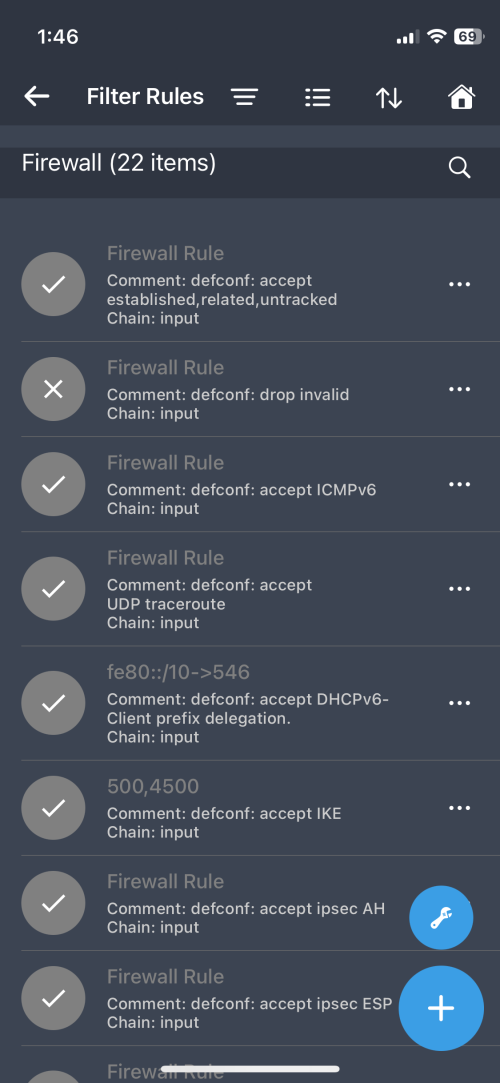
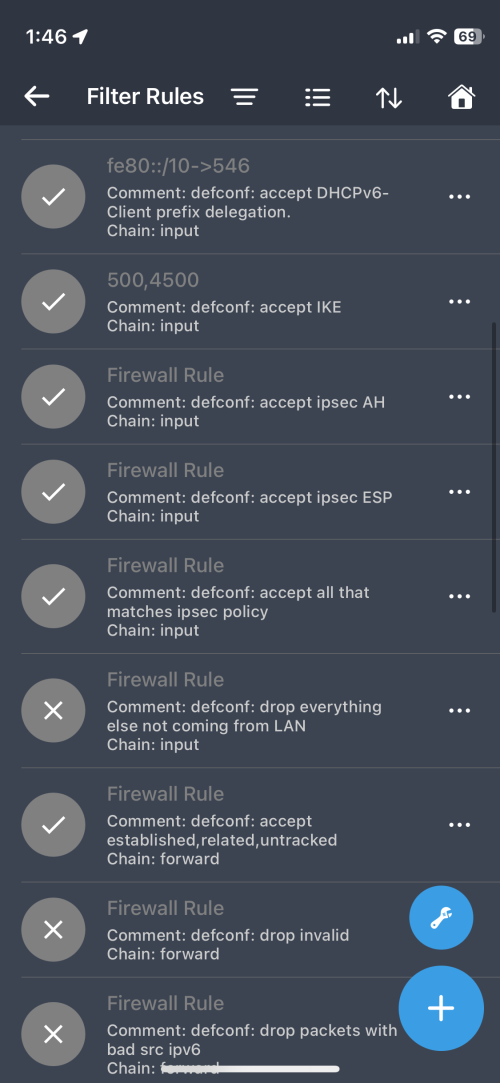
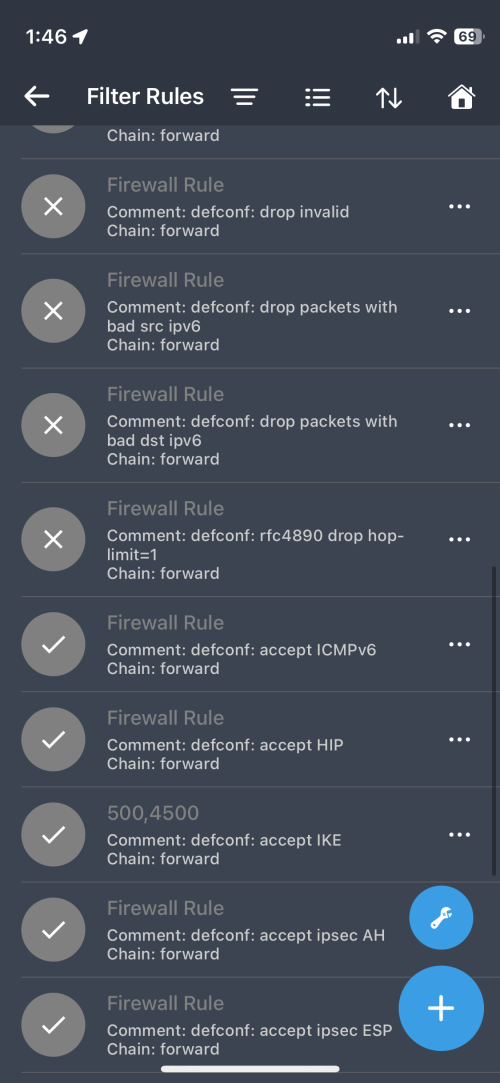
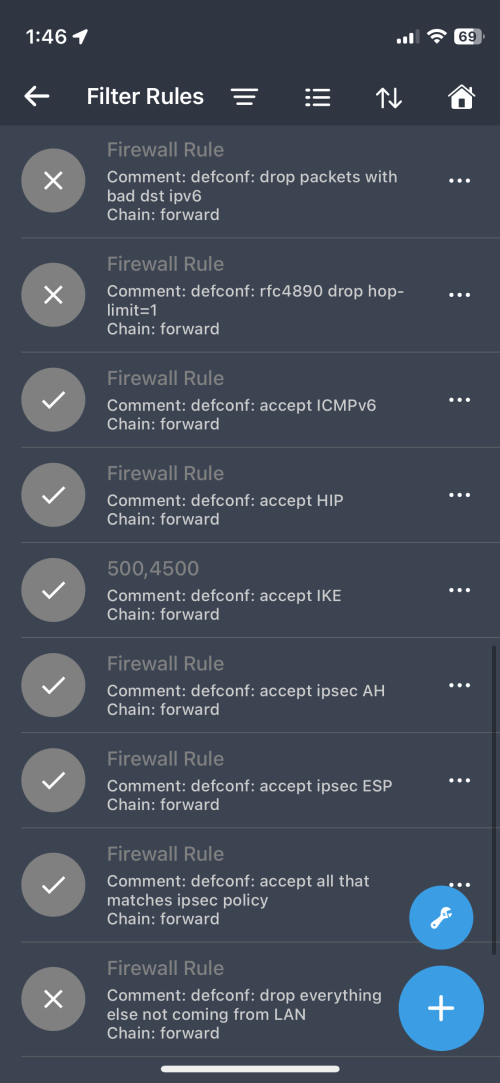
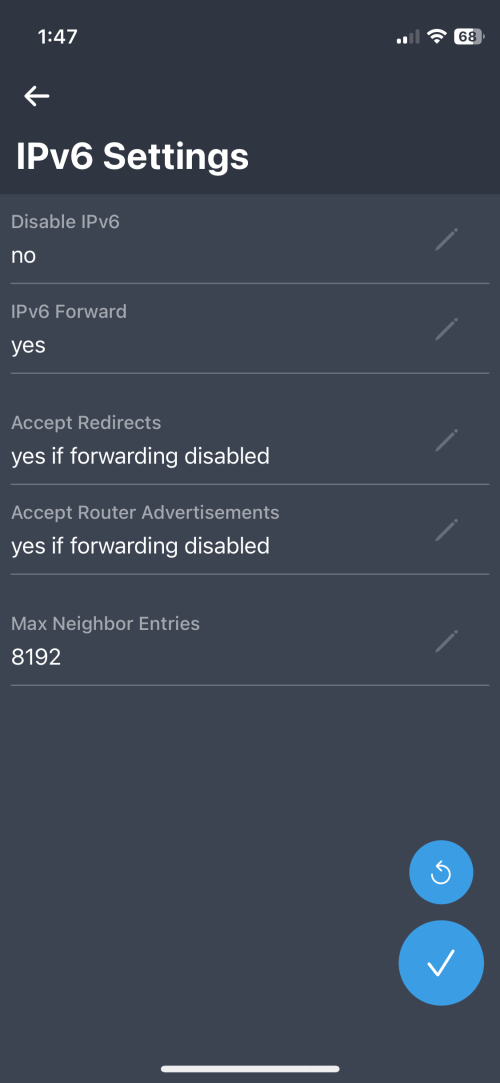
Just to confirm IPv6 > Firewall - NAT, Mangle, Raw and Address List are all disabled too right?

If you enable Fast Forward, you need to reboot for it to take effect.
*
Disabled all the items below and fast forward is enabled. Still max up to 350Mbps.

user posted image
user posted image
user posted image
user posted image
[
Quanta
post Jan 7 2024, 01:52 PM

Idiot member
******
Senior Member
1,425 posts

Joined: Jan 2003
From: Pearl 14000 + Kayangan 01000


user posted image
user posted image
user posted image
user posted image
user posted image
user posted image
user posted image
user posted image

This post has been edited by Quanta: Jan 7 2024, 01:52 PM
Quanta
post Jan 7 2024, 07:59 PM

Idiot member
******
Senior Member
1,425 posts

Joined: Jan 2003
From: Pearl 14000 + Kayangan 01000


QUOTE(hasmidzul_jojo @ Jan 7 2024, 05:38 PM)
HAP AX3

user posted image
*
is your ping time without any queue tree?
Quanta
post Jan 8 2024, 08:05 AM

Idiot member
******
Senior Member
1,425 posts

Joined: Jan 2003
From: Pearl 14000 + Kayangan 01000


QUOTE(kwss @ Jan 7 2024, 09:24 PM)
Did you enable or use anything in Queue?
If not, can you post your Tools > Profile when your CPU usage is 100%?

On your Address List, they are all non-routable because outside of 2000::/3.
Just drop them with route table, it's the highest performance method of doing it.
Except the documentation prefix which is a bogon anyway, you can just blackhole it with one extra route table entry.

Just curious what's the reason you added untracked to an accept rule?
Cannot see your full ruleset but seems like they are repeated twice?
*
1. Queue - yes enabled queue tree
CODE

Flags: X - disabled, I - invalid
0   name="queue-upload" parent=fromHSBB_IN packet-mark=no-mark limit-at=91M queue=fq-code1 priority=8 max-limit=100M burst-limit=101M burst-threshold=97M burst-time=5s bucket-size=0.1

1 X name="queue-download" parent=bridge packet-mark=no-mark limit-at=310M queue=fq-code1 priority=8 max-limit=350M burst-limit=400M burst-threshold=320M burst-time=8s bucket-size=0.01


2. Tools> Profile
CODE
[@MikroTik-TDM] > tool/profile  
Columns: NAME, USAGE
NAME          USAGE
www           0.3%
ethernet      0.1%
console       0.5%
dns           0.3%
networking    19%  
radv          0%  
management    1.7%
ssl           0.3%
dhcp          0.2%
profiling     0.1%
queuing       0.3%
bridging      0.8%
unclassified  6%  
total         29.6%


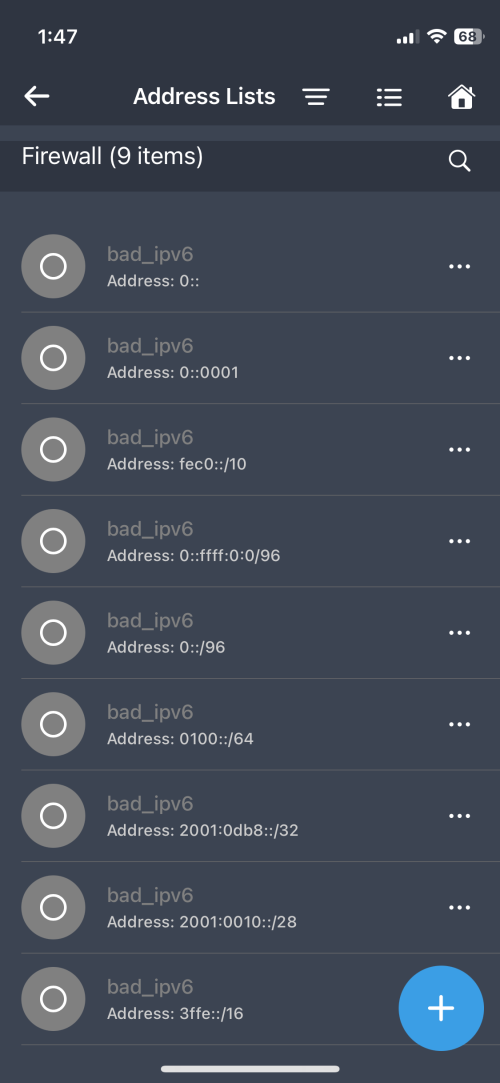
3. Address list from IPV6
Attached Image


4. Filter Rules are default, never add additional rules.

Quanta
post Jan 8 2024, 10:04 AM

Idiot member
******
Senior Member
1,425 posts

Joined: Jan 2003
From: Pearl 14000 + Kayangan 01000


QUOTE(kwss @ Jan 8 2024, 10:01 AM)
Do you get higher speed if you disable all your Queue?
*
same lingering around 300-350Mbps after disabling all filter rules, address lists
Quanta
post Jan 10 2024, 07:23 AM

Idiot member
******
Senior Member
1,425 posts

Joined: Jan 2003
From: Pearl 14000 + Kayangan 01000


Any links/tips to downgrade from RouterOS7.x to RouterOS6.x?
Quanta
post Jan 11 2024, 07:17 AM

Idiot member
******
Senior Member
1,425 posts

Joined: Jan 2003
From: Pearl 14000 + Kayangan 01000


QUOTE(kwss @ Jan 10 2024, 09:39 PM)
They have an official guide. Seems straightforward
https://help.mikrotik.com/docs/display/RKB/...rading+RouterOS

Did you still get low speed after disabling all the Simple Queue and Queue Tree?
*
no hope with RB750 on ipv6. still at 350Mbps. I think I have bricked it when trying to install openwrt's initramfs after successfully downgraded to 6.49.2.
Will try to debrick it when I have time.

This post has been edited by Quanta: Jan 11 2024, 07:17 AM
Quanta
post Jan 11 2024, 07:22 PM

Idiot member
******
Senior Member
1,425 posts

Joined: Jan 2003
From: Pearl 14000 + Kayangan 01000


QUOTE(kwss @ Jan 11 2024, 09:41 AM)
So sorry to hear that.
Follow the netinstall process to unbrick it.
*
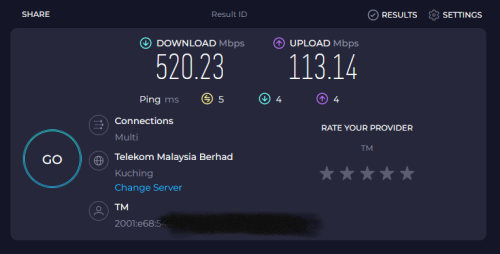
Finally debrick it and successfully converted to openwrt. IPV6 is at fullspeed right now. wohoo!!

Attached Image
Attached Image
Attached Image

This post has been edited by Quanta: Jan 12 2024, 08:22 AM
Quanta
post Jan 17 2024, 07:04 AM

Idiot member
******
Senior Member
1,425 posts

Joined: Jan 2003
From: Pearl 14000 + Kayangan 01000


Hi guys, I would like to use my eth1(WAN) port as normal LAN port. Possible to convert? If yes, mind to teach me how?

This post has been edited by Quanta: Jan 17 2024, 07:37 AM
Quanta
post Jan 19 2024, 02:26 PM

Idiot member
******
Senior Member
1,425 posts

Joined: Jan 2003
From: Pearl 14000 + Kayangan 01000


QUOTE(hasmidzul_jojo @ Jan 19 2024, 08:38 AM)
delete any connection setting on ether1 (vlan etc) and put ether1 on same bridge port as other LANs port
*
thanks man .. it is working.

Attached Image


Change to:
| Lo-Fi Version
0.0236sec    0.40    7 queries    GZIP Disabled
Time is now: 3rd December 2025 - 10:28 AM