

 May 6 2020, 09:46 PM


the connection from router to their server is established but things are not working as expected.
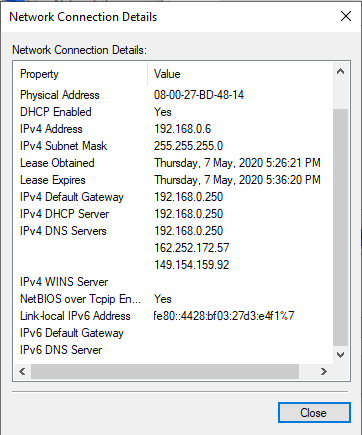
I only want my phone (192.168.0.5) to connect to vpn but the tunnel doesn't hide my true IPv6 and it is not using the VPN DNS.
....
When I IPLeak test the connection for my device, ipv4 vpn ip is detected, but ISP ipv6 are also detected. The DNS detected are google dns, not the VPN dns. (ip leaked)
Then, I disabled ipv6 in the router, my device (vpn) could not get any internet anymore.
I also excluded ipsec from fasttrack and added mark connections in mangle
I doubt there are something to do with the DNS settings, or firewall, not sure.
and is there any ways that I can automatically disable ipv6 to the clients when using the VPN without actually disable IPv6 in the router?
I also posted to MikroTik forum: https://forum.mikrotik.com/viewtopic.php?f=...533c653e64a12fa
any mikrotik sifu can look into my config
» Click to show Spoiler - click again to hide... «
CODE
# apr/24/2020 00:01:14 by RouterOS 6.46.5
# software id = KFRD-V8Q1
#
# model = RBD52G-5HacD2HnD
# serial number = **********
/interface bridge
add name=TMNETUNIFI.IPTV
add admin-mac=74:4D:28:CB:14:22 auto-mac=no comment=defconf name=bridge
/interface wireless
set [ find default-name=wlan1 ] antenna-gain=0 band=2ghz-b/g/n channel-width=20/40mhz-XX country=malaysia distance=\
indoors frequency=auto installation=indoor mode=ap-bridge ssid=MikroTik-CB1426 wireless-protocol=802.11
set [ find default-name=wlan2 ] band=5ghz-a/n/ac channel-width=20/40/80mhz-XXXX country=malaysia distance=indoors \
frequency=auto installation=indoor mode=ap-bridge ssid="AMPHAC\C2\B2" wireless-protocol=802.11
/interface vlan
add interface=ether1 name=vlan500 vlan-id=500
add interface=ether1 name=vlan600 vlan-id=600
/interface pppoe-client
add add-default-route=yes disabled=no interface=vlan500 name=pppoe-tmunifi service-name=TMNET_UNIFI_VDSL2 user=\
***********
/interface list
add comment=defconf name=WAN
add comment=defconf name=LAN
/interface wireless security-profiles
set [ find default=yes ] authentication-types=wpa-psk,wpa2-psk eap-methods="" mode=dynamic-keys \
supplicant-identity=MikroTik
/ip hotspot profile
set [ find default=yes ] html-directory=flash/hotspot
/ip ipsec mode-config
add name=SSVPN responder=no src-address-list=vpnc
/ip ipsec policy group
add name=SSVPN
/ip ipsec profile
add name=SSVPN
/ip ipsec peer
add address=lv-rig.prod.surfshark.com disabled=yes exchange-mode=ike2 name=SSVPN profile=SSVPN
/ip ipsec proposal
add name=SSVPN pfs-group=none
/ip pool
add name=dhcp ranges=192.168.0.20-192.168.0.60
/ip dhcp-server
add address-pool=dhcp disabled=no interface=bridge name=DHCP
/interface bridge port
add bridge=TMNETUNIFI.IPTV comment="iptv bridge to Eth 2" interface=ether2
add bridge=bridge comment=defconf interface=ether3
add bridge=bridge comment=defconf interface=ether4
add bridge=bridge comment=defconf interface=ether5
add bridge=bridge comment=defconf interface=wlan1
add bridge=bridge comment=defconf interface=wlan2
add bridge=TMNETUNIFI.IPTV comment="vlan 600 bridge to iptv bridge" interface=vlan600
/ip neighbor discovery-settings
set discover-interface-list=LAN
/interface detect-internet
set detect-interface-list=all
/interface list member
add comment=defconf interface=bridge list=LAN
add comment=defconf disabled=yes interface=ether1 list=WAN
add interface=pppoe-tmunifi list=WAN
/ip address
add address=192.168.0.250/24 comment=defconf interface=ether4 network=192.168.0.0
/ip cloud
set ddns-enabled=yes ddns-update-interval=5m
/ip dhcp-client
add comment=defconf interface=ether1
/ip dhcp-server lease
add address=192.168.0.251 client-id=1:10:62:eb:a3:e7:73 mac-address=10:62:EB:A3:E7:73 server=DHCP
add address=192.168.0.5 client-id=1:c:98:38:d2:fc:63 mac-address=0C:98:38:D2:FC:63 server=DHCP
add address=192.168.0.1 client-id=1:9c:5c:8e:7b:c1:23 mac-address=9C:5C:8E:7B:C1:23 server=DHCP
/ip dhcp-server network
add address=192.168.0.0/24 comment=defconf gateway=192.168.0.250 netmask=24
/ip dns
set servers=8.8.8.8,8.8.4.4,2001:4860:4860::8888,2001:4860:4860::8844
/ip dns static
add address=192.168.0.250 comment=defconf name=router.lan
/ip firewall address-list
add address=bef00a0a78c5.sn.mynetname.net list=WAN-IP
add address=192.168.0.5 list=vpnc
add address=192.168.0.1 disabled=yes list=vpnc
/ip firewall filter
add action=accept chain=input comment="defconf: accept established,related,untracked" connection-state=\
established,related,untracked
add action=accept chain=input comment="WINBOX REMOTE ACCESS" dst-port=8291 protocol=tcp
add action=drop chain=input comment="defconf: drop invalid" connection-state=invalid
add action=accept chain=input comment="defconf: accept ICMP" protocol=icmp
add action=drop chain=input comment="defconf: drop all not coming from LAN" in-interface-list=!LAN
add action=accept chain=forward comment="defconf: accept in ipsec policy" ipsec-policy=in,ipsec
add action=accept chain=forward comment="defconf: accept out ipsec policy" ipsec-policy=out,ipsec
add action=fasttrack-connection chain=forward comment="defconf: fasttrack" connection-state=established,related \
disabled=yes
add action=fasttrack-connection chain=forward comment="FastTrack w !ipsec" connection-mark=!ipsec connection-state=\
established,related
add action=accept chain=forward comment="defconf: accept established,related, untracked" connection-state=\
established,related,untracked
add action=drop chain=forward comment="defconf: drop invalid" connection-state=invalid
add action=drop chain=forward comment="defconf: drop all from WAN not DSTNATed" connection-nat-state=!dstnat \
connection-state=new in-interface-list=WAN
/ip firewall mangle
add action=mark-connection chain=forward comment="Mark IPsec" ipsec-policy=in,ipsec new-connection-mark=ipsec
add action=mark-connection chain=forward comment="Mark IPsec" ipsec-policy=out,ipsec new-connection-mark=ipsec
/ip firewall nat
add action=masquerade chain=srcnat comment="Hairpin NAT" dst-address=192.168.0.0/24 src-address=192.168.0.0/24
add action=masquerade chain=srcnat comment="defconf: masquerade" ipsec-policy=out,none out-interface-list=WAN
add action=dst-nat chain=dstnat comment="MC Server 25565" dst-address-list=WAN-IP dst-port=25565 protocol=tcp \
to-addresses=192.168.0.1 to-ports=25565
add action=dst-nat chain=dstnat comment="MC Server 25566" dst-address-list=WAN-IP dst-port=25566 protocol=tcp \
to-addresses=192.168.0.1 to-ports=25566
/ip ipsec identity
add auth-method=eap certificate=surfshark_ikev2.crt_0 eap-methods=eap-mschapv2 generate-policy=port-strict \
mode-config=SSVPN peer=SSVPN policy-template-group=SSVPN username=***********
/ip ipsec policy
add action=none dst-address=192.168.0.0/24 src-address=0.0.0.0/0
set 1 disabled=yes
add group=SSVPN proposal=SSVPN template=yes
/ipv6 address
add from-pool=pppoev6 interface=bridge
/ipv6 dhcp-client
add add-default-route=yes interface=pppoe-tmunifi pool-name=pppoev6 request=prefix use-peer-dns=no
/ipv6 firewall address-list
add address=::/128 comment="defconf: unspecified address" list=bad_ipv6
add address=::1/128 comment="defconf: lo" list=bad_ipv6
add address=fec0::/10 comment="defconf: site-local" list=bad_ipv6
add address=::ffff:0.0.0.0/96 comment="defconf: ipv4-mapped" list=bad_ipv6
add address=::/96 comment="defconf: ipv4 compat" list=bad_ipv6
add address=100::/64 comment="defconf: discard only " list=bad_ipv6
add address=2001:db8::/32 comment="defconf: documentation" list=bad_ipv6
add address=2001:10::/28 comment="defconf: ORCHID" list=bad_ipv6
add address=3ffe::/16 comment="defconf: 6bone" list=bad_ipv6
add address=::224.0.0.0/100 comment="defconf: other" list=bad_ipv6
add address=::127.0.0.0/104 comment="defconf: other" list=bad_ipv6
add address=::/104 comment="defconf: other" list=bad_ipv6
add address=::255.0.0.0/104 comment="defconf: other" list=bad_ipv6
/ipv6 firewall filter
add action=accept chain=input comment="defconf: accept established,related,untracked" connection-state=\
established,related,untracked
add action=drop chain=input comment="defconf: drop invalid" connection-state=invalid
add action=accept chain=input comment="defconf: accept ICMPv6" protocol=icmpv6
add action=accept chain=input comment="defconf: accept UDP traceroute" port=33434-33534 protocol=udp
add action=accept chain=input comment="defconf: accept DHCPv6-Client prefix delegation." dst-port=546 protocol=udp \
src-address=fe80::/10
add action=accept chain=input comment="defconf: accept IKE" dst-port=500,4500 protocol=udp
add action=accept chain=input comment="defconf: accept ipsec AH" protocol=ipsec-ah
add action=accept chain=input comment="defconf: accept ipsec ESP" protocol=ipsec-esp
add action=accept chain=input comment="defconf: accept all that matches ipsec policy" ipsec-policy=in,ipsec
add action=drop chain=input comment="defconf: drop everything else not coming from LAN" in-interface-list=!LAN
add action=accept chain=forward comment="defconf: accept established,related,untracked" connection-state=\
established,related,untracked
add action=drop chain=forward comment="defconf: drop invalid" connection-state=invalid
add action=drop chain=forward comment="defconf: drop packets with bad src ipv6" src-address-list=bad_ipv6
add action=drop chain=forward comment="defconf: drop packets with bad dst ipv6" dst-address-list=bad_ipv6
add action=drop chain=forward comment="defconf: rfc4890 drop hop-limit=1" hop-limit=equal:1 protocol=icmpv6
add action=accept chain=forward comment="defconf: accept ICMPv6" protocol=icmpv6
add action=accept chain=forward comment="defconf: accept HIP" protocol=139
add action=accept chain=forward comment="defconf: accept IKE" dst-port=500,4500 protocol=udp
add action=accept chain=forward comment="defconf: accept ipsec AH" protocol=ipsec-ah
add action=accept chain=forward comment="defconf: accept ipsec ESP" protocol=ipsec-esp
add action=accept chain=forward comment="defconf: accept all that matches ipsec policy" ipsec-policy=in,ipsec
add action=drop chain=forward comment="defconf: drop everything else not coming from LAN" in-interface-list=!LAN
/system clock
set time-zone-name=Asia/Kuala_Lumpur
/system identity
set name=AMPHAC2
/system ntp client
set enabled=yes primary-ntp=203.95.213.129 secondary-ntp=162.159.200.123 server-dns-names=""
/system scheduler
add interval=5m name=DynDNS on-event=DynDNS policy=ftp,reboot,read,write,policy,test,password,sniff,sensitive,romon \
start-time=startup
/system script
add dont-require-permissions=no name=DynDNS owner=amph policy=\
ftp,reboot,read,write,policy,test,password,sniff,sensitive,romon source=":global ddnsuser \"*************\"\r\
\n:global ddnspass \"**************\"\r\
\n:global theinterface \"pppoe-tmunifi\"\r\
\n:global ddnshost \"***********\" \r\
\n:global ipddns [:resolve \$ddnshost];\r\
\n:global ipfresh [ /ip address get [/ip address find interface=\$theinterface ] address ]\r\
\n:if ([ :typeof \$ipfresh ] = nil ) do={\r\
\n :log info (\"DynDNS: No ip address on \$theinterface .\")\r\
\n} else={\r\
\n :for i from=( [:len \$ipfresh] - 1) to=0 do={ \r\
\n :if ( [:pick \$ipfresh \$i] = \"/\") do={ \r\
\n :set ipfresh [:pick \$ipfresh 0 \$i];\r\
\n } \r\
\n}\r\
\n \r\
\n:if (\$ipddns != \$ipfresh) do={\r\
\n :log info (\"DynDNS: IP-DynDNS = \$ipddns\")\r\
\n :log info (\"DynDNS: IP-Fresh = \$ipfresh\")\r\
\n :log info \"DynDNS: Update IP needed, Sending UPDATE...!\"\r\
\n :global str \"/nic/update\\\?hostname=\$ddnshost&myip=\$ipfresh&wildcard=NOCHG&mx=NOCHG&backmx=NOCHG\"\r\
\n /tool fetch address=members.dyndns.org src-path=\$str mode=http user=\$ddnsuser \\\r\
\n password=\$ddnspass dst-path=(\"/DynDNS.\".\$ddnshost)\r\
\n :delay 1\r\
\n :global str [/file find name=\"DynDNS.\$ddnshost\"];\r\
\n /file remove \$str\r\
\n :global ipddns \$ipfresh\r\
\n :log info \"DynDNS: IP updated to \$ipfresh!\"\r\
\n } else={\r\
\n :log info \"DynDNS: dont need changes\";\r\
\n }\r\
\n} "
/tool mac-server
set allowed-interface-list=LAN
/tool mac-server mac-winbox
set allowed-interface-list=LAN
This post has been edited by PC_CHEAH: May 6 2020, 09:47 PM
 Quote
Quote


 0.0663sec
 0.81
0.81
 7 queries
 GZIP Disabled