Welcome Guest ( Log In | Register )

Outline · [ Standard ] · Linear+

Enterprise Networking Mikrotik Routers (RouterBoard & RouterOS), User and owner discussion group

views
     
NoobHacker
post Feb 1 2022, 12:52 AM

Regular
******
Senior Member
1,753 posts

Joined: Dec 2010
Hi all,

I bought a RB4011 last year for my 100Mbps Unifi. My last reliable networking equipment was linksys wrt54g which works until wireless-g no longer viable. Any equipment afterwards like consumer tplink or asus eventually having slow downs, hang, restarts or overheat. Thats why I buy this overkill equipment for peace of mind.

I love its cpu attached to chassis, passive + very good heat dissipation. I don't like fans as they collect dusts and generate noises. most consumer flagship routers needs a fan at some point.

I pair this router with omada APs. 1x 660HD and 2x EAP225. Having around 30 2.4Ghz Smart home IoT devices and 10 5Ghz devices. Dedicated HikVision analog cctv attached to ethernet.

Now my router CPU never go beyond 6%, most of the time 1%. any fun stuff I can do to utilize it's power?

I do see from Omada I can configure 1 ssid for 1 vlan, and I see a lot of people tend to isolate their iot from main network. But how will they be able to control their smart light from their smartphone directly if they are separated into different vlans?

I do see Omada have Guest network. It seems that it is done inside AP where trying to access other vlan will drop the packet. Could be fun to shift this responsibility into router. For example, having 20 phones using the guest network at once. Not sure how well the AP itself can handle this though.

As for QoS doesn't seem needed as this router handles everything instantly. maybe my simultaneous load is not enough.

What kind of fancy configuration do people do with their home firewall? From most I see could be port forwarding to maybe their cctv or nas.

And it seems I'm running out of ethernet port soon, just attach my existing unmanaged tplink 8 port switch to one of the ports? since the cpu load is so low. i envy the rb5009 so much with a nice switch chip inside sweat.gif

just being hand itchy and want to tinkering with some stuff lol, doesn't seem I have some objective or issues to fix here.
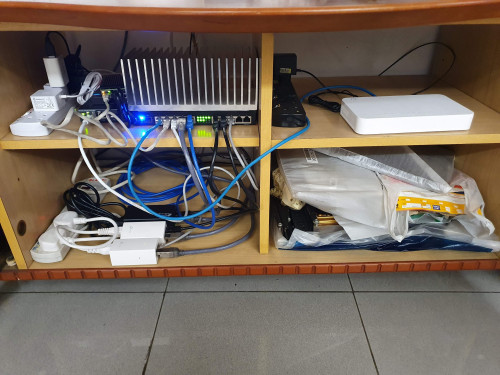
user posted image

yes that heatsink is just for fun because I had too much bad experience with router overheating hahahaha.

I use 2x stock poe injector that comes with eap225 and for 660 i buy another one for poe+. feels cheaper than poe switch and fully passive. if one of them spoil easier to replace as well.

rpi4 for home assistant + multiple iperf3 in docker for wifi tests.

This post has been edited by NoobHacker: Feb 1 2022, 10:54 AM
NoobHacker
post Feb 2 2022, 08:48 PM

Regular
******
Senior Member
1,753 posts

Joined: Dec 2010
QUOTE(jacktiew @ Feb 1 2022, 10:13 AM)
Nice setup. However the cable management have room to improve. Hahaha 😝
*
thanks. I actually tried once to rearrange but turns out not significantly better. those poe injectors are one of the major culprit.

those aren't finalized so I don't want to tie them together.

now i keep eyeing on crs328. dont actually need the bandwidth but just for cleaner cabling & fun. rpi poe hat is so expensive though. almost can buy another pi already.

seems like they have new line ups coming soon. hopefully they have more passive cooling products that sticks to the casing.

QUOTE(haturaya @ Feb 1 2022, 05:52 PM)
Nice...

What UPS do you use?  hmm.gif
*
I don't have a UPS sweat.gif
NoobHacker
post Feb 3 2022, 07:06 PM

Regular
******
Senior Member
1,753 posts

Joined: Dec 2010
QUOTE(Gaara92 @ Feb 3 2022, 06:51 PM)
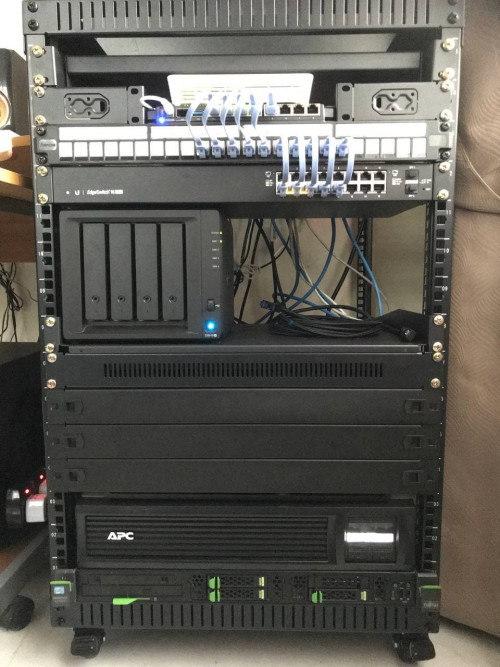
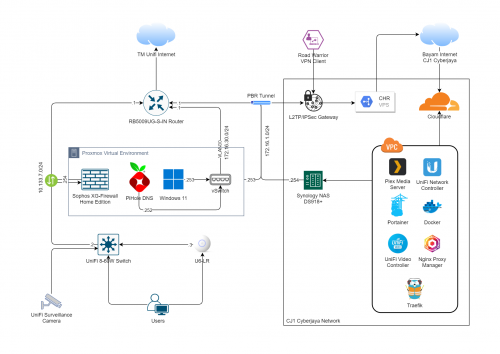
I think maybe someone can create a homelab thread here in LYN. I will share my homelab rack setup for you guys, in case anyone is thinking to build one.

user posted image
user posted image
*
nice.. hmm.gif how's pihole nowadays?

Used to use it a lot but eventually hit into issues

1. sometimes they block alipay and i have trouble performing payment

2. youtube history doesn't work

3. some apps will keep retry to send analytics nonstop (since blocked by pihole) and i will see like a super long bar to amazonaws endpoint

4. google search ads doesn't work


and I couldnt identify where you install the proxmox.. I used to have a HP sff pc for proxmox but hit into weird linux issues. did some google search says not using ecc ram. hows the power consumption for entire setup?


is the white thing above rb5009 the unifi onu? whats your router before you get your rb5009?


been thinking to get a ds220+ as well but my friend say new version coming soon. sounds fun to have local version of google photos.

This post has been edited by NoobHacker: Feb 3 2022, 07:14 PM
NoobHacker
post Feb 3 2022, 11:46 PM

Regular
******
Senior Member
1,753 posts

Joined: Dec 2010
QUOTE(Gaara92 @ Feb 3 2022, 08:58 PM)
I don't know about your pihole problem, but I use it with no problem. Sometimes if the pihole block some websites, i just add it into whitelist.
I installed proxmox on thinkstation PC which is using Xeon processor, I just added a 10Gbps nic into it and setting it to install sophos firewall vm, windows vm and also linux vm for pihole use.
Yes the white modem above rb5009 is the unifi onu. I am planning to use SFP GPON but currently the GPON I bought had some problems and I can't really use it, need to order other version.
The Synology NAS I used mainly for file and photo backup as well as Plex media server and also to run some dockerization stuff and currently routed to other network using VPS fixed public IP.
*
cool, might revisit pi-hole soon.

seems like server cpu is more suitable to install proxmox.

what do you do with docker in NAS? I see a lot of people do this but don't quite understand why run docker inside celeron cpu unit with low amount of ram.

also, did you google image the logo for your diagram one by one?
EDIT: nvm search seems working good in draw io

This post has been edited by NoobHacker: Feb 4 2022, 12:15 AM


Change to:
| Lo-Fi Version
0.0888sec    0.89    7 queries    GZIP Disabled
Time is now: 20th December 2025 - 04:21 AM