Welcome Guest ( Log In | Register )

Outline · [ Standard ] · Linear+

Enterprise Networking Mikrotik Routers (RouterBoard & RouterOS), User and owner discussion group

views
     
tng55
post May 11 2023, 11:37 PM

Regular
******
Senior Member
1,431 posts

Joined: Sep 2021


QUOTE(go626201 @ May 11 2023, 05:32 PM)
Normally no need to do extra settings for internet access,but if you not going to tinkering with it,better buy other consumer grade router.
Normal RM300+ router should be enough for most 90% people. And need bigger coverage just buy another one to pair mesh network.
*
https://forum.lowyat.net/index.php?showtopi...ost&p=107227314
@go626201 you not yet reply back
tng55
post May 26 2023, 01:21 PM

Regular
******
Senior Member
1,431 posts

Joined: Sep 2021


QUOTE(OlgaC4 @ May 24 2023, 04:09 PM)
RM2889 5G AX. Still testing. Just got it today
*
wow 6 month you order from subtel right
tng55
post May 26 2023, 08:24 PM

Regular
******
Senior Member
1,431 posts

Joined: Sep 2021


QUOTE(OlgaC4 @ May 26 2023, 02:44 PM)
Ya. Here is my initial review.

LTE is darn good. Signal is strong. Maxis tower about 150meter with ping 22-25
The AX wifi is rather below average. 2.4 and 5.
one cat 8 cable to 2.5G it respond better then my cable unfi 300mbps.
*
maxis signal strong what speed you got show speedtest result
tng55
post Jul 24 2023, 01:18 PM

Regular
******
Senior Member
1,431 posts

Joined: Sep 2021


QUOTE(hasmidzul_jojo @ Jul 23 2023, 03:37 PM)
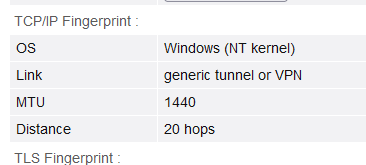
mine were like 20.

user posted image
CODE
https://browserleaks.com/ip


the MTU was like 1480 before and now its 1440.
*
mine 15 hops good or bad we don't understand
tng55
post Nov 30 2023, 01:23 AM

Regular
******
Senior Member
1,431 posts

Joined: Sep 2021


need wait replace next gen like RB5009 to get all 2.5GBPS x8 Port will be nice
tng55
post Jun 1 2025, 12:51 PM

Regular
******
Senior Member
1,431 posts

Joined: Sep 2021


i waiting Mikrotik new launch like RB5009 or high end all port must be 2.5GE Port all imported seen almost delay product launch new
tng55
post Jul 12 2025, 10:19 PM

Regular
******
Senior Member
1,431 posts

Joined: Sep 2021


QUOTE(boringz @ Jul 12 2025, 11:48 AM)
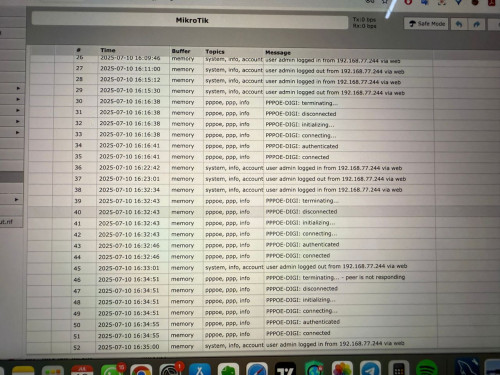
Hi all, does anyone use Mikrotik with Digi Fiber here?

I am signed up with 2gbps digi fiber plan recently, and I always get recurring disconnections from their pppoe randomly. I am using RB5009UG to fully utilize the 2gbps speed provided, connecting to a skyworth GN630E modem.

I'm wondering if there is anything from Digi backend that detects and blocks mikrotik routers or they detect high usage? (I share the internet with more than 30 devices concurrently on average).

Note: in a previous configuration with maxis fiber and using Mikrotik 4011 I do not have any such issues even with the 30+ device concurrent loads. The configurations are the same except the difference in PPPOE login details.

Any sifus can advise if this might be specific to only Digi fiber? Is there some backend FUP that I am not aware of or is it just that my line happen to be faulty?
user posted image
*
digi fibre its to much trouble why you did change digi
you was use maxis without disconnect that mean you maxis fibre prefect
maxis have 2gbps
not issue RB5009UG can use morethan 30++ devices
unifi also no problem and maxis fibre no problem
digi fibre its to much trouble batter report MCMC if they unable settle = you may terminate line digi fibre
get sign up maxis fibre 2gbps you settle

i know you dgi fibre 2 year contract but you need report then digi team visit you house if unable settle still same problem disconnect you may raise report mcm i hope mcmc will help terminate line digi fibre without pay fee
tell mcmc was previous use maxis fibre no problem
then you may sign up maxis fibre 2gbps
tng55
post Jul 12 2025, 11:34 PM

Regular
******
Senior Member
1,431 posts

Joined: Sep 2021


QUOTE(kwss @ Jul 12 2025, 11:25 PM)
My friend ah....
You know he is on TM infra. Everything from the ONU all the way to the BNG is TM punya barang.

He got frequent disconnection, it's TM punya BNG.
Same for all telco on TM infra.

I don't think this is something TM cannot solve.
Apa sarahan Digi?
*
but he previous maxis fiber that TM infra or maxis own infra
tng55
post Jul 14 2025, 11:26 AM

Regular
******
Senior Member
1,431 posts

Joined: Sep 2021


QUOTE(boringz @ Jul 14 2025, 11:21 AM)
hello! yes I am using maxis fiber port over same under TM infra. so happens only issue after changing to digi.

did report to MCMC and threaten about it but so far they only resolve download and upload speed and case closed even though I request to terminate.

so I am kinda stuck with this telco for 2 years. really attempting to see if its my issue or mikrotik issue. thanks everyone!
*
digi issue isp
not issue mikrotik
please attach screenshot logs PPPOE disconnect to send MCMC
batter case reopen not resolve
tng55
post Sep 16 2025, 04:09 PM

Regular
******
Senior Member
1,431 posts

Joined: Sep 2021


QUOTE(kwss @ Sep 13 2025, 10:56 AM)
If you value long term software update, nothing beats Mikrotik, Asus and Ubiquiti.

Avoid TP-Link at all cost. One model has multiple hardware revision. Not all hardware revision has the same software lifecycle. The worst part is you don't know what hardware revision you will be getting if you buy online. After all that, it is still a gamble how long you will actually get software update.

The 2-pack BT10 will end up cheaper than the equivalent Ubiquiti setup. You also don't have to deal with all the Ubiquiti bugs. Easier to setup too.
*
i see TP-Link Omada always multiple hardware revision explain EAP670 and EAP783 and EAP773 always multiple hardware revision right

what you think AP recommend brand Ubiquiti ??? or what are Best tell me Please
tng55
post Sep 17 2025, 11:53 PM

Regular
******
Senior Member
1,431 posts

Joined: Sep 2021


QUOTE(kwss @ Sep 17 2025, 05:21 AM)
What's best depends on what you really want because in WiFi7, every model from every manufacturer lack something. It's either number of mgig port, 10gig port, chain, radio.

Since you are using Asus, let's just do Asus. You will have zero learning curve.
Unless you are interested to spend the time and also money to learn networking, just stick to what you know best. To a lot of people, it makes no sense to spend money and still need to waste time.

Don't need mesh?
BE-92U. It has a 10gig port and 6ghz wifi, yet enough 2.5gig port for all your other stuff. Since 6ghz + MLO will exceed 2.5gig, I really do not see any reason to buy hardware with a single 10gig port for mesh. This model is only 2x2, the wireless mesh won't be spectacular either.

You use wired backhaul for mesh?
BT10. It has 2x 10gig port. One for internet, another for mesh node. You can daisy chain a third mesh node for 3 pack.
The downside is that there isn't really any extra mgig port to connect anything. This device is designed purely for wireless use case.

You use a wireless backhaul for mesh?
BQ16. It has an additional 5ghz band for backhaul. Don't bother with this model if you use a cable for backhaul since home environment will never have high enough endpoint density to make use of the dual 5ghz radio.
Downside is also no extra mgig port to connect anything. I mean if you use wireless backhaul then you can connect one 10gig to main node + another 10gig to mesh node. But with this setup, you ain't getting the lowest possible latency and maximum possible bandwidth.

As you can see, the best product don't exist, each model has trade off.

Now on to Ubiquiti. For you to use their product, you must also use a UCG or deploy your own Unifi OS Server, which means you must already have a home server.

From here onwards, you need to buy PoE switch. For 10gig 60W PoE, they came with a lot of ports. If you have many PoE device, then it's worth it, else it's a lot of wasted PoE port. Also the main use case for mgig PoE is only AP. So you are also throwing a lot of money into 10gig ports and just run them as 1gig.

However, if money is not a problem, then go for it. If you purely love aesthetic, this is okay too. Their rack + accessories + ether lighting looks great. Purely aesthetic point of view, not technical.

For their AP, I will be upfront. I will never buy another Ubiquiti AP after using one. YMMV.

If your wifi endpoint is mostly homogeneous, meaning they are all Intel laptop and your phones are all Qualcomm SoC, you will be fine.

If you have a lot of unknown endpoint with unknown wifi chip, like IoT heavy environment, better avoid Ubiquiti wifi.

From this alone you can see why many enterprise don't have problem with Ubiquiti. They are mostly Intel laptop and nothing else.

It doesn't means Ubiquiti is not a shitty product. I am just saying it works fine in a homogeneous environment.

Mikrotik wifi? Nah...

Bestest ever wifi7 AP? Perhaps a Ruckus with Unleashed. Easy to setup, super great performance, no external controller required, no licensing fee.
But the price.... $$$$
You also need a 60W PoE mgig switch... $$$$
*
i like ceiling wifi we run Cable i don't need MLO we can work ROAMING without disturbed disconnect wifi
yah i know POE Switch need it
Mikrotik wifi not need it
Mikrotik like RB5009 OR CCR2xxx waiting all port 2.5G Port

WHY EAP670 still with look picture
EAP670 look like fair away 45 feet look very good 30 feet look good
but Ubiquiti can't beat EAP670 hmm rclxub.gif

you think EAP670 they always make multiple hardware revision i am correct

ASUS don't want anymore because last time few month ago very bad news about Thousands Of Asus Routers Reportedly Affected By “ViciousTrap” Backdoor

so i plan get new latest mikrotik all port 2.5G delay

that why i plan AP with POE Switch


Attached thumbnail(s)
Attached Image
tng55
post Sep 18 2025, 01:20 PM

Regular
******
Senior Member
1,431 posts

Joined: Sep 2021


QUOTE(kwss @ Sep 18 2025, 01:01 AM)
MLO is what makes wifi7 so much faster than 6 / 6e. Why you don't want MLO? You can have MLO and still roam between AP. They are totally different thing and not related to each other.

Your graph says it all, Ubiquiti AP is shitty. End of story.

All devices from every manufacturer get hacked one way or another. It's not logical to avoid Asus simply because they appear on the news. They actually have long firmware lifecycle which helps in security. You as the user must always keep everything updated and not expose the WebUi / SSH / telnet to the Internet.

I mean you can take a chance with TP-Link firmware lifecycle. Maybe they are better, maybe not. I am judging firmware lifecycle of manufacturer based on their history. The future remains a mystery.

I am sure you already know which Omada AP you want. Your list is already their top tier stuff.
If you are going for their ceiling AP, get their 10gig PoE switch too. It's actually the cheapest 10g PoE switch in the world right now. For that features, it's competing with Cisco 1300 (C1300-16XTS), priced about the same but have more ports + PoE.

You can get the rb5009 and connect the SFP+ port into your Omada switch. Or LACP those 1gig port, since you suddenly have so many ports in your switch.

The said switch:
SX3832MPP
https://www.omadanetworks.com/my/business-n...-max/sx3832mpp/
*
RB5009 SFP+ 1 Port only will be use GPON PON STICK hmmm not enough so i will wait 2.5G all ports
POE Switch no need 24 Ports
enough 8 Port POE or 5 Port POE

do you think Omada AP they make always multiple hardware revision
i did google unable to found i think got hidden ??
10gig PoE switch recommed brand and model we need 8Port enough or 5Port Enough
do need Omada controller hardware like OC300 ???? or no need ?

i was think MLO wont work Roaming
so you tested MLO with Roaming let say downstairs AP and you go UPSTAIRS AP still stay WIFI without disconnect disturbed will auto Roaming staying WIFI Connected right


tng55
post Sep 18 2025, 10:04 PM

Regular
******
Senior Member
1,431 posts

Joined: Sep 2021


QUOTE(cyberic @ Sep 18 2025, 10:55 AM)
Do note that consumer wifi like Asus always good at speed and range. You might need 3 AP to get the speed and range like Asus. Enterprise AP is all about consistency and stability. Asus router still better for most home: simple, fast and very good coverage.
*
hmm i still like Enterprise AP because more stability and longer time then consumer wifi i already know
tng55
post Sep 18 2025, 10:07 PM

Regular
******
Senior Member
1,431 posts

Joined: Sep 2021


QUOTE(kwss @ Sep 18 2025, 09:19 PM)
The rb5009 has a 2.5g port. Plug that into your switch. If you need higher speed and don't want to LACP, plug the ONT stick into your switch and do ROAS (Router on a stick) setup. It will work full duplex up to 5g and half duplex all the way to 10g.

Go to the product download page and there's a drop-down to select hardware revision. EAP783 has v1 and v1.60.

Do not buy the OC200, it has been abandoned. Get the OC220 instead.

I don't know what switch to recommend you. You need to know your AP power draw, then the number of AP, plus any other PoE device. Add them all up +20% extra to be safe.
Every small 10g PoE switch out there has limited power, so this is your homework.

Omada AP support 802.11k/v/r. Your endpoint also need to support those standard to roam.
*
OHH batter OC300 future proof
if EAP783 OR EAP670
explain EAP783 X5 OR EAP670 X5
which recommed Switch POE for safety +20% extra
tng55
post Oct 7 2025, 02:20 AM

Regular
******
Senior Member
1,431 posts

Joined: Sep 2021


QUOTE(kwss @ Sep 20 2025, 06:34 PM)
I have no idea. That Cisco blog also use FastConnect 7800 as endpoint.

But GSM arena said no wifi 7. I simply Google and it seems Samsung disable them on purpose to make them feature parity with Exynos SKU? Until S25 where it is there for all.

Then I also found for TP-Link, they really cannot do roaming when using MLO. So tng55 is not making shit up.

No such limitation for Cisco and Arista AP, at least based on what I found.

WiFi is always a mess...
*
yah TP-Link cannot do cannot do roaming when using MLO
so i don't need MLO so very imported roaming hmmm
tng55
post Oct 7 2025, 02:27 AM

Regular
******
Senior Member
1,431 posts

Joined: Sep 2021


QUOTE(syahpian @ Oct 1 2025, 10:23 PM)

*
i watched but wifi 6 and still use 1GBPS Port outdate
long time mikrotik no new launch 2.5Gbps Port hmmm i think possible 2026 or 2027 i will be old age lol
tng55
post Oct 30 2025, 01:30 PM

Regular
******
Senior Member
1,431 posts

Joined: Sep 2021


mikrotik can track website URL HTTP and HTTPS FULL history multiple PC ???
few PCS each ip i can do but each PC track URL HTTP and HTTPS FULL history
its possible ???

if found website we want block too

This post has been edited by tng55: Oct 30 2025, 01:31 PM
tng55
post Oct 30 2025, 01:52 PM

Regular
******
Senior Member
1,431 posts

Joined: Sep 2021


QUOTE(kwss @ Oct 30 2025, 01:48 PM)
You use packet matcher but it's very leaky.

My suggestion is just use NextDNS as DoH resolver in Mikrotik.
In the forwarding rule, block dst port 53 and 853.

You then proceed to add your blocking rule inside NextDNS.
Then you review the log regularly to identify anyone trying to bypass like using VPN or whatnot.

You still cannot prevent people who bypass by not doing domain lookup when they connect to their VPN.
*
no worry multiple PC don't have VPN i aware

my office staff always use google chrome Incognito
that why i wanna check history what he use

NextDNS need purchase not free hmmmm

packet matcher but it's very leaky
why very leaky

This post has been edited by tng55: Oct 30 2025, 01:57 PM
tng55
post Oct 30 2025, 02:33 PM

Regular
******
Senior Member
1,431 posts

Joined: Sep 2021


QUOTE(kwss @ Oct 30 2025, 01:58 PM)
Then NextDNS easiest and most robust when combined with Mikrotik forward chain rules.
They got option to prevent usage of Apple Private Relay and other DNS too so it's very easy to configure. Basically don't need to know very in-depth how things work.

Free for 300k query. Not enough then rm8 per month. Bayar jer.
*
i not sure 300k query enough or not due office multiple PC

packet matcher but it's very leaky
why very leaky any issue leaky
tng55
post Oct 30 2025, 09:43 PM

Regular
******
Senior Member
1,431 posts

Joined: Sep 2021


QUOTE(kwss @ Oct 30 2025, 03:01 PM)
Try first, decide later. Maybe your staff didn't actually do anything then you don't pay loh.
You can continue using even if you exceed 300k and don't pay. NextDNS just won't do any filtering.
Unless your staff only do bad shit at the end of month when you already exceeded 300k.

RM8 very expensive for your business meh? Can claim as company expenses.
One burger special at those tepi jalan how much already?
Mixed rice how much?
Per month bro. Not per day.

Packet matching is stateless and only recognize header, options and payload using regex.
If there is fragmentation, it won't work.
If it is QUIC or HTTP/3, it won't work because the SNI is "encrypted".
If any of the keyword appear in any packet due to your filter being too generic, then it will have a lot of false positive.
Packet matcher is a data plane operation, meaning it must punt to control plane for logging, which is very CPU intensive.
It will definitely fill up your router log.
You won't gain any insight with how router log is being displayed.
You need solid knowledge and lots of testing to even make it work properly.

Finally I am not gonna offer any support for packet matcher in your use case. Tell you upfront first.
It is normally used at the edge for ACL use case, not URL filtering use case.
*
QUOTE(kwss @ Oct 30 2025, 03:35 PM)
tng55 if you are really kedekut then run a PiHole container inside your Mikrotik router.
Then proceed to add the forward chain rule to block dst port 53 and 853.
You will need to recreate all the ruleset that NextDNS already has.

I am not providing free tech support for this setup as well. You are on your own.
*
how can exceed 300k for 300K is URL history ? i never try before

many big company they also can trance fully http and https let say big company 100 computer but they easy trance http and https hmmm i not sure what they are use hmm.gif

i am not kedekut but i saw NextDNS business 1 year RM790 but not lifetime
ever year RM790 wow expensive can't claim


3 Pages < 1 2 3 >Top
 

Change to:
| Lo-Fi Version
0.0209sec    0.90    7 queries    GZIP Disabled
Time is now: 1st December 2025 - 09:18 AM