Outline ·
[ Standard ] ·
Linear+
Technical PlayStation 2 Tech Talk, Techical problem discussion
|
tot31
|
 Sep 28 2005, 11:53 AM Sep 28 2005, 11:53 AM
|

|
QUOTE(chocobee_2707 @ Sep 28 2005, 11:28 AM) this is my problem. i use ps2 39006series...cannot play ps2 games, is it coz of the malfunction or modchip or my ps2 is the old model that cannot play dvd9?? Is your PS2 can't play all the games or only DVD9 games? Here is what you can do to know wether you have laser problem or modchip problem. 1. Put in an audio cd (pressed or cdr disc). If all of the songs can be played then your CD diode is ok. 2. Put in a DVD movie (pressed or DVDR). If the movie plays well then your DVD diode is ok. Conclusion, your laser is still ok. If both step 1 & step 2 or either steps fail then it is confirm that you laser is gone. 3. Both step 1 & step 2 are ok but still can't boot any PS2 games (you got Red Screen Of Death), you might have a dead modchip or any of the modchip wires loose. |
|
|
|
|
|
tot31
|
Sep 29 2005, 11:36 AM
|
|
|
sniper, that is absolutely right.
|
|
|
|
|
|
tot31
|
Sep 29 2005, 02:23 PM
|
|
|
Be caution...powerboard for v4-v8 models are not compatible with v9-v11 powerboards.
note :
v4=3000x
v5/v6=3000xR
v7/v8=3900x
v9/v10=5000x
|
|
|
|
|
|
tot31
|
Oct 5 2005, 01:36 PM
|
|
|
That laser Djinn is the worst among the PS2 slim laser.It's called SPU-3170. The best is the KHM-430 then PVR802W. Yup I've just got the rare brand new v7 39001/N NTSC/UC online pack PS2. It comes with :- 1 x v7 PS2 console NTSC/UC 1 x Sony original Controller 1 x Network adaptor 1 x AV adaptor 1 x original ATV Offroad Fury 2 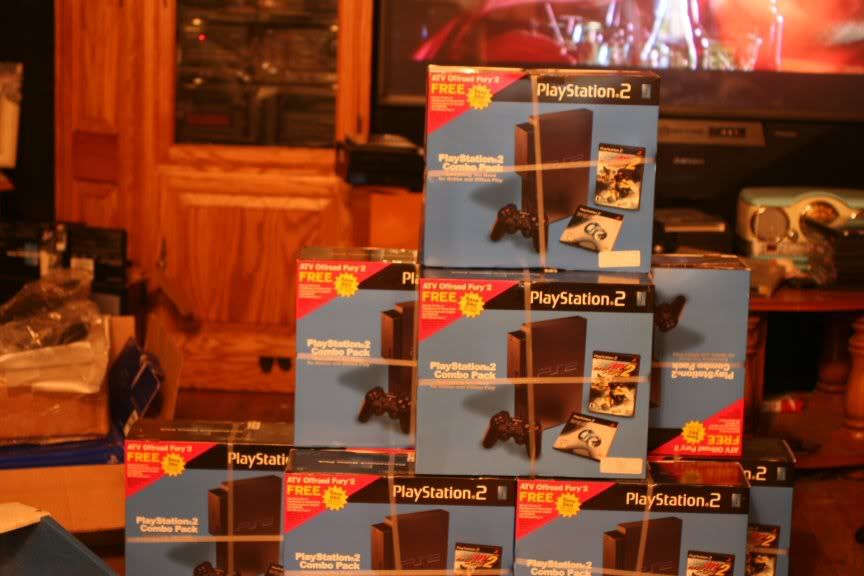 |
|
|
|
|
|
tot31
|
Oct 5 2005, 03:11 PM
|
|
|
sell??? no my friend..
|
|
|
|
|
|
tot31
|
Oct 12 2005, 11:17 AM
|
|
|
have you tried to change to other rainbow six disc?
|
|
|
|
|
|
tot31
|
Oct 12 2005, 11:26 AM
|
|
|
Most probably your modchip has problem with this game. Some old chips got problems with newer games. That's why is the best to get a modchip that can be flashed upgradable firmware such as DMS3/4, Matrix Infinity, O2 and Ripper.
|
|
|
|
|
|
tot31
|
Oct 12 2005, 12:03 PM
|
|
|
QUOTE(carpathia @ Oct 12 2005, 11:40 AM) My PS2 (Fat version) is working fine (Messiah 2 chip i think):
1) : the cd trays ejects normally but when you load the tray using the eject button, the tray will move very slowly back to the unit. is this a mechanical problem or dust issue? This is a wear and tear issue mostly mechanical QUOTE(carpathia @ Oct 12 2005, 11:40 AM) 2) whats the latest and best mod chip in the market now? so far i have no issues playing games but when i swap games, sometimes i do need to reboot. The latest and the best modchip in the market is DMS3/4, Matrix Infinity and Crystal Chips but these modchips ain't cheap and if you're the kind of cheap ppl don't even think of buying it. If you're really a PS2 enthusiast and don't mind spending money then I would really recommend it. |
|
|
|
|
|
tot31
|
Oct 14 2005, 11:30 AM
|
|
|
QUOTE(emonsters @ Oct 14 2005, 08:54 AM) try 2 different rainbow six disc , not working. try cleaning lense , not working. try adjusting the lense not working. try position vertically and also not working. what else to do ah? If you read my post (I've posted this before)..I don't know wether you read it or not. Your current modchip might be the problem. |
|
|
|
|
|
tot31
|
Oct 17 2005, 03:43 PM
|
|
|
QUOTE(lookman @ Oct 17 2005, 03:16 PM) If you just want to play the economy games then both is ok but I would suggest you to choose Pro7 because if you choose Modbo you might kill it if you accidently change the settings. |
|
|
|
|
|
tot31
|
Oct 17 2005, 03:56 PM
|
|
|
QUOTE(lookman @ Oct 17 2005, 03:52 PM) Price wise ... I assume both are the same price (when purchase with the PS2).... also what about the ease of usage ? Any links for this ? Tried googling it but not able to find the correct web site. Price wise is the same for both chips. If you try googling Pro7 of course you can't find it because it's a clone Mars modchip and you how much is that modchip actually cost...you'll be surprise man. This is how those Sg Wang guys survive...CUT THROAT....muahahahhahahh |
|
|
|
|
|
tot31
|
Oct 18 2005, 04:34 PM
|
|
|
For you info YIKEYOU and the rest of you newbs...PS2 can play CDR,CDRW,DVD-R,DVD+R and also DVDRW (for certain models like v9-v13).
|
|
|
|
|
|
tot31
|
Oct 18 2005, 04:54 PM
|
|
|
QUOTE(yikyeou @ Oct 18 2005, 04:53 PM) sorry...im a noob...dono what u mean... If you a newb and when ppl answer you question and you still don't understand it, just take that answer put it into google and you'll get thousands of answers. |
|
|
|
|
|
tot31
|
Oct 18 2005, 05:00 PM
|
|
|
I'm posting this again here in the technical forum.
How To Choose A Good PS2 Modchip
The most important part of selecting a mod-chip is to ensure that you select a "stable" chip that goes into a "sleep mode" after booting the required game and can "wake up" again if needed to.
STABILITY:
There are many different ways to check if a mod-chip is stable, but unfortunately the most effective way is through experience. Things that you can check for yourself;
a.When you look at a mod-chip PC Board you will note that among the few components there is a large I.C. or chip (sometimes more). When you read the markings on such a chip you will see that it will have part numbers (ignore these) and a large logo like name, this is what you should be looking at. Actel, Xilinx and Quicklogic have proven to be the best. The reason for this is; They are very well engineered chips with stability in mind. They have an "over voltage" protection feature, meaning that it will block voltage spikes which can damage the lens. They can run at higher clock speeds than what is required by the PS2 meaning that data transfer can be executed with precise accuracy.
The exact opposite of these 3 chips is the "Scenix or UbiCom" I.C. this is actually not the same type of chip as the Actel, Xilinx and Quicklogic chips. You can almost call it the big brother of the PSone chip. It does not have any voltage protection and it's maximum clock speed is equal to the minimum clock speed required by the PS2. What this means is that lens damage can occur through a voltage spike, and data transfer is normally not very accurate.
b.Except for the DMS3, normally when there is more than 1 large chip present on the modchip PC Board it is not a good chip.
SLEEP MODE:
After the chip has booted the title required, it will go into hiding and only monitor what the PS2 is doing. The advantage of this is that the chip does not interfere with the normal operation of the PS2 and it does not damage the lens by sending unnecessary signals to the lens. Unfortunately since "sleep mode" is part of the code that is programmed on the chip, there is no way of checking for this feature on the actual chip.
WAKE UP:
Only chips that have sleep modes can have a "wake-up" mode. Consoles from v7 (SCP39004) had a new feature added to them. The console can try and authenticate the disk that is being played at any time. People with v7 consoles, Magic 3 chips, and a NTSC or pirated version of
Splinter Cell will know what I'm talking about. While playing the game it will go to a red screen that says "PLEASE INSERT A PLAYSTATION® OR PLAYSTATION® 2 FORMAT DISK". If you have a chip installed with a "wake-up" feature the chip will wake up and resend the required data to stop this from happening. Now that you more or less know how to tell a good quality chip from a bad one it's time to ask yourself what your needs are. I will explain all the different features in detail.
BOOTS PSone GAMES:
I think you can figure this one out for yourself. (No matter what chip you have, you will never get
100% of all PSone game to work on a PS2)
PERFORMANCE SCREEN CENTERING FOR PSone GAMES:
When a NTSC (American or Jap) PSone game is being played on a PAL (Europe, R.S.A.) PS2
the screen will lift up, meaning that a part of the top of the screen will be cut off. The amount that
is cut off depends on the size of the T.V. On a 74cm T.V. about 100mm will usually be cut off.
If a chip has the "screen center" feature it will fix this problem for you.
BOOTS ALL PS2 GAMES:
Say no more. Please note that from time to time certain chips may have problems with some games. This is why "Flash upgradeable" chips are normally the best choice. Normally cheaper chips have the most problems with imported original games.
FAST BOOT MODE:
When holding a certain button while pressing reset with a disk inside the console, the console will reset but not show any of the start up screens. Instead it will go straight to the first game screen.
DISK SWAPPING:
If you use a cheat device like an AR2 or Xploder you will need to put the cheat disk in the console first and after selecting the game cheat required you will have to insert the game disk. At this point the console will try to authenticate the disk and if the chip does not support "disk swapping" it will not boot the game.
MULTI REGION DVD:
Currently R.S.A. PS2s can only play Zone 2 DVDs. "Multi region DVD" will allow you to play all zones (DVDs from any country).
MACRO VISION REMOVAL:
When trying to record a DVD movie by connecting your PS2 to a VCR the screen will go black for a few seconds then the audio will go away and then some lines across the screen. This will carry on for as long as the VCR is recording, the moment you stop recording the movie will play as normal. This is what "macro vision" does. There are 2 different "macro visions" at work, the first is on the actual console, the second on the DVD disk provided that it has this type of protection. Since there's constantly new developments in "macro vision' protection it is not possible for modchips to remove "macro vision" on every disk.
DEV MODE 1:
Short for devolution mode. Currently a few chips support this mode, the DMS3, Matrix infinity, Ripper, Lisa XP, DMS4, O2, Ghost2 and DMS4. This allows you to boot applications or software from a folder on the memory card. Take for example the PS2 reality media player which allows the console to play MP3s and DivX movies. Normally if you would like to use a program like this you will have to manually create a disk with the media player and the MP3s or DivX movies on it. You will have to do this for every disk that you would like to play. If you have a mod-chip that supports "devolution mode" you'll be able to install such a program to your memory card and also boot it from there by holding a certain button when turning the console on. This means that all your favourite MP3s and DivX movies can be thrown on a disk and played without having to create them in any special way.
DEV MODE 2:
A boot mode for the PS2 hard drive. Works pretty much the same way as devolution mode1.DMS4 supports this mode.
O.S. OR OPERATING SYSTEM:
A new browser for the PS2 which will allow the user to change video settings e.g. if you are using
an older TV set and the game plays back in black and white, then the default output can be changed to PAL to prevent this from happening. Homebrew apps can also be installed and un-installed from the O.S.
HOMEBREW APPS:
These are software programs deigned by coders in their spare time. These programs are not copyright protected by Sony and do not belong to Sony at all. These programs are free and may be downloaded and used as required by the user. Since these programs are not PS2 games, they need to be booted in a special way. If a mod-chip has a devolution mode or O.S. then these apps can be booted from the memory card or HDD just by selecting it on-screen.
STEALTH MODE (SWITCH OFF):
The mod-chip can be deactivated by the user. The console will behave as it did before a mod-chip was installed. There are 3 reasons why this should be used.
a. If an original game is detected the mod-chip simply turn it off.
b. If you would like to play games online. Some servers will not allow you on if your console has a mod-chip in it.
c. You can not install official Sony software or upgrades with a mod-chip installed unless it can be turned off.
FLASH UPGRADABLE:
"Flash upgradeable" means to be able to update or reprogram the mod-chip via CD with the correct software on it. All you have to do is put the update disk in and the chip will do all the work.
Earlier we covered the different chips that can be used to create a mod-chip, but essentially the code on the mod-chip is what makes it. Mod-chip developers are constantly working to better the code or software on their mod-chips and when they do you can have these updates for free forever.
HDD PATCHING:
This is when a game will installs most of it's files to a hard drive that is connected to the PS2. Note it will only do this if you have an official Sony hard drive. When you have "HDD Patching" enabled you can connect any computer hard drive not larger than 137 GB to your PS2 and the mod-chip will do a patching process to make the game believe that is the official Sony hard drive.
|
|
|
|
|
|
tot31
|
Oct 18 2005, 05:12 PM
|
|
|
QUOTE(yikyeou @ Oct 18 2005, 05:02 PM) i may not new in ps2...i bought my ps2 3 years ago...today...i just know dat ps2 can do so many thing...last time...i used to play games nia...now tryin to upgrade myself... LOL...canned compressed air also don't know....   how you said you not a newb.... |
|
|
|
|
|
tot31
|
Oct 18 2005, 05:27 PM
|
|
|
QUOTE(yikyeou @ Oct 18 2005, 05:15 PM) Congrats..that's what I like it  Just be honest and you'll get help. Ok I'll answer your PM here. Q1. How do I want to know what modchip I'm using? A1. You must do a visual check, means you must open your PS2 and take a pic and post it here. Maybe I or the rest of the members can identify it for you. There is no other way, I repeat... NO OTHER WAY, so don't ask other way than opening up your machine. If you scared to open it up ask someone who knows what's he's doing. Don't be like my friend who end up destroying his PS2 just to see the stupid clone modchip. Q2. PS2 Reality A2. Personally I like SMS (Simple Media System) better as it has support for playing Divx/xvid avis from network,hdd, usb device, cd and even dvd format. Where to get it. You can get it from ps2-scene.org. I've tried PS2 Media Reality and really don't like it. How to use it very simple. How to use SMS Commands:
At Startup:
Select-R1 for NTSC
Select-R2 for PAL
Select-R1-Square for non-interlaced NTSC
Select-R2-Square for non-interlaced PAL
Menu:
Triangle- up one directory level
Left or right directional- switch to device menu
Up or down directional- navigate files
Select+Circle- switch PS2 off
Select-R1- move screen right
Select-L1- move screen left
Select R2- move screen down
Select L2- move screen up
Select-Square- save current configuration to mc0:/SMS
Select-Triangle- exit to PS2 Browser
While playing a film:
Triangle- exit to file menu
Select- Pause (hit select again or hold for 200ms and the "Pause" message will disappear)
Start- Resume |
|
|
|
|
|
tot31
|
Oct 18 2005, 05:39 PM
|
|
|
QUOTE(yikyeou @ Oct 18 2005, 05:28 PM) i dont know how to burn it to a cdr... LoL....i thought you know...2 yrs already have PS2 right...ok I'll teach you..There is 2 ways to make a homebrew bootable disc. First, you can use Nero and second you can make a PS2 CD ISO image using CDGENPS2 (google to find it) I don't to spoonfeed everything. Method 1. Using Nero 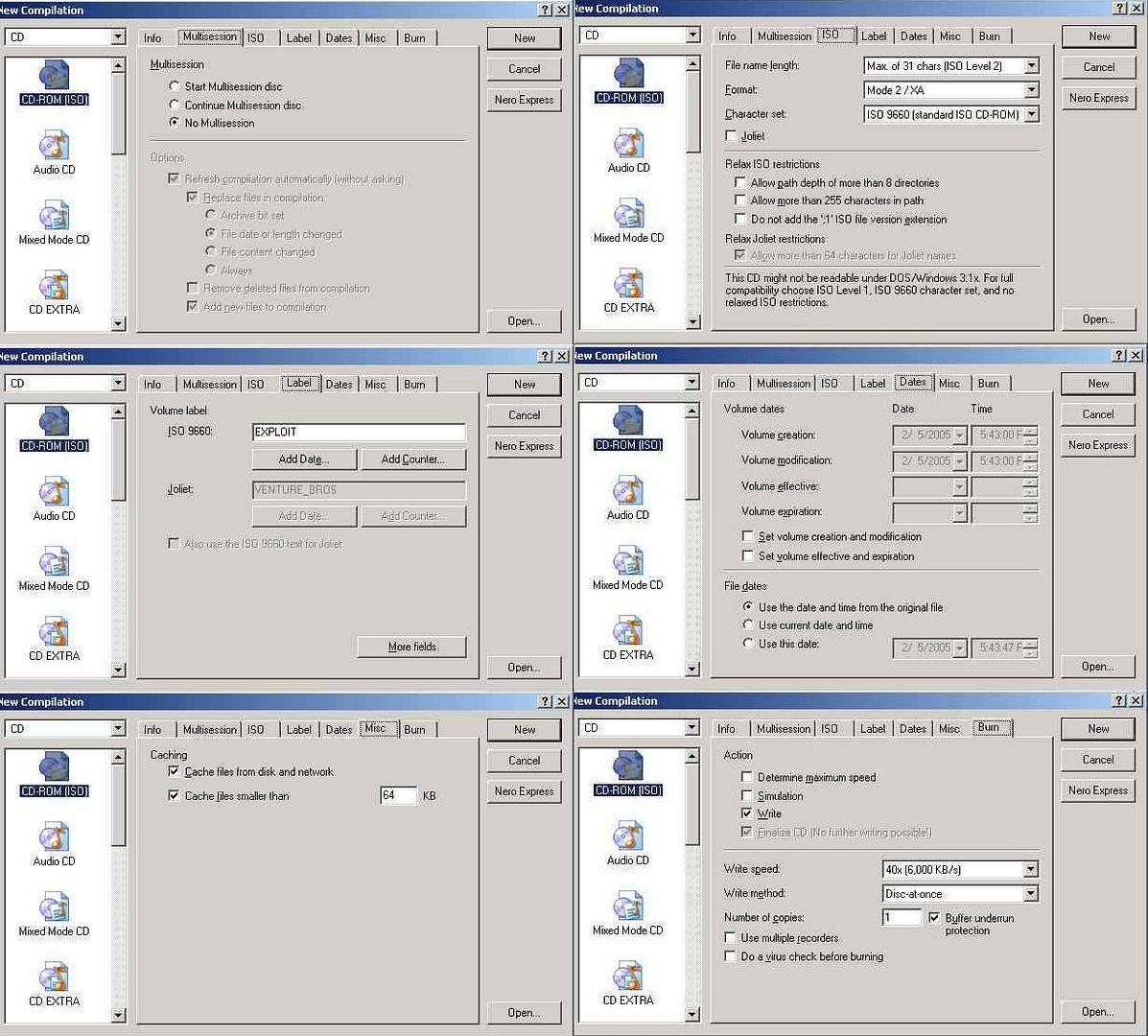 Method 2. Making an ISO Image using CDGENPS2 To be continue..... |
|
|
|
|
|
tot31
|
Oct 24 2005, 08:15 AM
|
|
|
QUOTE(darknessz @ Oct 22 2005, 05:10 PM) ah..wanna ask a question here i juz bought a ps2 from a forumer yday..everything goes fine but the vibration wun work..i bought a brand new controller but itz still not working...tested it on marvel snk 2 and tekken 4... so may i noe wat is happening ? One of the fuse have blown. Need to replace the fuse or bridge a wire. If you send to Sg Wang they will charge around RM30 for bridging the a small wire on the dead fuse. |
|
|
|
|
|
tot31
|
Oct 25 2005, 12:21 PM
|
|
|
The desgin looks damn funny....mushroom...thank god they didn't make a D**K as the design. LOL
|
|
|
|
|
|
tot31
|
Nov 3 2005, 02:51 PM
|
|
|
QUOTE(yewjhin @ Nov 2 2005, 09:30 PM) Wowoww thanks so much... Whats LA chip? I just want a modchip that can play u-know-wat games. Whats the price range and cheapest model? LA chip a DVD controller chip. All v9/v10 aka 5k series PS2 are using this chip and known to self destruct itself. The LA chip itself is not that expensive but the labour is costly as it is not that easy to change the chip. |
|
|
|
|



 Quote
Quote
 0.1694sec
 0.61
0.61
 7 queries
 GZIP Disabled