


Attached thumbnail(s)


Official N45/N55 Club ♥ V2, Closed :)
|
|
 Aug 22 2011, 10:28 PM Aug 22 2011, 10:28 PM
Return to original view | Post
#1
|
 
Newbie
0 posts Joined: Aug 2011 
|
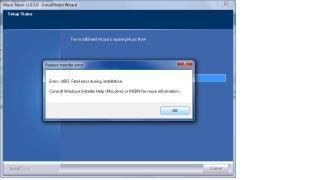
hey, can i ask about the Music Now! program? under that program tab got Music Now! installer.. den got repair this software and uninstall. i click on repair this software but it comes out an error msg.. below is the error msg.. how shud i solve it??
Attached thumbnail(s)
|
|
|
|
|
|
Aug 22 2011, 10:48 PM
Return to original view | Post
#2
|
|
Newbie
0 posts Joined: Aug 2011
|
QUOTE(Trance4eva @ Aug 22 2011, 10:28 PM) this kind of problem if they dun give you one to one exchange can complain to consumer support d la then, wat shud i do? cos i insert the asus cd to install oso shows the same thing.. this program not comes together with the laptop itself? Added on August 22, 2011, 10:29 pm it means you only have the installer....but not the files to install Asus Music Now. Some files are missing...  |
|
|
Aug 22 2011, 10:57 PM
Return to original view | Post
#3
|
|
Newbie
0 posts Joined: Aug 2011
|
QUOTE(Trance4eva @ Aug 22 2011, 10:52 PM) you do have Asus Music Now install right??? got that program file.. but i click it show music now installer,. den under it is repair this software and uninstall..or did you reformat your whole laptop??? i didn't do anything.. i take back my laptop from the shop just now den it's like that already... i didn't reformat it... |
|
|
Aug 22 2011, 10:59 PM
Return to original view | Post
#4
|
|
Newbie
0 posts Joined: Aug 2011
|
QUOTE(Duckies @ Aug 22 2011, 10:54 PM) It comes as default.Wat happened to it until u have to repair? i also dunno what happened.. this is what it shows when i first open it...Attached thumbnail(s) 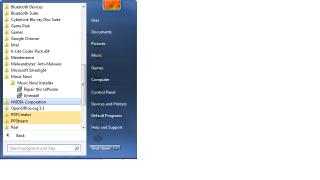
|
|
|
Aug 22 2011, 11:04 PM
Return to original view | Post
#5
|
|
Newbie
0 posts Joined: Aug 2011
|
QUOTE(htpkevin @ Aug 22 2011, 11:01 PM) hmm i deleted the programme straight away. But i thought is press the top left button to boot up music now? o... im so blurred.. still not get used to it.. i press those buttons den got windows things come out.. dunno wat's it.. |
|
|
Aug 22 2011, 11:15 PM
Return to original view | Post
#6
|
|
Newbie
0 posts Joined: Aug 2011
|
QUOTE(Trance4eva @ Aug 22 2011, 11:02 PM) yea i thought the same thing too owh.. i off my laptop then press the power4gear button.. den it comes out the installation is incomplete.. please start ur windows to complete it.. try click Star Menu>at the bottom most taip Asus Music Now or Music Now see if anything beside the installer appears another way is off your laptop and press the Power4gear button to start or ask another N55/N44SF owner   |
|
|
Aug 22 2011, 11:36 PM
Return to original view | Post
#7
|
|
Newbie
0 posts Joined: Aug 2011
|
QUOTE(IvanWong1989 @ Aug 22 2011, 11:19 PM) nono... no problem yet.. it's corect.. first time open music now.. should instal and configure stuff de.. ooo.. then what should i install and configure? haha..then boot again to windows to cont.. next time u can open music now with the left side button..when ur lappy is OFF |
|
|
Aug 23 2011, 12:34 AM
Return to original view | Post
#8
|
|
Newbie
0 posts Joined: Aug 2011
|
QUOTE(lakost @ Aug 23 2011, 12:24 AM) I think what Kelly have is the incomplete Music Now installer. If he can get a copy of a complete installer then his problem will be fixed. owh.. where can i get that copy of complete installer? haiz.. |
|
Topic ClosedOptions
|
| Change to: |  0.0433sec 0.0433sec
 0.18 0.18
 7 queries 7 queries
 GZIP Disabled GZIP Disabled
Time is now: 9th December 2025 - 05:56 AM |
 Quote
Quote