QUOTE(jauzi90 @ Oct 20 2011, 01:00 PM)
waiting for your update. If better than XXPH, then ill join you..

QUOTE(xsaintzx @ Oct 20 2011, 02:44 PM)
DO NOT flash any firmware that is meant for other phone to your Galaxy SL or you will end up with a bricked/semi bricked phone for sure.
I just flashed XXKPH to my gf phone yesterday, it should be released earlier

QUOTE(ekestima @ Oct 20 2011, 09:26 PM)
My wife's SL still running on 2.2.1.
Should update to 2.3.5 better right ?
QUOTE(xauxix @ Oct 20 2011, 11:58 PM)
tried..so far so good..will be update after i install papago.

actually don't want to flash or tweak my phone after got bad experience
while swap internal to external sd.
but my phone going crazy like hell, touch screen didn't respond at all.
try factory reset, still same.
last option, flashing rom !
my luck, my it fix my problem.no more touchscreen not respond..
QUOTE(Hunz @ Oct 21 2011, 12:37 AM)
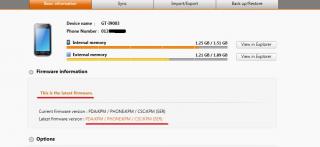
2.3.5 available for kies update?
i check nothing is there
Haha. Well, 2.3.5 (XXKPM) is much better than 2.3.4 (XXKPH). Why?
1. Scrolling is super smooth
2. Camera is better (exposure)
3. GPS lock is very fast
4. Battery usage ok la (wifi and HSDPA)
Comments:
The phone is stable for last 2 days until this morning. After the charging was completed, the phone is a bit lag. I don't know why. After reboot also lag lag when typing something but other apps are running smoothly. Maybe because I flashed the XXKPM from XXKPH.
Trying for luck again, I'll reflash again tonight, from clean XXKPE -> XXKPM.
By the way, I'm using ODIN to flash and not Samsung KIES. How to flash using ODIN? Please check previous page(s).



 Oct 9 2011, 12:14 PM


 Quote
Quote



 0.0360sec
 0.50
0.50
 7 queries
 GZIP Disabled