

 Aug 16 2011, 07:09 AM, updated 15y ago


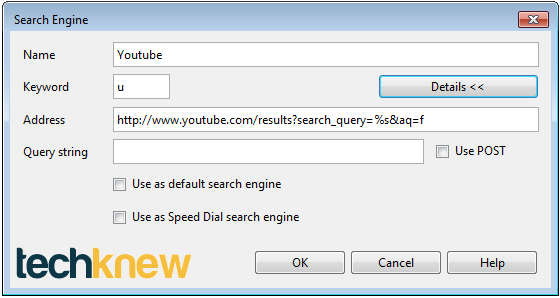
1. Click on the Menu > Settings > Preferences > Search tab > Add.
2. Fill up the blanks according to the image. Copy and paste http://www.youtube.com/results?search_query=%s&aq=f
3. Click OK.
4. You can now search in the address bar by typing: "u nigahiga" (without the apostrophes)
Tip 2: You can Google any word in Opera by right-clicking the word/phrase and click on Google Search and at the same time hold the CTRL button.
By: http://techknew.blogspot.com/2011/08/tips-...ing-search.html
This post has been edited by techknew: Aug 16 2011, 07:10 AM
 Quote
Quote
 0.0131sec
 0.59
0.59
 5 queries
 GZIP Disabled