Outline ·
[ Standard ] ·
Linear+
Sony Ericsson Xperia™ X10 Official Thread [V3], Now with Android 2.3.3 Gingerbread
|
SteamShark
|
 Oct 31 2011, 01:13 PM Oct 31 2011, 01:13 PM
|
Getting Started


|
aaaa, wat ROM is da best now? can we have a poll? LOL! I still using WBv5.0.0c. I found tat da available RAM is around 164MB and my friend hu using stock GB ROM has around 220MB RAM available. why is it has so much different?
|
|
|
|
|
|
Ivan113
|
Oct 31 2011, 02:00 PM
|
|
|
lots of RAM or not i think depends on the apps you install, and also the tweak tat the dev do
|
|
|
|
|
|
TSEugene91
|
Oct 31 2011, 02:46 PM
|
|
|
QUOTE(SteamShark @ Oct 31 2011, 01:13 PM) aaaa, wat ROM is da best now? can we have a poll? LOL! I still using WBv5.0.0c. I found tat da available RAM is around 164MB and my friend hu using stock GB ROM has around 220MB RAM available. why is it has so much different? huh? sure ka? 220MB free RAM????  Even Wolf's Gaming ROM only reach like 190MB? With lots of apps and services removed!  This post has been edited by Eugene91: Oct 31 2011, 02:46 PM This post has been edited by Eugene91: Oct 31 2011, 02:46 PM |
|
|
|
|
|
SteamShark
|
Oct 31 2011, 03:24 PM
|
Getting Started
|
QUOTE(Eugene91 @ Oct 31 2011, 03:46 PM) huh? sure ka? 220MB free RAM???? Even Wolf's Gaming ROM only reach like 190MB? With lots of apps and services removed! Not free but both using n free. tatz y Im curious about it. how come his stock GB cn so powerful.
Added on October 31, 2011, 3:25 pmQUOTE(Ivan113 @ Oct 31 2011, 03:00 PM) lots of RAM or not i think depends on the apps you install, and also the tweak tat the dev do U sure RAM depends on apps install? r u kd? RAM is RAM, storage is storage. LOL This post has been edited by SteamShark: Oct 31 2011, 03:25 PM |
|
|
|
|
|
wkkm007
|
Oct 31 2011, 04:54 PM
|
|
|
QUOTE(SteamShark @ Oct 31 2011, 01:24 PM) Not free but both using n free. tatz y Im curious about it. how come his stock GB cn so powerful.
Added on October 31, 2011, 3:25 pmU sure RAM depends on apps install? r u kd? RAM is RAM, storage is storage. LOL Apps like run background. so more apps install, more background app and it service file. |
|
|
|
|
|
Ivan113
|
Oct 31 2011, 04:54 PM
|
|
|
QUOTE(SteamShark @ Oct 31 2011, 03:24 PM) Not free but both using n free. tatz y Im curious about it. how come his stock GB cn so powerful.
Added on October 31, 2011, 3:25 pmU sure RAM depends on apps install? r u kd? RAM is RAM, storage is storage. LOL lol!! research before you talk, some apps are keep in background even after you exit them, like viber, poweramp, facebook, google+, swiftkey X, they all run in background ( or foreground? not sure ), so that apps like facebook can notify you when u get new notifications, like gmail and googleplus too. |
|
|
|
|
|
wkkm007
|
Oct 31 2011, 04:55 PM
|
|
|
I hate auto startup app  eat ram and bat.
Added on October 31, 2011, 4:56 pmQUOTE(Ivan113 @ Oct 31 2011, 02:54 PM) lol!! research before you talk, some apps are keep in background even after you exit them, like viber, poweramp, facebook, google+, swiftkey X, they all run in background ( or foreground? not sure ), so that apps like facebook can notify you when u get new notifications, like gmail and googleplus too. off topic: RAM disk lol Use pic as wallpaper use lesser ram and bat. then live wallpaper This post has been edited by wkkm007: Oct 31 2011, 05:02 PM |
|
|
|
|
|
Ivan113
|
Oct 31 2011, 05:02 PM
|
|
|
QUOTE(wkkm007 @ Oct 31 2011, 04:55 PM) I hate auto startup app eat ram and bat.
Added on October 31, 2011, 4:56 pmoff topic: RAM disk lol some app that run in background or foreground didnt eat battery but ram, not sure background or foreground, i simply uninstall un-frequent apps that i use to save RAM that they eat |
|
|
|
|
|
wkkm007
|
Oct 31 2011, 05:07 PM
|
|
|
QUOTE(Ivan113 @ Oct 31 2011, 03:02 PM) some app that run in background or foreground didnt eat battery but ram, not sure background or foreground, i simply uninstall un-frequent apps that i use to save RAM that they eat Another way freeze it with titanium 
Added on October 31, 2011, 6:49 pm *shootme using 10mb ram  *underclock to 576-245.67 mhz This post has been edited by wkkm007: Oct 31 2011, 06:53 PM |
|
|
|
|
|
Ivan113
|
Oct 31 2011, 06:53 PM
|
|
|
u got so less thing, I got lots of thing running, only left 60MB-80mb, u got 188MB, how many apps u got?
|
|
|
|
|
|
wkkm007
|
Oct 31 2011, 07:08 PM
|
|
|
QUOTE(Ivan113 @ Oct 31 2011, 04:53 PM) u got so less thing, I got lots of thing running, only left 60MB-80mb, u got 188MB, how many apps u got? I close all unused app eg: viber and whatsapp. on when needed. » Click to show Spoiler - click again to hide... « Barcode scanner
Panorama beta
NFS shift
fruit Ninja
TegraZone Games
Photoshop Express
ColorNote
Tapatalk
AnyCut
Angry Birds
Extended Controls
Cpu Spy
iPhone Top Charts
CPU Master Free
Pure Calender
ShootMe
Zynga Poker
WhatsApp
Viber
Super Security
Zuma Revenge
Space Physics
Documents To Go
Titanium Backup
Facebook
and stock app + WB app
25+- app This post has been edited by wkkm007: Oct 31 2011, 07:11 PM |
|
|
|
|
|
Ivan113
|
Oct 31 2011, 07:15 PM
|
|
|
zzzz! 25 apps only, no wonder la  see mine  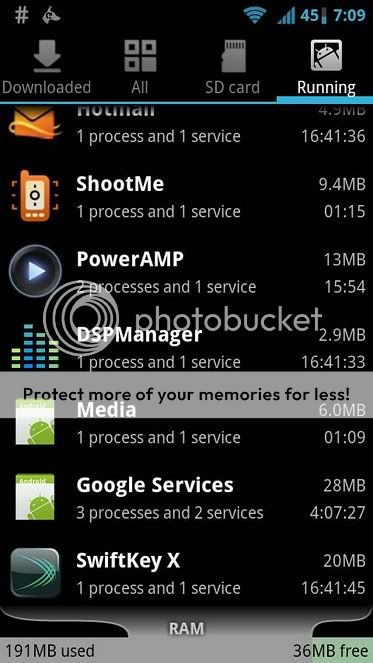
Added on October 31, 2011, 7:21 pmand i want ask you, the freeze function in titanium backup is for wat?  This post has been edited by Ivan113: Oct 31 2011, 07:21 PM This post has been edited by Ivan113: Oct 31 2011, 07:21 PM |
|
|
|
|
|
wkkm007
|
Oct 31 2011, 07:31 PM
|
|
|
QUOTE(Ivan113 @ Oct 31 2011, 05:15 PM) zzzz! 25 apps only, no wonder la see mine
Added on October 31, 2011, 7:21 pmand i want ask you, the freeze function in titanium backup is for wat? I guess prevent it running and also remove on the app tray/menu  |
|
|
|
|
|
Ivan113
|
Oct 31 2011, 08:01 PM
|
|
|
I see i see, just installed mobo task killer, just testing it, although they said task killer is not needed in Gingerbread, but do you agree? memory management still looks very poor, or maybe i installed lots of apps, lol
|
|
|
|
|
|
SteamShark
|
Oct 31 2011, 08:47 PM
|
Getting Started
|
Y u all gt so much RAM?Mine just gt 90+ using and 90+free
Added on October 31, 2011, 8:49 pmQUOTE(Ivan113 @ Oct 31 2011, 05:54 PM) lol!! research before you talk, some apps are keep in background even after you exit them, like viber, poweramp, facebook, google+, swiftkey X, they all run in background ( or foreground? not sure ), so that apps like facebook can notify you when u get new notifications, like gmail and googleplus too. I cn 100% gurantee u I noe wat i talk more den u do. RAM is for the phone 2 process and storage is simply somethg 4 u to keep data. U instal apps has nth 2 do wf RAM AT ALL DUDE. This post has been edited by SteamShark: Oct 31 2011, 08:49 PM |
|
|
|
|
|
Ivan113
|
Nov 1 2011, 12:03 AM
|
|
|
QUOTE(SteamShark @ Oct 31 2011, 08:47 PM) Y u all gt so much RAM?Mine just gt 90+ using and 90+free
Added on October 31, 2011, 8:49 pmI cn 100% gurantee u I noe wat i talk more den u do. RAM is for the phone 2 process and storage is simply somethg 4 u to keep data. U instal apps has nth 2 do wf RAM AT ALL DUDE. a big LOL for you sir, please do more research.... please edit: or do you want me to explain to you? This post has been edited by Ivan113: Nov 1 2011, 12:11 AM |
|
|
|
|
|
TSEugene91
|
Nov 1 2011, 06:19 AM
|
|
|
Actually apps do have running processes in background for example FB now mine is running in background at 40MB+ even though the app was closed earlier. But doesn't matter to me as long as it doesn't drain the battery.
|
|
|
|
|
|
langsk
|
Nov 1 2011, 10:29 AM
|
Getting Started
|
DooMLoRD's Easy Rooting Toolkit... http://forum.xda-developers.com/showthread.php?t=1321582hehehehe Easy rooting.... |
|
|
|
|
|
wkkm007
|
Nov 1 2011, 12:34 PM
|
|
|
I just need a clarify about [ROOT] aZuZu Root Method for stock SE 2.3.3 GB - Step By Step http://forum.xda-developers.com/showthread.php?t=1196421. Does the unlock the boatloader?
Added on November 1, 2011, 12:57 pmAppMan from TEAM ROM what is the function? This post has been edited by wkkm007: Nov 1 2011, 12:57 PM |
|
|
|
|
|
abundai
|
Nov 1 2011, 01:03 PM
|
|
|
guys...i think some of us are getting the terms wrong
RAM = Random Access Memory... the more app running, the higher RAM usage. but the good thing is, for GB rom, u dont have to worry at all. GB can handle RAM management quite well compared to older version. Dont use TaskKiller to free up more RAM space cos that is just wrong. Unlike the old days, where TaskKiller can be very useful to kill those poorly written apps that wont let go of RAM even it is not being used...
(click on Settings-Application-Running... u'll get RAM reading)
Phone Memory is different..its the internal storage where u install apps. more APPS u install, the more phone memory it will occupy... so dont be shock when u run out of phone memory... cos it was you who installed TOO much apps... but then, that is when app2sd comes in handy.....
(click on Settings-Application-All... u'll get phone memory/internal storage reading)
This post has been edited by abundai: Nov 1 2011, 01:05 PM
|
|
|
|
|



 Quote
Quote





 0.0302sec
 0.73
0.73
 6 queries
 GZIP Disabled