Welcome Guest ( Log In | Register )

Bump Topic Topic Closed RSS Feed

Outline · [ Standard ] · Linear+

 HP Pavillion DV6-6XXX series Owners Lounge V3, -130 owners. Refreshed! Aww Yeah!!

views
     
chahupping
post Aug 24 2011, 02:56 AM

Getting Started
**
Junior Member
137 posts

Joined: May 2009
QUOTE(lee_what2004 @ Aug 24 2011, 03:56 AM)
Like that I'm not sure.
I guess the only way fix it is untick the auto-hide, apply then tick it back..
*
i tried it almost 100 times d. cry.gif cry.gif
lee_what2004
post Aug 24 2011, 03:00 AM

*stare* ji--------
Group Icon
Elite
14,813 posts

Joined: Nov 2006


or try exit some program on the system tray, maybe that one keep causing the taskbar to appear..
chahupping
post Aug 24 2011, 03:06 AM

Getting Started
**
Junior Member
137 posts

Joined: May 2009
QUOTE(lee_what2004 @ Aug 24 2011, 04:00 AM)
or try exit some program on the system tray, maybe that one keep causing the taskbar to appear..
*
http://www.tomshardware.com/forum/35061-45...kbar-doesn-work
i tried his method, lol. suprisingly it works.
lee_what2004
post Aug 24 2011, 03:10 AM

*stare* ji--------
Group Icon
Elite
14,813 posts

Joined: Nov 2006


hmm, which basically almost like a restart...
chahupping
post Aug 24 2011, 03:12 AM

Getting Started
**
Junior Member
137 posts

Joined: May 2009
QUOTE(lee_what2004 @ Aug 24 2011, 04:10 AM)
hmm, which basically almost like a restart...
*
oh~ at least it works, thx for ur help and advices anw. really nice to have u in our thread helping us. smile.gif
lee_what2004
post Aug 24 2011, 03:13 AM

*stare* ji--------
Group Icon
Elite
14,813 posts

Joined: Nov 2006


Sure biggrin.gif
louisfjh
post Aug 24 2011, 04:53 AM

Getting Started
**
Junior Member
257 posts

Joined: May 2008


user posted image
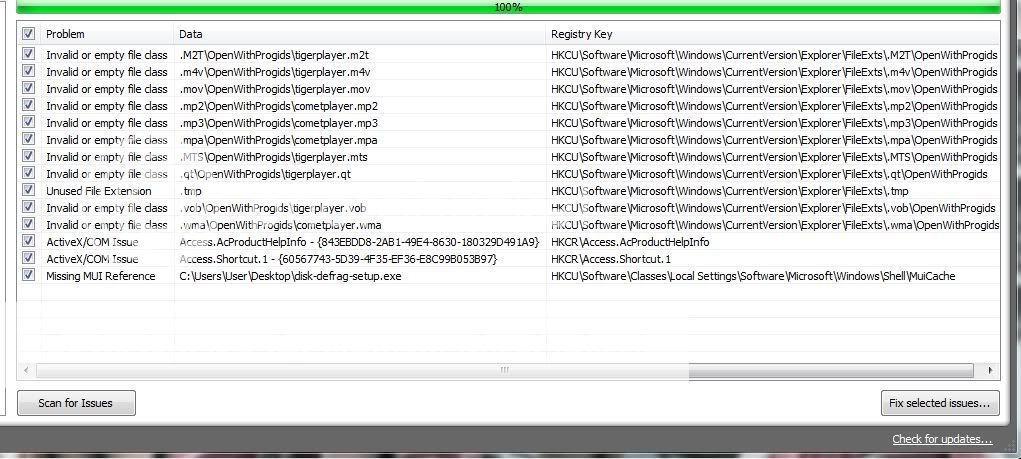
here the issue i always get.. i remove the player edy but it still always appear @@ any idea?


Added on August 24, 2011, 5:04 amthe revo uninstaller how to use? how to check my player completely remove or not???

This post has been edited by louisfjh: Aug 24 2011, 05:04 AM
spicediablo
post Aug 24 2011, 09:11 AM

Getting Started
**
Junior Member
114 posts

Joined: Apr 2006


QUOTE(Acid_RuleZz @ Aug 23 2011, 05:51 PM)
Yeah you should or else WLM will enable hardware acceleration when u're on HD3000.  laugh.gif
Revo Uninstaller can help u trace registry to make sure u've remove the applications completely.

+1 for U3.  thumbup.gif
*
Done.Working fine now. Have to disable IE9 hardware acceleration too or else it won't be able to switch.. sweat.gif
lee_what2004
post Aug 24 2011, 10:05 AM

*stare* ji--------
Group Icon
Elite
14,813 posts

Joined: Nov 2006


QUOTE(louisfjh @ Aug 24 2011, 04:53 AM)
here the issue i always get..  i remove the player edy but it still always appear @@ any idea?
*
If you keep scan and fix it ?
spicediablo
post Aug 24 2011, 11:31 AM

Getting Started
**
Junior Member
114 posts

Joined: Apr 2006


QUOTE(Acid_RuleZz @ Aug 23 2011, 04:13 PM)
Raxco who is behind PerfectDisk is Microsoft’s Gold Certified Partners. Another application worth to mention is Diskeeper.
Either one of this is perfect for someone like SRLee because it has auto defrag feature that'll auto defrag your files when idle.
Both also prevent files from fragmenting i think.

hmm.gif  hmm.gif


Added on August 23, 2011, 4:14 pmIt does consume some resources tho..


Added on August 23, 2011, 4:17 pm
Mine still working.. i can still swith GPU even when MSN is running.
Yeah.. perfectdisk is gooding but i think its a waste of resources for normal home user. You can try the trial version first.
*
I've installed perfect disk pro. But it doesn't start up with windows. I tried searching in the options to enable it but din see any related options. Any advice?
TSAcid_RuleZz
post Aug 24 2011, 11:41 AM

ミウ ❤
*******
Senior Member
6,612 posts

Joined: Jan 2003
From: Tomorrow


^ not even in service list?
spicediablo
post Aug 24 2011, 11:53 AM

Getting Started
**
Junior Member
114 posts

Joined: Apr 2006


QUOTE(Acid_RuleZz @ Aug 24 2011, 11:41 AM)
^ not even in service list?
*
There is a PDagent in the process list... nod.gif
TSAcid_RuleZz
post Aug 24 2011, 12:23 PM

ミウ ❤
*******
Senior Member
6,612 posts

Joined: Jan 2003
From: Tomorrow


fuuuuuuuuu... envyTouchpad is so nais, i'll show how to setup them for a basic gooding.

1. Download envyTouchPad.exe from here. Extract and run.. you don't need to install.

2. You will see envyTouchpad icon in the traybar, click on it. Tick "Start with Windows" if you want it to start with windows(which i did).

3. Now go to "Scrolling" tab and set the speed & acceleration according to your preference. This is my setting by the way.
» Click to show Spoiler - click again to hide... «

4. Then go to "Tapping" tab and disable "1 finger" tap. Set your 2 fingers and 3 fingers function according to your need and click "Save".
» Click to show Spoiler - click again to hide... «

5. Now open right click "Synaptic Touchpad" icon on tray and select "Touchpad Properties". Disable "Two-Fingers Scrolling", Pinch Zoom & Three-Fingers Flick. You can disable side scrolling too if you want.
» Click to show Spoiler - click again to hide... «

6. Now enter "PalmCheck-Enhanced ACM" setting and untick "Restrict pointing to zone" and "Restrict tapping to zone".
» Click to show Spoiler - click again to hide... «

7. Voila. Now u can enjoy smooth 2 fingers scrolling, better 2 fingers tapping and 3 fingers tapping.
» Click to show Spoiler - click again to hide... «

louisfjh
post Aug 24 2011, 03:15 PM

Getting Started
**
Junior Member
257 posts

Joined: May 2008


QUOTE(lee_what2004 @ Aug 24 2011, 10:05 AM)
If you keep scan and fix it ?
*
yea i keep scan & fix it.. at the same time.. it will no more issue after few scan.. but after few hour or few day i scan again.. the stupid player thing appear again @@
lee_what2004
post Aug 24 2011, 03:20 PM

*stare* ji--------
Group Icon
Elite
14,813 posts

Joined: Nov 2006


Install it back and this time use Revo Uninstaller to do it..
spicediablo
post Aug 24 2011, 04:09 PM

Getting Started
**
Junior Member
114 posts

Joined: Apr 2006


QUOTE(Acid_RuleZz @ Aug 24 2011, 12:23 PM)
fuuuuuuuuu... envyTouchpad is so nais, i'll show how to setup them for a basic gooding.

1. Download envyTouchPad.exe from here. Extract and run.. you don't need to install.

2. You will see envyTouchpad icon in the traybar, click on it. Tick "Start with Windows" if you want it to start with windows(which i did).

3. Now go to "Scrolling" tab and set the speed & acceleration according to your preference. This is my setting by the way.
» Click to show Spoiler - click again to hide... «

4. Then go to "Tapping" tab and disable "1 finger" tap. Set your 2 fingers and 3 fingers function according to your need and click "Save".
» Click to show Spoiler - click again to hide... «

5. Now open right click "Synaptic Touchpad" icon on tray and select "Touchpad Properties". Disable "Two-Fingers Scrolling", Pinch Zoom & Three-Fingers Flick. You can disable side scrolling too if you want.
» Click to show Spoiler - click again to hide... «

6. Now enter "PalmCheck-Enhanced ACM" setting and untick "Restrict pointing to zone" and "Restrict tapping to zone".
» Click to show Spoiler - click again to hide... «

7. Voila. Now u can enjoy smooth 2 fingers scrolling, better 2 fingers tapping and 3 fingers tapping.
» Click to show Spoiler - click again to hide... «

*
Thanks!!
louisfjh
post Aug 24 2011, 04:21 PM

Getting Started
**
Junior Member
257 posts

Joined: May 2008


QUOTE(lee_what2004 @ Aug 24 2011, 03:20 PM)
Install it back and this time use Revo Uninstaller to do it..
*
okok i try...thank


Added on August 24, 2011, 4:30 pmuninstall wif wat mode?? moderator ? advance?

This post has been edited by louisfjh: Aug 24 2011, 04:30 PM
TSAcid_RuleZz
post Aug 24 2011, 04:38 PM

ミウ ❤
*******
Senior Member
6,612 posts

Joined: Jan 2003
From: Tomorrow


moderate should be enough.
reevephon
post Aug 24 2011, 05:28 PM

I'm a tech Freak
******
Senior Member
1,719 posts

Joined: Feb 2006
From: Kuala Lumpur


» Click to show Spoiler - click again to hide... «

Now I can feel the touchpad is as nice as Macbook Pro's.
j-insigh
post Aug 24 2011, 05:31 PM

Casual
***
Junior Member
329 posts

Joined: Dec 2008


ACid! nice! biggrin.gif  rclxms.gif  thumbup.gif

This post has been edited by j-insigh: Aug 24 2011, 05:32 PM

123 Pages « < 47 48 49 50 > » Top
Topic ClosedOptions
 

Change to:
| Lo-Fi Version
0.0228sec    0.36    6 queries    GZIP Disabled
Time is now: 8th December 2025 - 02:54 PM