

QUOTE(lee_what2004 @ Aug 24 2011, 04:10 AM)
hmm, which basically almost like a restart...

oh~ at least it works, thx for ur help and advices anw. really nice to have u in our thread helping us. 
HP Pavillion DV6-6XXX series Owners Lounge V3, -130 owners. Refreshed! Aww Yeah!!
|
|
 Aug 24 2011, 03:12 AM Aug 24 2011, 03:12 AM
Return to original view | Post
#41
|
 
Junior Member
137 posts Joined: May 2009 
|
QUOTE(lee_what2004 @ Aug 24 2011, 04:10 AM) hmm, which basically almost like a restart... oh~ at least it works, thx for ur help and advices anw. really nice to have u in our thread helping us. |
|
|
|
|
|
Aug 25 2011, 01:11 AM
Return to original view | Post
#42
|
|
Junior Member
137 posts Joined: May 2009
|
how come when i wanna transfer some 1 big file from internal to my external, it cant be transfered?? how to fix it??
|
|
|
Aug 25 2011, 04:37 PM
Return to original view | Post
#43
|
|
Junior Member
137 posts Joined: May 2009
|
QUOTE(spicediablo @ Aug 25 2011, 05:01 PM) Hi Experts, was playing around the beats settings as shown in the red box. Anybody knows how I can restore the original settings without reinstalling the driver? i guess there is a default button at the advance setting tab, i use that to restart the original setting. [attachmentid=2405417] |
|
|
Aug 26 2011, 05:41 PM
Return to original view | Post
#44
|
|
Junior Member
137 posts Joined: May 2009
|
whats the normal transfer rate for usb2.0 form internal to external??
|
|
|
Aug 26 2011, 10:18 PM
Return to original view | Post
#45
|
|
Junior Member
137 posts Joined: May 2009
|
QUOTE(lee_what2004 @ Aug 26 2011, 07:11 PM) 20-27MB/s for big files ? oh~~ ok thx, btm i solve the external thing, i reformat and change the file system to ntds. so no problem now, thx lee.Can reach 30MB/s if have SSD.. |
|
|
Aug 27 2011, 09:50 PM
Return to original view | Post
#46
|
|
Junior Member
137 posts Joined: May 2009
|
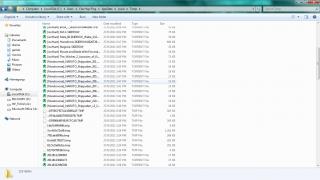
can i delete these files after i done dling the torrents files??
|
|
|
|
|
|
Aug 28 2011, 12:45 AM
Return to original view | Post
#47
|
|
Junior Member
137 posts Joined: May 2009
|
why is there another disk pop out after i update everything through hp assistant??
Attached thumbnail(s) 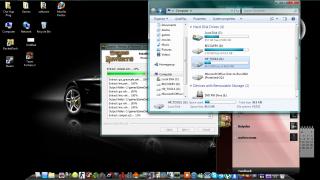
|
|
|
Aug 28 2011, 12:49 AM
Return to original view | Post
#48
|
|
Junior Member
137 posts Joined: May 2009
|
QUOTE(joonwei23 @ Aug 28 2011, 01:46 AM) oh that's nothing. really ntg?? wont it eat up my hdd space?? oh thx for compliment, its rocket dock. with mac skin i think. you can just hide that away. anyways, nice dock. mind telling me what program is that ?  |
|
|
Aug 29 2011, 04:15 PM
Return to original view | Post
#49
|
|
Junior Member
137 posts Joined: May 2009
|
i just update my bios and everything through hp assistant, and the hdd temp is solve and lower temp when playing crisis 2, way lower.. after update, i realise that turboboost is off when put to coolest mode, thats why my temp playing crysis 2 is 20 degress lower, lol.
Attached thumbnail(s) 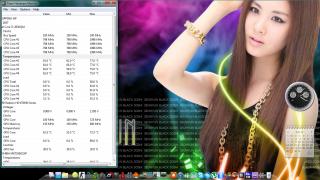
|
|
|
Aug 29 2011, 07:38 PM
Return to original view | Post
#50
|
|
Junior Member
137 posts Joined: May 2009
|
QUOTE(rurushu @ Aug 29 2011, 05:46 PM) so bro, you mean our temp were so hot last time was due to the turbo-boost?? I think so. |
|
|
Aug 29 2011, 11:49 PM
Return to original view | Post
#51
|
|
Junior Member
137 posts Joined: May 2009
|
QUOTE(rurushu @ Aug 30 2011, 12:36 AM) Yeah, i tried to untick then apply, then tick then apply again in admin mode, in non-admin mode also no difference optimised mode shud be ok, i run under that and using coolest + u3, so its quite ok now. im happy!  Tired coz after all the hassle and headache crunching the problem to what is it that cause the high temps of >90, in the end... it was because i set it to "Performance Optimised" mode and not "Coolest" mode... so was like... "What the hell.... went through all the trouble and the problem was that?!" kind of feeling   :D:D finally can play crysis 2 for non-stop and without worrying the side effect for long term, guess i will just wait till i have enough courage to reapply thermal paste myself later on. :D:D finally can play crysis 2 for non-stop and without worrying the side effect for long term, guess i will just wait till i have enough courage to reapply thermal paste myself later on. |
|
|
Aug 31 2011, 11:43 AM
Return to original view | Post
#52
|
|
Junior Member
137 posts Joined: May 2009
|
now i have problem, my boottimer wont run at startup automatically everytime i turn on my computer?? after i update everything, especially bios, something seems different. lol.
|
|
|
Aug 31 2011, 12:09 PM
Return to original view | Post
#53
|
|
Junior Member
137 posts Joined: May 2009
|
QUOTE(lee_what2004 @ Aug 31 2011, 12:47 PM) Boottimer supposedly only run once after you start it.. huh? last time, it will count my boot time evertime i start my comp wor. |
|
|
|
|
|
Aug 31 2011, 12:29 PM
Return to original view | Post
#54
|
|
Junior Member
137 posts Joined: May 2009
|
so how??
|
|
|
Aug 31 2011, 07:49 PM
Return to original view | Post
#55
|
|
Junior Member
137 posts Joined: May 2009
|
QUOTE(lee_what2004 @ Aug 31 2011, 02:19 PM) If you run it, still show result ? yea, it still show. wa, u guys make me wanna change the theme also, but i scare i mess up things. =.='. |
|
|
Aug 31 2011, 09:30 PM
Return to original view | Post
#56
|
|
Junior Member
137 posts Joined: May 2009
|
QUOTE(lee_what2004 @ Aug 31 2011, 10:26 PM) Play/Pause, Open new tab, refresh ? etc where can i find themes? My icon  |
|
|
Aug 31 2011, 09:37 PM
Return to original view | Post
#57
|
|
Junior Member
137 posts Joined: May 2009
|
QUOTE(lee_what2004 @ Aug 31 2011, 10:31 PM) deviantart under which categories?? how to install? |
|
|
Sep 1 2011, 01:24 AM
Return to original view | Post
#58
|
|
Junior Member
137 posts Joined: May 2009
|
sifu lee, can u teaach me step by step, im quite confuse.
|
|
|
Sep 1 2011, 01:27 AM
Return to original view | Post
#59
|
|
Junior Member
137 posts Joined: May 2009
|
QUOTE(lee_what2004 @ Sep 1 2011, 02:25 AM) E.g. for Elune theme wat u mean updated to sp1?http://minhtrimatrix.deviantart.com/art/Elune-199350232 Download the rar file there. [How to install] 1. Install Universal Theme Patcher, re-patch again if you updated to SP1. 2. Copy everything in themes folder (Elune folder, Elune 1(Bottom), Elune 1 (Top)...) into C:\Windows\Resources\Themes 3. Take Ownership, rename the original to back up and replace modified explorerframe.dll in System32 folder. 4. Restart Windows & then select this theme in Personalize Menu |
|
|
Sep 1 2011, 01:37 AM
Return to original view | Post
#60
|
|
Junior Member
137 posts Joined: May 2009
|
QUOTE(lee_what2004 @ Sep 1 2011, 02:29 AM) If you used the Universal Theme Patcher before update to Win 7 SP1, then after you update SP1, you need to patch again because the patched file has been replaced with the unpatched by SP1. shit, this is so confusing, ok, i dled the rar, so wat i do now?? |
|
Topic ClosedOptions
|
| Change to: |  0.0261sec 0.0261sec
 0.23 0.23
 7 queries 7 queries
 GZIP Disabled GZIP Disabled
Time is now: 6th December 2025 - 02:46 AM |
 Quote
Quote