Virus/Malware eset nod32 stop working (ENHANCED PROTECTION MODE), virus!! help me urgently plzzzz....
Virus/Malware eset nod32 stop working (ENHANCED PROTECTION MODE), virus!! help me urgently plzzzz....
|
|
 Jul 22 2011, 03:56 PM Jul 22 2011, 03:56 PM
|
 
Senior Member
1,684 posts Joined: Nov 2006 From: KL  
|
File scanner log should be consisted in the page that you put as link for the file scanning. Certain file scanner site generates scanned log for users, whereas the site you use put the direct link for users for analysis.
|
|
|
|
|
|
Jul 22 2011, 04:02 PM
|

Junior Member
40 posts Joined: Jul 2011 
|
i see... thanx..
|
|
|
Jul 22 2011, 04:32 PM
|

Senior Member
2,901 posts Joined: Jan 2007 
|
Thanks chris
Are you still having the same problem? |
|
|
Jul 22 2011, 04:44 PM
|
|
Junior Member
40 posts Joined: Jul 2011
|
WOW!! i just checked... now, i can open facebook page already! YEAY! thanks BlueWind for the help!!! thank u.... a lots......
 btw, wad the problem wif my lptp actually? |
|
|
Jul 22 2011, 05:04 PM
|
|
Senior Member
2,901 posts Joined: Jan 2007
|
There was something inside your computer making funny stuff to your host file. I just flush it away, but I do found other unwanted stuff that are not supposed to be in your computer so I had them clean up.
My only advice to you is always, I mean ALWAYS run only one anti-virus coupled with a standalone firewall, and malware scanner such as the one you have which is highly recommended to have; Malwarebytes. There is a bit more to do. It's up to you whether you want to do it, because this is only part of follow up scan that I do routinely to make sure everything is in order. If you cannot wait for ESET to complete its scan then you can close this thread if you want. Just remember to press Clean Up button in OTL. Re-run Malwarebytes' Anti-Malware
Click OK to either and let MBAM proceed with the disinfection process. If asked to restart the computer, please do so. Failure to reboot will prevent MBAM from removing all the malware. =================================================== ESET Online Scanner I'd like us to scan your machine with ESET OnlineScan Note: If you are using Windows Vista/7, open your browser by right-clicking on its icon and select 'Run as administrator' to perform this scan. *Note It is recommended to disable onboard antivirus program and antispyware programs while performing scans so there are no conflicts and it will speed up scan time. Please don't go surfing while your resident protection is disabled! Once the scan is finished remember to re-enable your antivirus along with your antispyware programs.
On your next reply please post : MBAM log ESET log Let me know if you have any problems in performing with the steps above or any questions you may have. |
|
|
Jul 22 2011, 07:08 PM
|
|
Newbie
1 posts Joined: Jul 2011
|
Yeah~
I solve my problems also! Thanks a lot!  |
|
|
|
|
|
Jul 22 2011, 09:49 PM
|
|
Junior Member
40 posts Joined: Jul 2011
|
i found a threat after using eset online scan. wad shud i do?
Added on July 22, 2011, 9:50 pmbtw, dis is my MBAM log Malwarebytes' Anti-Malware 1.51.1.1800 www.malwarebytes.org Database version: 7229 Windows 6.1.7601 Service Pack 1 Internet Explorer 9.0.8112.16421 22-Jul-11 7:18:46 PM mbam-log-2011-07-22 (19-18-46).txt Scan type: Quick scan Objects scanned: 172603 Time elapsed: 2 minute(s), 37 second(s) Memory Processes Infected: 0 Memory Modules Infected: 0 Registry Keys Infected: 0 Registry Values Infected: 0 Registry Data Items Infected: 0 Folders Infected: 0 Files Infected: 0 Memory Processes Infected: (No malicious items detected) Memory Modules Infected: (No malicious items detected) Registry Keys Infected: (No malicious items detected) Registry Values Infected: (No malicious items detected) Registry Data Items Infected: (No malicious items detected) Folders Infected: (No malicious items detected) Files Infected: (No malicious items detected) Added on July 22, 2011, 9:52 pmeset log ESETSmartInstaller@High as downloader log: all ok # version=7 # OnlineScannerApp.exe=1.0.0.1 # OnlineScanner.ocx=1.0.0.6528 # api_version=3.0.2 # EOSSerial=fc7362219fe210448e5d51c9de7ffc6b # end=finished # remove_checked=false # archives_checked=true # unwanted_checked=true # unsafe_checked=false # antistealth_checked=true # utc_time=2011-07-22 01:44:03 # local_time=2011-07-22 09:44:03 (+0800, Malay Peninsula Standard Time) # country="United States" # lang=1033 # osver=6.1.7601 NT Service Pack 1 # compatibility_mode=512 16777215 100 0 255206 255206 0 0 # compatibility_mode=5893 16776573 100 94 0 62964838 0 0 # compatibility_mode=8192 67108863 100 0 725 725 0 0 # scanned=256762 # found=1 # cleaned=0 # scan_time=7255 C:\_OTL\MovedFiles\07222011_145157\C_Windows\System32\drivers\etc\hosts Win32/Qhost trojan (unable to clean) 00000000000000000000000000000000 I This post has been edited by lisieng: Jul 22 2011, 09:52 PM |
|
|
Jul 22 2011, 10:45 PM
|
|
Senior Member
2,901 posts Joined: Jan 2007
|
It's a quarantined file that I nuked it earlier this afternoon. You're good to go now, unless you have any other issues.
Clean up with OTL:
|
|
|
Jul 22 2011, 10:55 PM
|
|
Junior Member
40 posts Joined: Jul 2011
|
already clean up. so that means my lptp virus free already?
|
|
|
Jul 22 2011, 11:31 PM
|

Senior Member
1,175 posts Joined: Jun 2006 From: Borneo Island
|
Got The Same Problem Here.The Antivirus Problem Already Solved I Think,But Still Couldnt Connect To Facebook
|
|
|
Jul 22 2011, 11:45 PM
|
|
Junior Member
40 posts Joined: Jul 2011
|
mine ok oredi!
|
|
|
Jul 23 2011, 12:00 AM
|
|
Senior Member
2,901 posts Joined: Jan 2007
|
QUOTE(lisieng @ Jul 22 2011, 10:55 PM) already clean up. so that means my lptp virus free already? As far as I could tell, it's free now.  |
|
|
Jul 23 2011, 12:05 AM
|
|
Junior Member
40 posts Joined: Jul 2011
|
wow! thanks again... big clap!!!
  |
|
|
|
|
|
Jul 23 2011, 12:08 AM
|
|
Junior Member
122 posts Joined: Jan 2003
|
QUOTE(BlueWind @ Jul 23 2011, 12:00 AM) As far as I could tell, it's free now. BeueWind, ever encounter the FB virus that will just auto restart the Laptop when logged in, even in safe mode? 1 of my company trainee just encounter that... which I have no idea how to stop it, and she using a acer laptop that fully screwed, I dare not open it to take out the harddisk due to the laptop is quite new, zzzz. Any good tools that you can recommend that able solve the issue in dos mode mode or other boot disk? |
|
|
Jul 23 2011, 01:24 AM
|
|
Senior Member
2,901 posts Joined: Jan 2007
|
Maybe it would be a better idea if you help her to restore to factory settings from the hidden partition in her Acer laptop.
|
|
|
Jul 23 2011, 11:24 AM
|
|
Newbie
4 posts Joined: Jul 2011
|
I've been having the same issue as well. I followed the scan step you posted.but It doesnt work for me.
please help me to solve this. thanks in advance i uploaded my OTL and Extras.  Extras.Txt ( 34k )
Number of downloads: 6
Extras.Txt ( 34k )
Number of downloads: 6
Extras.Txt ( 34k )
Number of downloads: 6
Extras.Txt ( 34k )
Number of downloads: 6Attached File(s)
OTL.Txt ( 67.91k )
Number of downloads: 3 |
|
|
Jul 23 2011, 11:40 AM
|
|
Senior Member
2,901 posts Joined: Jan 2007
|
Open your own thread and PM me your link. I need to get these logs separated to avoid confusion.
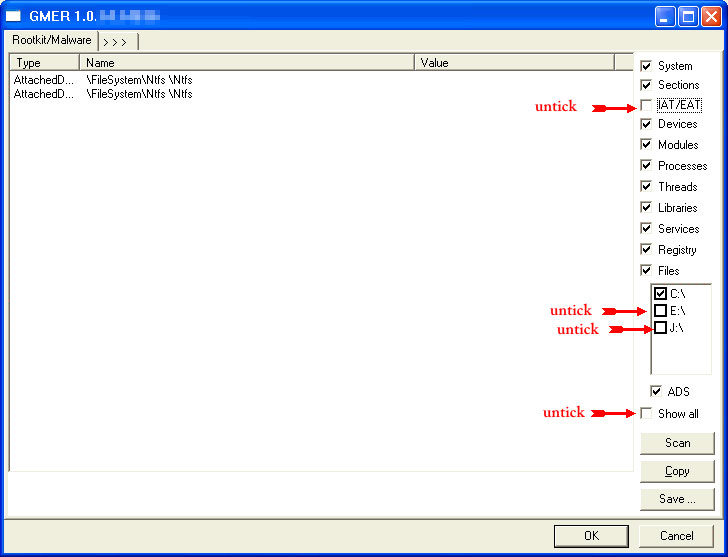
I also need you to run GMER and post that in your new thread. Don't attach it. It's much easier for me. On a second thought, copy paste the OTL log you have now in your new thread as well. 
Rootkit scans often produce false positives. Do NOT take any action on any "<--- ROOKIT" entries |
|
|
Jul 23 2011, 01:27 PM
|
|
Newbie
2 posts Joined: Jul 2011
|
i also have this problem, what should i do?
|
|
|
Jul 23 2011, 03:11 PM
|
|
Junior Member
15 posts Joined: Oct 2007
|
i hv the same problem. if i reformat will it help remove the virus?
Added on July 23, 2011, 3:26 pmbtw i got the same virus from the facebook thing T_T This post has been edited by art108: Jul 23 2011, 03:26 PM |
|
|
Jul 23 2011, 04:21 PM
|
|
Newbie
4 posts Joined: Jul 2011
|
I had posted as you request. blue wind
|
| Change to: |  0.0174sec 0.0174sec
 0.73 0.73
 6 queries 6 queries
 GZIP Disabled GZIP Disabled
Time is now: 6th December 2025 - 01:07 PM |
 Quote
Quote button.
 to download the ESET Smart Installer. Save it to your desktop.
 icon on your desktop.
 button.

 or
or  on your desktop.