Outline ·
[ Standard ] ·
Linear+
Virus/Malware eset nod32 stop working (ENHANCED PROTECTION MODE), virus!! help me urgently plzzzz....
|
hcleong
|
 Jul 19 2011, 11:48 PM Jul 19 2011, 11:48 PM
|
Getting Started


|
It is normal for all the icon and display change bad in safe mode. because the windows only load minimum driver and program, as long as you din try to change anything thing, it should not affect you display setting when boot back in normal mode. Spybot also need to update in data pattern, make sure you have it updated, and do a full scan, scanning in safe mode is preferable due do minimum items was loaded, hence less chances that the virus will sit in the memory.
|
|
|
|
|
|
lisieng
|
Jul 19 2011, 11:55 PM
|
New Member
|
ok, now doing full scan.... btw, i found out this site... what do u think? shud i follow? microsoft security essentials? thanx for all ur helps again  |
|
|
|
|
|
hcleong
|
Jul 20 2011, 12:01 AM
|
Getting Started
|
hmm, it is also a antivirus, but by microsoft, some say it goods while some say it is not, I din really try that. Did you fail to connect to www.facebook.com via 1 type of browser only, or you try other browser also return the same result?
If all browsers fail, can you try this, open command prompt, type:-
ping www.facebook.com
And see what reply you get. And also ipconfig/all and paste the result result here.
|
|
|
|
|
|
lisieng
|
Jul 20 2011, 12:09 AM
|
New Member
|
is dis correct way to ping?? command prompt, then type ping www.facebook.com ??
Added on July 20, 2011, 12:11 amall my browser fail to connect to fb just now... ping nid internet connection?
Added on July 20, 2011, 12:15 ami didnt connect to internet n this is my result, computer in safe mode ipconfiguration: primary dns suffix:... node type...hybrid ip routing enabled: no wins proxy enabled: no as for ping www.facebook.com ping request couldnot find host www.facebook.com. pls check the name and try again
Added on July 20, 2011, 12:17 ambtw, r u an someone in computer and software professionals? This post has been edited by lisieng: Jul 20 2011, 12:17 AM |
|
|
|
|
|
hcleong
|
Jul 20 2011, 12:25 AM
|
Getting Started
|
>.<, need to back to normal mode 1st lar, in safe mode unless you specific select it else it will disable most of the hardware. After you do all teh scanning, reboot back to normal mode then try to ping and the ipconfig/all command again.
I'm 打杂..... what also need to know a bit, from software to hardware, pc to server..... but most of it I din go deep enough to be a specialist, >.<
|
|
|
|
|
|
lisieng
|
Jul 20 2011, 12:33 AM
|
New Member
|
normal mode? haha.. okok... will do it later lo after finish scanning..  uh, for me, all this things that i have been done now is already very DEEP ler... haiz.. never done all these before..
Added on July 20, 2011, 12:47 amnormal mode ping www.facebook.com still cannot find host for ipconfig so many ler... cnt copy n paste de... == This post has been edited by lisieng: Jul 20 2011, 12:47 AM |
|
|
|
|
|
lisieng
|
Jul 20 2011, 12:53 AM
|
New Member
|
so i take the picture.. haha 
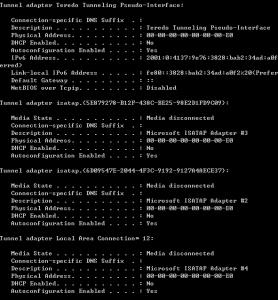

Added on July 20, 2011, 12:55 amso?? This post has been edited by lisieng: Jul 20 2011, 12:55 AM |
|
|
|
|
|
hcleong
|
Jul 20 2011, 01:03 AM
|
Getting Started
|
hmm, seem like you are using celcom broadband, you can try the command below with command prompt:
ipconfig /flushdns
After that try to ping www.facebook.com again.
|
|
|
|
|
|
lisieng
|
Jul 20 2011, 01:16 AM
|
New Member
|
same thing...could not find host...
huhu, y like dat? cannot save dy ar my laptop?? T.T
|
|
|
|
|
|
hcleong
|
Jul 20 2011, 01:29 AM
|
Getting Started
|
I think may be need to manual change the DNS server and try.... What OS you using?
you can try the below command, to see if you able to get the www.facebook.com ip, from command promt:
nslookup
enter then type,
server 8.8.8.8
after that type:
www.facebook.com
and hit enter again. If it run well, you should see something like below in the reply:
Server: google-public-dns-a.google.com
Address: 8.8.8.8
Non-authoritative answer:
Name: www.facebook.com
Address: 69.171.229.14
server 8.8.8.8
|
|
|
|
|
|
lisieng
|
Jul 20 2011, 01:38 AM
|
New Member
|
OS? window 7
command prompt:cant find www.facebook.com: No response from server
==
y dis virus so strong de?
|
|
|
|
|
|
hcleong
|
Jul 20 2011, 01:42 AM
|
Getting Started
|
ok... can you win 7 machine still can online browser other website? or only the facebook problem?
|
|
|
|
|
|
lisieng
|
Jul 20 2011, 01:46 AM
|
New Member
|
i think so far only the facebook problem..  |
|
|
|
|
|
hcleong
|
Jul 20 2011, 01:48 AM
|
Getting Started
|
what browser are you using?
|
|
|
|
|
|
lisieng
|
Jul 20 2011, 01:52 AM
|
New Member
|
internt explorer n google chrome
|
|
|
|
|
|
hcleong
|
Jul 20 2011, 01:56 AM
|
Getting Started
|
QUOTE(lisieng @ Jul 20 2011, 01:52 AM) internt explorer n google chrome Can go into your IE, Alt+T, then select Internet Options -> Select Connection Tab, then click on LAN Setting, in the setting pop up, it should have a few check box there, is any of it check and with value? |
|
|
|
|
|
lisieng
|
Jul 20 2011, 01:59 AM
|
New Member
|
no. nothing checked
Added on July 20, 2011, 2:06 ambtw, tis virus keep comeout after i full scan my lptp... after i remove it, n run full scan again, this same thing come out. fullscan using malwarebyte
Trojan.Agent-registry key-HKEY_CLASSES_ROOT\thunder
This post has been edited by lisieng: Jul 20 2011, 02:06 AM
|
|
|
|
|
|
hcleong
|
Jul 20 2011, 02:19 AM
|
Getting Started
|
QUOTE(lisieng @ Jul 20 2011, 01:59 AM) no. nothing checked
Added on July 20, 2011, 2:06 ambtw, tis virus keep comeout after i full scan my lptp... after i remove it, n run full scan again, this same thing come out. fullscan using malwarebyte Trojan.Agent-registry key-HKEY_CLASSES_ROOT\thunder I think that is from your 迅雷. This is interesting, I have never see something like this.... Will try to think something for it... btw, did you change your fb password? Just in case, since this virus are try to block you from fb... |
|
|
|
|
|
lisieng
|
Jul 20 2011, 02:22 AM
|
New Member
|
yes,changed my password already via other lptp. okie, thanx for your help, guess that we shud try tomorrow. its too late dy. again, thanx for ur help.learned alot today. looking forward for other way to solve dis. |
|
|
|
|
|
TSPruneFace
|
Jul 20 2011, 09:22 PM
|
Getting Started
|
QUOTE(lisieng @ Jul 19 2011, 11:55 PM) before this i have eset and avira (at the same time in my laptop..lols...) then, after being infected, both antivirus cannot be used oredi. so i uninstalled them. then, i download malwarebyte as suggested. 1st scan, 43 object infected. 2nd time, 1 infected... idk why then, i go download avira back... detect two infected=quarantined. then i scann my lptp again... using both malwarebyte n avira... both clear... now how?? my google chrome still say "could not connect to www.facebook.com' ==... what is going on???? lol... my problem solved already ... the last thing u shud do is run CCleaner... that's all.. TQ  This post has been edited by PruneFace: Jul 20 2011, 09:23 PM This post has been edited by PruneFace: Jul 20 2011, 09:23 PM |
|
|
|
|



 Quote
Quote


 0.0213sec
 0.13
0.13
 6 queries
 GZIP Disabled