Welcome Guest ( Log In | Register )

Bump Topic Topic Closed RSS Feed

Outline · [ Standard ] · Linear+

 Huawei Ideos X5 Thread V2, Perfect balance of value and performance

views
     
H.K. Lee
post Jul 25 2011, 09:53 PM

Getting Started
**
Junior Member
159 posts

Joined: Oct 2010
hey guys..going to join you guys soon..

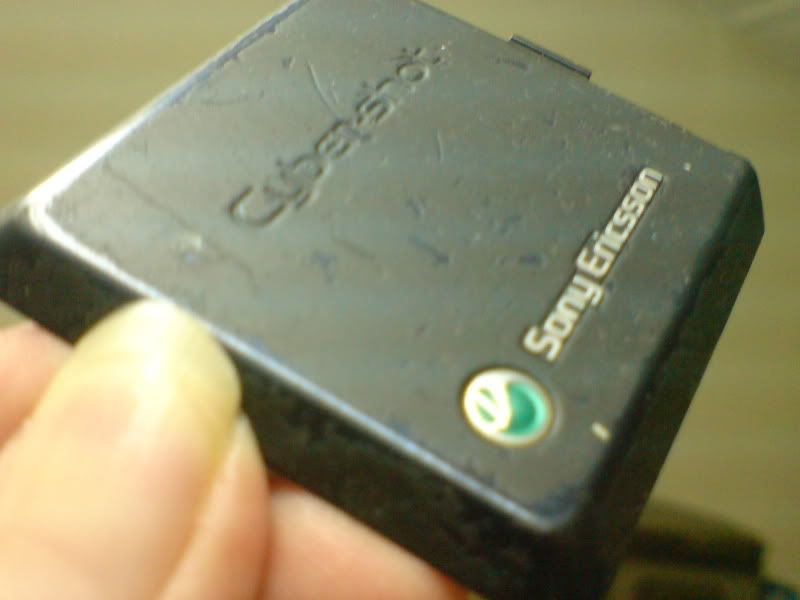
anyway how do you guys deal with the rubbery surface at the back cover of the phone?..it will wear off and looks really ugly later on..just like my k810i..it looks ugly now..
H.K. Lee
post Jul 25 2011, 10:18 PM

Getting Started
**
Junior Member
159 posts

Joined: Oct 2010
QUOTE(ShengHow @ Jul 25 2011, 10:02 PM)
buy a casing lor
i dont knw cant prevent or not but at least slow down  tongue.gif
wow!
before i bought x5
i was using k810i too
and my backside is just like urs
it's not ugly
but cool  sweat.gif  sweat.gif  rolleyes.gif  rolleyes.gif
*
lol..how can it be cool? you scratch everything off?..
mine look like this

user posted image


H.K. Lee
post Jul 26 2011, 09:07 PM

Getting Started
**
Junior Member
159 posts

Joined: Oct 2010
hey guys..how do you transfer contact numbers from sim card to the phone?..anything that can review my contact..

just bought it..can add me into the list liao thx..

problem solved..


how long should i charge for the first time?..


This post has been edited by H.K. Lee: Jul 26 2011, 09:15 PM
H.K. Lee
post Jul 26 2011, 11:26 PM

Getting Started
**
Junior Member
159 posts

Joined: Oct 2010
I havnt go through the whole thread yet, sorry if i repeat question

i found out that my x5 cannot detect wifi 802.11g..which i set-up using my laptop under the ad-hoc network..im using broadband, so I was trying to share my internet to the x5

but it can detect 802.11n, which i think is those normal signal send by a router..

anyone tried it?..
H.K. Lee
post Jul 26 2011, 11:51 PM

Getting Started
**
Junior Member
159 posts

Joined: Oct 2010
whao!!..that's great!..

dude, go try and see...the wifi thingy
H.K. Lee
post Jul 27 2011, 07:44 AM

Getting Started
**
Junior Member
159 posts

Joined: Oct 2010
fully charged the phone until 12pm...explore a bit here and there on the phone, wake up at 7.15am..battery status:85%..display:lowest, switched off all connection, switched off all sound effect, switched off haptic feed back..not as bad as it seems...

to set-up an ad-hoc network, go to

control panel > network and sharing center > set up a connection or network (located on the left side bar for my case, vista)

select set up a wireless ad hoc (computer to computer) network, the description on what the network do is written there

create a network name (ssid), left the security type to be wpa2, secure the network with a password (make sure you turn on your wireless card)

select allow internet connection sharing, switch off firewall and antivirus if yours is very strong..

Go back to the network and sharing center windows, click on "connect to a network" located at the same side bar, scroll down and you can see that you're connected to the network you've just created, just move your mouse to the network name and the description will present, it will says that the radio type is 802.11g. look at other network that you can detect, most of them are 802.11n. (for my case)

before that, make sure that your internet are not from a router, because you need your wireless card to create a network, you're basically disconnecting from the internet to create it if you do the steps i've told you. it only works for those who use broadband (using usb), cable(LAN or dial-up). anything that doesnt occupy your wireless card. this is very useful to share interent when you go to your friend's house that still use cable.

go to your phone, wireless and networks. turn on wifi and you still cant detect it. you can also add wifi network with the same ssid and password. cant work either. so maybe there's something im missing out, or the phone cannot detect it. but it's already written in the websites that this phone can do it..are we scammed?..


Added on July 27, 2011, 7:46 am
QUOTE(ShengHow @ Jul 26 2011, 11:55 PM)
idk how to use laptop to make itself become hotspot
psps ><
btw, let me knw if u wanna get casing yea  biggrin.gif
*
i think i'll get a softcase, either red or transparent or both, how much are you selling?

This post has been edited by H.K. Lee: Jul 27 2011, 07:46 AM

H.K. Lee
post Jul 27 2011, 08:05 AM

Getting Started
**
Junior Member
159 posts

Joined: Oct 2010
anyway, from my reading the battery we're using is li-po battery, and this is what i get

1. there's no need to drain the battery or charge intensely. The reason people do this is because older batteries have what they call the memory effect. although we might need to do that to calibrate with the digital battery indicator.

2. for li-po battery, never drain out all the battery. i guess in normal operating condition, the phone would have tell you the battery is required to be charged, so be careful with what you guys do to your phone in order to extend the battery usage without charging

3. use the specified charger and do not overcharged. no need to worry as most of the modern charger have a timer, or some kind of system to cut off the charging once the battery is full..

and lastly, even if you've exhausted your battery, get a new one then..coorect me if im wrong..
H.K. Lee
post Jul 27 2011, 08:10 AM

Getting Started
**
Junior Member
159 posts

Joined: Oct 2010
QUOTE(shadow111 @ Jul 27 2011, 07:58 AM)
i hv setup accordingly to your step above.. i can see "mytest" network appearing with "Waiting for users".. but I'm nt able to detect it thru my phone.
nt sure whether this is due to my notebook as it's a company notebook..  sad.gif
*
sad.gif i strongly think that the phone cannot detect it, or we need to modified something for it to work. because that's the exact step how i share internet when my friend come over with a laptop. maybe if you've extra laptop, you can try it out and see. if the laptop can detect it, but not the phone. then we need to question the manufacturer.

alright..will be back at night..see you guys..
H.K. Lee
post Jul 27 2011, 08:12 PM

Getting Started
**
Junior Member
159 posts

Joined: Oct 2010
7.15am battery status:85%
8.10pm battery status:15%
H.K. Lee
post Jul 27 2011, 08:23 PM

Getting Started
**
Junior Member
159 posts

Joined: Oct 2010
[quote=chubz,Jul 27 2011, 07:59 PM]

LOL
x5 cannot compare to 2x
it's different level of phone
depend on your budget jor
*

[/quote]

I can afford 2x but since I'm only a college student, I wouldn't spend so much on a phone.
*

[/quote]


different people spend differently,

some people like to set budget as the basis, they set how much they're willing the spend first

some people like to buy the latest, and never change another phone until it can no longer be used

some people like to buy what's worth the money, eventhough it's not the super high tech ones, or even if it go over our budget. I think most of us here fall into this category, feels good when you know you spend each cent wisely..
H.K. Lee
post Jul 27 2011, 08:51 PM

Getting Started
**
Junior Member
159 posts

Joined: Oct 2010
how do i even pair the phone with laptop?..or send file between each devices..? using the bluetooth

This post has been edited by H.K. Lee: Jul 27 2011, 08:52 PM
H.K. Lee
post Aug 3 2011, 07:04 PM

Getting Started
**
Junior Member
159 posts

Joined: Oct 2010
how to get into root directory in the microSD?..
H.K. Lee
post Aug 6 2011, 11:23 AM

Getting Started
**
Junior Member
159 posts

Joined: Oct 2010
Have internet connection in my PC..through USB modem

I want to share that connection to my phone, MEANS I want to have internet connection in my phone

there are only 3 logical way to this
- use wifi card
- use bluetooth
- use USB

WIFI card
-can intall connectify into my PC to share, create a hotspot (wont work because my WIFI card cannot broadcast hotpot signal)
-create Ad-Hoc network using pc (android phone cannot detect these signal without rooting it)

how about bluetooth and USB?..anyone have solution?..

H.K. Lee
post Aug 12 2011, 08:27 AM

Getting Started
**
Junior Member
159 posts

Joined: Oct 2010
im not sure whether you guys have notice..if you press the camera shot button longer, it'll focus first..work just like normal camera for me..
H.K. Lee
post Aug 20 2011, 02:43 PM

Getting Started
**
Junior Member
159 posts

Joined: Oct 2010
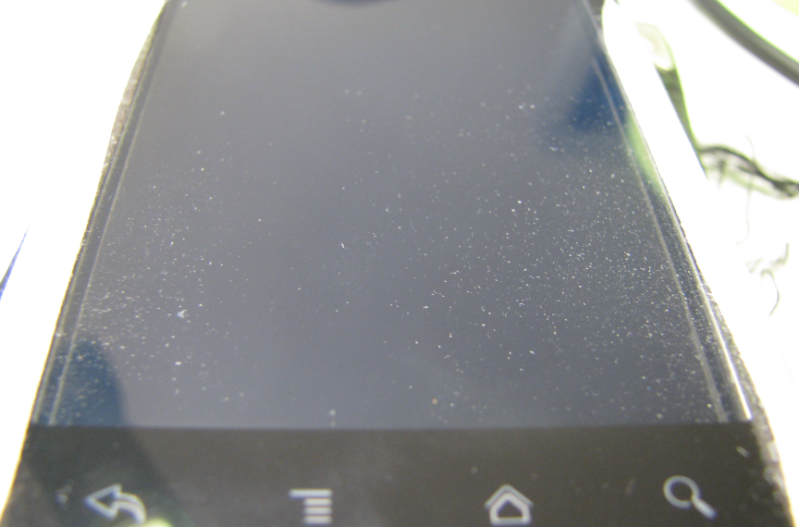
Dust problem..

user posted image
H.K. Lee
post Aug 20 2011, 03:06 PM

Getting Started
**
Junior Member
159 posts

Joined: Oct 2010
my place is clean..the dust sip in from the side...you guys dont have this prob?..

H.K. Lee
post Aug 20 2011, 04:50 PM

Getting Started
**
Junior Member
159 posts

Joined: Oct 2010
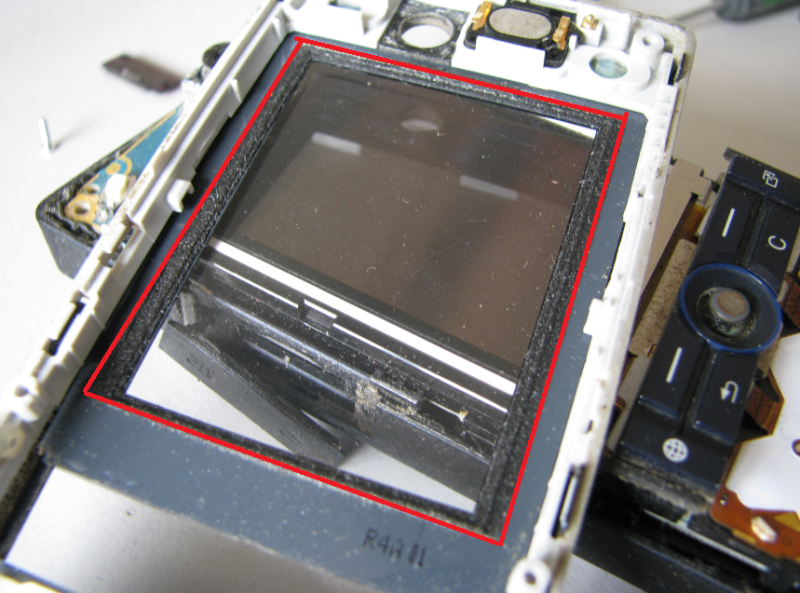
Dont they have something like this?..shown in the red box..it kept my k810i display dust free for 2 years..

my hand very itchy feel like want to open it up and wipe it off...

user posted image

This post has been edited by H.K. Lee: Aug 20 2011, 04:52 PM
H.K. Lee
post Aug 20 2011, 05:06 PM

Getting Started
**
Junior Member
159 posts

Joined: Oct 2010
yup..it's in between the capacitive screen and the display screen..
my phone is basically naked..but still, i've only used it less than one month..

you guys think the shop (pyramid) know how to open this and clean it?..i dont want to void the warranty..

Don't think vacuum can clean it completely..
H.K. Lee
post Aug 20 2011, 06:18 PM

Getting Started
**
Junior Member
159 posts

Joined: Oct 2010
QUOTE(bryanjs @ Aug 20 2011, 06:15 PM)
har....so geng d phone only take for rm150....they must b treat this as china phone so gv a low price to take in....swt


Added on August 20, 2011, 6:17 pm

hmmm....depend on budget. if u can afford x5, then choose x5 rather than take ace. Ace laggy than x5 if compare the price...but it branded so the price same as x5. smart phone ma....must smart right? laggy will downgrade a smart phone...my own opinion la~~
*
That's what we call marketing..
H.K. Lee
post Aug 20 2011, 06:22 PM

Getting Started
**
Junior Member
159 posts

Joined: Oct 2010
QUOTE(bryanjs @ Aug 20 2011, 06:19 PM)
haha.....most ppl look at brand d....that's y the shop take it only for rm150 ==
*
it only mean that we are special...

2 Pages  1 2 >Top
Topic ClosedOptions
 

Change to:
| Lo-Fi Version
0.0399sec    0.20    7 queries    GZIP Disabled
Time is now: 6th December 2025 - 10:01 AM