Outline ·
[ Standard ] ·
Linear+
Hardware Hackintosh Thread V2.0, The Official OSX86 Thread (Hardware)
|
wanna be hi-tech
|
 Apr 14 2014, 09:12 PM Apr 14 2014, 09:12 PM
|

|
guys , super noob in Hackintosh......
need some guidance on as to whether the following hardware would be sufficient to hack at least Snow Leopard.....
HP XW9400 workstation
Processor : AMD Opteron Dual Core Processor 2218 x
2 (it is 2 physical unit)
Memory : 2GB x 4
HDD : SAS 70GB x 1
VGA : NVIDIA QUADRO FX3500
......the MOBO is the stock mobo, which i have yet to check the model....... thx guys
|
|
|
|
|
|
wanna be hi-tech
|
Apr 16 2014, 11:54 AM
|
|
|
QUOTE(wiraone @ Apr 15 2014, 05:33 PM) It is hard to get AMD support on newer OSX, the old ones need a patched kernel too. So, I believe not worth a try. Put Linux on that and I believe you've a good machine to play with.  dear...I Lv that rig. Too bad it's got issues for hackin. Thx for the reply. |
|
|
|
|
|
wanna be hi-tech
|
May 26 2014, 05:47 PM
|
|
|
Guys .... For a basic hakintosh, will gigabyte GA-G41M-Combo with a quad core, be able to start with ? http://www.gigabyte.com/products/product-p...spx?pid=3997#ov |
|
|
|
|
|
wanna be hi-tech
|
May 27 2014, 01:33 PM
|
|
|
QUOTE(wiraone @ May 26 2014, 05:52 PM) Should not be a problem: http://www.tonymacx86.com/user-builds/8086...ed-working.htmlThe above is for older SL but I believe you could install Mavericks on it. Thx wiraone. Do thk I can run lion with this Mobo n a. A quad core... Of course wit sufficient rams n a gc. |
|
|
|
|
|
wanna be hi-tech
|
May 27 2014, 01:35 PM
|
|
|
QUOTE(wiraone @ May 26 2014, 05:52 PM) Should not be a problem: http://www.tonymacx86.com/user-builds/8086...ed-working.htmlThe above is for older SL but I believe you could install Mavericks on it. I spoke too soon...... Thx for the link wiraone ..... Woohoo I can use my Mobo ..... TQ so muc dude....  |
|
|
|
|
|
wanna be hi-tech
|
May 27 2014, 04:17 PM
|
|
|
QUOTE(wiraone @ May 27 2014, 01:42 PM) Here is the guide on how to get this thing working with L/ML: http://www.tonymacx86.com/mountain-lion-de...-fa-osx-ml.htmlJust look for atheros LAN driver if you want to go with Mavericks (here probably: http://www.osx86.net/topic/18341-atheros-a...net-connection/ ) TQ tQ ....soo muc....uve been very helpfully..... Thx for the links dude.....really appreciate it....  |
|
|
|
|
|
wanna be hi-tech
|
Jun 8 2014, 03:37 PM
|
|
|
Hi Wira,
I have successfully installed Mavericks on the below:-
* Gigabyte GA G41M Combo (2.0 rev)
* Q8400 2.66Ghz
* Coolermaster Hyper 212
* Coolermaster Ex2 (525)
* Eah 5750 (Ati Radeon)
* WD 160GB HDD
Ive run the Multibeast and the ethernet, audio and video seems fine...I have yet to update as ive yet to configure the driver for the GC. ive managed to download the kexts for it, but i dont know how to run it!
This rig of mine had previously booted W7. Now that i have installed the HAck, can i slot in the other HD (W7) and dual boot it or bootcamp/emulation ware is the only way ?
What i am asking is ...if i boot with both HDDs, will the mobo be able to boot windows, since its settings have already been changed. Tq
|
|
|
|
|
|
wanna be hi-tech
|
Jun 8 2014, 07:48 PM
|
|
|
QUOTE(wiraone @ Jun 8 2014, 06:40 PM) Yes, you can do multiboot, just remove your existing HDD, install new HDD and Windows7. When done, connect both HDDs, don't forget to set your BIOS to bootup from your MacOSX partition. If Chimera doesn't see your Win7 partition, you could add it manually. BTW, if you could run OSX now, there is no need to install kext for your GC. What made you think you need a kext for it? Hi Wira, Thx for your reply.  * i already have a HDD with W7 in it, it was what i was running b4 the hack. So, as you say that i can boot from 2 different HDD, then, i can just connect the HDD which has W7 in it and boot...right ? * regarding the GC, the hack which i installed does not have any setting for resolution or a 2nd monitor, it only has a single option and the current resolution is not a perfect fit. So, i assumed that i need to further tweak the GC. * if i dont have to install any further kexts, then how do i change the resolution and 2nd monitor settings... Please reply. Thank you. |
|
|
|
|
|
wanna be hi-tech
|
Jun 8 2014, 07:50 PM
|
|
|
» Click to show Spoiler - click again to hide... « QUOTE(wiraone @ Jun 8 2014, 06:40 PM) Yes, you can do multiboot, just remove your existing HDD, install new HDD and Windows7. When done, connect both HDDs, don't forget to set your BIOS to bootup from your MacOSX partition. If Chimera doesn't see your Win7 partition, you could add it manually. BTW, if you could run OSX now, there is no need to install kext for your GC. What made you think you need a kext for it? aND yeah, i forgot to mention... i had received a lot of error messages upon executing the Multibeast...will post it here later... |
|
|
|
|
|
wanna be hi-tech
|
Jun 9 2014, 01:32 PM
|
|
|
» Click to show Spoiler - click again to hide... « QUOTE(wiraone @ Jun 9 2014, 09:38 AM) 1) On multiboot, yes, that is correct. 2) On mavericks, yes, there is no setting on the resolution etc. It is either best for display or scaled. Which port are you connecting your monitor to? Is it the internal GC? 3) I believe if you've your monitors connected to both, then the option for the 2nd monitor will be there. Just share here your "About this Mac" -> System Report and under Graphics/Displays. What gets recognised there. ps: Please don't call your installation a hack, it is quite confusing, just call it whatever OS release you've, if it is mavericks, just call it mavericks etc. Hi Wira, 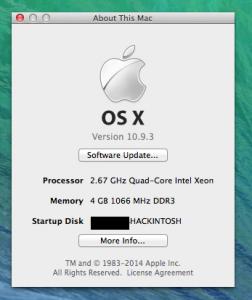

These are the error messages which i received upon finishing the installation via Multibeast... 

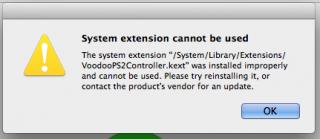

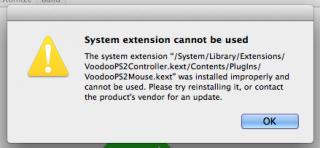

I will later post the info about the rest of the hardware built... This post has been edited by wanna be hi-tech: Jun 9 2014, 01:32 PM |
|
|
|
|
|
wanna be hi-tech
|
Jun 9 2014, 01:37 PM
|
|
|
QUOTE(wiraone @ Jun 9 2014, 09:38 AM) 2) On mavericks, yes, there is no setting on the resolution etc. It is either best for display or scaled. Which port are you connecting your monitor to? Is it the internal GC? 3) I believe if you've your monitors connected to both, then the option for the 2nd monitor will be there. Just share here your "About this Mac" -> System Report and under Graphics/Displays. What gets recognised there. * No settings ..oh dear....hw to adjust then ..... * i already tried connecting the second monitor....it works whn the bios is being booted...but does not work when the OS starts. |
|
|
|
|
|
wanna be hi-tech
|
Jun 9 2014, 01:38 PM
|
|
|
QUOTE(wiraone @ Jun 9 2014, 01:34 PM) You missed the System Report -> Graphics/Display screenshot. BTW, those are not errors, they're warning messages. Ok...will post it later today.....thx |
|
|
|
|
|
wanna be hi-tech
|
Jun 9 2014, 01:39 PM
|
|
|
QUOTE(wiraone @ Jun 9 2014, 01:34 PM) BTW, those are not errors, they're warning messages. ...so there is nothing for me to fix or worry about the warnings...is it. |
|
|
|
|
|
wanna be hi-tech
|
Jun 9 2014, 01:50 PM
|
|
|
» Click to show Spoiler - click again to hide... « QUOTE(wiraone @ Jun 9 2014, 01:41 PM) To disable the warning, just click the 3rd options there, "anywhere". But I have never got the error when installing from multibeast before. I already did that...but still i do receive the warnings... I think i ddnt choose the right settings in the M/beast.... will post it here...maybe u can tell me which setting to use ..in M/beast... thank you.. |
|
|
|
|
|
wanna be hi-tech
|
Jun 9 2014, 05:53 PM
|
|
|
QUOTE(wiraone @ Jun 9 2014, 02:15 PM) Different motherboard has different kexts need to be installed, mine is ASUS. Just follow the link that I've given you in the original reply, it usually has the required kexts to be installed. BTW, do use the latest multibeast for mavericks. yeah the latest...from tonymacx..6.3 for mavericks.. |
|
|
|
|
|
wanna be hi-tech
|
Jun 9 2014, 05:58 PM
|
|
|
QUOTE(wiraone @ Jun 9 2014, 02:15 PM) Different motherboard has different kexts need to be installed, mine is ASUS. Just follow the link that I've given you in the original reply, it usually has the required kexts to be installed. BTW, do use the latest multibeast for mavericks. actually ..i did not any kexts for GC form tonymacx.....as i couldn't get for my GC model. So i got it from here http://www.osx86.net/files/file/3643-ati-radeon-hd-5750/But i don't know how to install it. I guess i need to copy it to the system folder ...but not sure of the path. |
|
|
|
|
|
wanna be hi-tech
|
Jun 9 2014, 08:35 PM
|
|
|
QUOTE(wiraone @ Jun 9 2014, 01:34 PM) You missed the System Report -> Graphics/Display screenshot. BTW, those are not errors, they're warning messages. here it is 
and yeah i saw your link above... .just downloaded it....hw am i suppose to install it ? via Multibeast ? or copy and paste ? Thx This post has been edited by wanna be hi-tech: Jun 9 2014, 08:39 PM |
|
|
|
|
|
wanna be hi-tech
|
Jun 9 2014, 09:41 PM
|
|
|
QUOTE(wiraone @ Jun 9 2014, 08:49 PM) Download the kext installer, run it, and drag & drop the kext to the application. Btw, how many GC do you have? Does your pc have the internal GPU? Have you enabled it in the bios? * downloaded, clicked the zip file, it extracted 'kext utility.app' i clicked the kext utility app and a list texts open up as shown in the download page when u say drag and drop the kext, u mean the kext which had downloaded on the other page ? * my does have an on board vga output and i also have a EAH 5750 attached to the mobo. * so if i am connecting to the monitor via the Eah 5750, do i still have to enable the internal GPU in the bios ? sorry ....super noob to hackintosh  |
|
|
|
|
|
wanna be hi-tech
|
Jun 10 2014, 09:05 AM
|
|
|
» Click to show Spoiler - click again to hide... « QUOTE(wiraone @ Jun 10 2014, 08:21 AM) Yes, just drag the .kext file to the app as instructed. It will put the kext into the correct folder and do the necessary stuff to active it. For dual monitor, yes, do check the dual LCDs guide at tonymacx86, you need to do few things to get it running. Here is mine when both are recognised: [attachmentid=4007186] I tried it yesterday .... But nthg seems to change.... Still no settings for monitor resolution ..... I can't read ur screen capture..... Too blurred... |
|
|
|
|
|
wanna be hi-tech
|
Jun 10 2014, 11:46 AM
|
|
|
QUOTE(wiraone @ Jun 10 2014, 09:09 AM) Click the image, you'll get clearer image. Sorry... Was using my phone earlier.... Couldn't view. K, I saw ur capture......u are using 5770.... Just a single hop from my 5750 and h have both present, on board n the card. Hmmm.... Can you tell me which setting in bios u meddled with for the graphics.... Thanx u hav been very helpful....  |
|
|
|
|



 Quote
Quote

 0.0536sec
 0.61
0.61
 7 queries
 GZIP Disabled