Welcome Guest ( Log In | Register )

Outline · [ Standard ] · Linear+

 >>Malaysia ThinkPad User Community<<, Post Pics of your Setup & Discussion

views
     
awetan
post Aug 22 2007, 09:41 AM

Casual
***
Junior Member
319 posts

Joined: Jan 2003
From: melbourne


Hi fellow thinkpadians, t60p user reporting in.

@ vit:
Care to elaborate more? ie: do you mean you have formatted it and reinstall but the laptop still feels slower compare to last time when it is new?

@ babymiki:
IMO though, current Thinkpad model doesn't have a good model for gaming as their graphic chip is the low end ones. To be exact, whether is it suitable for gaming or not it depends much on the graphic, regardless of which thinkpad model. Google up some gaming laptop graphics to get some ideas.
awetan
post Aug 22 2007, 10:27 AM

Casual
***
Junior Member
319 posts

Joined: Jan 2003
From: melbourne


@ V3000: thanks. your x61 has all the good traits of t60, and it is even sexier happy.gif

Btw just a thought: I found that the security implementation of thinkpad (fingerprint login, password manager) is a bit of a hassle. As I don't really required them atm is there a way to turn them off (not uninstalling them) - the fingerprint login? I managed to turn off the password manager however no luck to the fingerprint login. I tried disable them but then it doesn't work. It still requires me to swipe the finger or type in password.
awetan
post Aug 22 2007, 11:24 AM

Casual
***
Junior Member
319 posts

Joined: Jan 2003
From: melbourne


Thinkpad conservative brief case look and the matte black surface is rare nowadays. I think thinkpads is more sexy than macbook happy.gif

However, the main reason ppl choose thinkpad is because its quality and dependability. and the keyboard too...
awetan
post Aug 22 2007, 06:54 PM

Casual
***
Junior Member
319 posts

Joined: Jan 2003
From: melbourne


Regarding the security chip and hdd data protection, according to Austin explanation, I assumed that this security chip is built in on the notebook. so does this means that someone could still steal the data inside the hdd by removing it from thinkpad and open it externally?

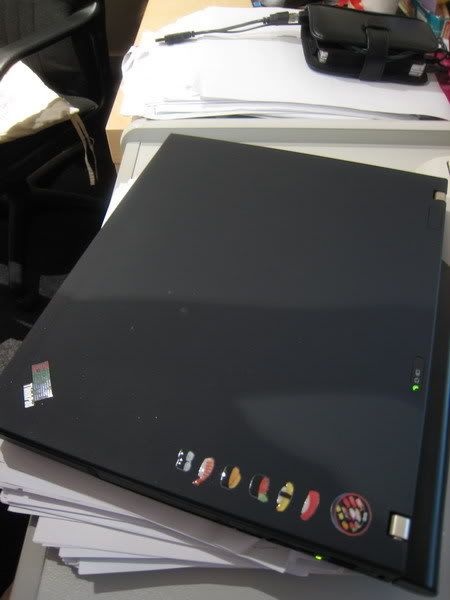
btw here is my lunchbox, complete with lunch menu selection tongue.gif

user posted image
awetan
post Jan 15 2008, 11:39 AM

Casual
***
Junior Member
319 posts

Joined: Jan 2003
From: melbourne


have anyone tried replacing the hitachi 7k100 (7200 rpm, 100gb) drive with the newer 7k200? any significant performance gain?

I am thinking of getting the 200gb for my t60 but the price tag is scary...
awetan
post Jan 16 2008, 02:42 PM

Casual
***
Junior Member
319 posts

Joined: Jan 2003
From: melbourne


Thanks for the replies guys. But the 7k200 is just so expensive, it costs aud349 in melbourne. I am trying to justify whether should I replace my 7k100 with it.

FYI the 7k100 is a 7200 rpm drive. So if I swap I am essentially changing to another similar HDD that also spins at 7200rpm, same drive from hitachi, only difference being that drive is of a newer generation. There are plenty reviews on the web comparing between them 2, but I am not sure whether does that translate to faster windows experience.

Does an improvement of 5-10 ms seek/read time translate to better OS respond?
awetan
post May 5 2008, 03:39 PM

Casual
***
Junior Member
319 posts

Joined: Jan 2003
From: melbourne


QUOTE(Austin @ May 3 2008, 11:00 PM)
of course can..... I already upgraded my T60 to 250GB Seagate Momentus 5400.4 SATA2 Hard Disk...

fast and quiet.... less power consumption. smile.gif
*
Hi Austin,

Just curious when you upgrade your T60 hdd do you mean a 7200rpm unit? wouldnt going back to the 5400rpm hdd makes the laptop slower?
awetan
post Jul 7 2008, 12:15 PM

Casual
***
Junior Member
319 posts

Joined: Jan 2003
From: melbourne


QUOTE(Cynox @ Jul 4 2008, 05:16 PM)
hi, Austin, thanks for the reply.  Want to check you something:-

1.  if I change to a new HDD, can I made a recovery partition in the new HDD?  Or the recovery partition can only be created by Lenovo, we can only use recovery CD/DVD to restore if upgrade HDD? 

2.  the other way round - is it possible to remove the recovery partition and use it as normal space if I have made a recovery CD.

3.  if i partition the HDD (oem HDD with recovery partition inside) into 2 - 1 for OS and 1 for data, during the recovery process, can I restore the OS to the specific OS partition and the data partition remain intact?

4.  can i install some software - office, firefox, etc and then make a recovery cd/dvd/partition which include the software so the next time I make a restoration from the recovery cd/dvd/partition, it will also restore the software as well so I no need to reinstall everything again?

Sorry for all the noob questions, thanks.  smile.gif
*
Hi,

Answer to some of your questions:
1. You can try clone all your contents in your old HDD into the new one. The hidden partition can also be cloned into the new HDD by disable the pre-desktop area under the BIOS and apply the "tedious measures" of cloning thinkpad HDD.

2. Yes it is possible to remove, by disable the pre-desktop area in BIOS you should be able to see the hidden partition in windows or using partitioning software. But bear in mind that the recovery CD may not work if you removed the hidden partition (someone please verify that I am not sure).

3. not sure, probably yes

4. yes. I tried it once. All the previous programs came back including the un-emptied junk in the recycle bins.


Added on July 7, 2008, 12:21 pm
QUOTE(caspersky @ Jul 4 2008, 11:01 PM)
i'm not quite sure, but i think for questions 2, u have to keep the hidden partition as it is needed for recovery cd to work.

for question 4, my previous acer laptop allows me to do that, but i dont know about lenovo.

Have someone tried adding additional memory to Thinkpad R61?
*
Do you mean to ask how to add RAM to the thinkpad?

http://www-307.ibm.com/pc/support/site.wss...ocid=MIGR-67707
at the middle of the page there is some pdf files of the hardware maintenance for r61.


This post has been edited by awetan: Jul 7 2008, 12:21 PM

awetan
post Jul 8 2008, 12:21 PM

Casual
***
Junior Member
319 posts

Joined: Jan 2003
From: melbourne


QUOTE(caspersky @ Jul 7 2008, 10:51 PM)
Thanks awetan for the link, i tried opening the palm rest but i was not able to open the left side of the cover so i stopped at that stage, i'm afraid that i will spoil the whole thing if i forcefully crack open it.  sweat.gif
*
Dun worry. Just proceed to open it. It is normal to hear a crack sound upon opening the palm rest. But beware not to pull the palm rest away too fast as there is wires connecting the touchpad on the palm rest to the base. I nearly snapped the wires 1st time opening it sweat.gif


Added on July 8, 2008, 12:26 pm
QUOTE(fcuk90 @ Jul 8 2008, 11:52 AM)
lenovo laptop brand and ibm are same company or not ?
*
They used to be the same. Lenovo used to build thinkpad for IBM before IBM sell the business to them.

This post has been edited by awetan: Jul 8 2008, 12:26 PM
awetan
post Jul 9 2008, 11:17 AM

Casual
***
Junior Member
319 posts

Joined: Jan 2003
From: melbourne


QUOTE(Klemann C @ Jul 8 2008, 11:59 PM)
ello.....can anyone mind to enlighten me bout this??  icon_question.gif
*
According to these sites you can upgrade it to a max of 2GB RAM for the R52. And it is possible to remove both 2 RAM from the 2 slots.
http://www-307.ibm.com/pc/support/site.wss/MIGR-58832.html
http://www.memorystock.com/memory/IBMThinkPadR521860xxx.html

Why don't you crack open it to have a look at the RAM slots? the you would know which and how many RAM to buy.
http://www-307.ibm.com/pc/support/site.wss/MIGR-53390.html

this site includes the instruction for open up thinkpad and movies clips of how to do it, to install / uninstall both the optional and the pre-installed RAM


Added on July 9, 2008, 11:21 am
QUOTE(Cynox @ Jul 8 2008, 05:14 PM)
But I heard the service level of Thinkpad and Lenovo's other model like the "Y Series" are heaven and earth in Spore.  Thinkpad is still serviced by IBM tech centre (which provide first class service) in Spore whereas Lenovo sub-con the service of the other model to a third party which provide lousy service.  How's the service in Msia?
*
I am currently residing at Aus so am not sure how is the service bck in msia. Perhaps you could try pm austin for this.

This post has been edited by awetan: Jul 9 2008, 11:21 AM
awetan
post Aug 23 2008, 11:59 PM

Casual
***
Junior Member
319 posts

Joined: Jan 2003
From: melbourne


just get 2GB (single stick) and see for yourself whether if you are satisfied for the upgrade. Even though RAM is dirt cheap no point wasting money on the other 1GB if you don't think you need to utilize it.


Change to:
| Lo-Fi Version
0.5366sec    0.37    7 queries    GZIP Disabled
Time is now: 5th December 2025 - 12:52 AM