Outline ·
[ Standard ] ·
Linear+
>>Malaysia ThinkPad User Community<<, Post Pics of your Setup & Discussion
|
Benefon
|
 Nov 17 2019, 01:31 PM Nov 17 2019, 01:31 PM
|

|
QUOTE(zz287963 @ Nov 17 2019, 11:18 AM) Does anyone know what would be the problem that causes my battery charge so slow? Started charging (when laptop is switched off) since 10am but until 1145am it's just 65% and after unplugged, restart and continue charging but just became 74% after around 30mins. 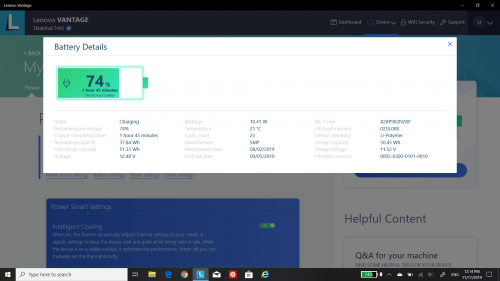 Do not turn on battery setting conversation mode. that one keep between 55-60% stop charged |
|
|
|
|
|
Benefon
|
Nov 17 2019, 07:08 PM
|
|
|
QUOTE(SharkBait9 @ Nov 17 2019, 07:06 PM) Hey guys, first time buying thinkpad. Can anyone recommend a good one for video editing? Someone recommended P52 but not available in Malaysia. Any other option? Budget from 3k to 4.5k Try to get P43s that’s good than enough for you to editing or doing cad. |
|
|
|
|
|
Benefon
|
Nov 17 2019, 08:50 PM
|
|
|
QUOTE(SharkBait9 @ Nov 17 2019, 08:29 PM) Alright thanks. What about the P53s? Seems about the same and is a bit cheaper P53s display not as good, brightness at 250nits Max. P43s got many selection for display options |
|
|
|
|
|
Benefon
|
Nov 17 2019, 10:50 PM
|
|
|
QUOTE(SharkBait9 @ Nov 17 2019, 09:13 PM) oh god are they still peddling that shit screen? Had to return Legion Y530 because of that. Was hoping to get 15.6 in because 14 in resolution is a bit cramped for editing, but I can buy a seperate screen I guess. Usually I work with external monitor  |
|
|
|
|
|
Benefon
|
Nov 17 2019, 10:56 PM
|
|
|
|
|
|
|
|
|
Benefon
|
Nov 18 2019, 10:24 AM
|
|
|
QUOTE(shinzan @ Nov 18 2019, 10:23 AM) For those who are having problem with their X1C7's battery/power: https://forums.lenovo.com/t5/ThinkPad-X-Ser...wn/td-p/4561156How Is your X C7 now? |
|
|
|
|
|
Benefon
|
Nov 18 2019, 10:28 AM
|
|
|
QUOTE(shinzan @ Nov 18 2019, 10:27 AM) Same like before. Still happened quite a few times last week. Suddenly shutdown. Then have to connect to charger to power on the laptop. Battery icon showing 'X' red icon.  Why no plan to request from live chat and do a case for repair? Make sure the warranty still cover Another thing can try to format and install new window 10 Sometime is windows has problem This post has been edited by Benefon: Nov 18 2019, 10:30 AM |
|
|
|
|
|
Benefon
|
Nov 18 2019, 10:35 AM
|
|
|
QUOTE(shinzan @ Nov 18 2019, 10:32 AM) Done via live chat before. They suggested me to go to service center. When i called one of the SC at Cyberjaya, they me told me to left the notebook for checking. Estimated time repair will be around 3 weeks  Will try to install new window 10 today as your suggestion  Actually my New C940 a bit laggy , after format n reinstall new windows 10, now getting better. |
|
|
|
|
|
Benefon
|
Nov 18 2019, 10:39 AM
|
|
|
QUOTE(shinzan @ Nov 18 2019, 10:37 AM) Nice...maybe window 10 problem too...if wanna reinstall, can we retain all software that installed before? Nowadays all software can downlaod online or in windows store such as Lenovo vantage, u can backup to cloud base for save all ur data. |
|
|
|
|
|
Benefon
|
Nov 18 2019, 10:45 AM
|
|
|
QUOTE(shinzan @ Nov 18 2019, 10:42 AM) Reinstall Windows 10. For our reference: 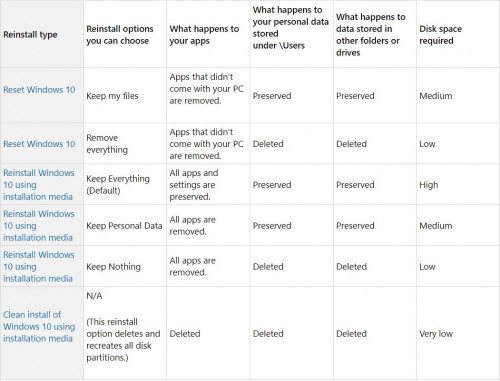 Try can , if still happen, if you wanna create windows 10 installation drive and boots from USB drive, before startup tag on F12. Follow by go custom option to format ur drive and do fresh install new windows 10. |
|
|
|
|
|
Benefon
|
Nov 20 2019, 10:21 AM
|
|
|
QUOTE(Eternalgl0ry @ Nov 20 2019, 10:19 AM) so how now? IF problem still persist must be defect already.....   Ya sometime is the battery chipset issue. They can replace for free |
|
|
|
|
|
Benefon
|
Nov 20 2019, 02:17 PM
|
|
|
QUOTE(shinzan @ Nov 20 2019, 02:15 PM) So far nothing bad happened after reinstalled Windows 10. Feel happy but still monitoring Omg ur windows 10 so badly? |
|
|
|
|
|
Benefon
|
Nov 20 2019, 04:15 PM
|
|
|
QUOTE(G-17 @ Nov 20 2019, 04:11 PM) Maybe it's a Vantage issue? A member on one of the other forums I'm at recently had similar problems on his brand new X1C7. Was running fine out of the factory with Windows 10. After a few days he enabled the battery charge threshold and quick resume features in Vantage, and everything went to shit. The machine sometimes wouldn't charge, sometimes will say charging but then suddenly Windows will show the "battery low" message, sometimes needed to hard reset by poking the hole underneath - all sorts of weird issues, maybe even worse then yours. After a fresh install of Windows 10 everything went back to normal, he just didn't turn on charge threshold and and easy resume features. Now he's dual-booting Windows and Linux and sets the charge threshold from the on Linux side (Ubuntu 19.10) via TLP, and everything is still running well. So I'm guessing the culprit might be Vantage. I have encounter vantage battery setting gone, can’t click on auto stop feature. After format window and reinstalled, back to normal |
|
|
|
|
|
Benefon
|
Nov 20 2019, 05:33 PM
|
|
|
QUOTE(SharkBait9 @ Nov 20 2019, 05:32 PM)  So which do you think is better? To compare for which one? |
|
|
|
|
|
Benefon
|
Nov 20 2019, 05:36 PM
|
|
|
QUOTE(SharkBait9 @ Nov 20 2019, 05:34 PM) P43s good for workstation and photo editing T490 good for light games |
|
|
|
|
|
Benefon
|
Nov 20 2019, 05:41 PM
|
|
|
QUOTE(SharkBait9 @ Nov 20 2019, 05:36 PM) sorry still trying to figure out how to post. Just from P43s and T490. Image : https://imgur.com/a/hP0g2bNBoth are the same, different is the graphics card only Actually MX250 from T490 still can handle many photoshop or editing software This post has been edited by Benefon: Nov 20 2019, 05:44 PM |
|
|
|
|
|
Benefon
|
Dec 4 2019, 04:36 PM
|
|
|
QUOTE(werrbug @ Dec 4 2019, 04:25 PM) Hi, where you guys buy keyboard cover/protector for t490? most seller only sell for t480. can fit t490 keyboard? Aiyoh all the keyboard layout is the same. Just buy jer |
|
|
|
|
|
Benefon
|
Dec 9 2019, 10:25 AM
|
|
|
QUOTE(zz287963 @ Dec 9 2019, 10:24 AM) Hi sifus, this issue still keep on occurring. Plugged in 2hours, charged from 20% to 60% only lol. Using a 65W authentic Lenovo charger but then the Wattage showed in Lenovo Vantage was just 10Watt. Any solutions? Remove your vantage software see how |
|
|
|
|
|
Benefon
|
Dec 9 2019, 10:28 AM
|
|
|
QUOTE(zz287963 @ Dec 9 2019, 10:27 AM) U mean uninstall and reinstall again? Bingo usually is vantage battery setting an issue |
|
|
|
|
|
Benefon
|
Dec 9 2019, 10:41 AM
|
|
|
QUOTE(zz287963 @ Dec 9 2019, 10:34 AM) Did it, the wattage is now 36 Watt, and estimated time for full charge from 61% is 1 hour and 30mins. Normal? Usually take a bit longer , from 60-100% around 1.5 hours with 65W pd |
|
|
|
|





 Quote
Quote


 0.2462sec
 0.34
0.34
 7 queries
 GZIP Disabled