Welcome Guest ( Log In | Register )

Outline · [ Standard ] · Linear+

 [Review] An amateur review on Silverstone Raven 03, Desktop casing (Picture Updated)

views
     
TSRyuKageX
post Jul 5 2011, 01:29 AM, updated 15y ago

Casual
***
Junior Member
303 posts

Joined: Dec 2007
From: Bamboo River


Hi,

After some researches and discussions in this thread, I finally made my decisions to buy the Raven 03 due to the unique designs and possible improved cooling for my trifire setup. I will be taking this review from the point of view of someone who only assembled 3 complete pc (ie a noob) biggrin.gif.

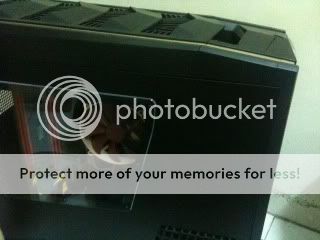
user posted image
The gold panel fits since I have a Noctua cooler which fan is a brownish in color

Pre assembling:

The box was nice and sturdy, the box plus the casing is surprisingly light. Took out the casing and the gold color strips gave me the idea to spray it to another color to make it look nicer. It is also quite short and almost as tall as my old casing which are one of the reason I bought it. Edit: I guess my Noctua cooler complement the gold panel so may keep the original color biggrin.gif
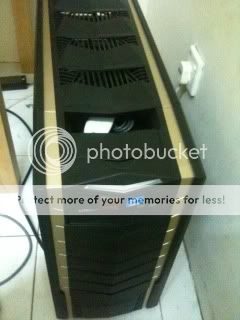
user posted image
The gold panel fits since I have a Noctua cooler which fan is a brownish in color

Assembling:

The first complain would be the screws since they were just mixed together in a bag which kind of searching for the right one took some time. Wish they could separate them properly. The mobo installation is pretty standard but the hard disk took some time since it is positioned in a unique way. The tricky part was the psu cables since I was expecting some kind of holder like my older casing for the cables but since there is none, I have to compromise by pushing it to corner and forcing the back plate on it but it still do a beautiful job by hiding the cables. The sata cable was a bit tricky due to the orientation of the mobo. The last part was the plugging of the psu to the wall socket. Somehow it was not mentioned in the guide and spend a few minutes to look for the male port. Overall it took me longer than standard casing.
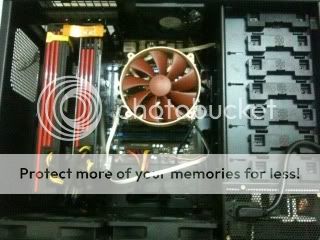
user posted image
Big enough to leave the 6990 a few inch of space
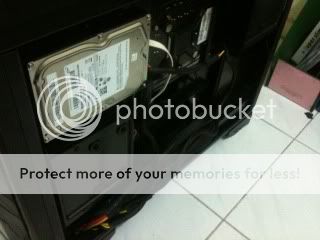
user posted image
The hard disk area came with anti shock build
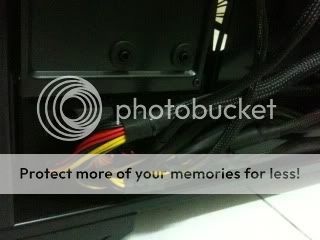
user posted image
The PSU is located in the front

Post assembling:

My first complain is the lack of the usb port in front of the casing and although it says USB 3.0, it actually just an adapter that you will connect to the USB 3.0 on the I/O of my mobo although the mobo have a free internal 3.0 support but it is not such a big deal since my existing ports are already enough for me. And aesthetically, the gold strip ruined it since the hard disk indicator is red in color. The need to take of the top cover everytime need to access the usb is kind of a hassle. But other than the minor complains, it perform well above expectation with the fans was very silence even though set to 100% speed using the in built fan controller. The cooling factor also shows up here with my trifire manage go to cooler than the old casing. The lack of cluttered wires on the floor also helps in making things look organized.
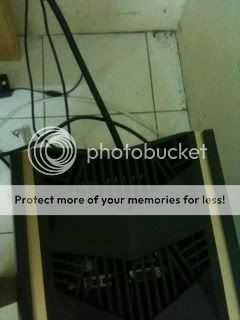

user posted image
No more dangling wires at the back of the casing
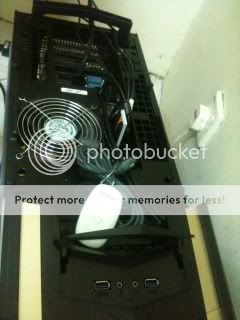
user posted image
The spaces at the top is big enough to put most usb devices

Cooling factors:

After a few days of using this casing, I opened up the casing and realised that I didnt plug in the second fan which is below the graphic cards. At that time, with afterburner setting, the max temperature when testing in extreme mode is 85oC for both card. Turning on the second fan gave me max 67oC for the 6970 and 75oC for the 6990 biggrin.gif. Although further testing need to be done but its safe to say for now the cooling works. smile.gif

Pro:

1) Medium sized with full tower spaces

2) Good cable management

3) Light weight

4) Spacious, can fit in both 6970+6990 without feeling crowded

5) No more cables mess at the back of the casing

6) Silent (until the 6990 starts wailing during intense gaming)

Cons:

1) The gold panelings make it hard to match with a theme

2) Unusual orientation of casing makes it a bit hard to assemble

3) The psu makes it hard to find the plug in area (its under the casing)

4) Plasticky feeling (doesnt matter much to me but may put off other people


This post has been edited by RyuKageX: Jul 16 2011, 09:23 PM
cmgan72
post Jul 7 2011, 01:05 AM

Daisyoix PC
******
Senior Member
1,340 posts

Joined: Feb 2009


it has been 2 days. still waiting for the pictures. whistling.gif
TSRyuKageX
post Jul 16 2011, 09:25 PM

Casual
***
Junior Member
303 posts

Joined: Dec 2007
From: Bamboo River


QUOTE(cmgan72 @ Jul 7 2011, 01:05 AM)
it has been 2 days. still waiting for the pictures. whistling.gif
*
Hi, the review have been updated with pics. I was really busy, haha. Please comment to improve my review biggrin.gif
choen
post Jul 17 2011, 02:13 PM

Getting Started
**
Junior Member
102 posts

Joined: Aug 2009
Watch out for accumulated heat at the back hdd are towards the front
TSRyuKageX
post Jul 18 2011, 01:10 PM

Casual
***
Junior Member
303 posts

Joined: Dec 2007
From: Bamboo River


QUOTE(choen @ Jul 17 2011, 02:13 PM)
Watch out for accumulated heat at the back hdd are towards the front
*
I'm sorry but i don get what you mean?
choen
post Jul 18 2011, 10:14 PM

Getting Started
**
Junior Member
102 posts

Joined: Aug 2009
You can mount four regular hdd at the back of the mother board right? The area above psu will accumulate a lot of heat that have no where to disperse.


Added on July 18, 2011, 10:16 pmVentilation towrds the back is better. Just watch out for your hdd temperature.

This post has been edited by choen: Jul 18 2011, 10:16 PM
TSRyuKageX
post Jul 18 2011, 11:40 PM

Casual
***
Junior Member
303 posts

Joined: Dec 2007
From: Bamboo River


oh, yeah, true also, i guess by opening the slot above the psu can solve that, anyway, thanks for the advice biggrin.gif
narong30
post Jul 18 2011, 11:51 PM

Casual
***
Junior Member
328 posts

Joined: Jun 2010
From: Puchong


Which GPU brand are you using ? HIS?
choen
post Jul 19 2011, 12:17 PM

Getting Started
**
Junior Member
102 posts

Joined: Aug 2009
Also be very careful with top panel cover. The tabs are very fragile. Front panel too.
TSRyuKageX
post Jul 19 2011, 02:13 PM

Casual
***
Junior Member
303 posts

Joined: Dec 2007
From: Bamboo River


QUOTE(narong30 @ Jul 18 2011, 11:51 PM)
Which GPU brand are you using ? HIS?
*
Powercolor and asus, bith reference design why?

QUOTE(choen @ Jul 19 2011, 12:17 PM)
Also be very careful with top panel cover. The tabs are very fragile. Front panel too.
*
Yeah, risky if you always try to reach for the motherboard panel frequently
trisx
post Jul 25 2011, 04:10 PM

Life is Full of BS eyh !
******
Senior Member
1,198 posts

Joined: Nov 2008
From: ~~BacK FroM HelL~~ Status: R.I.P
u CF same card or 6990 n 6970?
TSRyuKageX
post Jul 25 2011, 06:20 PM

Casual
***
Junior Member
303 posts

Joined: Dec 2007
From: Bamboo River


6990 n 6970 trifire
Dandy
post Jul 25 2011, 10:35 PM

Getting Started
**
Junior Member
193 posts

Joined: Sep 2008


nice!!!+rich!!!
MyJuliet
post Jul 26 2011, 10:07 AM

New Member
*
Newbie
2 posts

Joined: Jul 2011
This helps me a great deal. Thank you.
flodder
post Jul 26 2011, 10:21 AM

6 batang ab numb addicted with 6 bintang
******
Senior Member
1,039 posts

Joined: Nov 2007
From: Penang Island Status: No Solidarity No Corruption


QUOTE(RyuKageX @ Jul 19 2011, 02:13 PM)
Powercolor and asus, bith reference design why?
Yeah, risky if you always try to reach for the motherboard panel frequently
*
resistor temperature will easy hot and burn out
trisx
post Jul 26 2011, 11:16 AM

Life is Full of BS eyh !
******
Senior Member
1,198 posts

Joined: Nov 2008
From: ~~BacK FroM HelL~~ Status: R.I.P
u testes ur trifire yet? i test my gc with catalyst 11.6 damn lagging while gaming.feel like wanna bang my head on the wall.stupid fags
TSRyuKageX
post Jul 26 2011, 04:16 PM

Casual
***
Junior Member
303 posts

Joined: Dec 2007
From: Bamboo River


hurm, which game are you talking about? have you installed any CAP yet? So far most game run smoothly for me
trisx
post Jul 27 2011, 10:08 AM

Life is Full of BS eyh !
******
Senior Member
1,198 posts

Joined: Nov 2008
From: ~~BacK FroM HelL~~ Status: R.I.P
found out the problem.my 5830 suck my system Ram.dunno why. this problem happens in windows 7, it suck almost 1gb for aero.

so i tried install win Xp then the problem solved lol.
halllo81
post Jul 31 2011, 11:43 PM

Getting Started
**
Junior Member
181 posts

Joined: Apr 2011
seem like ur noctua not really match with ur btm fan ..i mean the way of airflow!
if u r using D14..i think it's the best!
TSRyuKageX
post Aug 1 2011, 10:32 AM

Casual
***
Junior Member
303 posts

Joined: Dec 2007
From: Bamboo River


I agree, but when i bought it didnt realize it was not the d14..sad.gif oh well
halllo81
post Aug 2 2011, 08:59 PM

Getting Started
**
Junior Member
181 posts

Joined: Apr 2011
hehe..going to get a raven 03 soon..
in these few day think i can receive..
cheers for raven 03 user
TSRyuKageX
post Aug 2 2011, 11:38 PM

Casual
***
Junior Member
303 posts

Joined: Dec 2007
From: Bamboo River


good for you!! biggrin.gif
halllo81
post Aug 4 2011, 06:18 PM

Getting Started
**
Junior Member
181 posts

Joined: Apr 2011
u like the Gold Stripe?
i just receive my Raven 03..remove the gold stripe rdy to spray..don know which color to spray..now thinking
and the 5.25 bay also remove and rdy to put extra 4 fan
rear and side panel also i planing to add fan on it
TSRyuKageX
post Aug 4 2011, 09:09 PM

Casual
***
Junior Member
303 posts

Joined: Dec 2007
From: Bamboo River


for now I'll leave the gold stripe alone, planned to spray it red to fit my cards but right now to lazy tongue.gif
halllo81
post Aug 4 2011, 09:31 PM

Getting Started
**
Junior Member
181 posts

Joined: Apr 2011
Good idea with red stripe..
TSRyuKageX
post Aug 5 2011, 05:29 PM

Casual
***
Junior Member
303 posts

Joined: Dec 2007
From: Bamboo River


yeah, at the very least it will go with the hard disk led..smile.gif
jay
post Aug 5 2011, 07:02 PM

Legendary
*****
Senior Member
904 posts

Joined: Jan 2003
From: Central Region Status: Safe Trader
red stripe+red LED flex.gif
halllo81
post Aug 7 2011, 10:49 PM

Getting Started
**
Junior Member
181 posts

Joined: Apr 2011
it's a nice case ..
now i'm OC to 4.8 ghz with prime 95 one hours..not over 75 temp..
and the usb 3.0 ...do ur mobo come with bracket?
i don know how to mention..but i plug it with a extension cable to mobo..
so the mobo usb 3.0 still available...
TSRyuKageX
post Aug 8 2011, 11:40 PM

Casual
***
Junior Member
303 posts

Joined: Dec 2007
From: Bamboo River


QUOTE(jay @ Aug 5 2011, 07:02 PM)
red stripe+red LED  flex.gif
*
Hehe, I agree tongue.gif, just need the push to do it

QUOTE(halllo81 @ Aug 7 2011, 10:49 PM)
it's a nice case ..
now i'm OC to 4.8 ghz with prime 95 one hours..not over 75 temp..
and the usb 3.0 ...do ur mobo come with bracket?
i don know how to mention..but i plug it with a extension cable to mobo..
so the mobo usb 3.0 still available...
*
No bracket for me so less two usb for me sad.gif


Change to:
| Lo-Fi Version
0.0305sec    0.49    5 queries    GZIP Disabled
Time is now: 21st December 2025 - 03:31 AM