
Welcome Guest ( Log In | Register )

Outline · [ Standard ] · Linear+

Streamyx Streamyx frequently disconnected, Need help!! TM cant fixed it =O

views
     
TSterrence_my
post Jul 1 2011, 05:34 AM, updated 15y ago

New Member
*
Junior Member
38 posts

Joined: Oct 2009


Broadband provider
ISP/package: Streamyx 512kbps (RM66)
Location: Johor, Kluang
Have you called your ISP's helpline?:
Yes

Personal equipment
Modem: TP-link TD-W8901G
Router: Same as above (2in1)
Firewall used: none

Problem details
First occurence of problem: It happens during anytime that i connected to internet, it is just disconnected from the internet (win 7 there the connection appears a yellow triangle with !, diagnose via windows troubleshooting and it shows DNS server is not responding
Problem frequency: the shortest time in between is about 15 minutes, and the longest time is around 5 hours
Problem description: Every time disconnected, I have to restart my modem and it will re-connect back to internet, it is frustrated while you are playing online game (in a dungeon but you never know that if you can complete the dungeon without DC or not)
I had got TM technicians come and they can't find any problem with the line in my home, and Im not sure that whether it is my modem problem as I do not have spare modem to test.
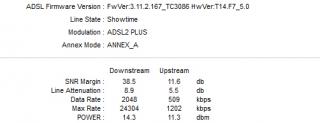
Attached Image

here come the status of the modem and the connection...

does anyone know any possibility?

MOD:
here come the system log when the net was down:

7/1/2011 16:4:23> Call drop because echo reply not received in time
7/1/2011 16:4:23> SNMP TRAP 2: link down

update 2 (7th July 2011)

I managed to borrow a TM modem from my friend and test, and the second modem is also facing the dc problem as it stated the same error "call drop because echo reply is not received in time"

I have called tm again and ask the CS girl to reset my port, the problem seems unsolved still.
Can anyone give me some suggestion on what should I do and how should I do?

please


Added on July 7, 2011, 3:10 pmanyone helps?
please

This post has been edited by terrence_my: Jul 7 2011, 03:10 PM
TSterrence_my
post Aug 19 2011, 01:18 AM

New Member
*
Junior Member
38 posts

Joined: Oct 2009


QUOTE(backisland @ Aug 18 2011, 10:10 PM)
ur line attenuation is low
Try to connect it directly to the main output of you line, remove the phone cable also. make sure you plug the modem only.
Do 2 test one with a splitter and one without the splitter and Screenshot the DSL Status Result
*
huh? but according to the pinned post:

http://forum.lowyat.net/topic/222851

Line Attenuation
Measure of how much the signal has degraded between the DSLAM and the modem. Maximum signal loss recommendation is usually about 60dB. The lower the dB the better for this measurement.
> 20dB and below is outstanding
> 20dB-30dB is excellent
> 30dB-40dB is very good
> 40dB-50dB is good
> 50dB-60dB is poor and may experience connectivity issues
> 60dB or above is bad and will experience connectivity issues

my line attenuation is good enough (or it shall be excellent?)
btw, I changed splitter, cable, whatever I can change even modem yet the problem is still there.

During disconnection, I can just plug out the tel line and plug in back to get reconnect, If I left my modem without doing anything, it won't reconnect, any helps?

I was just thinking that it is TMNUT side problem and they might fix it soon, therefore I didnt call 100 since last calling... somehow... It doesn't fix itself the problem hahaha... luckily I temporary away from the online game and just do normal surfing XD

This post has been edited by terrence_my: Aug 19 2011, 01:26 AM
TSterrence_my
post Aug 19 2011, 07:02 PM

New Member
*
Junior Member
38 posts

Joined: Oct 2009


QUOTE(brianw87 @ Aug 19 2011, 12:34 PM)
Hey guys, my issue has been resolved! rclxm9.gif  rclxm9.gif

Here's my case.

I called TM 2 days ago. At first an agent helped me to reset the port. But then a lady from L2 called me again to inform that they noticed issue was still persist even port reset. On yesterday, TM gave me another call that they changed the cable outside n ask me to try again. Guess what? I no longer having dc problem anymore! I can even surf youtube without the need to wait for buffer now! laugh.gif (of coz, still hv to buffer a bit for 720p above lol.. tongue.gif

tips: verify the cause of dc is not from your side 1st before calling them (I changed cable, splitter, even new modem for the headache dc issue..  sweat.gif ) this would skip a lot of unnecessary questions/lame troubleshooting. It helps to save a lot of time for both side to detect the root cause and take immediate action. The technician dont even come to my house and my prob was fixed  icon_rolleyes.gif
*
Cool, congratz, i am gonna give them another call in the following few days =D
TSterrence_my
post Aug 25 2011, 03:16 PM

New Member
*
Junior Member
38 posts

Joined: Oct 2009


I called again since the problem occurred for almost 2 months and still exists.
The CS girl seems can't understand mine "frequently disconnection" and ask me to do internet not available troubleshooting and reset the port, after long long lame troubleshooting I realised that she misunderstood my problem then I stopped her and explained the details, and then she only knows what problem I am having and finally ask technicians to check the region hardware but not come to my house. thanks god... hope this solve soon


Change to:
| Lo-Fi Version
0.0163sec    0.30    7 queries    GZIP Disabled
Time is now: 8th December 2025 - 06:19 PM