Welcome Guest ( Log In | Register )

Bump Topic Topic Closed RSS Feed
126 Pages « < 63 64 65 66 67 > » Bottom

Outline · [ Standard ] · Linear+

 ▐▐ ★HTC Desire Official Thread V11 ★▐▐, Brillante En Silencio

views
     
ShinnKQ
post Oct 15 2011, 05:15 PM

I used to have a member title, until I took an arrow in the knee
******
Senior Member
1,242 posts

Joined: Nov 2010
From: PJ
QUOTE(rattan @ Oct 15 2011, 03:48 PM)
Anyone know how I can change this drop down notification to the GB type. I find this not useful at all.

ROM : CM7.1
*
I find your statement+question not useful at all.

Please explain how that, is not Gingerbread AOSP.

This post has been edited by ShinnKQ: Oct 15 2011, 05:18 PM
Ken112334
post Oct 15 2011, 05:47 PM

New Member
*
Junior Member
13 posts

Joined: Aug 2010


okay now i have follow all the instruction here ( http://forum.xda-developers.com/showthread.php?t=1016084 )
then i flash my rom to RCMix S v2.0 A2SD+ Bravo Hboot.

everything seems nicely done. but when i go market and download some application, i see the internal memory goes down? isnt it suppose stay the same and it auto install into the sd card ext4?
nick67
post Oct 15 2011, 05:49 PM

What?
******
Senior Member
1,501 posts

Joined: Mar 2010
QUOTE(Ken112334 @ Oct 15 2011, 05:47 PM)
okay now i have follow all the instruction here ( http://forum.xda-developers.com/showthread.php?t=1016084 )
then i flash my rom to RCMix S v2.0 A2SD+ Bravo Hboot.

everything seems nicely done. but when i go market and download some application, i see the internal memory goes down? isnt it suppose stay the same and it auto install into the sd card ext4?
*
Probably need to manually activate a2sd. And anyway part of the application will still be installed in the internal memory no matter what.
Ken112334
post Oct 15 2011, 05:52 PM

New Member
*
Junior Member
13 posts

Joined: Aug 2010


and how do i manually activate it? i think this is the last part already yawn.gif
by the way, how do i check if the application is install on sd card ext?
nick67
post Oct 15 2011, 08:20 PM

What?
******
Senior Member
1,501 posts

Joined: Mar 2010
QUOTE(Ken112334 @ Oct 15 2011, 05:52 PM)
and how do i manually activate it? i think this is the last part already yawn.gif
by the way, how do i check if the application is install on sd card ext?
*
- get terminal from market
- Type su
- Type a2sd zipalign
- Type a2sd cachesd
- Type a2sd reinstall

astria
post Oct 15 2011, 09:25 PM

an apple a day keeps the doctor away
*********
Senior Member
22,158 posts

Joined: Aug 2008
From: Singapore


noob qn... using CM7.1, how do i setup to install apps on the SD card instead of the ROM?
phgmail
post Oct 15 2011, 10:40 PM

Getting Started
**
Junior Member
287 posts

Joined: Sep 2010
it's good to see this thread still alive.havent been here for a long time.hehe.
one thing i notice,when typing in this forum using desire,no more lag.it's good thing i guess.
ShinnKQ
post Oct 15 2011, 11:19 PM

I used to have a member title, until I took an arrow in the knee
******
Senior Member
1,242 posts

Joined: Nov 2010
From: PJ
QUOTE(astria @ Oct 15 2011, 09:25 PM)
noob qn... using CM7.1, how do i setup to install apps on the SD card instead of the ROM?
*
CM Settings, 1st one.
HAVE you flashed the a2sd script by CM (Unofficial one)?

http://forum.xda-developers.com/showpost.p...412&postcount=2
^ Bottom there got link to download a zip for you to flash.

OR Find an app called Simple2Ext.

Make SURE YOU FLASH THAT BEFORE INSTALLING APPs or you have to reinstall all the apps.
rattan
post Oct 16 2011, 05:18 AM

Droid
Group Icon
Trade Dispute
3,379 posts

Joined: Apr 2006
From: KL


QUOTE(ShinnKQ @ Oct 15 2011, 05:15 PM)
I find your statement+question not useful at all.

Please explain how that, is not Gingerbread AOSP.
*
shocking.gif

Current Notification Bar on CM7.1 :
user posted image

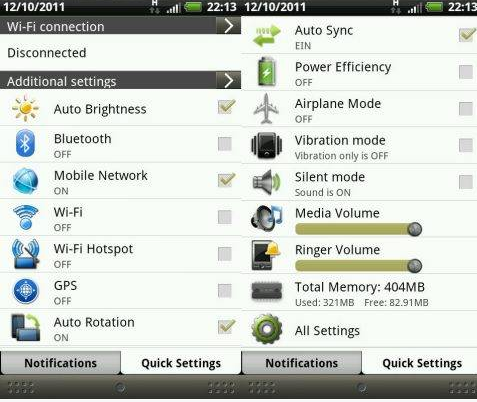
What I need/ I want / Im comfortable with / use to / enjoy using :
user posted image

I hope u understand now. If my question was suppose to be useful I wont be here. Ill be a Dev and be seated as a XDA developer. We are here to learn and help other with what we know. Your throwbacks has been very harsh and insulting lately. Take this with a pinch of salt, as I can be quite direct when insulted.

Came in peace, no harm meant.

This post has been edited by rattan: Oct 16 2011, 05:22 AM
albnok
post Oct 16 2011, 06:22 AM

Alpha Male
Group Icon
Elite
4,956 posts

Joined: Jan 2003
From: KL


rattan: Uh... isn't CyanogenMod 7.1 meant to be like AOSP, and other ROMs may have extra tabs in the notifications?

Thus if you say "GB type" we assume you mean what Google gave us which is what CM7.1 (somewhat) follows. So you're expecting something out of a ROM that wasn't meant to do that.

That said, I would say if you do have a Quick Settings page, it isn't quite in the spirit of replaceable-components Android (y'know, being able to replace keyboard, lock screen, etc.) because as far as I know, the notification menu is OS firmware level. It's not even something you can change at the Launcher level (which is replaceable.) It's not a widget either, unless the firmware lets you put whatever widgets you want in the notification bar.

I would personally prefer to be able to change the widget because whatever CM7.1 or even your screenshot gives me does not reach the level of Widgetsoid. I'd like a big 4x4 grid full of toggle icons instead of scrolling.

So how would this be implemented? Do you drag a widget up into the notification bar, and choose a name for the tab e.g. "Quick Settings"? Why not allow more widgets as long as there is space?

Then it comes to a point that you're just replicating a Home screen but from the notification bar.

Don't get me wrong, I do think it's a good idea to have Quick Settings there so you don't need to go Home to find the widget and switch them.
astria
post Oct 16 2011, 09:26 AM

an apple a day keeps the doctor away
*********
Senior Member
22,158 posts

Joined: Aug 2008
From: Singapore


QUOTE(ShinnKQ @ Oct 15 2011, 11:19 PM)
CM Settings, 1st one.
HAVE you flashed the a2sd script by CM (Unofficial one)?

http://forum.xda-developers.com/showpost.p...412&postcount=2
^ Bottom there got link to download a zip for you to flash.

OR Find an app called Simple2Ext.

Make SURE YOU FLASH THAT BEFORE INSTALLING APPs or you have to reinstall all the apps.
*
thx, will try that when i get home...

how abt the SD card? how should i partition it?

QUOTE(albnok @ Oct 16 2011, 06:22 AM)
Don't get me wrong, I do think it's a good idea to have Quick Settings there so you don't need to go Home to find the widget and switch them.
*
u can customize which quick settings buttons to appear on the notification bar in CM...

right now i ve WiFi, Tether, Bluetooth, 2G/3G, brightness and vibration toggle on my notification bar...

and then there's also others like Play/Pause media, next/previous song, GPS toggle, LED torch, Sync, Mobile Data, Airplane mode, etc etc...

This post has been edited by astria: Oct 16 2011, 09:34 AM
noobandroid
post Oct 16 2011, 09:54 AM

Audiophile
********
All Stars
11,836 posts

Joined: Mar 2011
From: Kota Kinabalu, Sabah


QUOTE(astria @ Oct 16 2011, 09:26 AM)
thx, will try that when i get home...

how abt the SD card? how should i partition it?
u can customize which quick settings buttons to appear on the notification bar in CM...

right now i ve WiFi, Tether, Bluetooth, 2G/3G, brightness and vibration toggle on my notification bar...

and then there's also others like Play/Pause media, next/previous song, GPS toggle, LED torch, Sync, Mobile Data, Airplane mode, etc etc...
*
SD partition use max of 2GB, not more, how to do? use partition manager or GParted

astria
post Oct 16 2011, 10:58 AM

an apple a day keeps the doctor away
*********
Senior Member
22,158 posts

Joined: Aug 2008
From: Singapore


QUOTE(noobandroid @ Oct 16 2011, 09:54 AM)
SD partition use max of 2GB, not more, how to do? use partition manager or GParted
*
how abt using recovery instead? is that possible?
ShinnKQ
post Oct 16 2011, 11:12 AM

I used to have a member title, until I took an arrow in the knee
******
Senior Member
1,242 posts

Joined: Nov 2010
From: PJ
QUOTE(rattan @ Oct 16 2011, 05:18 AM)
shocking.gif

I hope u understand now. If my question was suppose to be useful I wont be here. Ill be a Dev and be seated as a XDA developer. We are here to learn and help other with what we know. Your throwbacks has been very harsh and insulting lately. Take this with a pinch of salt, as I can be quite direct when insulted.

Came in peace, no harm meant.
*
I already knew you were going to post this, thus the hostile response.

Your question is no different than asking, I have an apple, I want to change the apple's skin to carrot because I'm not comfortable with apple's skin.

NONE of us are developers, how are we supposed to answer that question? Your question is not just changing the colour but you need to add small icons, new fonts, etc etc etc.

Please know the difference in ROMs between HTC SENSE, AOSP and MIUI (though it's AOSP based but totally different UI)

Notification is part of a UI in each of the ROM, unless you're a good developer you can try and mix around. (Probably possible)

Sorry for being harsh, got carried away.

If there is NO app that can change this, therefore.

Now, do you know why there's things called HTC Sense, Motorola Blur etc..?

Looking at the searches I see no one trying to implement Sense 2.1/3.0 elements into a pure AOSP Rom.
Perhaps a request would help on XDA whistling.gif

And besides, why not just use a Sense ROM and use custom launcher to look like AOSP? rclxub.gif

@ Red Bold - That.

QUOTE(albnok @ Oct 16 2011, 06:22 AM)
rattan: Uh... isn't CyanogenMod 7.1 meant to be like AOSP, and other ROMs may have extra tabs in the notifications?

Thus if you say "GB type" we assume you mean what Google gave us which is what CM7.1 (somewhat) follows. So you're expecting something out of a ROM that wasn't meant to do that.

That said, I would say if you do have a Quick Settings page, it isn't quite in the spirit of replaceable-components Android (y'know, being able to replace keyboard, lock screen, etc.) because as far as I know, the notification menu is OS firmware level. It's not even something you can change at the Launcher level (which is replaceable.) It's not a widget either, unless the firmware lets you put whatever widgets you want in the notification bar.

I would personally prefer to be able to change the widget because whatever CM7.1 or even your screenshot gives me does not reach the level of Widgetsoid. I'd like a big 4x4 grid full of toggle icons instead of scrolling.

So how would this be implemented? Do you drag a widget up into the notification bar, and choose a name for the tab e.g. "Quick Settings"? Why not allow more widgets as long as there is 7space?

Then it comes to a point that you're just replicating a Home screen but from the notification bar.

Don't get me wrong, I do think it's a good idea to have Quick Settings there so you don't need to go Home to find the widget and switch them.
*
Well said.

I believe notification should be under Launcher's jurisdiction.
If it's ever customisable that is in terms of theming it.

I think it's possible if you use up a whole screen, make a large window and inside has all the quick settings identical to the one in newer Sense and of course, the fonts will have to be smaller by 1 or 2.

@ Underline :- There are already quick settings on AOSP/MIUI/Newer Sense.


Added on October 16, 2011, 11:37 am
QUOTE(astria @ Oct 16 2011, 09:26 AM)
thx, will try that when i get home...

how abt the SD card? how should i partition it?

u can customize which quick settings buttons to appear on the notification bar in CM...

right now i ve WiFi, Tether, Bluetooth, 2G/3G, brightness and vibration toggle on my notification bar...

and then there's also others like Play/Pause media, next/previous song, GPS toggle, LED torch, Sync, Mobile Data, Airplane mode, etc etc...
*
I always use Recovery and never had any problems. 512mb is more than enough for regular users. 1024mb is for seriously heavy app keepers (we're talking about hundreds)

Yes you can customise that but refer to Rattan's question. Seperating them (Like newer Sense's notification of Quick Settings)

This post has been edited by ShinnKQ: Oct 16 2011, 11:42 AM

56331818
post Oct 16 2011, 12:35 PM

New Member
*
Junior Member
4 posts

Joined: Feb 2009


Hey guys, is there any way to install voice search, i cant seem to make it work always get force close no matter what version i install btw i using miui au rom, does it support?
nick67
post Oct 16 2011, 12:51 PM

What?
******
Senior Member
1,501 posts

Joined: Mar 2010
QUOTE(56331818 @ Oct 16 2011, 12:35 PM)
Hey guys, is there any way to install voice search, i cant seem to make it work always get force close no matter what version i install btw i using miui au rom, does it support?
*
It should support..I'm using miui xj and it installed perfect though I had to use market enabler to download it..
56331818
post Oct 16 2011, 01:02 PM

New Member
*
Junior Member
4 posts

Joined: Feb 2009


QUOTE(nick67 @ Oct 16 2011, 12:51 PM)
It should support..I'm using miui xj and it installed perfect though I had to use market enabler to download it..
*
ok, is it the latest version?
TShazril
post Oct 16 2011, 01:57 PM

.: This Is Brazil! :.
*******
Senior Member
3,070 posts

Joined: Dec 2006
From: Damansara


is it possible to use d2ext from miui xj and use it on miui au???itchy to experiment... biggrin.gif
nick67
post Oct 16 2011, 02:14 PM

What?
******
Senior Member
1,501 posts

Joined: Mar 2010
QUOTE(56331818 @ Oct 16 2011, 01:02 PM)
ok, is it the latest version?
*
Yea downloaded from market bro

QUOTE(hazril @ Oct 16 2011, 01:57 PM)
is it possible to use d2ext from miui xj and use it on miui au???itchy to experiment... biggrin.gif
*
shocking.gif How you plan to do it bro?? Have to implement the d2ext script to miui au rom but I have no knowledge on how to do that..
rattan
post Oct 16 2011, 02:23 PM

Droid
Group Icon
Trade Dispute
3,379 posts

Joined: Apr 2006
From: KL


QUOTE(ShinnKQ @ Oct 16 2011, 11:12 AM)
I already knew you were going to post this, thus the hostile response.

Your question is no different than asking, I have an apple, I want to change the apple's skin to carrot because I'm not comfortable with apple's skin.

NONE of us are developers, how are we supposed to answer that question? Your question is not just changing the colour but you need to add small icons, new fonts, etc etc etc.

Please know the difference in ROMs between HTC SENSE, AOSP and MIUI (though it's AOSP based but totally different UI)

Notification is part of a UI in each of the ROM, unless you're a good developer you can try and mix around. (Probably possible)

Sorry for being harsh, got carried away.

If there is NO app that can change this, therefore.

Now, do you know why there's things called HTC Sense, Motorola Blur etc..?

Looking at the searches I see no one trying to implement Sense 2.1/3.0 elements into a pure AOSP Rom.
Perhaps a request would help on XDA  whistling.gif

And besides, why not just use a Sense ROM and use custom launcher to look like AOSP?  rclxub.gif

@ Red Bold - That.
Well said.

I believe notification should be under Launcher's jurisdiction.
If it's ever customisable that is in terms of theming it.

I think it's possible if you use up a whole screen, make a large window and inside has all the quick settings identical to the one in newer Sense and of course, the fonts will have to be smaller by 1 or 2.

@ Underline :- There are already quick settings on AOSP/MIUI/Newer Sense.


Added on October 16, 2011, 11:37 am

I always use Recovery and never had any problems. 512mb is more than enough for regular users. 1024mb is for seriously heavy app keepers (we're talking about hundreds)

Yes you can customise that but refer to Rattan's question. Seperating them (Like newer Sense's notification of Quick Settings)
*
Well explained. Now I get the whole idea. Its me that's not use to AOSP based ROM's. Coming from Sense based ROM. Therefore the question was raised.

Thanks for the input. I can live with the new notification bar. Will get use to it.

Cheers buddies

126 Pages « < 63 64 65 66 67 > » Top
Topic ClosedOptions
 

Change to:
| Lo-Fi Version
0.0295sec    0.79    6 queries    GZIP Disabled
Time is now: 12th December 2025 - 09:54 PM