Welcome Guest ( Log In | Register )

Bump Topic Topic Closed RSS Feed

Outline · [ Standard ] · Linear+

 HP Pavillion DV6-6XXX series Owners Lounge V2, - 91 owners!! FUUUUUUUUUUUUU!!

views
     
rurushu
post Aug 3 2011, 04:02 AM

Look at all my stars!!
*******
Senior Member
2,021 posts

Joined: Jun 2011
From: Shah Alam


QUOTE(Efalex @ Aug 3 2011, 03:20 AM)
The battery is just a precaution. If any power outage happen during the BIOS flashing, your laptop will turn up dead. You don't want a 15.6" paper weight, right?
I'm not sure if HP's laptop allow it,but Dell's laptop will require plugged in battery for BIOS update or it won't update it.
*
oooo..... okok, you cleared my doubts. Thanks!
rurushu
post Aug 3 2011, 10:43 AM

Look at all my stars!!
*******
Senior Member
2,021 posts

Joined: Jun 2011
From: Shah Alam


QUOTE(Acid_RuleZz @ Aug 3 2011, 04:31 AM)

Added on August 3, 2011, 4:33 amFunny.. why i can't click "Quote" button? sweat.gif
*
me too.... but now can already, i think LYN some time sot-sot abit....
QUOTE(Efalex @ Aug 3 2011, 08:27 AM)
Just done update the new BIOS and I'm happy to report that it works. We now can choose to have either Manual or Auto switching within the same laptop.

To enable the switching method, enter the BIOS by spamming F10 during start up.
Under the configuration tab, the fifth option (under the "Action Key") named "Switchable Graphic", select Fixed for manual switching or Dynamic for auto switching.

Dynamic will remember the previous setting while Fixed will allow you to choose which graphic card to run.
Caveat: For Fixed (Manual) Switching, remember to close all application like browser, game, office application, communication program (especially MSN) et cetera before you switch graphic.
*
Thanks Efalex for your instructions. Thought you said you got no time to on laptop until weekends? laugh.gif

Edit: I also updated my BIOS and enabled the "Fixed" mode just now. Now my dv6-6114tx works like a charm!!!!! Makes me wanna go jumping around and screaming for joy!!! rclxm9.gif rclxm9.gif

This post has been edited by rurushu: Aug 3 2011, 11:05 AM
rurushu
post Aug 3 2011, 01:39 PM

Look at all my stars!!
*******
Senior Member
2,021 posts

Joined: Jun 2011
From: Shah Alam


QUOTE(spicediablo @ Aug 3 2011, 11:51 AM)
I've flashed my BIOS successfully. Currently running on 6770 but when i click on intel, it doesn't switch back. Anyone experienced this? I have closed msn and other programs before trying to switch.

[attachmentid=2365806]


Added on August 3, 2011, 11:53 am

Hi guys,

Done. Switching seemlessly now. I rebooted and it worked!! rclxm9.gif
*
Congrats bro!!!!

QUOTE(ngkhanmein @ Aug 3 2011, 11:58 AM)


Added on August 3, 2011, 11:59 am
already mentioned that new bios work but a lot ppl dun dare flashed bios.. as long insert ur battery + adapter + close all program during flash bios & everything is fine..

i dunno flashed how many times jor..
*
LOL... the first time i flashed my BIOS is without the battery, because that time i dunno the huge R-I-S-K back then. Was relieved that time nothing went wrong, phew sweat.gif
The second time i flashed the BIOS i plugged in the battery now, coz i scared the 15.6" paperweight might happen.... but nevertheless, it was a success!
rurushu
post Aug 4 2011, 01:24 AM

Look at all my stars!!
*******
Senior Member
2,021 posts

Joined: Jun 2011
From: Shah Alam


QUOTE(louisfjh @ Aug 3 2011, 10:31 PM)
so now 6114 better than 6001 edy..
abit regret to sell my 6114 but no choice cus rush & ned use to work... sweat.gif
*
LOL... well, just 1 or 2 weeks after you sell your 6114tx and the problem is gone laugh.gif
Well, at least you get to do your stuff first though nod.gif nod.gif
rurushu
post Aug 4 2011, 10:51 PM

Look at all my stars!!
*******
Senior Member
2,021 posts

Joined: Jun 2011
From: Shah Alam


QUOTE(louisfjh @ Aug 4 2011, 02:15 AM)

3week time.. bfore i bough my 6001.. see my signature when i bough my 6001 then know...

*
o.O.... ok, well, it is still ok la... since you need it urgently. No harm with your 6001tx right? hmm.gif
QUOTE(louisfjh @ Aug 4 2011, 07:08 AM)
1st time try crisis 2 wif my U3 cooler...
cool sense coolest mode...
u3 cooler.....
play crisis for 45 mins
user posted image
*
Why everyone's temp is so low one.... Mine played crysis 2 with U2 cooler with Coolsense Performance optimised mode the CPU temp is 92-95 degrees and the GPU is 86-88degrees.... I brought to HP service centre twice already and they said the temp is normal.... any other clue to why my 6114tx temperature so high??? cry.gif cry.gif cry.gif
rurushu
post Aug 5 2011, 12:08 AM

Look at all my stars!!
*******
Senior Member
2,021 posts

Joined: Jun 2011
From: Shah Alam


QUOTE(dilumcc @ Aug 5 2011, 12:01 AM)
i played crysis 2 for only 2 mins on high perfomace, on battery and cool sense to optimize perfomace mode. my lap turned off lol. first time that happend :S my temps are normally under 90 while playing crysis. i thnik its something to do with high performance + battery. and i had it on my lap may be the vents on the bottom was blocked.

is it normal for the lap to turn off suddenly like that? it didnt turn back on agian, then after a while it worked. now back to normal. played for like 40 mins temps was 85.
*
Wa.... you played on battery mode??? Sorry wor coz i never tried playing it with battery (the high temp will kill the battery). Hmm... you all played for like 40-45 minutes? Me played around 40 something minutes also below 90, maybe long hours will exceed 90? shocking.gif shocking.gif

Btw, wanna ask you guys who played crysis 2. The nano catalysts thing... will the number of nano catalysts you collected "disappear" or "decreases" when you quit the game, then resume the game? Sorry im using ph34r.gif hehe.... Because the first time i quit, then when i resume back, the number of nano catalysts dropped, then the second time i quit and resume, it all gone... have to recollect again.... haih.... and does all alien dropped nano catalysts? Or only some? Because not all dead aliens that i killed allowed me to collect the catalysts.... icon_question.gif
rurushu
post Aug 5 2011, 12:13 AM

Look at all my stars!!
*******
Senior Member
2,021 posts

Joined: Jun 2011
From: Shah Alam


QUOTE(louisfjh @ Aug 5 2011, 12:04 AM)
both same spec... just 6114 have bluray disc drive..& more expensive
*
LOL... louisfjh, you're contrasting the price? sweat.gif

Sifu lee, does my case is overheating? I brought to HP centre first time they changed the GPU fan and heatsink, the second time they check they said no problem, just help me updating the BIOS and drivers (which i think does not improve/change the problem)....
rurushu
post Aug 5 2011, 12:30 AM

Look at all my stars!!
*******
Senior Member
2,021 posts

Joined: Jun 2011
From: Shah Alam


QUOTE(lee_what2004 @ Aug 5 2011, 12:21 AM)
^dare to do repaste thermal paste yourself ?

Can run IntelBurnTest (change to 10 times) and compare with Acid_RuleZz temp ?
http://forum.lowyat.net/index.php?showtopi...post&p=44288822
*
Want to ask as louisfjh, how to do the intelburntest? What does the test justify?
QUOTE(louisfjh @ Aug 5 2011, 12:24 AM)
dam.. duno wat problem wif the recovery media... waste me 1 dvd...
fail on verify the disc... then ask me try again @@ u alll have the problem b4???
i scare i waste 2nd dvd again = =


Added on August 5, 2011, 12:24 am
next time will try play more than 1 hour or 2 hour


Added on August 5, 2011, 12:26 am
how to run intel burn test???
*
Me dont have the verifying error.... Me do the recovery the very FIRST THING when i entered into windows for the FIRST time....

Okay... do post your temp after you tried 1 or 2 hours....
rurushu
post Aug 5 2011, 12:37 AM

Look at all my stars!!
*******
Senior Member
2,021 posts

Joined: Jun 2011
From: Shah Alam


QUOTE(lee_what2004 @ Aug 5 2011, 12:33 AM)
It will stress your CPU...
Kinda to check whats the max temp your CPU can reach..
Best result if you can run IntelBurnTest + Furmark since this will stress the CPU and GPU at the same time and since DV6 is using shared cooling for CPU and GPU, should have more heat compared to just stressing CPU..
*
Oh.... okok. Just off my laptop. Will try it on Friday night or later morning, thanks sifu lee. notworthy.gif notworthy.gif
Will post the temps after the test.
rurushu
post Aug 5 2011, 01:13 PM

Look at all my stars!!
*******
Senior Member
2,021 posts

Joined: Jun 2011
From: Shah Alam


QUOTE(ngkhanmein @ Aug 5 2011, 12:08 PM)
i not yet try.. i now damn  vmad.gif  mad.gif  cos opposition unable to win next election.. i wan reformation!!! change gov please.. m'sia is goin bankrupt soon.. i change all the currency to other liau for my saving..
*
Erm... want to change government i also agree... the custom tax alone is already pissing me off..... But i hope not PAS take over la, if not our lives = THE END....
rurushu
post Aug 5 2011, 01:42 PM

Look at all my stars!!
*******
Senior Member
2,021 posts

Joined: Jun 2011
From: Shah Alam


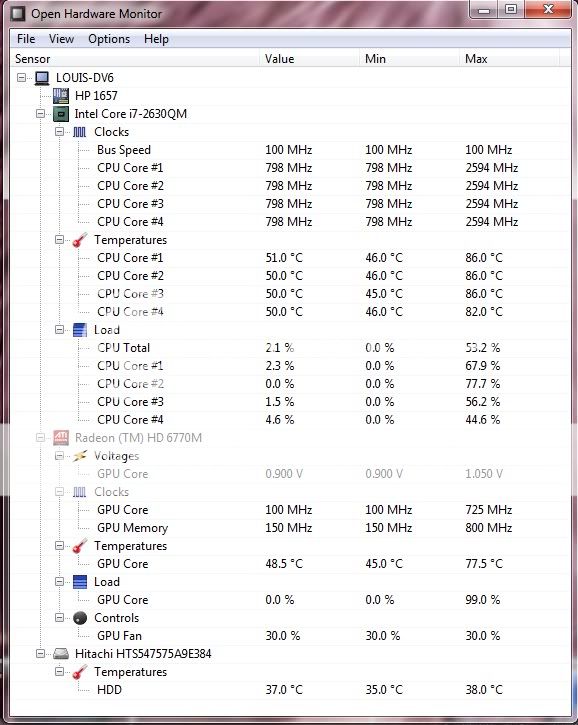
Sifu lee, this is my temp after doing the intelburntest just now... the Coolsense is in Performance Optimised mode, ran it under U2 cooler....
Is the temp considered ok?


Attached thumbnail(s)
Attached Image
rurushu
post Aug 5 2011, 03:05 PM

Look at all my stars!!
*******
Senior Member
2,021 posts

Joined: Jun 2011
From: Shah Alam


QUOTE(RiverDrifte @ Aug 5 2011, 02:42 PM)
not diamond ah? we on the same page?  blush.gif I mean i am going to get the ic7 diamond thermal paste.

Might even make a video of me doing xxx the repaste.. haha..  whistling.gif
adui.. this 1 will never end la..  rolleyes.gif my view on politics is totally different from everyone else  laugh.gif  so i never give much hope on local politics.
*
Please do make the video!!!! I also want to reapply thermal paste, was planning to send back to the troublesome/bothersome hp service centre and wait for 3 days again, but would be EXTREMELY delighted if you can make a tutorial video on how to apply the thermal paste ourselves! thumbup.gif thumbup.gif
Btw, can recommend which thermal paste is the best/most effective? Me noob in thermal paste section rclxub.gif rclxub.gif

This post has been edited by fariz: Aug 5 2011, 10:31 PM
rurushu
post Aug 5 2011, 03:23 PM

Look at all my stars!!
*******
Senior Member
2,021 posts

Joined: Jun 2011
From: Shah Alam


QUOTE(lee_what2004 @ Aug 5 2011, 03:13 PM)
Seems higher compared to others.
Can try one more time? This time download Throttlestop from my sig. Run it and tick 'disable turbo' then 'save' and 'turn on'.
Speed will decrease, but we will see how much the TurboBoost cause extra heat..
*
ok, will try again with the throttlestop. Will post again after test. notworthy.gif
rurushu
post Aug 5 2011, 04:06 PM

Look at all my stars!!
*******
Senior Member
2,021 posts

Joined: Jun 2011
From: Shah Alam


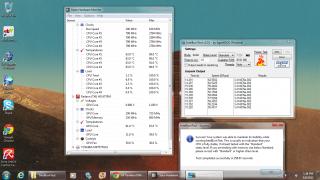
Sifu lee, this is my 2nd test.
this time, i tested without switching on my Radeon HD6770M GPU, the one i tested earlier is while the HD6770M is ON.
The coolsense is set at Performance Optimised, ran under the U2 cooler.
The throttlestop i did what you instructed and this is the result.
So, what can we infer from this result?


Added on August 5, 2011, 4:08 pm
QUOTE(Bboy4Life @ Aug 5 2011, 03:41 PM)
Oh my...Mine even higher  shocking.gif  shocking.gif
I ran intelburntest and my max temp i got is
88c 92c 93c 88c doh.gif  doh.gif
*
You ran under what condition? Can state clearly thee variables? Like, what environment, the coolsense settings, using with or w/o cooler and etc. Can provide more accurate information for the sifus to judge....

This post has been edited by rurushu: Aug 5 2011, 04:08 PM


Attached thumbnail(s)
Attached Image
rurushu
post Aug 5 2011, 09:56 PM

Look at all my stars!!
*******
Senior Member
2,021 posts

Joined: Jun 2011
From: Shah Alam


QUOTE(RiverDrifte @ Aug 5 2011, 04:12 PM)
rurushu, somehow your result seems to be better then me yawn.gif but my temp are lower then yours. mine never passed 1996Mhz wor..
*
Huh? How you know the results are better? And somehow hotter? LOL... what expression should i show? doh.gif doh.gif
QUOTE(lee_what2004 @ Aug 5 2011, 04:19 PM)
@rurushu, did you close that openhardware monitor before doing the second test? Because after disable turbo, the max speed should be 2.0GHz and your hdd quite hot...
*
Erm... sifu lee, when i do the tests for test 01 and test 02, both also i start the openhardware monitor first, then only i ran the intelburntest....
My hdd when idle i think is around 38-41 or 42, when gaming is around 42 or 42.5 degrees.

QUOTE(RiverDrifte @ Aug 5 2011, 04:38 PM)
sifu lee, if compare me and ruru, his result is better but hotter by +-2/3 degree.. so how to get a better result? better thermal paste?

and i also like my HDD at 35~
*
Heh??????? River, you sure my results are better than yours? But yours are cooler than mine!!!! I also thinking maybe is the thermal paste issue.... argh....

QUOTE(lee_what2004 @ Aug 5 2011, 04:42 PM)
Don't think the temp would affect performance much at the 2.0GHz, it could be your background running program..
*
And sifu lee, when i ran the second test, i was buffering youtube videos (although i think they already finished buffering when i ran the 2nd test...)
Does that affects the result?


Added on August 5, 2011, 9:58 pm
QUOTE(chahupping @ Aug 5 2011, 06:35 PM)
mine also hit 95 after 15mins. sad.gif
YES!! Ur video will definitely help everyone!! pls do one.
my temp after doing intelburntest with 10times, standard, under u3, coolest mode in coolsense, optimized performance, and 6:45pm under a normal fan room. normal?? my openhardware cant detect hdd temp even run in admin??
*
Yes, finally i found you!!! I forgot your name but i remember last time got one user also posts high temps when played crysis 2 like mine, but i just cant remember his name!!! Now finally saw you, you not in LYN often?

This post has been edited by rurushu: Aug 5 2011, 09:58 PM

rurushu
post Aug 5 2011, 11:43 PM

Look at all my stars!!
*******
Senior Member
2,021 posts

Joined: Jun 2011
From: Shah Alam


QUOTE(gseed87 @ Aug 5 2011, 11:40 PM)
I accidently unplug the adapter and cause sudden shut down =( will this cause big damage to my laptop?
*
I think the damage sustained is not as big as when you're flashing your BIOS....
rurushu
post Aug 6 2011, 12:54 AM

Look at all my stars!!
*******
Senior Member
2,021 posts

Joined: Jun 2011
From: Shah Alam


QUOTE(lee_what2004 @ Aug 6 2011, 12:05 AM)
On the second test, before you open openhardwaremonitor, the throttlestop turn on or off ? If still off, then its normal for the 2nd screenshot to show cpu max at 2.8ghz

*
On the second test, i still open the openhardwaremonitor first, then only i open the throttlestop, at that time it is turned off because that is the first time i open the throttlestop.
So in the end sifu lee, my temps are normal? rclxub.gif

QUOTE(gseed87 @ Aug 6 2011, 12:23 AM)
I decided not to pull out the battery anymore  sad.gif  Better i change the battery than change the laptop hardware..although got warranty..


Added on August 6, 2011, 12:25 am
Ya..this baby just 2 days old..abit heart pain..i should not pull out = =..when i i put in the battery, nothing happen. But when i pull out, shits happen..damn la
*
LOL.... me only first day use got put battery... after that every time i use also without battery... why you guys plugged out the cable so fast? Me always let the whole thing shut down and no LED lights on my lappy, then after i plugged out the cooler and the external mouse only i switched off the power and plugged out.... sweat.gif sweat.gif sweat.gif
rurushu
post Aug 6 2011, 01:47 AM

Look at all my stars!!
*******
Senior Member
2,021 posts

Joined: Jun 2011
From: Shah Alam


QUOTE(gseed87 @ Aug 6 2011, 12:57 AM)
Hais...but if power breakdown, how u going to prevent?never happen to u?

I play starcraft2 with ultra setting got abit lag..not so smooth. Is it normal for this laptop?lol
*
LOL... so far not yet experience power breakdown. If like that then cannot lo, it is not a manipulative variable...
But if you plugged in the battery all the time... o...ok, since you decided that you rather change battery more often then i can comment no more, it's your laptop and preferences anyway... hmm.gif

QUOTE(SRLee @ Aug 6 2011, 01:08 AM)
What about my result for IntelBurnTest? Is there a standard score somewhere?

Conditions:

1. No cooler.
2. Air-conditioned room (23C maybe).
3. Laptop not running any other programs except IntelBurnTest.
4. HP Coolsense set to Performance Optimized Mode.

» Click to show Spoiler - click again to hide... «

*
I think you can compare with moderator acid's results, just a few pages back.
Me still waiting for guidance from sifu lee....
rurushu
post Aug 6 2011, 02:07 AM

Look at all my stars!!
*******
Senior Member
2,021 posts

Joined: Jun 2011
From: Shah Alam


QUOTE(gseed87 @ Aug 6 2011, 01:54 AM)
So u never want to put in the battery when u plugin adapter? hmm.gif  If your area never experience power breakdown for 3 4 years...it maybe safe to do so..i scared already unsure.gif
*
Erm... actually if can i wont take out the battery, but you know, you never knew when you will game or do something that is resource intensive that would heat up the notebook, so im just a little concerned about the battery's wear and tear....
Well, if you're a very forgetful person (sorry, doesnt mean to sound rude) then you better plugged in the battery, because i dont think there's any other way around it hmm.gif
Erm, my area rarely experience power breakdown but of course not NEVER experience breakdown la, well, now that you mentioned it, it makes me wanna keep the battery in.... especially now since i uninstalled crysis 2 so now my lappy is almost tad "empty" with just my animes + anime songs.... laugh.gif

5 Pages « < 3 4 5Top
Topic ClosedOptions
 

Change to:
| Lo-Fi Version
0.0542sec    0.51    7 queries    GZIP Disabled
Time is now: 10th December 2025 - 08:28 AM