

how come when i play rmvb files with mpc-hc, there is no audio??
HP Pavillion DV6-6XXX series Owners Lounge V2, - 91 owners!! FUUUUUUUUUUUUU!!
HP Pavillion DV6-6XXX series Owners Lounge V2, - 91 owners!! FUUUUUUUUUUUUU!!
|
|
 Jul 20 2011, 10:49 PM Jul 20 2011, 10:49 PM
Return to original view | Post
#21
|
 
Junior Member
137 posts Joined: May 2009 
|
how come when i play rmvb files with mpc-hc, there is no audio??
|
|
|
|
|
|
Jul 20 2011, 11:54 PM
Return to original view | Post
#22
|
|
Junior Member
137 posts Joined: May 2009
|
(You are missing a decoder for RealAudio COOK. You can install that by following these steps:
Download the Windows version of binary codec pack for MPlayer. http://www.mplayerhq.hu/design7/dload.html#binary_codec (filename = windows-essential-20071007.zip) Extract only these files from the ZIP archive: cook.dll, pncrt.dll, sipr3260.dll, drv33260.dll, drv43260.dll Put those files in the Windows system folder. That is C:\Windows\System32\ on a 32-bit version of Windows. That is C:\Windows\SysWOW64\ on a 64-bit version of Windows. It is also recommended to disable decoding of RealVideo in ffdshow. That allows usage of the video decoder that you have installed, which should give better a bit performance. ffdshow video decoder configuration -> Codecs -> Set RealVideo 1/2/3/4 to disabled. The instructions above assume that "RealMedia splitter" is already installed. That DirectShow filter is included in the K-Lite Codec Pack. IMPORTANT NOTE #1: The above codecs are 32-bit and will only work with 32-bit players! No 64-bit versions exist! IMPORTANT NOTE #2: MPC is not fully compatible with RealPlayer version 11 and newer. If you have got RealPlayer installed, then the only way to get proper playback in other players to by replacing the file cook.dll that was installed by RealPlayer. Replace it with the version of the file that is included in the ZIP archive mentioned above. You don't need to install any of the other dll files. The location of the file that you should replace is usually: C:\Program Files\Common Files\Real\Codecs\cook.dll The above instructions are 100% guaranteed to work. If it does not work for you it means you did something wrong. Read the instructions again!) is it means can work for 72bit version?? |
|
|
Jul 21 2011, 09:59 PM
Return to original view | Post
#23
|
|
Junior Member
137 posts Joined: May 2009
|
what is the normal discharge rate for intel gc with power safe, min brightness, listening music using beats and doing some research on the internet?? with fully charged battery i gt 3hours+ with -14.9 discharge rate.
|
|
|
Jul 22 2011, 12:34 AM
Return to original view | Post
#24
|
|
Junior Member
137 posts Joined: May 2009
|
QUOTE(aeroxd @ Jul 22 2011, 01:21 AM) k, i'm in now, got my 6108tx today, bought the rm4721 pikom pc fair promo bundle. 3 years onsite warranty?!!! means they go ur house and repair??came with the beats headphones, a printer, a laptop bag, a mouse, windows microsoft office 2010 and 3 years onsite warranty  |
|
|
Jul 22 2011, 05:26 PM
Return to original view | Post
#25
|
|
Junior Member
137 posts Joined: May 2009
|
what the h***?? since when hp offer onsite warranty?? that means my carepack is useless??
hypermarket is selling u3 at rm79 and a free memorycard reader. Its just opposite AllIT store.  just a few steps and u can save rm7. just a few steps and u can save rm7.This post has been edited by chahupping: Jul 22 2011, 05:28 PM |
|
|
Jul 23 2011, 12:58 PM
Return to original view | Post
#26
|
|
Junior Member
137 posts Joined: May 2009
|
QUOTE(rurushu @ Jul 23 2011, 01:55 PM) Guys, yesterday at 12.00 am i tried playing crysis 2 to check my dv6-6114tx's temperature. why dun set to coolsense?? i have the same temp also, but mine worst,1 of the core hit 96, i guess only u and me hit this temp compare to others, i also dun dare to play crysis d. this is the settings/conditions: -played crysis 2 for an hour from 12.00am to 1.00am in the lowest settings -set coolsense to performance optimised -use the U2 coolerpad -in a relatively warm room with no air-condition -set the CPU-Z and GPU-Z running Results: when system is idle, average temperature is around 40 something to 50 something (all the cores and hdd) one hour after playing crysis 2, the temperature shot up to 94 degree celcius!!!! (all cores the max temp is around 90 something and the hdd also) the HD6770M is peaked at 87 degree celcius also.... Guys, is this normal? What should i do to improve the temperature? Now i dont even dare to play crysis 2 after learning the temperature, cant even sleep well yesterday after gaming...  first day when i played, i played for 2 hours+ under the same condition... Any help?   |
|
|
|
|
|
Jul 23 2011, 06:44 PM
Return to original view | Post
#27
|
|
Junior Member
137 posts Joined: May 2009
|
i heard there is onsite warranty for hp, isit true?
|
|
|
Jul 24 2011, 04:49 PM
Return to original view | Post
#28
|
|
Junior Member
137 posts Joined: May 2009
|
my temp after playing crysis 2 under normal fan with u3 and coolest mode.
i knw its quite high compare to others, but can i still play?? will it affect my laptop?? Attached thumbnail(s) 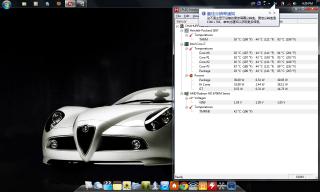
|
|
|
Jul 24 2011, 06:26 PM
Return to original view | Post
#29
|
|
Junior Member
137 posts Joined: May 2009
|
[quote=Acid_RuleZz,Jul 24 2011, 06:11 PM]
When the CPU temp reach 100c it will throttled down to prevent damage. so means be4 100c, the temp is still acceptable?? will it have any side effect on long term?? |
|
|
Jul 24 2011, 07:59 PM
Return to original view | Post
#30
|
|
Junior Member
137 posts Joined: May 2009
|
QUOTE(Acid_RuleZz @ Jul 24 2011, 07:39 PM) You'll see wear level varied everytime you recharge. i nt sure mine is 6114 or 6001? how to check? i heard there is onsite warranty, but i donno whether my 3 years warranty carepack include, any idea how to check? The performance will drop when throttled down. Yes. Side effect.. maybe the components around it will degrade faster.  Other 6114TX owner also having high temps like you? If only you better go to HP service centre to check. Previously joonwei sent his laptop to repair his speaker and it took 1 week. reevephon sent to service centre to repair his keyboard and it only took 30mins i think. Applying thermal paste is a quick job.. maybe u'll get the laptop on the same day. |
|
|
Jul 30 2011, 11:09 PM
Return to original view | Post
#31
|
|
Junior Member
137 posts Joined: May 2009
|
QUOTE(j-insigh @ Jul 30 2011, 11:50 PM) I got the Black color one but certainly not helping you by proving wat color beneath the nice black color that super match our lappie. i have been trying to find the keyboard protector, what brand is that? where to get? how much? |
|
|
Aug 2 2011, 03:29 PM
Return to original view | Post
#32
|
|
Junior Member
137 posts Joined: May 2009
|
QUOTE(Acid_RuleZz @ Aug 2 2011, 04:41 AM) ArticSilver.. don't have IC7 at my disposal at the moment. suddenly i hope acid just stay next to my house, so that he can reapply the thermal paste for me. any link to show step by step? bringing to hp service centre is way too far for me and they may not do it properly just simply check and tell me its done. |
|
|
Aug 5 2011, 06:35 PM
Return to original view | Post
#33
|
|
Junior Member
137 posts Joined: May 2009
|
QUOTE(rurushu @ Aug 4 2011, 11:51 PM) o.O.... ok, well, it is still ok la... since you need it urgently. No harm with your 6001tx right? mine also hit 95 after 15mins.  Why everyone's temp is so low one.... Mine played crysis 2 with U2 cooler with Coolsense Performance optimised mode the CPU temp is 92-95 degrees and the GPU is 86-88degrees.... I brought to HP service centre twice already and they said the temp is normal.... any other clue to why my 6114tx temperature so high??? QUOTE(RiverDrifte @ Aug 5 2011, 03:42 PM) not diamond ah? we on the same page? YES!! Ur video will definitely help everyone!! pls do one. I mean i am going to get the ic7 diamond thermal paste. I mean i am going to get the ic7 diamond thermal paste.Might even make a video of me doing  adui.. this 1 will never end la..  my view on politics is totally different from everyone else my view on politics is totally different from everyone else  so i never give much hope on local politics. so i never give much hope on local politics.my temp after doing intelburntest with 10times, standard, under u3, coolest mode in coolsense, optimized performance, and 6:45pm under a normal fan room. normal?? my openhardware cant detect hdd temp even run in admin?? This post has been edited by chahupping: Aug 5 2011, 06:48 PM Attached thumbnail(s) 
|
|
|
Aug 5 2011, 08:39 PM
Return to original view | Post
#34
|
|
Junior Member
137 posts Joined: May 2009
|
QUOTE(Momojii @ Aug 5 2011, 07:56 PM) your temperature is higher than mine though o_O. Are you sure you set it to coolest mode cause everytime you restart your computer without the battery it will get reset.. im sure, i set it everytime i login. |
|
Topic ClosedOptions
|
| Change to: |  0.0470sec 0.0470sec
 0.90 0.90
 7 queries 7 queries
 GZIP Disabled GZIP Disabled
Time is now: 11th December 2025 - 05:56 AM |
 Quote
Quote