Welcome Guest ( Log In | Register )

Bump Topic Topic Closed RSS Feed
27 Pages « < 24 25 26 27 >Bottom

Outline · [ Standard ] · Linear+

 Digital TV Station Malaysia, How do I tune to digital TV station?

views
     
joshhd
post Oct 19 2019, 09:33 PM

Look at all my stars!!
*******
Senior Member
7,799 posts

Joined: Dec 2014
From: Malaysia


QUOTE(nunogomes21 @ Oct 19 2019, 07:39 PM)
But i already have a tv with built it DVBT2. Can i cause by the cable since i am not using RG6 type cable. I did went to hardware shop to survey the RG6 cable but they said its only for astro since the cable connection end is screw type and not suitable for connection to tv or wall mounted socket. Any idea how to use the RG6 cable for digital tv?
*

That hardware shop guy is not wrong. RG6 cable is indeed uses for satellite TV like Astro. All along was like that, but decades ago it wasn't well known to use it for terrestrial TV. But today, the RG6 coaxial cable is also commonly used for terrestrial TV. It is better than others, as it is shielded and has minimal loss due to attenuation especially if the cable length is long.
So basically you can say that RG6 cable can be used for both digital TV and satellite TV (Astro).
Also, get those normal and affordable ones (usually cable in white colour) are pretty much good enough already. Not necessary must get those expensive ones.

As for the connector, you can use this connector socket:
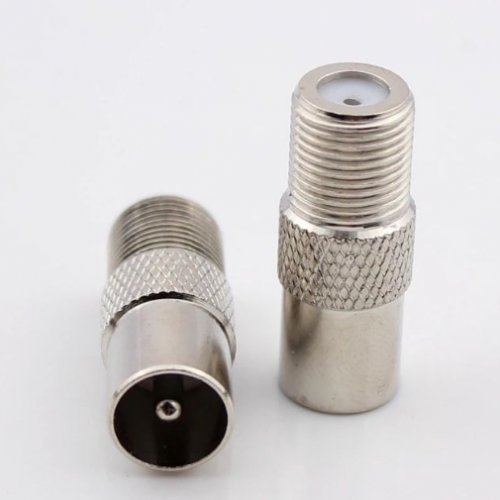
user posted image
So anytime, you can just screw this connector socket, and connect to your TV to receive digital TV.

https://shopee.com.my/F-Type-Screw-Connecto...2699.2822820814
*The link above is just for reference. I'm not affiliated to this seller.

Although your TV has built in DVB-T2, you can still try use a DVB-T2 box (maybe ask your neighbour/friend to lend you for a while to test) and see if you can get the signals. If the digital TV box can receive all channels without issues, then perhaps there's something wrong with your TV's built in DVB-T2 tuner (unlikely would happen la, but no harm trying though...). But anyhow, try change to RG6 cable first.

This post has been edited by joshhd: Oct 19 2019, 09:43 PM
joshhd
post Oct 20 2019, 11:34 AM

Look at all my stars!!
*******
Senior Member
7,799 posts

Joined: Dec 2014
From: Malaysia


QUOTE(AV_2018 @ Oct 20 2019, 10:59 AM)
I just directly terminate my RG6 with Beiling-Lee/PAL connectors.
*

Can also...
But for me, I prefer using "F connector to Belling Lee connector" type of converter so that I can easily interchange between Astro and UHF antenna, by using the same RG6 cable. That's also why I highly recommend RG6 cable for multi purposes (2 in 1, satellite and terrestrial) for TV.

Example, let say if I don't use satellite TV (Astro) anymore, I can still use back the same RG6 cable to connect to my outdoor UHF antenna, no rewiring or new separate cable needed. Just change the necessary connectors only.
joshhd
post Oct 20 2019, 12:04 PM

Look at all my stars!!
*******
Senior Member
7,799 posts

Joined: Dec 2014
From: Malaysia


QUOTE(dayojah @ Oct 20 2019, 11:45 AM)
RG6 is the cheapest and most available low loss cable
A lot of old TV coax is rubbish, minimal shielding or solid and lossy dielectric intended for the original RTM1 low band VHF
*

Besides 3C-2V and 5C-2V coaxial cables which was commonly used for terrestrial TV during the 70s-80s, is there any other cable types used for receiving analogue terrestrial TV back in the old days in Malaysia?

Some people tried using their existing old 3C-2V or 5C-2V cables (either used or abandoned for analogue TV reception last time) to try receive digital TV signals, some can get signal (especially using signal boosters), some would experience unstable or no signal at all.

In simple words, it is considered as old and rubbish cable in today's context.

Might as well as replace to RG6 coaxial cable to get the best reception possible in the area (subject to antenna and surroundings), and the use of older signal boosters for analogue TV are not longer needed, or must not be in use to receive digital TV.

Correct me if I'm wrong.

This post has been edited by joshhd: Oct 20 2019, 12:05 PM
joshhd
post Oct 20 2019, 09:55 PM

Look at all my stars!!
*******
Senior Member
7,799 posts

Joined: Dec 2014
From: Malaysia


QUOTE(AV_2018 @ Oct 20 2019, 07:50 PM)
In addition, for DVB-T2 frequencies that are near 680MHz, a properly shielded and terminated RG6 cable is needed and it shall be kept as far away from HDMI ports and cables as possible or at least not in parallel. This is because some HDMI cables transmitting 1080p signal can interfere with such frequencies and cause the signal quality to drop. This is from my experience and confirmed by the HDMI clock frequency in the HDMI 1.3 specification. To test if it is HDMI interference, turn off all HDMI source devices when monitoring DVB-T2 signal levels.
*

Is it every HDMI devices will have such interference, or only certain kind of devices?

QUOTE(teamjoker @ Oct 20 2019, 09:30 PM)
So far my condo can only see these channels:
TV1 TV2 TV Okey
HD SPORTS
BES
Signal strength only about 69%
Already do full scan many times.
What should I do next to receive 8tv and ntv7 channels?
Thks
*

What is your location (city and state)? Have you tried manual scan (enter frequency manually and scan for channels)?
joshhd
post Oct 20 2019, 10:52 PM

Look at all my stars!!
*******
Senior Member
7,799 posts

Joined: Dec 2014
From: Malaysia


QUOTE(teamjoker @ Oct 20 2019, 09:59 PM)
Kota damansara. Have not tried manual scan yet. Where to get the frequency info? Thks.
*

Since you're in Klang Valley area, just manual scan this frequency 666MHz (also known as Channel 49) to get Media Prima and other channels.
joshhd
post Oct 20 2019, 11:56 PM

Look at all my stars!!
*******
Senior Member
7,799 posts

Joined: Dec 2014
From: Malaysia


QUOTE(dayojah @ Oct 20 2019, 10:00 PM)
3C-2V is 41dB/100m @ 750 MHz
5C-2V is 29dB/100m @ 750 MHz
RG6 is 18dB/100m @ 750 MHz

The 3C-2V should be skipped, the 5C-2V is ok at shorter lengths if in good condition
*

Ohh I see...
But when someone can't get digital TV signals, and then
"I don't know what is my cable type. My wiring there doesn't have any labels, and didn't state if it's 3C-2V, 5C-2V or RG6 or RG6/U."

If ask them to identify and "measure" the cable diameter seems a little impractical and would likely give up to go and "measure" this kind of things. 😂😂😂

If this happens, how would you advise the person to check what's the cable type? Or just ask, the cable has been there for how many years already? If the cable is more than 10 years ago, advise them to just change new one, or how? (If the cable has already 10+ years, it shouldn't be a big problem, isn't it? hmm.gif )

QUOTE(keatliang2005 @ Oct 20 2019, 10:34 PM)
thanks for the insight
smile.gif
for past two days, i was unable to resolve, unable to received RTM based channel, and only prima media one. signal strength is about 54%, now i isolate the hdmi cable with aluminium foil. and it works.  rclxms.gif

my antenna is high rise building master antenna system.

hope this help others  thumbup.gif
*

Wow... I didn't know that. biggrin.gif
Can you take photo of what you did to your HDMI cable, like how you shield the cable with aluminium foil.
Thanks a lot biggrin.gif
joshhd
post Oct 21 2019, 11:25 AM

Look at all my stars!!
*******
Senior Member
7,799 posts

Joined: Dec 2014
From: Malaysia


QUOTE(AV_2018 @ Oct 21 2019, 10:55 AM)
True. It is possible also. But from what I see, they put all the blame to the viewers of not able to receive strong and stable DTT signal.
They must be receiving overwhelming negative responses from netizens and MCMC.

I'm pretty sure many people didn't realise that poorly shielded HDMI cable can cause interference to TV signals. They should first advice users to unplug or power off every single devices near TV that uses HDMI (like Astro, android TV box, karaoke system, home theater system and others). Once it's off or unplugged, then only scan for channels and monitor the signal readings while aslifn antenna until uou get signal. As you turn on the devices one by one. When one device causes significant signal drop, or become no signal, go change to another hdmi cable.


According to the company, frequency restack (within 470-690MHz) can be done in 6 months after analogue switch off. So have to wait for few months then only we shall see some improvements.

And I hope MYTV will increase the video and audio bitrate to at least 6Mbps and 80kbps HE-AAC V1 respectively.


joshhd
post Oct 22 2019, 02:38 AM

Look at all my stars!!
*******
Senior Member
7,799 posts

Joined: Dec 2014
From: Malaysia


QUOTE(dayojah @ Oct 21 2019, 10:42 PM)
Restacking will help for several reasons, but interference levels rise if anything at lower frequencies.

Path loss from the transmitter to your home is lower
Cable losses lower
Rain and wet roof loss lower
Receiver sensitivity usually better
*

Hmmm... I have some questions wanna ask...
<600MHz = frequencies lower than 600MHz (example 470-606MHz)
>600MHz = frequencies above 600MHz (example 606-742MHz)


1. If the <600MHz part of UHF frequency seems to bring more benefit than >600MHz, and once analogue TV has fully switched off, what are the other benefits of using >600MHz then?
Seems that >600MHz brings more disadvantages than advantage to me.

And why some other countries (assuming already complete ASO), still uses >600Mhz frequencies for DTT if using frequencies that are <600MHz brings more benefit?

QUOTE
Restacking will help for several reasons, but interference levels rise if anything at lower frequencies.
2. What are the other things that is on <600MHz which could potentially cause interference? Wireless microphones? hmm.gif

3. Once 700MHz is used for 4G/5G, how would it affect viewers that uses UHF antenna that supports almost entire range of UHF TV frequency (e.g. 470-869MHz)?
If the DTT frequencies is re-stacked to <600MHz, will 4G/5G signal from 700MHz band still causes interference to those DTT reception?

4. What if someone can't get digital TV signals yet not sure what's the cable type used, especially if the cable jacket doesn't have any labels like 3C-2V, 5C-2V or RG6 or RG6/U?
Not everyone knows how, and willing to identify/measure the cable diameter like that. If this happens, how would you advise the person to check what's the cable type?
(At least if the person knows that if it's RG6 type, then at least it is safe to assume the cable type is ideal, and unlikely experience much cable loss like 3C-2V type (unless cable is damaged).
joshhd
post Oct 22 2019, 11:43 AM

Look at all my stars!!
*******
Senior Member
7,799 posts

Joined: Dec 2014
From: Malaysia


QUOTE(dayojah @ Oct 22 2019, 07:46 AM)
1) The only reason for using >600MHz is shortage of channels, eg Singapore is currently allocated all of the 500MHz block - a ridiculous situation with DTTV
The USA is already reallocating above 620 MHz for other services

2) Cables tend to radiate more in the VHF than the UHF due to their length, I have seen this in the SIRIM labs many times. The source can be Ethernet, hdmi ( my link above shows plenty of low uhf ), switched mode power supplies and any computer.

3) I have seen MATV systems having to install a low pass filter to reduce LTE interference in Europe

4) If the cable is not marked, it is probably rubbish.
*

1. Let say MYTV to restack its muxes to 474MHz, 490MHz, 506MHz, on top of the benefits mentioned earlier (like better coverage), what are the ways for viewers to prevent interference from other devices like Ethernet, HDMI, and so on, since you say lower frequencies tend to radiate more?

2. How you mean shortage of channels? Once ASO has completed, they can use between 470-690MHz, so how shortage of channels is it?

3. Hmm, why Singapore is allocated with entire 500MHz block, yet their channels only has 6. I got the info that they seem to transmit blank signals, like 594MHz and 602MHz. Means, there is pretty strong signal being transmitted but no channel inside. Any idea why?

4. Does that mean every DTT viewers in Malaysia must use a low pass filter (4G LTE filter) to prevent interference, even if the DTT muxes are on 474, 490 and 506MHz? If yes, then why MCMC or any telcos didn't mention that such issue will arise if 700MHz is use for 4G/5G, like they kept quiet about it?

5. Even if the cable is RG-6 and it's not marked, does it mean it's probably rubbish too? Would u advise the person to change to new cable if there's no markings on the cable jacket, even the cable still works fine and viewer able to receive adequate signal levels?

6. Besides HDMI, cable, antenna, geographical factors.... What are the other possible reasons that may cause viewers to not able to receive DTT signals that we haven't talk about?

This post has been edited by joshhd: Oct 22 2019, 12:21 PM
joshhd
post Oct 27 2019, 06:06 PM

Look at all my stars!!
*******
Senior Member
7,799 posts

Joined: Dec 2014
From: Malaysia


QUOTE(Skylinestar @ Oct 27 2019, 11:13 AM)
But still doesn't explain why I can get 698MHz clearly but not 666MHz.
i found out splitter like this causes too much signal loss  cry.gif doh.gif  or is my termination not good enough  confused.gif
user posted image
*
This is not cable splitter. This is cable joiner. Joiner causes very very minimal signal loss, or you can say almost no loss. Or else, try use other cable joiner.
If you think your cable termination is not good enough, then check your cable's termination or re-do the termination of the cable.

QUOTE(Skylinestar @ Aug 5 2019, 10:31 AM)
The tower is on the opposite side of my house. Lazy to climb up to the rooftop to install mast and antenna. End up just put it at the car porch with cloth hanger, despite 180° opposite direction. (Tried rotating 180° and it seems to make no difference)
On my china tvbox, 80% strength at 698MHz. On Hisense TV, 50%. Silky smooth though.

Poorfag installation. Free from weather extreme.  tongue.gif
user posted image
*

Do you still put your UHF antenna like this? What a waste... Such many elements UHF antenna should be put at higher grounds. If lazy to put on rooftop, then at least put upstairs balcony, somewhere higher or something.
» Click to show Spoiler - click again to hide... «


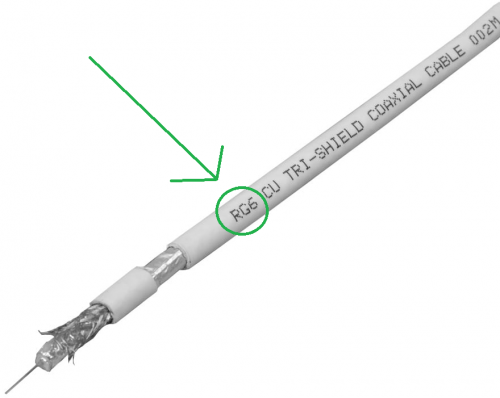
Are you using RG6 coaxial cable? Look through your cable and see if it has the label has the word "RG6" or "RG-6" or something similar labels like "RG-6/U" on the cable's PVC jacket like this:
user posted image
*Note: The "TRI-SHIELD" label is just a reference. Its fine if the cable is Dual Shield or Quad Shield.
If it's not RG-6, or other types of cables (especially thin looking cables like 3C-2V), just get it changed, and rewire your cabling to the new RG-6 coaxial cable.
RG-6 coaxial cable is also used for satellite TV reception, such as Astro.
joshhd
post Oct 27 2019, 06:40 PM

Look at all my stars!!
*******
Senior Member
7,799 posts

Joined: Dec 2014
From: Malaysia


QUOTE(Skylinestar @ Oct 27 2019, 06:18 PM)
Will check out the termination.
Tried upstair balcony before. No difference from putting it on the ground floor.  I wish I can put at rooftop, but don't have tall ladder and any tools and super tall mast to mount properly.
I already shifted the antenna outside a bit, next to my main gate. Previous antenna placement not good enough because signal loss if my opposite neighbor opens his house windows.
*

If still the same, try power off all HDMI devices near your TV (meaning, all equipment that has HDMI output) such as Astro box, karaoke system, Android TV box, Bluray player, etc.
Or you can disconnect the HDMI cable from the equipment/device if not convenient to power off the particular device, but better is power off temporarily.

Some HDMI cables (especially cheap or can't determine good quality or not ones) are known for causing interference to certain UHF frequencies, hence disrupting reception on certain digital TV signals.
It is proven by some users that after powering off/unplug HDMI cable from the devices, it'll suddenly able to receive strong and stable digital TV signals. So I think no harm trying.

If you're using digital TV box to receive digital TV, try replace to another HDMI cable (look for good quality ones, not necessary expensive ones) and see if condition persists.

Let say if after turning off all HDMI devices, then you can get good signal from all 2 muxes, then try power on your HDMI devices one by one.
Then you know which HDMI cable that is connected to the device is causing interference to the TV reception.

This post has been edited by joshhd: Oct 27 2019, 06:43 PM
joshhd
post Oct 27 2019, 07:12 PM

Look at all my stars!!
*******
Senior Member
7,799 posts

Joined: Dec 2014
From: Malaysia


QUOTE(Skylinestar @ Oct 27 2019, 06:48 PM)
Thanks for the tips.
I don't have any HDMI devices. Just a Hisense TV, placed next to my computer. But can interference affects one mux only? 100% quality on tv2 but 0% quality on tv3.
*

There is a possibility. Your computer, is it connected to HDMI cable too? Don't miss out that one...

It depends. That could be one of the reason why some viewers can only receive signals from either one of the 2 muxes.
Even if it's less than 30km line of sight away from transmitter, probably is due to geographical factor like hills, buildings or others.
You'll have to relocate the antenna to somewhere else in and out around your house to see which "sweet spot" can get adequate signals from both frequency muxes, such as a room the back of your house, or upstair's room facing the window or something.
Otherwise, just call MYTV to assign an installer to your house so they'll help you install it on your rooftop.

Or, use in-line amplifier, which I don't think it is the efficient way to solve the issue, considering that you're using a UHF antenna with so many elements yet your installation isn't standard and proper.
joshhd
post Oct 27 2019, 10:30 PM

Look at all my stars!!
*******
Senior Member
7,799 posts

Joined: Dec 2014
From: Malaysia


QUOTE(AV_2018 @ Oct 27 2019, 07:32 PM)
Interference will affect the MUX that is the same frequency as the interfering signal. There should be low chance of interference if the signal strength of DVB-T2 signal is strong and a good, shielded and properly terminated RG6 cable is used for the antenna.
*

All RG-6 cables are shielded, isn't it? It's either dual shield or quad shield. Are there un-shielded RG-6 cables out there anyway?
I wanna ask a very detail questions. Hope you don't mind:

1. Is there an easy way to identify if the HDMI cable is "sh*t quality" or very likely that it will cause RF interference which ultimately can affect DTT signals?

2. Is there any specific or approximate distance from the faulty HDMI cable that causes interference to the RG6 cable? 1 metre apart? 2 metres apart?

3. Which part of the RG6 cable are likely to cause harmful interference by HDMI first? Is it the F connector part that connects to digital TV box/IDTV or the outdoor UHF antenna? Or the RF interference can simply affect throughout the RG6 cable?

4. What if the HDMI cable that causes interference is positioned at very close to the outdoor UHF antenna? Will that affect the reception too?

5. Is there a way to "create a shield" to mitigate or avoid RF interference altogether for the user's existing faulty/poor quality HDMI cable?
joshhd
post Oct 28 2019, 08:30 PM

Look at all my stars!!
*******
Senior Member
7,799 posts

Joined: Dec 2014
From: Malaysia


QUOTE(dayojah @ Oct 28 2019, 07:18 PM)
Use RG6 and the cable attenuation will only be about 4dB, so no point in using a booster.
Getting the antenna a bit higher and the cable connected main element away from other metal like that metal frame will have far more benefit.
*

But I somehow don't really understand how come some users (especially still using old wiring and antenna), have to power on the masthead amplifier (booster) to get digital TV signals. I'm referring to the masthead amplifier used during the old analogue TV era (e.g. typically the orange box under rooftop UHF antenna, and a small white box near TV that connects to power).
They need to power it on to receive digital TV signals.
If they power it off, no signal. Or some users is, if power on the masthead amp, no signal, but once power off, it'll have signal but not high and unstable.

Is it because the antenna used is degraded cable or it's not RG-6? Or the antenna is too little "elements" or not powerful enough? Or simply because TV transmitter distance is too far away? Or what?

This is kinda contradicting, cuz some or many people may think that to receive digital TV signals today, using a masthead amplifier (booster) is as necessary as getting analogue TV reception like decades ago. Cuz some users find that without booster, they can't get adequate or no signal at all.

Changing/rewire to the new RG-6 cable will greatly improve the signal reception, so does it "guarantees" that digital TV viewers today are seriously no need to use masthead amplifier (booster) anymore and they can throw it away already? As long is:

Outdoor UHF antenna + RG6 cable (properly terminated) = You've tried your best to get digital TV signal.

This post has been edited by joshhd: Oct 28 2019, 08:32 PM
joshhd
post Oct 28 2019, 10:23 PM

Look at all my stars!!
*******
Senior Member
7,799 posts

Joined: Dec 2014
From: Malaysia


QUOTE(silrave @ Oct 28 2019, 10:03 PM)
hi
now the normal tv channel cant receive
can i know go where apply the tv box and support to watch tv
*

The "normal TV" that you can't receive anymore, is called analogue TV.
it has replaced with digital TV (数码电视 in Mandarin). To continue watching TV using antenna, there's 2 ways:
1) Buy a brand new TV
2) Buy DVB-T2 digital TV converter box, which you can easily purchase online:
https://shopee.com.my/SIRIM-MCMC-Certified-...3781.2251258034
https://shopee.com.my/MYTV-Decoder-Siaran-D...84212.792302418

As for the installation instructions and things to take note, just scroll up and read previous posts.

This post has been edited by joshhd: Oct 28 2019, 10:24 PM
joshhd
post Oct 29 2019, 12:18 AM

Look at all my stars!!
*******
Senior Member
7,799 posts

Joined: Dec 2014
From: Malaysia


QUOTE(silrave @ Oct 28 2019, 11:33 PM)
do some research means i need buy the box and digital antenna in order to use the digital tv right ?
*

Can you share with us your TV brand and model number, and a photo of your TV antenna?
And you live in which town/city?
joshhd
post Oct 29 2019, 02:18 AM

Look at all my stars!!
*******
Senior Member
7,799 posts

Joined: Dec 2014
From: Malaysia


QUOTE(silrave @ Oct 29 2019, 01:27 AM)
those old old big tv XD
but got color de
at kampung muhibah consider kl or puchong
antenna is those old cheap cheap antenna
*

Ohh if that's the case, you'll need to buy digital TV box then.
Your old cheap antenna, is it indoor or outdoor type?

You can try use back the antenna if it's the UHF type, not necessary must buy new antenna first. But if you're using the old VHF antenna then yes, you got to buy new UHF antenna.
You buy the digital TV box first, then try connect to your old antenna you have now.
And make sure you're using RG-6 coaxial cable for greater signal performance.
If still can't get signal, then only consider buy new UHF antenna. Outdoor type is highly recommended.

https://shopee.com.my/ME-16E-DIGITAL-TV-ANT...8079.3106879949
https://shopee.com.my/Digital-Antenna-UHF-H...38079.313253815
*These links are just for reference. I'm not related to this seller.
joshhd
post Oct 29 2019, 06:53 PM

Look at all my stars!!
*******
Senior Member
7,799 posts

Joined: Dec 2014
From: Malaysia


QUOTE(nickelkadmium @ Oct 29 2019, 06:30 PM)
Hi,

I just bought a samsung smart tv NU7090 series 7.

Plugged in the coaxial cable to the tv and apartment tv wall socket. Started searching, but cant find any digital channel. How do i fix this?

My coaxial cable is like the screw type at the end, iv screwed the f adapter to it.

Do i need to call my apartment management to ask if the apartment has the correct antenna?

I asked samsung and the support person advised me to get a UHF indoor antenna
*

Yes, contact your building management to see if they've upgraded their centralised, master antenna to support digital TV reception. If they've not upgrade their system, tell them to upgrade and ask when will it be done.
Alternatively, try connect another F-Type Female to PAL Male Adapter if you have one (just in case, although very unlikely, the adapter is not working well).

Or else, get an good indoor UHF antenna, or a smaller outdoor UHF antenna (e.g. JP-5E) and place it somewhere near TV (not necessary must install outside, although it is better if install outside).
joshhd
post Oct 29 2019, 11:18 PM

Look at all my stars!!
*******
Senior Member
7,799 posts

Joined: Dec 2014
From: Malaysia


QUOTE(Jacli @ Oct 29 2019, 10:43 PM)
My antenna is the cheap rabbit ears type. Not sure its UHF or not.
*

Which city/town did you live?
Landed terrace house or high rise (apartment)?
joshhd
post Oct 30 2019, 10:20 AM

Look at all my stars!!
*******
Senior Member
7,799 posts

Joined: Dec 2014
From: Malaysia


QUOTE(Jacli @ Oct 30 2019, 10:03 AM)
Landed terrace house in wangsa maju
*

It is known that certain areas in Wangsa Maju has some reception. Anyone stay in Wangsa Maju here, do share your experience of the reception.

You got to use outdoor UHF antenna for better reception. If you dont have one, or u have one but many years already, consider change new antenna and RG6 coaxial cable. Make sure no signal boosters are used.

27 Pages « < 24 25 26 27 >Top
Topic ClosedOptions
 

Change to:
| Lo-Fi Version
0.8500sec    0.86    7 queries    GZIP Disabled
Time is now: 14th December 2025 - 11:53 AM