Welcome Guest ( Log In | Register )

Outline · [ Standard ] · Linear+

 NVIDIA Geforce GT540M POISON!, Gameplay Videos + Reviews

views
     
younik
post Mar 20 2012, 02:47 AM

Getting Started
**
Junior Member
93 posts

Joined: Sep 2009


QUOTE(Acid_RuleZz @ Mar 20 2012, 02:34 AM)
Have you install MSI Afterburner yet? Want to check whether Optimus actually working on your system. hmm.gif

Link: MSI Afterburner Beta 14
*
thanx for the link
downloading rite now
will try tomorrow
thanx again bros
smile.gif
Ivan113
post Mar 20 2012, 03:20 AM

Enthusiast
*****
Senior Member
925 posts

Joined: Apr 2011
anyone using GT520M?
younik
post Mar 20 2012, 02:32 PM

Getting Started
**
Junior Member
93 posts

Joined: Sep 2009


QUOTE(Acid_RuleZz @ Mar 20 2012, 02:34 AM)
Have you install MSI Afterburner yet? Want to check whether Optimus actually working on your system. hmm.gif

Link: MSI Afterburner Beta 14
*
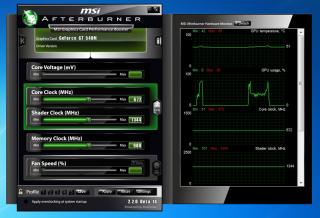
done installing bro
Attached Image
what should i check actually? tongue.gif

Acid_RuleZz
post Mar 20 2012, 02:49 PM

ミウ ❤
*******
Senior Member
6,612 posts

Joined: Jan 2003
From: Tomorrow


QUOTE(younik @ Mar 20 2012, 02:32 PM)
done installing bro
Attached Image
what should i check actually?  tongue.gif
*

Click setting, go to On-Screen Display tab and set Toogle On-Screen Display hotkey. After that play Fifa12 and enable the OSD.
Need you to monitor the Core Clock, Memory Clock, FPS and GPU Usage.

And take post screenshot of it if you can. laugh.gif
younik
post Mar 20 2012, 07:20 PM

Getting Started
**
Junior Member
93 posts

Joined: Sep 2009


QUOTE(Acid_RuleZz @ Mar 20 2012, 02:49 PM)
Click setting, go to On-Screen Display tab and set Toogle On-Screen Display hotkey. After that play Fifa12 and enable the OSD.
Need you to monitor the Core Clock, Memory Clock, FPS and GPU Usage.

And take post screenshot of it if you can. laugh.gif
*
ok this is what i managed to get
does this make any sense to u all?
(sory la i dono what to look for) tongue.gif
Attached Image
tis was while i play fifa with a bit of lag and stuttering


Acid_RuleZz
post Mar 20 2012, 07:32 PM

ミウ ❤
*******
Senior Member
6,612 posts

Joined: Jan 2003
From: Tomorrow


QUOTE(younik @ Mar 20 2012, 07:20 PM)
ok this is what i managed to get
does this make any sense to u all?
(sory la i dono what to look for)  tongue.gif
tis was while i play fifa with a bit of lag and stuttering
*

Go here and do No.1 and No.2. After that play Fifa and press the Hotkey u just set on No.2(in my case Alt + Num-) to enable On-screen Display(OSD) in game like the image below (top right).
» Click to show Spoiler - click again to hide... «


Need you to check the GPU usage (%) while playing Fifa12. If 0% i guess that mean you're not using GT540M. hmm.gif
younik
post Mar 20 2012, 07:32 PM

Getting Started
**
Junior Member
93 posts

Joined: Sep 2009


other two shots that might be of your interests

Attached Image

Attached Image

do advice me ok guys
thanx
blush.gif


Added on March 20, 2012, 7:37 pm
QUOTE(Acid_RuleZz @ Mar 20 2012, 07:32 PM)
Go here and do No.1 and No.2. After that play Fifa and press the Hotkey u just set on No.2(in my case Alt + Num-) to enable On-screen Display(OSD) in game like the image below (top right).
» Click to show Spoiler - click again to hide... «


Need you to check the GPU usage (%) while playing Fifa12. If 0% i guess that mean you're not using GT540M. hmm.gif
*
ohhhh
ok2
will try again


Added on March 20, 2012, 8:01 pm
QUOTE(Acid_RuleZz @ Mar 20 2012, 07:32 PM)
Go here and do No.1 and No.2. After that play Fifa and press the Hotkey u just set on No.2(in my case Alt + Num-) to enable On-screen Display(OSD) in game like the image below (top right).
» Click to show Spoiler - click again to hide... «


Need you to check the GPU usage (%) while playing Fifa12. If 0% i guess that mean you're not using GT540M. hmm.gif
*
aiyaaa suddenly cannot attached the screenshot
nvm
i'll write here


GPU: 64'C, 32%, 672MHz, 1344MHz
MEM: 900MHz, 212 MB
D3D9: 32.5 FPS


Added on March 21, 2012, 5:16 pmthis is the latest reading

GPU: 65'C, 30%,672Mhz,1344MHz
MEM: 900MHZ, 206MB
D3d9: 35.5 FPS (aiyoooo)

hmm
at the menu
i got 60.1 FPS
but during gameplay, the reading was 35.5 FPS
after installing i havent change any setting at the nvidia control panel
i did right click run with high performance gc to play fifa though


This post has been edited by younik: Mar 21 2012, 05:16 PM

DWExia
post May 17 2012, 01:21 PM

Getting Started
**
Junior Member
140 posts

Joined: Dec 2009
Hi guys I have a question

I plan to update my Nvidia Gt540M driver however everytime it will say Nvidia installation failed.

Any way to fix this
hoodidi
post May 22 2012, 05:25 PM

Getting Started
**
Junior Member
134 posts

Joined: Jun 2010
NICE ~ INFO
hafzsan
post Jul 1 2012, 02:11 PM

New Member
*
Newbie
1 posts

Joined: Jul 2012
Hello...
i have problem with my laptop
i have 5750G acer aspire laptop. it's run smooth but when i open games..
eg: Residen Evil 5 & Dungeon Siege 3. Even at minimum graphic..
it shutdown when play about 15-30minute..
i think overheat problem.. anyone can guide me how to clean my acer laptop airflow??
anyway i already update the nvidia driver..
thank you...

29 Pages « < 27 28 29Top
 

Change to:
| Lo-Fi Version
0.0249sec    0.16    6 queries    GZIP Disabled
Time is now: 7th December 2025 - 01:07 PM