Welcome Guest ( Log In | Register )

Outline · [ Standard ] · Linear+

 NVIDIA Geforce GT540M POISON!, Gameplay Videos + Reviews

views
     
younik
post Mar 19 2012, 11:33 PM

Getting Started
**
Junior Member
93 posts

Joined: Sep 2009


hi guys
my laptop runs i5 2430 M 2.4Ghz with GT 540 M 2Gb
the problem is, play fifa 12 and pes 12 lagging kaw2 one

i followed the tips from here:

http://eins.my/tips-optimize-gaming-on-nvi...-gpu/#more-4058

but i didnt OC of course

and updated my gc driver with this:

http://www.geforce.com/Drivers/Results/42588

still the gameplay lagging one

how can i optimize my system to play smoothly like dis:

http://www.youtube.com/watch?v=OZHqau7rQ7Q

can somebody please be my savior!

i saw someone with the name skeleton202 posted this in the 2nd page of the thread

QUOTE
at 1st i've doubt bout tis card where lag playin with low setting on pes , two world , assasin creed..

but the root of tis is the auto-switch gpu system made by nvidia =.='
may i know, did he ever get the solution because i really do need one
thanx in advance guys!
smile.gif


younik
post Mar 20 2012, 01:43 AM

Getting Started
**
Junior Member
93 posts

Joined: Sep 2009


QUOTE(Ngto @ Mar 20 2012, 01:09 AM)
I see you still haven't solved your problems, huh ? smile.gif

Try this (I read from another thread but Desktop PC, different card 550 Ti), but it's worth a try. See whether you have this  Asus utility called GamerOSD installed on your system. If so, uninstall it and then reboot and reinstall the Nvidia drivers.

Worth a try, nothing to lose smile.gif
*
searched for it, but there's no GamerOSD in the system
hmm
sad.gif
younik
post Mar 20 2012, 02:47 AM

Getting Started
**
Junior Member
93 posts

Joined: Sep 2009


QUOTE(Acid_RuleZz @ Mar 20 2012, 02:34 AM)
Have you install MSI Afterburner yet? Want to check whether Optimus actually working on your system. hmm.gif

Link: MSI Afterburner Beta 14
*
thanx for the link
downloading rite now
will try tomorrow
thanx again bros
smile.gif
younik
post Mar 20 2012, 02:32 PM

Getting Started
**
Junior Member
93 posts

Joined: Sep 2009


QUOTE(Acid_RuleZz @ Mar 20 2012, 02:34 AM)
Have you install MSI Afterburner yet? Want to check whether Optimus actually working on your system. hmm.gif

Link: MSI Afterburner Beta 14
*
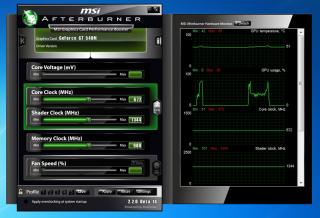
done installing bro
Attached Image
what should i check actually? tongue.gif

younik
post Mar 20 2012, 07:20 PM

Getting Started
**
Junior Member
93 posts

Joined: Sep 2009


QUOTE(Acid_RuleZz @ Mar 20 2012, 02:49 PM)
Click setting, go to On-Screen Display tab and set Toogle On-Screen Display hotkey. After that play Fifa12 and enable the OSD.
Need you to monitor the Core Clock, Memory Clock, FPS and GPU Usage.

And take post screenshot of it if you can. laugh.gif
*
ok this is what i managed to get
does this make any sense to u all?
(sory la i dono what to look for) tongue.gif
Attached Image
tis was while i play fifa with a bit of lag and stuttering


younik
post Mar 20 2012, 07:32 PM

Getting Started
**
Junior Member
93 posts

Joined: Sep 2009


other two shots that might be of your interests

Attached Image

Attached Image

do advice me ok guys
thanx
blush.gif


Added on March 20, 2012, 7:37 pm
QUOTE(Acid_RuleZz @ Mar 20 2012, 07:32 PM)
Go here and do No.1 and No.2. After that play Fifa and press the Hotkey u just set on No.2(in my case Alt + Num-) to enable On-screen Display(OSD) in game like the image below (top right).
» Click to show Spoiler - click again to hide... «


Need you to check the GPU usage (%) while playing Fifa12. If 0% i guess that mean you're not using GT540M. hmm.gif
*
ohhhh
ok2
will try again


Added on March 20, 2012, 8:01 pm
QUOTE(Acid_RuleZz @ Mar 20 2012, 07:32 PM)
Go here and do No.1 and No.2. After that play Fifa and press the Hotkey u just set on No.2(in my case Alt + Num-) to enable On-screen Display(OSD) in game like the image below (top right).
» Click to show Spoiler - click again to hide... «


Need you to check the GPU usage (%) while playing Fifa12. If 0% i guess that mean you're not using GT540M. hmm.gif
*
aiyaaa suddenly cannot attached the screenshot
nvm
i'll write here


GPU: 64'C, 32%, 672MHz, 1344MHz
MEM: 900MHz, 212 MB
D3D9: 32.5 FPS


Added on March 21, 2012, 5:16 pmthis is the latest reading

GPU: 65'C, 30%,672Mhz,1344MHz
MEM: 900MHZ, 206MB
D3d9: 35.5 FPS (aiyoooo)

hmm
at the menu
i got 60.1 FPS
but during gameplay, the reading was 35.5 FPS
after installing i havent change any setting at the nvidia control panel
i did right click run with high performance gc to play fifa though


This post has been edited by younik: Mar 21 2012, 05:16 PM


Change to:
| Lo-Fi Version
0.0274sec    0.53    7 queries    GZIP Disabled
Time is now: 9th December 2025 - 04:14 PM