Outline ·
[ Standard ] ·
Linear+
HP Pavillion DV6-6XXX series Owners Lounge, ~thou shall read 1st post or get troll.
|
joonwei23
|
 May 3 2011, 10:31 PM May 3 2011, 10:31 PM
|

|
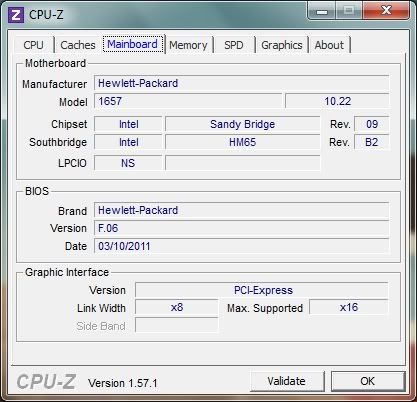
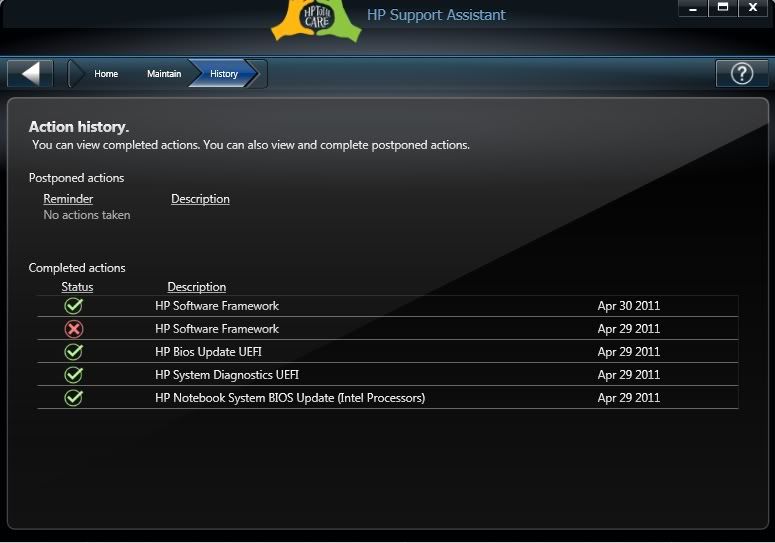
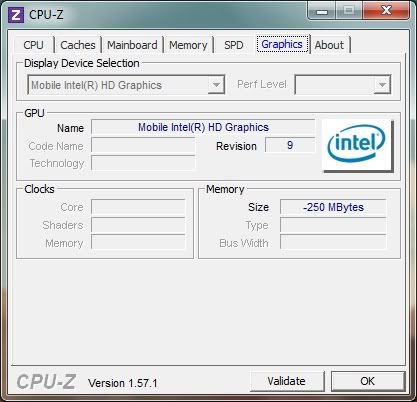
QUOTE(kenhirai83 @ May 3 2011, 10:27 PM) Had tried to restart and test again. Same result. Here is the current BIOS i having. » Click to show Spoiler - click again to hide... « HP Update History. » Click to show Spoiler - click again to hide... « CPUID reading after switch back to Intel Integrated graphic card. » Click to show Spoiler - click again to hide... « well i'm currently using adapter without the battery. cpuid is showing -250mb for my integrated gpu too. weird eh, but my 6770 is fine though  |
|
|
|
|
|
joonwei23
|
May 3 2011, 10:43 PM
|
|
|
updated my bios yesterday.  didn't really check the updates though. All i know my caps lock was on when starting up. a few flashes then windows started |
|
|
|
|
|
joonwei23
|
May 3 2011, 11:05 PM
|
|
|
QUOTE(kenhirai83 @ May 3 2011, 10:47 PM) reevephon, your bios version F.06 or F.05 ?? I had update to F.06. before that the reading is normal. joonwei23, how is your CPUID reading for graphic memory ?? mine's at 1024mb's now since i'm using the 6770 atm. |
|
|
|
|
|
joonwei23
|
May 4 2011, 08:28 AM
|
|
|
QUOTE(Acid_RuleZz @ May 4 2011, 07:36 AM) can u right click on desktop then click Graphic Properties? then on the left pane click Gaming>3D Application Settings.mana ada  lol, i can't find that. edit : okay, i found that  bugger there was 2 graphic properties.  This post has been edited by joonwei23: May 4 2011, 08:32 AM This post has been edited by joonwei23: May 4 2011, 08:32 AM |
|
|
|
|
|
joonwei23
|
May 4 2011, 06:20 PM
|
|
|
I've played black ops on my lappy. AA set to 16x, everything else I didn't touch though. Very smooth |
|
|
|
|
|
joonwei23
|
May 4 2011, 08:29 PM
|
|
|
QUOTE(Acid_RuleZz @ May 4 2011, 06:59 PM) Bro, i think u mean AF not AA coz AA max=8x only and AA is very taxing... will drop your game fps down to single digit if set at max.  AA = Anti Aliasing AF = Anisotropic Filtering No I meant AA as in Anti Aliasing. I changed it to 16x in the settings at Black Ops. Outside I'm not sure though. But for me it was smooth though.  |
|
|
|
|
|
joonwei23
|
May 4 2011, 08:35 PM
|
|
|
QUOTE(Acid_RuleZz @ May 4 2011, 08:31 PM) Oh.. u set it inside the game. I tot from Catalyst menu. haha, is there anything I should edit at the catalyst menu ? to increase the performance ? |
|
|
|
|
|
joonwei23
|
May 5 2011, 12:31 PM
|
|
|
QUOTE(ThisIsBoletaria @ May 5 2011, 12:19 PM) @Vox: Some things to try out: 1) Defrag your hard drive. 2) Restore your system to stock using the Recovery CDs you made. 3) Sue HP. Sue HP ? |
|
|
|
|
|
joonwei23
|
May 5 2011, 12:59 PM
|
|
|
QUOTE(Vox @ May 5 2011, 12:34 PM) what you mean by defrag? i haven do the recovery yet btw, can i use other owners of DV6 to do the recovery? lol you can't. just get 3 dvd's and do the recovery. takes less than an hour only |
|
|
|
|
|
joonwei23
|
May 5 2011, 01:27 PM
|
|
|
Guys, is there any software that can clean junk files and registry. Not looking for trials. As in free and full edition. thanks |
|
|
|
|
|
joonwei23
|
May 5 2011, 09:00 PM
|
|
|
something weird happened.
my black ops got an error during a mission.
prolly cause its copy paste from my friends hd.
so i reinstalled using the disc.
weird, the game starts to lag.
i used the same setting I did before I reinstall but its lagging this time around.
any idea what happened ?
|
|
|
|
|
|
joonwei23
|
May 5 2011, 09:08 PM
|
|
|
QUOTE(Acid_RuleZz @ May 5 2011, 09:03 PM) Try to off that AA?  that's what I thought but previously, it was at 16x and no lag at all. and I'm honest. really don't know why suddenly like that gah, i'll try. anyways, is there anything I can do about this at the catalyst control center ? |
|
|
|
|
|
joonwei23
|
May 5 2011, 09:21 PM
|
|
|
QUOTE(Trance4eva @ May 5 2011, 09:19 PM) lag as in lag in game or only loading??? loading is fine, in fact it is very fast. just when I'm shooting it lags a bit. what's happening.... |
|
|
|
|
|
joonwei23
|
May 5 2011, 09:31 PM
|
|
|
QUOTE(Acid_RuleZz @ May 5 2011, 09:25 PM) if the lag is gone when off the AA, is there any different in graphic quality compare to the previous installation? set all to use apps settings in CCC, easier. i don't get you. lol, mind showing me your settings ?
Added on May 5, 2011, 9:32 pmQUOTE(Trance4eva @ May 5 2011, 09:26 PM) Hmm weird Since ur using ****** version, try copy paste the crack from ur frens HDD to ur installed directory trying now.. This post has been edited by joonwei23: May 5 2011, 09:32 PM |
|
|
|
|
|
joonwei23
|
May 5 2011, 09:47 PM
|
|
|
QUOTE(Acid_RuleZz @ May 5 2011, 09:42 PM) i mean is the lag gone after u off AA inside the game? [attachmentid=2196729] i did what trance said. I copied the whole file and replace it with the one I installed and wolaa, no lag anymore. must the stupid games fault... nope, my AA is still at 16x at the moment
Added on May 5, 2011, 9:54 pmbtw, your CCC diff than mine, yours have that AMD Optimized option. Mine doesn't. Weird eh ? Means I haven't update..  is it from the windows update as well ? This post has been edited by joonwei23: May 5 2011, 09:54 PM |
|
|
|
|
|
joonwei23
|
May 5 2011, 10:04 PM
|
|
|
QUOTE(Acid_RuleZz @ May 5 2011, 10:03 PM) not same version as me? try install CCC from amd website AMD Catalyst™ Display Driver[attachmentid=2196745] so I uninstall mine first then only install the new one or ? can i just install the new one straight ? |
|
|
|
|
|
joonwei23
|
May 5 2011, 10:32 PM
|
|
|
QUOTE(Acid_RuleZz @ May 5 2011, 10:20 PM) i think u just need to select install CCC only, no need to remove anything. there's this option asking whether to install express or custom. what's the difference ? |
|
|
|
|
|
joonwei23
|
May 5 2011, 11:18 PM
|
|
|
QUOTE(Acid_RuleZz @ May 5 2011, 11:15 PM) haha chill2 |
|
|
|
|
|
joonwei23
|
May 6 2011, 01:10 AM
|
|
|
QUOTE(mfa333 @ May 6 2011, 12:40 AM) oops sorry, i mean the headphone.. not bad, but your ear will tend to get hot after a long time wearing it. so yeah, sound quality is good. but there's better if you have the cash |
|
|
|
|
|
joonwei23
|
May 6 2011, 04:23 AM
|
|
|
something weird happen after I update my CCC. My font started to change. And it happened in wc3 and black ops. anyone experience the same thing ?
Added on May 6, 2011, 4:31 amQUOTE(Vox @ May 6 2011, 02:05 AM) Bro so finally you successfully installed the driver anot ? make any difference anot?  not driver, my driver was updated through windows. its the ati catalyst centre.. yeah weird.. This post has been edited by joonwei23: May 6 2011, 04:31 AM |
|
|
|
|



 Quote
Quote

 0.0492sec
 0.13
0.13
 7 queries
 GZIP Disabled