

anyone can give idm downlod screenshot for 4mbps (from mediafire)
cause i'm want to know how fast 4mbps can go...
thnx
Streamyx The Official Streamyx 4Mbps Users Club V4, Streamyx 4 Mbps Discussion Thread Q&A
Streamyx The Official Streamyx 4Mbps Users Club V4, Streamyx 4 Mbps Discussion Thread Q&A
|
|
 Oct 25 2011, 03:36 PM Oct 25 2011, 03:36 PM
Return to original view | Post
#1
|
 
Junior Member
199 posts Joined: May 2008 From: Selayang Mall/Hosp. Selayang   
|
anyone can give idm downlod screenshot for 4mbps (from mediafire)
cause i'm want to know how fast 4mbps can go... thnx |
|
|
Nov 9 2011, 05:07 PM
Return to original view | Post
#2
|
|
Junior Member
199 posts Joined: May 2008 From: Selayang Mall/Hosp. Selayang
|
already be a 4mbps a month ago....application take about 2+ day like that (apply from ahcheap@lyn) and installer ppl come my home and do port upgrading and giving srvice aceptance form(for free cordless phone claim),speed increase in same night also...nver downtime so far...so far so good..speed as my siggy..
cheers This post has been edited by machai_world: Nov 9 2011, 05:07 PM |
|
|
Nov 17 2011, 04:23 AM
Return to original view | Post
#3
|
|
Junior Member
199 posts Joined: May 2008 From: Selayang Mall/Hosp. Selayang
|
I think my connection is stable...am i right?
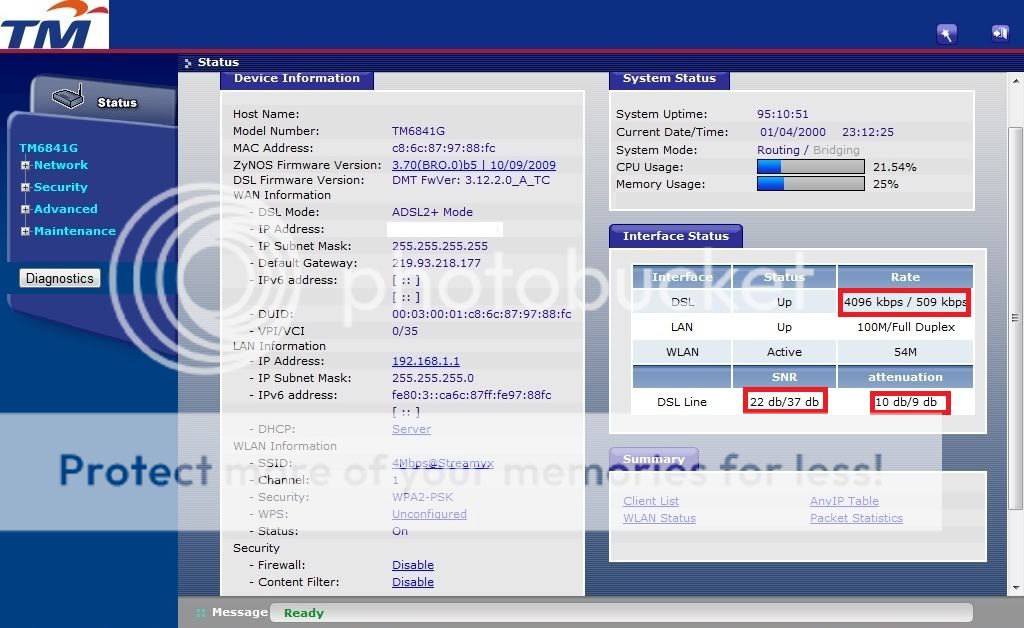 Added on November 17, 2011, 4:34 am QUOTE(HafisUN @ Nov 10 2011, 07:15 PM) New streamyx 4mb user in da house ^^ 1. Reject ?sorry.. i dun know how to kick it out..there is some question i want to ask: 1) how to reject other people from connecting to my WIFI & kick the out? 2) free modem from TM, does it good? should i change to other modem? such as? 3) how to change my WIFI password?  2. I got Zyxel...so far,stable...if got any prob...then should call TM for exchange new/refurbish one.. 3. Instruction: i. Go start and type cmd (if XP , choose Run) ii. then command prompt appear,then type ipconfig iii. You should see at Default Gateway (there w'll see 192.168.1.1 or else) iv. Go browser then type dafault gateway (192.168...) v. Type modem username and password (default for zyxel: tmadmin,tmadmin ) vii.. and go on security setting and so on (Default security: WEP ,do change to WPA2-PSK) Sorry if any wrong instruction.. Cheers, This post has been edited by machai_world: Nov 17 2011, 04:35 AM |
|
Topic ClosedOptions
|
| Change to: |  0.0410sec 0.0410sec
 0.70 0.70
 7 queries 7 queries
 GZIP Disabled GZIP Disabled
Time is now: 10th December 2025 - 01:53 PM |
 Quote
Quote