

60GB SSD can cost RM400..
240GB can cost RM1.5K..
ASUS A | N | U Series Combined Thread V4, All about ASUS...
ASUS A | N | U Series Combined Thread V4, All about ASUS...
|
|
 Nov 17 2011, 12:59 PM Nov 17 2011, 12:59 PM
Return to original view | Post
#341
|
 
Elite
14,813 posts Joined: Nov 2006  
|
60GB SSD can cost RM400..
240GB can cost RM1.5K.. |
|
|
|
|
|
Nov 17 2011, 02:08 PM
Return to original view | Post
#342
|
|
Elite
14,813 posts Joined: Nov 2006
|
Worth to upgrade, if you are concern about responsiveness.
On budget, you can try find Intel X25-M 160GB OEM on the garage sales, some selling RM400. Comparison: The SSD is the slow one though in this video. But if currently the notebook is enough for you, then better save it for the desktop  |
|
|
Nov 17 2011, 02:35 PM
Return to original view | Post
#343
|
|
Elite
14,813 posts Joined: Nov 2006
|
Won't do much on CPU/GPU temp, mostly the HDD area would be cooler..
This post has been edited by lee_what2004: Nov 17 2011, 02:36 PM |
|
|
Nov 17 2011, 02:41 PM
Return to original view | Post
#344
|
|
Elite
14,813 posts Joined: Nov 2006
|
The flood affect the HDD, not the SSD, since its different parts...
|
|
|
Nov 18 2011, 02:04 PM
Return to original view | Post
#345
|
|
Elite
14,813 posts Joined: Nov 2006
|
Better take the A43Sv.
Not sure the A43Sa implements auto switching or not, since that one has problem with OpenGL.. |
|
|
Nov 24 2011, 06:21 AM
Return to original view | Post
#346
|
|
Elite
14,813 posts Joined: Nov 2006
|
QUOTE(MaGNiFiCo @ Nov 23 2011, 07:56 PM) guys can recommend cheap asus laptop with b950 proc + hd 3000? just gonna use it for office work No Asus with that spec.so far i've found the cheapeast is Asus A43SJ-VX590. but it comes with nvidia gt 520m i tried to stay away from a dedicated graphic card. previous personal experience  budget below 1.5k   QUOTE(HaN18 @ Nov 24 2011, 12:31 AM) Any Asus lap top recommend budget 4k, 15 inch full HD with i7 N55SF don't have FullHD, Core i7 model only using 1366x768.how is N55SF , and how much is it? |
|
|
|
|
|
Nov 24 2011, 11:32 AM
Return to original view | Post
#347
|
|
Elite
14,813 posts Joined: Nov 2006
|
Seems like A43Sa also don't have switchable feature. It will use AMD all the time..
|
|
|
Nov 24 2011, 11:55 AM
Return to original view | Post
#348
|
|
Elite
14,813 posts Joined: Nov 2006
|
Can't say for sure. Overheating isn't just about the GPU model, but its mostly depends on the notebook cooling efficiency and the environment..
|
|
|
Nov 24 2011, 12:27 PM
Return to original view | Post
#349
|
|
Elite
14,813 posts Joined: Nov 2006
|
^he use Dell Inspiron 15R.
A43Sa doesn't look that bad for gaming temperature.. This post has been edited by lee_what2004: Nov 24 2011, 12:28 PM Attached thumbnail(s) 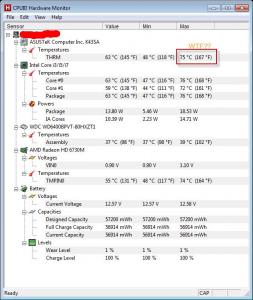
|
|
|
Nov 24 2011, 01:55 PM
Return to original view | Post
#350
|
|
Elite
14,813 posts Joined: Nov 2006
|
Should be around RM70..
|
|
|
Nov 24 2011, 02:26 PM
Return to original view | Post
#351
|
|
Elite
14,813 posts Joined: Nov 2006
|
Its different generation Asus.
The A42 generation runs quite hot, the A42Jv with GT335M always hit 90C when gaming, HDD also can hit 50C... and that A40Ja is equivalent with A42Ja in Malaysia.. |
|
|
Nov 24 2011, 05:46 PM
Return to original view | Post
#352
|
|
Elite
14,813 posts Joined: Nov 2006
|
Well, you should find GT540M and HD6730M, since that's what is your target.
From the screenshot I gave before, the HD6730M runs quite cool.. |
|
|
Nov 24 2011, 09:02 PM
Return to original view | Post
#353
|
|
Elite
14,813 posts Joined: Nov 2006
|
Should be little to none effect...
|
|
|
|
|
|
Nov 30 2011, 05:09 PM
Return to original view | Post
#354
|
|
Elite
14,813 posts Joined: Nov 2006
|
QUOTE(yazidalgresh @ Nov 28 2011, 08:44 AM) and everytime i restart the laptop, the icons appear on the desktop. but i have unchecked the show desktop icons. what's wrong ah? Should be the Power 4 Gear overriding the desktop icon settings..really worried coz a few days use already got problem:( QUOTE(yazidalgresh @ Nov 29 2011, 02:40 AM) Added on November 29, 2011, 8:46 ambtw, i use the event viewer to see the boot time. it's an average of 99secs. i think that's quite long. when i open the boot degradation it seems that backgroung prefetch time takes a lot of the boot time. any suggestion on how to reduce the boot time? i saw from a forum a guy made his boot time 27secs. same model |
|
|
Nov 30 2011, 05:40 PM
Return to original view | Post
#355
|
|
Elite
14,813 posts Joined: Nov 2006
|
Means you double click, it shows nothing? Not even the .exe running on task manager ?
|
|
|
Nov 30 2011, 07:15 PM
Return to original view | Post
#356
|
|
Elite
14,813 posts Joined: Nov 2006
|
After restart, the media player only can run once ? Then need to restart again ?
|
|
|
Dec 6 2011, 09:04 AM
Return to original view | Post
#357
|
|
Elite
14,813 posts Joined: Nov 2006
|
QUOTE(yazidalgresh @ Nov 30 2011, 07:51 PM) yes. precisely When you start the media player and it didn't show up. Open Event Viewer - Windows Logs - Application, try find 'Error' that is around the time you start the media player.QUOTE(eki91 @ Dec 3 2011, 07:47 AM) i tried to uninstalled the preinstall fast boot from my a42jv.. Try install Fast Boot again, then uninstall it.im using your uninstaller soft.. when uninstall using the built in uninstaller ,the setup take too long.. (it stop at about 15% of the loading bar )i,ve wait 3 hours oledi but still the same..even cancel seem not working then i end up kill it using task manager..i've tried many times trying it but still the same.. please help.. thx in advance QUOTE(verdangilte @ Dec 4 2011, 03:18 PM) guys..i need some help...when i dl the latest realtek audio software and i run it...its pop up something like this... If you install the default driver from Asus, it install fine ?Common Language Runtime Debugging Services Application has generated an exception that could not be handled. Process ID=0x14 (1300), Thread Id=0xe8(232) Click OK to terminate the application. Click CANCEL to debug the application. pls help me to fix it.... |
|
|
Dec 6 2011, 02:59 PM
Return to original view | Post
#358
|
|
Elite
14,813 posts Joined: Nov 2006
|
Something corrupted..
|
|
|
Dec 6 2011, 04:13 PM
Return to original view | Post
#359
|
|
Elite
14,813 posts Joined: Nov 2006
|
Could be the installer corrupt, could be the Windows corrupt.
Why want install latest version? Got problem with the old one ? |
|
|
Dec 6 2011, 05:06 PM
Return to original view | Post
#360
|
|
Elite
14,813 posts Joined: Nov 2006
|
You tested the driver already?
|
|
Topic ClosedOptions
|
| Change to: |  0.0483sec 0.0483sec
 0.32 0.32
 7 queries 7 queries
 GZIP Disabled GZIP Disabled
Time is now: 8th December 2025 - 09:03 PM |
 Quote
Quote