Welcome Guest ( Log In | Register )

Bump Topic Topic Closed RSS Feed
134 Pages « < 126 127 128 129 130 > » Bottom

Outline · [ Standard ] · Linear+

 ASUS A | N | U Series Combined Thread V4, All about ASUS...

views
     
Hico
post Jan 1 2012, 08:04 AM

Look at all my stars!!
*******
Senior Member
4,709 posts

Joined: Jan 2003
QUOTE(aspire2oo6 @ Dec 24 2011, 09:57 PM)
I am usingĀ  Asus Zenbook UX21E-KX004V I was wondering can i upgrade the ram of this unit?

user posted image
Nokia N8 @ Asus Zenbook UX21E-KX004V by JTproductions, on Flickr
*
aspire2oo6, hows your zenbook? i am thinking to get one too.. any feedback or comment from you??

This post has been edited by Hico: Jan 1 2012, 08:05 AM
de4thscythell
post Jan 1 2012, 03:00 PM

in progress
******
Senior Member
1,941 posts

Joined: Mar 2007


QUOTE(aspire2oo6 @ Dec 24 2011, 09:57 PM)
I am using  Asus Zenbook UX21E-KX004V I was wondering can i upgrade the ram of this unit?

user posted image
Nokia N8 @ Asus Zenbook UX21E-KX004V by JTproductions, on Flickr
*
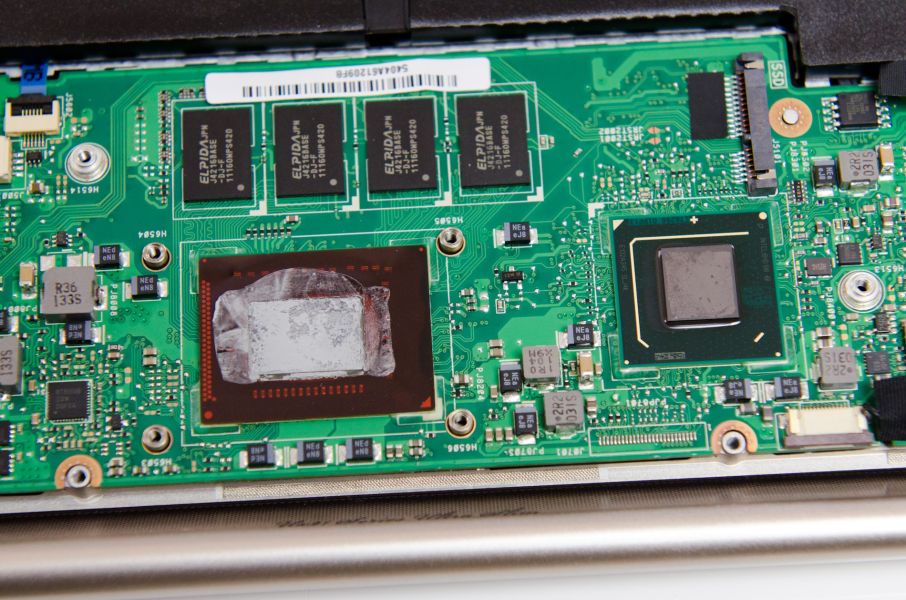
It say here : No memory upgrade possibility on the UX21

The RAM is soldered onto the board, refer pic:
» Click to show Spoiler - click again to hide... «


Source:
ASUS Zenbook UX21 Teardown
ASUS UX21 System & Dissection Tour
aspire2oo6
post Jan 1 2012, 05:38 PM

Banned
*********
All Stars
35,468 posts

Joined: Oct 2006

QUOTE(Hico @ Jan 1 2012, 08:04 AM)
aspire2oo6, hows your zenbook? i am thinking to get one too.. any feedback or comment fromĀ  you??
*
its awesome. For normal use + photoshop + gaming its bloody fast. Do i need to upgrade the ram? At the moment nope because its not just fast its BLOODY FAST =p

Boot up windows in 20 seconds.
Battery life can last 5-6 hours in power saving mode
Bloody fast responsiveness.
Lag? Huh what is lag? Yeap that smooth.
Worth paying 4K ++ yes very worthy it my opinion
Small charger
Very slim
Multi touch pad ( able to do gesture like in iphone aka swipe to go to desktop, Slide photos and even pinch zoom)
Instant On option able to turn on instantly if enter standby
Awesome speaker experience with clarity by Bang & Olufsen if u do not know what is it its quality is similar to bose

Here a demo


This post has been edited by aspire2oo6: Jan 1 2012, 05:42 PM
Hico
post Jan 3 2012, 06:24 PM

Look at all my stars!!
*******
Senior Member
4,709 posts

Joined: Jan 2003
QUOTE(aspire2oo6 @ Jan 1 2012, 05:38 PM)
its awesome. For normal use + photoshop + gaming its bloody fast. Do i need to upgrade the ram? At the moment nope because its  not just fast its BLOODY FAST =p

Boot up windows in 20 seconds.
Battery life can last 5-6 hours in power saving mode
Bloody fast responsiveness.
Lag? Huh what is lag? Yeap that smooth.
Worth paying 4K ++ yes very worthy it my opinion
Small charger
Very slim
Multi touch pad ( able to do gesture like in iphone aka swipe to go to desktop, Slide photos and even pinch zoom)
Instant On option able to turn on instantly if enter standby
Awesome speaker experience with clarity by Bang & Olufsen if u do not know what is it its quality is similar to bose

Here a demo

*
how much did u get ur zenbook? 3299???
aspire2oo6
post Jan 3 2012, 08:07 PM

Banned
*********
All Stars
35,468 posts

Joined: Oct 2006

QUOTE(Hico @ Jan 3 2012, 06:24 PM)
how much did u get ur zenbook? 3299???
*
the RM3299 is the smaller version of 11 inch screen with i5 processor and smaller SSD

Mine is the RM4200 i7 processor with 13.3 screen and 256GB SSD

This post has been edited by aspire2oo6: Jan 3 2012, 08:08 PM
azliayob
post Jan 4 2012, 12:22 AM

Getting Started
**
Junior Member
130 posts

Joined: Oct 2010
From: Pasir Gudang-Tampoi-Johor Bahru
Alex, add me to your list.

Bought Asus U46SV today @1500 hours, Rm2499 Meadow System (free upgrade to 8G ram) cool.gif

Btw, as I read from the 1st page, I only need to charge to full, no need to leave overnight. Right?

How do i know the laptop is already full charge. I did not switch on...

Thanks


azliayob
post Jan 4 2012, 01:36 AM

Getting Started
**
Junior Member
130 posts

Joined: Oct 2010
From: Pasir Gudang-Tampoi-Johor Bahru
Also need ur guys help...

What apps or software should I remove from my U46SV..

There are so many of them, particularly from asus...

I need to uninstall and update necessary driver before I make a recovery set..

Thanks in advance

zhengyang89
post Jan 4 2012, 12:55 PM

On my way
****
Senior Member
521 posts

Joined: Jul 2008
From: Ipoh, Perak


QUOTE(aspire2oo6 @ Jan 3 2012, 08:07 PM)
the RM3299 is the smaller version of 11 inch screen with i5 processor and smaller SSD

Mine is the RM4200 i7 processor with 13.3 screen and 256GB SSD
*
Bro, where you buy at RM4200 ? lowest i can find RM4250.
Hico
post Jan 4 2012, 02:02 PM

Look at all my stars!!
*******
Senior Member
4,709 posts

Joined: Jan 2003
QUOTE(aspire2oo6 @ Jan 3 2012, 08:07 PM)
the RM3299 is the smaller version of 11 inch screen with i5 processor and smaller SSD

Mine is the RM4200 i7 processor with 13.3 screen and 256GB SSD
*
ic..cos saw from the model you said should be 11 inch one.. then yours should be ux31? hows the heat management if open those heavy app?
de4thscythell
post Jan 4 2012, 08:36 PM

in progress
******
Senior Member
1,941 posts

Joined: Mar 2007


Just want to share this nice little app: Asus Mainframe Utility blush.gif
as reviewed in this article by addictivetips: Asus Multiframe Utility: Resize & Snap App Windows To 9 Screen Regions Per Monitor


Added on January 4, 2012, 8:43 pm
QUOTE(azliayob @ Jan 4 2012, 12:22 AM)
Alex, add me to your list.

How do i know the laptop is already full charge. I did not switch on...

Thanks
*
On my A43SJ, there's an LED indicator light, under the touchpad that turn RED when the battery is charging, and turn GREEN when the battery is fully charged.
Not sure bout your model. Might be the same blush.gif

This post has been edited by de4thscythell: Jan 4 2012, 08:44 PM
aspire2oo6
post Jan 5 2012, 12:09 AM

Banned
*********
All Stars
35,468 posts

Joined: Oct 2006

QUOTE(Hico @ Jan 4 2012, 02:02 PM)
ic..cos saw from the model you said should be 11 inch one.. then yours should be ux31? hows the heat management if open those heavy app?
*
It seems to be alright not really that hot always put on my lap happy.gif
Coldf3ar
post Jan 5 2012, 10:49 AM

On my way
****
Junior Member
519 posts

Joined: Jul 2008
Okay. I think my series of laptop got problem with USB port. Let say i've plug in my external hard disk(A), then if i put another external hard disk(B), the other ext hard disk(A) will disconnect. My friend have same model and problem too. Not sure bcoz of drivers or da laptop itself (power not enuf). Anyone got problem same like this with other laptop ?

I always on my laptop at workplace. And seem like da power extension got problem. When touch metal, sure kena electric....

*A52JC

This post has been edited by Coldf3ar: Jan 5 2012, 10:50 AM
nothingz
post Jan 5 2012, 05:42 PM

6 Stars General
*******
Senior Member
2,757 posts

Joined: Jan 2007


my gf is using A43SJ with B940 processor if i am not mistaken, i want to ask if it is possible to upgrade to SATA 3 SSD without voiding the warranty?

I know that nowadays notebooks do not come with recovery CD, so i have to burn the recovery CD on my own from the system? (HP notebook is like this)

This post has been edited by nothingz: Jan 5 2012, 06:04 PM
Coldf3ar
post Jan 5 2012, 11:12 PM

On my way
****
Junior Member
519 posts

Joined: Jul 2008
QUOTE(nothingz @ Jan 5 2012, 05:42 PM)
my gf is using A43SJ with B940 processor if i am not mistaken, i want to ask if it is possible to upgrade to SATA 3 SSD without voiding the warranty?

I know that nowadays notebooks do not come with recovery CD, so i have to burn the recovery CD on my own from the system? (HP notebook is like this)
*
I dun think it will void da warranty. If theres any problem with your laptop and neeed warranty, then swap back to old hdd.
nothingz
post Jan 5 2012, 11:16 PM

6 Stars General
*******
Senior Member
2,757 posts

Joined: Jan 2007


QUOTE(Coldf3ar @ Jan 5 2012, 11:12 PM)
I dun think it will void da warranty. If theres any problem with your laptop and neeed warranty, then swap back to old hdd.
*
ok, i have done some google, i think if the SATA port only supports Sata 2, Sata 3 SSDs are backward compatible, should be fine then. Sata 3 and Sata 2 HDD are almost the same price.

there is software inside the notebook to burn the recovery CD, right?
azliayob
post Jan 6 2012, 04:54 AM

Getting Started
**
Junior Member
130 posts

Joined: Oct 2010
From: Pasir Gudang-Tampoi-Johor Bahru
QUOTE(azliayob @ Jan 4 2012, 12:22 AM)
Alex, add me to your list.

Bought Asus U46SV today @1500 hours, Rm2499 Meadow System (free upgrade to 8G ram)  cool.gif

Btw, as I read from the 1st page, I only need to charge to full, no need to leave overnight. Right?

How do i know the laptop is already full charge. I did not switch on...

Thanks
*
thanks de4thscythell... I thought so, but the indicator seem to good to be true for the first time charge...


QUOTE(azliayob @ Jan 4 2012, 01:36 AM)
Also need ur guys help...

What apps or software should I remove from my U46SV..

There are so many of them, particularly from asus...

I need to uninstall and update necessary driver before I make a recovery set..

Thanks in advance
*
icon_question.gif
lee_what2004
post Jan 6 2012, 08:27 AM

*stare* ji--------
Group Icon
Elite
14,813 posts

Joined: Nov 2006


QUOTE(azliayob @ Jan 4 2012, 01:36 AM)
Also need ur guys help...

What apps or software should I remove from my U46SV..

There are so many of them, particularly from asus...

I need to uninstall and update necessary driver before I make a recovery set..

Thanks in advance
*
If you want to keep it minimal, ATK and Wireless Console3
As for the rest,
http://forum.notebookreview.com/asus/38068...ware-guide.html

QUOTE(nothingz @ Jan 5 2012, 11:16 PM)
ok, i have done some google, i think if the SATA port only supports Sata 2, Sata 3 SSDs are backward compatible, should be fine then.  Sata 3 and Sata 2 HDD are almost the same price.

there is software inside the notebook to burn the recovery CD, right?
*
If yours is not freeDOS model, there should have Asus AI Burner to burn the recovery disc..
GaRd3NiA
post Jan 6 2012, 11:23 AM

Getting Started
**
Junior Member
212 posts

Joined: Sep 2004


Hi all bro, i planning to get a laptop this weekend, there r 3 in mind N45SF, U46SV n U41SV, both the U series looks very similar, the N series is better, but heavier. Which one do u recommend? Thanks!!!

lee_what2004
post Jan 6 2012, 11:51 AM

*stare* ji--------
Group Icon
Elite
14,813 posts

Joined: Nov 2006


Want more gaming performance & speaker, N45SF.
Want more battery life, less weight, U46Sv.
GaRd3NiA
post Jan 6 2012, 12:18 PM

Getting Started
**
Junior Member
212 posts

Joined: Sep 2004


thanks, but how about the U41SV?

134 Pages « < 126 127 128 129 130 > » Top
Topic ClosedOptions
 

Change to:
| Lo-Fi Version
0.0215sec    0.48    6 queries    GZIP Disabled
Time is now: 4th December 2025 - 08:34 PM