

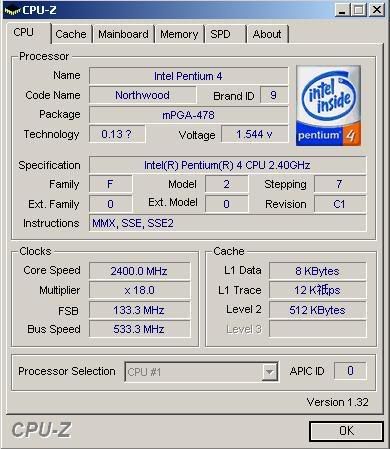
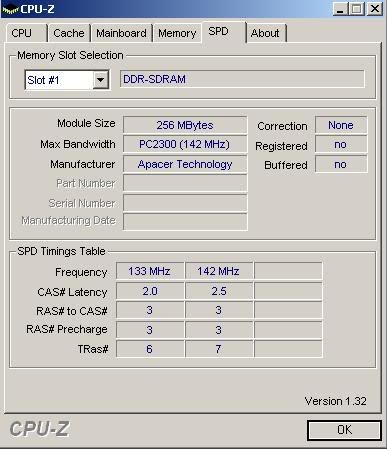
This post has been edited by Confession: Feb 12 2006, 03:40 PM
INTEL OVERCLOCKING THREAD, TIPS,Q n A, Results...Great For NueBis
|
|
 Feb 12 2006, 03:30 PM Feb 12 2006, 03:30 PM
Return to original view | Post
#1
|
 
Senior Member
727 posts Joined: Dec 2005   
|
Hi, i wish to overclock my Northwood 2.4ghz but i have zero experience in overclocking , can someone teach me how and wat to do to overclock my cpu ? Btw, i'm using Jetway PM9MSR2 s478 mobo VIA chipset.
This post has been edited by Confession: Feb 12 2006, 03:40 PM |
|
|
|
|
|
Feb 13 2006, 04:02 PM
Return to original view | Post
#2
|
|
Senior Member
727 posts Joined: Dec 2005
|
QUOTE(low yat 82 @ Feb 13 2006, 01:09 PM) b4 u do any oc'n recommend u read d pinned thread first in order for u to noe wats u r doin... Ok, btw what software to use to overclock the cpu ? |
|
|
Feb 13 2006, 05:38 PM
Return to original view | Post
#3
|
|
Senior Member
727 posts Joined: Dec 2005
|
Juz wanna ask roughly my P4 2.4ghz (s478 Northwood) will increase to how much ghz ON STOCK COOLING ?
|
|
|
Feb 13 2006, 05:55 PM
Return to original view | Post
#4
|
|
Senior Member
727 posts Joined: Dec 2005
|
QUOTE(Icehart @ Feb 13 2006, 03:42 AM) Try to increase your FSB 10 by 10 and see how far you can go. Do remember to watch out for your cpu temperature. 1. How to check my CPU temperature ?This is the guideline for newbs : Limitation for Northwood core Processor :
Limitation for Prescott Core Processor :
2. What is Vcore ? izzit the one that i circle in red ? 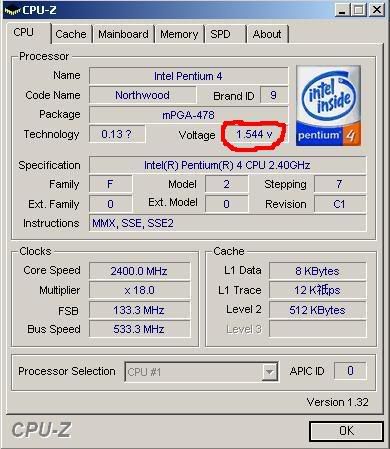 |
|
|
Feb 13 2006, 06:30 PM
Return to original view | Post
#5
|
|
Senior Member
727 posts Joined: Dec 2005
|
Ok, this is the results:
From- To- 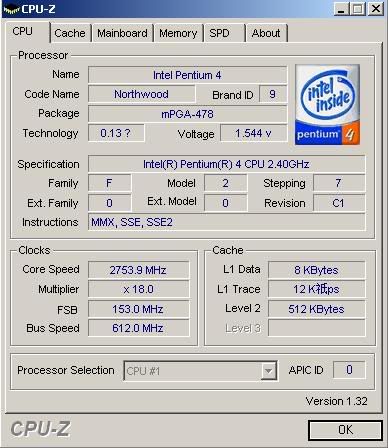 I'm having this on stock cooling , when i set it to 163 then save to cmos after exit and then the monitor shut off , maybe not suitable huh ? |
|
|
Feb 13 2006, 06:57 PM
Return to original view | Post
#6
|
|
Senior Member
727 posts Joined: Dec 2005
|
QUOTE(low yat 82 @ Feb 13 2006, 06:35 PM) try increase d vcore..i belief ur proc had hit d wall... to confirm this, u need to find d max speed ur ram can run first.. use memtest I can't find the function on the bios that can increase the vcore. Near where ? |
|
|
Feb 19 2006, 03:18 PM
Return to original view | Post
#7
|
|
Senior Member
727 posts Joined: Dec 2005
|
From:
To:  Is this good on stock cooling ? This post has been edited by Confession: Feb 19 2006, 03:19 PM |
|
Topic ClosedOptions
|
| Change to: |  0.0454sec 0.0454sec
 0.26 0.26
 7 queries 7 queries
 GZIP Disabled GZIP Disabled
Time is now: 2nd December 2025 - 04:56 AM |
 Quote
Quote