Outline ·
[ Standard ] ·
Linear+
iOS Screenshot & Modding Theme Thread, READ:STRICTLY X PIRACY ICON SCREENSHOT!
|
maderfader
|
 May 20 2011, 02:14 PM May 20 2011, 02:14 PM
|
Getting Started


|
QUOTE(Feux Follets @ May 20 2011, 12:24 PM) I think that is Suave HD. The sms is a tweak called bitesms (i think its a paid cydia tweak). Note sure on the 4 dots. Dont use bite. QUOTE(Nidz @ May 20 2011, 01:04 PM) the four dots means u have four pages of option for that sms. first dot - open, call, reply 2nd dot - template, delete etc same goes for 3rd and 4th dots... this comes with bitesms thanks for the info guys  |
|
|
|
|
|
poex
|
May 20 2011, 08:43 PM
|
Getting Started
|
hi all, i hv tried a lot of lockscreen themes you guys using however my slide to unlock bar (the default black colour transparent bar) still appear..the slide to unlock wording and the slider already hilang but the black bar is still there..shitbrix..i gv up already.. google a lot and tried so many tweaks from cydia to hide the black transparent bar however still cannot fix the issue... do anyone know how to remove the black transparent bar and left only the background wallpaper itself?really annoying to see that bar there.. you guys can refer my lockscreen below for my problem.. 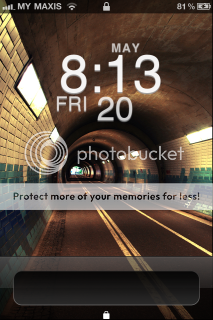 perhaps can help  thanks! |
|
|
|
|
|
Nidz
|
May 20 2011, 09:47 PM
|
|
|
install LockInfo from cydia.
then go to settings>lock info>Lockscreen>Layout> turn on Hide Lock Slider
to disable the plugins, go to settings>lock info>Lockscreen>Plugin Visibility, then turn off everything.
|
|
|
|
|
|
poex
|
May 21 2011, 12:34 AM
|
Getting Started
|
QUOTE(Nidz @ May 20 2011, 09:47 PM) install LockInfo from cydia. then go to settings>lock info>Lockscreen>Layout> turn on Hide Lock Slider to disable the plugins, go to settings>lock info>Lockscreen>Plugin Visibility, then turn off everything. Thanks a lot nidz. It works already... |
|
|
|
|
|
invisiblelim
|
May 23 2011, 10:13 PM
|
|
|
wanna ask ho.. i just installed prestige HD, but when i click on any folder, it turns back to my normal theme, is that normal? or i need to install other thing?
|
|
|
|
|
|
alive88
|
May 24 2011, 12:50 AM
|
|
|
QUOTE(invisiblelim @ May 23 2011, 10:13 PM) wanna ask ho.. i just installed prestige HD, but when i click on any folder, it turns back to my normal theme, is that normal? or i need to install other thing? install folderenhancer to avoid returning to default theme when u click on a folder.. hope this helps |
|
|
|
|
|
krayz_underground
|
May 24 2011, 01:06 AM
|
|
|
Woah..
So long have not come here.
All oso nice Themes.. Keep it up guys..
I'll be rooting for this thread..
|
|
|
|
|
|
SUSchokia
|
May 24 2011, 08:53 AM
|
|
|
Oh silver that a pretty damn nice theme, the cloud is animated?
|
|
|
|
|
|
invisiblelim
|
May 24 2011, 09:14 AM
|
|
|
QUOTE(alive88 @ May 24 2011, 12:50 AM) install folderenhancer to avoid returning to default theme when u click on a folder.. hope this helps ya, it's help alot~~ i just intalled it.. thanks ^.^ |
|
|
|
|
|
ssilverr82
|
May 24 2011, 09:59 AM
|
Getting Started
|
QUOTE(chokia @ May 24 2011, 09:53 AM) Oh silver that a pretty damn nice theme, the cloud is animated? yea dude... u must see when it rains... real cool animation... sadly, cant see if it snows.. lol |
|
|
|
|
|
MyKy44
|
May 24 2011, 11:12 AM
|
|
|
guy any of u done theme editing before? say, if i wanna make a theme+icons of my own, how do i do it? any tutorials or links to it?
|
|
|
|
|
|
Eiraku
|
May 24 2011, 01:03 PM
|
|
|
QUOTE(MyKy44 @ May 24 2011, 11:12 AM) guy any of u done theme editing before? say, if i wanna make a theme+icons of my own, how do i do it? any tutorials or links to it? Not sure. For me I 'mod' themes to my liking and add whatever I like based on the existing files. Try http://tinyurl.com/32sedlk for a simple explaination of the theming process. It might not be updated to support 4.3.x though. Apple likes to rename themable filenames for each firmware upgrade lol. This post has been edited by Eiraku: May 24 2011, 01:21 PM |
|
|
|
|
|
MyKy44
|
May 24 2011, 01:19 PM
|
|
|
QUOTE(Eiraku @ May 24 2011, 01:03 PM) Not sure. For me I 'mod' themes to my liking and add whatever I like based on the existing files. Try http://tinyurl.com/32sedlk for a simple explaination of the theming process. thanks man. i'll look into it.  hope can make a stickman theme for my ipon oh crap.... tutorial says using Mac.. hope win7 also can do.. D: This post has been edited by MyKy44: May 24 2011, 01:26 PM |
|
|
|
|
|
RaplaJingga
|
May 24 2011, 05:35 PM
|
|
|
wahhh.. more nice themes. Thanks 4 sharing ya. |
|
|
|
|
|
MyKy44
|
May 24 2011, 11:12 PM
|
|
|
hey how u guys mod for 1. calendar 2. youtube 3. camera 4. ipod i tried, didn't come up  i'm on 4.3.3. renamed the folder following the path shown by SBSettings This post has been edited by MyKy44: May 24 2011, 11:24 PM |
|
|
|
|
|
Eiraku
|
May 25 2011, 12:41 AM
|
|
|
QUOTE(MyKy44 @ May 24 2011, 11:12 PM) hey how u guys mod for 1. calendar 2. youtube 3. camera 4. ipod i tried, didn't come up i'm on 4.3.3. renamed the folder following the path shown by SBSettings Using Winterboard? Then download a complete theme first (suave HD for instance) and modify. It's simpler that way because all the proper theme directories and folders are already in place. Just prepare your own icons/UI element/whatever, replace what you want and delete what you do not need. Winterboard is drag and drop like that. Oh and make sure your base theme is 4.3.x compatible. Also, bundleID is important. Check using AppInfo. Only use folders if you can't theme an app/whatever with bundles. This post has been edited by Eiraku: May 25 2011, 12:46 AM |
|
|
|
|
|
invisiblelim
|
May 25 2011, 08:20 AM
|
|
|
I had a question again.. When I call it turns back to my previous theme, is there any way to change that too?
|
|
|
|
|
|
MyKy44
|
May 25 2011, 09:19 AM
|
|
|
QUOTE(Eiraku @ May 25 2011, 12:41 AM) Using Winterboard? Then download a complete theme first (suave HD for instance) and modify. It's simpler that way because all the proper theme directories and folders are already in place. Just prepare your own icons/UI element/whatever, replace what you want and delete what you do not need. Winterboard is drag and drop like that. Oh and make sure your base theme is 4.3.x compatible. Also, bundleID is important. Check using AppInfo. Only use folders if you can't theme an app/whatever with bundles. alright i'ma try tht. thanks |
|
|
|
|
|
frozzbyte
|
May 25 2011, 12:37 PM
|
|
|
@kbteh I you called that 'simple' ... I dunno how it will look if you go all out. |
|
|
|
|



 Quote
Quote





 0.0265sec
 1.12
1.12
 6 queries
 GZIP Disabled