Welcome Guest ( Log In | Register )

23 Pages < 1 2 3 4 > » Bottom

Outline · [ Standard ] · Linear+

 Fundamentals of Overclocking, NEWBIES PLS READ THIS BEFORE POSTING

views
     
rzonealley
post Aug 20 2005, 10:44 PM

Freude Am Fahren
*****
Senior Member
968 posts

Joined: Dec 2004
From: Papar/K.Kinabalu


QUOTE(PCcrazy @ Aug 9 2005, 01:57 PM)
No software can measure the temperature if there is no hardware/external sensor temperatures via optional probes installed. Some motherboards either do not show exact figures or do not support RAM temperature monitoring at all. So,we make use of lay a hand on technique most of the time and formulate educated estimation about it. Btw, before touching the RAM please make sure to ground yourself first as to avoid static charge.  smile.gif
*
the ram heat quite annoying afaik n all the time heat makes ur
prime test or memtest failed
as to avoid overheated prob. atleast make sure the casing air flow
is good, but better if just cool it with some good cfm fan.

but just like pccrazy said the touch using ur hand is owez trusted xD
splinter
post Sep 20 2005, 05:21 PM

New Kid In Town
*******
Senior Member
2,120 posts

Joined: Jan 2003
From: In front my PC


How to comfirm my CPU pass prime95 test?

Pentium 4 HT enable. When running one prime95, its only around 50% cpu resource. Do i need to run two prime95 at the same times? I seem cant running two prime at the same time.
PeowYong
post Sep 20 2005, 05:35 PM

PeowYong
*******
Senior Member
2,263 posts

Joined: Jan 2003
From: MMU Cyberjaya, Sandakan


yup...
u need to run 2 prime at the same time to make ur pc usage 100%


install and open 2 prime, 1 of it set the affinity to 0, another set to 1

to do this,
advanced->affinity-> UNTICK "let program run on any CPU"->Specific CPU to run on set to "0"

then the another prime also the same, but change the "Specific CPU to run on" to 1

then use torture test to test both.... 1 using small FFTs and another 1 use large FFTs
PCcrazy
post Sep 21 2005, 01:56 AM

Milanista
*******
Senior Member
3,224 posts

Joined: Jan 2003
From: B.B.Bangi


QUOTE(splinter @ Sep 20 2005, 09:53 PM)
Ya, since they put Prime95 on stability download links.. why dont give some guide on how to use it. I know its easy, execute n run, but for p4 users is slightly different. need to set the CPU 0 - 1 (Thanks to PeowYong) or else i still running 1 prime and feel i happy safe with 50%cpu resource running.

SOrry if i posting at wrong place. Since its an easy Q for pro OC to answer with. No need create new threat.
*
I will do that, this thread is still under construction. I'm busy this few months. smile.gif
Meanwhile please don't discuss in here. You can only post guidelines and stuffs.
Evogenix
post Sep 24 2005, 03:57 PM

I Missed LYN Grey Skin T_T
******
Senior Member
1,809 posts

Joined: Jan 2003


Dear mod, i create this thread at overclock section because i felt its more suitable at here than software section.
But, feel free to move it if it really breaking any rules of lyn.


Just start my collage holiday, flex.gif flex.gif
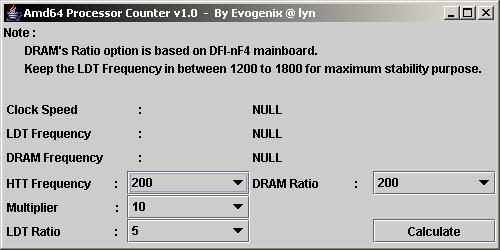
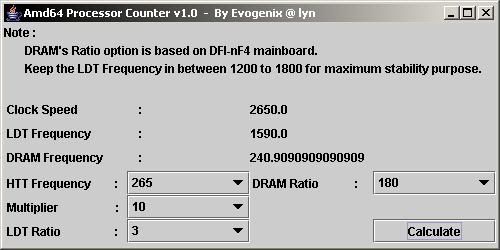
so, i start with this simple software so called " amd64 Processor's Counter V1.0" for those that needed. rolleyes.gif

It's a simple java GUI application that use to calculate/estimate System's ClockSpeed, LDT frequency and Memory Frequency
before you start wacking those setting into your BIOS. laugh.gif laugh.gif

note :
1. DRAM' ratio was based on my DFI-ultra-D BIOS 7.04bta by BigToe. notworthy.gif
2. Memory frequency output was compared with memory table that made by Oska Wu. notworthy.gif
3. Since i'm using java language on this application, so you need JavaEnvironment to execute the file. [ most of the pc should support this file ]
4. Application ziped, @ 5.6KB of size.
5. Feel free to PM me, if any bug[s] found on this application.

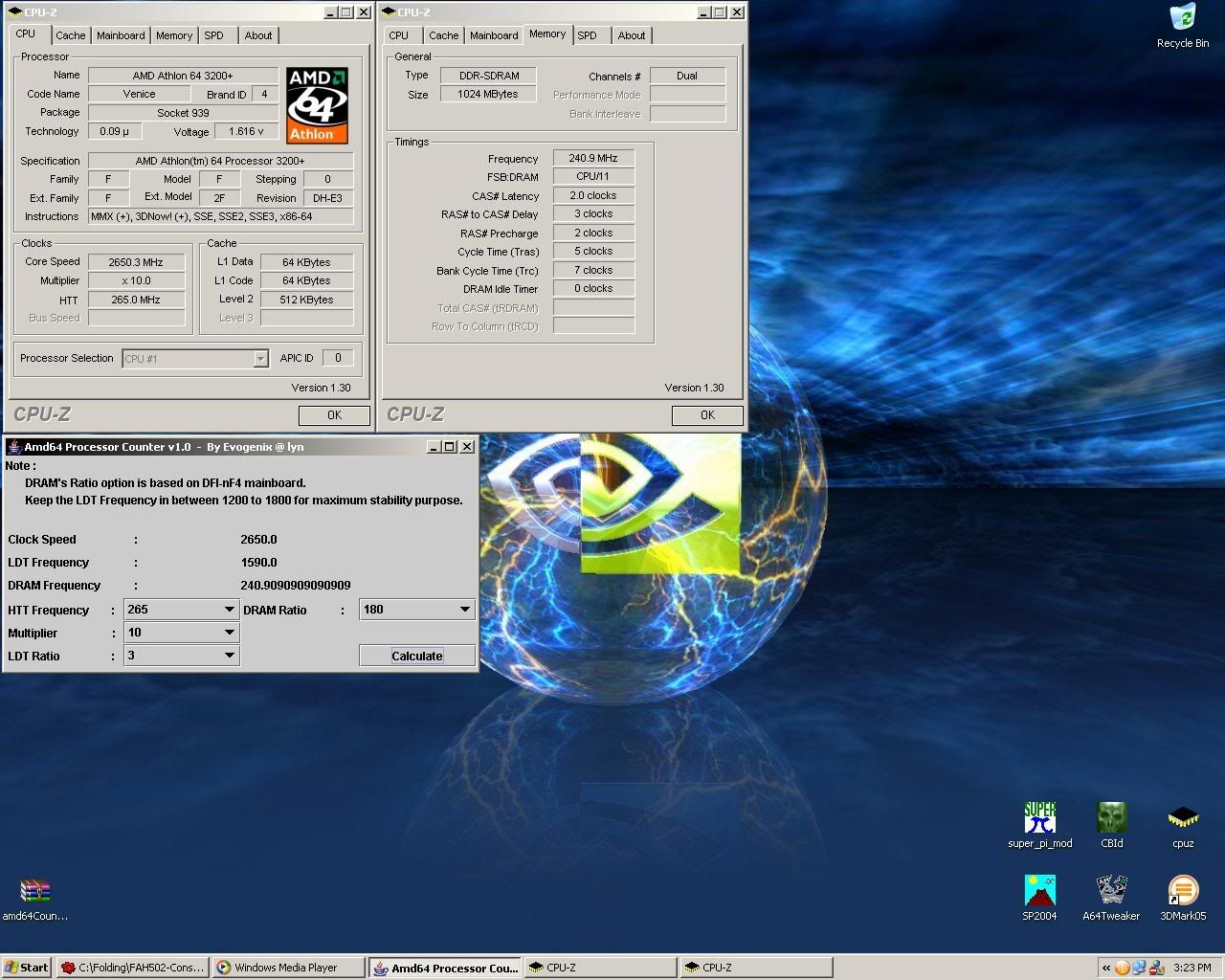
Here's some screenies of my application,

Screenshot #1 :
user posted image

Screenshot #2 :
user posted image

Screenshot #3 : Comparing the estimated frequency and the real life frequency from cpu-z 1.3
user posted image


More deteils on RAM's Ratio :
100 = RAM/FSB : 01/02
120 = RAM/FSB : 03/05
133 = RAM/FSB : 02/03
140 = RAM/FSB : 07/10
166 = RAM/FSB : 05/06
180 = RAM/FSB : 09/10
200 = RAM/FSB : 01/01
233 = RAM/FSB : 07/06
250 = RAM/FSB : 05/04


updated v1.1 :
Attached File  amd64CounterV1.1.zip ( 5.6k ) Number of downloads: 162


Evogenix

This post has been edited by Evogenix: Sep 27 2005, 12:00 AM
PCcrazy
post Sep 26 2005, 11:14 PM

Milanista
*******
Senior Member
3,224 posts

Joined: Jan 2003
From: B.B.Bangi


BIOS for beginners,

http://www.tomshardware.com/cpu/20050922/index.html

QUOTE
The Basic Input-Output System (BIOS) is an essential set of routines in a PC, which is stored on a chip on the motherboard. It acts as an intermediary between a computer's hardware and its operating system. Without the BIOS, the PC's operating system would have no way to communicate with, or take control of, the hardware.

In other words, the BIOS is a crucial component of any computer. If its options are set incorrectly, the BIOS could slow your computer down by as much as 40%. Unfortunately, as new processors and motherboard chipsets are released, BIOS options continue to get even more confusing. As a result, many seasoned technicians are still baffled by the jargon-laced and confusing options available in a modern computer's BIOS setup program.


Another helpful guides into BIOS

http://www.wimsbios.com/

http://computer.howstuffworks.com/bios.htm

http://en.wikipedia.org/wiki/BIOS
PCcrazy
post Sep 28 2005, 10:48 PM

Milanista
*******
Senior Member
3,224 posts

Joined: Jan 2003
From: B.B.Bangi


QUOTE(joylay83 @ Sep 28 2005, 08:52 PM)
i intend to use this software on my new NF4 mobo (Asus? DFI? MSI?) next month when i buy it.

but this software dosen't work very well on my current Abit NF2 mobo. It gives me blue screens after i OC about 10%. (edit: is it due to my hardware?)

Is there any way to increase the overclockability of this software? I understand that Abit guru performs much better. I wanna do software OC coz then i can OC only when i need it, and also dun need to reboot. Takes less time too. I dun mind the fluctuation in speed or the spread spectrum, with enough cooling it should be good.  notworthy.gif
*
ClockGen anyone? rolleyes.gif

http://www.cpuid.org/clockgen.php

QUOTE
The ClockGen serie consists in a set of overclocking software that allow to change the clock of some of your system devices on-the-fly : CPU, memory, AGP, PCI Express, PCI. Each of these software is dedicated to one or several motherboards.


Oh, btw in reply to this,
QUOTE
I dun mind the fluctuation in speed or the spread spectrum, with enough cooling it should be good.


Pls bear in mind that good cooling is not enough, RAM settings? PCI lock? Dividers? I will not recommend software overclocking anyday anytime. Your system is not stable most of the time. Furthermore there are too much tweaks you missed by using software overclocking utility.
PCcrazy
post Sep 28 2005, 11:11 PM

Milanista
*******
Senior Member
3,224 posts

Joined: Jan 2003
From: B.B.Bangi


QUOTE
When I OC my system, anything more then 210MHz external clock (840FSB) and In 3DMark03 CPU test benchmark, artifect are everywhere.....only that benchmark, normal 3D benchmark, application all runs well. CPU stress test also didn't crash, running for few hours, CPU temp max about 50c, mobo temp max 45c

Anyone knows where the problem lies?


this is the common issue for 865 chipset when u use 1gb ram to oc

http://www.cpuid.org/download/Tw865.zip

download this, change the dram latency parameter from 00 to 01
hope this help

Credits to zt_lee

QUOTE
thanks everybody that contributed their time and effort to help...i've solved the problem via tweak865. the downside of this software is you have to manually change the value from 00 to 01 everytime botting into the window, but i've found another way to remove that pain step. i dunno whether this method has been adopted and published in the forum or not yet but here it goes:

step 1:
after unzipped the software to the desired directory,change the dram latency parameter from value 00 to 01, click apply and save the setting.you will be prompted to save the setting in a notepad format.

step2:
create the shortcut for the execution file name tweak865.exe and move it to c:\documents and settings\"USER NAME"\start menu\programs\startup.

step 3:
right click the shortcut and click on the properties. you'll noticed the "target" directory of the origin tweak865.exe location in your hard drive. after the target directory ends, press space bar and then add in this phrase ( -file=tw865.txt )excluding the bracket. for example: "c:\program files\tweak865\tw865.exe" -file=tw865.txt and press ok

step 4:
to check that you have successfully add the program to startup, press start, all programs, startup, shortcut to tw865. if the shortcut exist there, it should be no problem anymore.

step 5:
restart your computer, the next time you boot into windows again, the tweak865.exe should be in the msconfig under startup tab.

and there you go, the problem should be solved. say bye bye to tearing effect. forgive me if my explanation is not good enough, i could've use some photos to show you as it will be more easier to understand as the old saying goes: a picture can represents a thousand words but sadly i dun have any webcam or digicam. hope this helps to those who are still suffering from this problem.


credit to sonic_darknight
This post has been edited by PCcrazy: Mar 3 2006, 05:41 PM

joylay83
post Nov 9 2005, 02:03 AM

Enthusiast
*****
Senior Member
854 posts

Joined: Jun 2005
From: N9


QUOTE(PCcrazy @ Sep 28 2005, 10:48 PM)
ClockGen anyone?  rolleyes.gif

http://www.cpuid.org/clockgen.php
Oh, btw in reply to this,
Pls bear in mind that good cooling is not enough, RAM settings? PCI lock? Dividers? I will not recommend software overclocking anyday anytime. Your system is not stable most of the time.  Furthermore there are too much tweaks you missed by using software overclocking utility.
*
i see what you mean. you can't adjust the voltages and dividers and latencies in any software overclocking. smile.gif i'd rather restart and overclock in the bios. <-- tried this in an Abit machine.
misao
post Dec 3 2005, 12:38 PM

Casual
***
Junior Member
324 posts

Joined: Jul 2005
From: P.J.


Umm, I can't seem to find this anywhere..

What are the -risks- or disadvantages of overclocking RAM? Assuming that you keep the temp at a safe range? Will your RAM burn out faster, will it overstress your processor, etc?
joylay83
post Dec 4 2005, 01:53 AM

Enthusiast
*****
Senior Member
854 posts

Joined: Jun 2005
From: N9


i am not very sure bout this, but try googling for 'overvolting'. hope you will find some info. will do this myself later too sweat.gif

btw afaik value rams are at higher risk of burning compared to performance ram. but currently i am using 512x2 kvr overclock from ddr266 to ddr300, 2.8v. so far no problem. no temp monitoring. cool.gif

This post has been edited by joylay83: Dec 4 2005, 01:55 AM
shinja_82
post Dec 12 2005, 01:48 PM

New Member
*
Junior Member
30 posts

Joined: Oct 2005

hi ... just wanna ask something
i just flash my pci-e bios
my original card is x700 pro
but after flashing it using x700xt bios .. it turn to x700se
how far it change my graphic quality
n why it become x700se
can somebody help me


ohmy.gif blink.gif cry.gif

This post has been edited by shinja_82: Dec 17 2005, 12:06 AM
gengstapo
post Jan 12 2006, 11:17 AM

Retired enthusiast
********
All Stars
10,688 posts

Joined: Jan 2005
dunno where to put my noob question.. sound goes like this

"what is this Bank Interleave??"
"which wan better, 2-banks or 4-banks etc??"


thanks brows.gif
Survivor
post Jan 17 2006, 05:59 PM

I will survive...
*****
Senior Member
795 posts

Joined: Jan 2003


I dunno whether anyone has posted this before but as a newbie i think this is quite useful so i decided to share...if someone already bring this out in the pass then i m very sorry tongue.gif

Check this out--->Bios A-Z

This post has been edited by Survivor: Jan 17 2006, 05:59 PM
low yat 82
post Feb 16 2006, 10:08 PM

time is nearing to end
*******
Senior Member
4,081 posts

Joined: Aug 2005


some guide from our own forummer..deeppow
dunno where to post... mod plz move this to d correct place..

http://www.deep-powder.net/OC_Guide/Mem_Mo...cking_Guide.htm

This post has been edited by low yat 82: Feb 16 2006, 10:09 PM
nickken
post May 15 2006, 03:53 PM

New Member
*
Junior Member
36 posts

Joined: May 2006
From: Malacca

i just run the memtest86 i boot it from my A drive, buy half way my pc restarts.... over and over again without finishing the test...
is my RAM damaged or is it part of the test??
newbieockids
post May 16 2006, 07:18 PM

Regular
******
Senior Member
1,405 posts

Joined: Jun 2005


QUOTE(nickken @ May 15 2006, 03:53 PM)
i just run the memtest86  i boot it from my A drive, buy half way my pc restarts.... over and over again without finishing the test...
is my RAM damaged or is it part of the test??
*
at what setting?..
default?..
siauann
post May 16 2006, 07:48 PM

Music-Movies-Coffee
*******
Senior Member
3,375 posts

Joined: May 2005
From: MeeRee


wanna ask y i run 2 sp2004 test at the same time but the cpu resource oso show 50%?

newbieockids
post May 17 2006, 12:28 AM

Regular
******
Senior Member
1,405 posts

Joined: Jun 2005


QUOTE(siauann @ May 16 2006, 07:48 PM)
wanna ask y i run 2 sp2004 test at the same time but the cpu resource oso show 50%?
*
since ur procs got HT tech.. assign each app for each core..

siauann
post May 17 2006, 06:46 PM

Music-Movies-Coffee
*******
Senior Member
3,375 posts

Joined: May 2005
From: MeeRee


QUOTE(newbieockids @ May 17 2006, 12:28 AM)
since ur procs got HT tech.. assign each app for each core..
*
i'v done tat...one set to 0..and the other one set to 1..but thn whn i run it wif blend test it only shows 50%... sweat.gif

23 Pages < 1 2 3 4 > » Top
 

Change to:
| Lo-Fi Version
0.0216sec    0.81    6 queries    GZIP Disabled
Time is now: 19th December 2025 - 09:23 PM