Welcome Guest ( Log In | Register )

Outline · [ Standard ] · Linear+

 Which is the best thermal compound for laptops?

views
     
TSeugenechiuu
post Feb 22 2011, 06:27 AM, updated 15y ago

Gadget/Food Enthusiast
*******
Senior Member
2,909 posts

Joined: Jul 2009
From: London, United Kingdom or Kota Kinabalu, Sabah


I have been thinking to change the thermal compound in my laptop, was wondering which ones are the best? Or all of them are similar??

I see some China brands one, and there's Artic Silver 5, IC Diamond, OCZ Freeze and all have different price tags...

Was wondering which one should I choose?

P.S. Does it void the warranty? I googled and most ppl said No but just to clarify it here...
astria
post Feb 22 2011, 08:18 AM

an apple a day keeps the doctor away
*********
Senior Member
22,158 posts

Joined: Aug 2008
From: Singapore


personally i would avoid those that conduct electricity, so AS5 is out...

currently have OCZ Freeze in my laptop... not bad... 35C on idle... and i ve a syringe of Arctic Cooling TX-2 on standby as well...
cowithgun
post Feb 22 2011, 08:18 AM

A cow that can play notebook & phone
*******
Senior Member
2,248 posts

Joined: Sep 2010
Wow! where do you find IC Diamond? i ve been looking for it in Lowyat!
TSeugenechiuu
post Feb 22 2011, 09:36 AM

Gadget/Food Enthusiast
*******
Senior Member
2,909 posts

Joined: Jul 2009
From: London, United Kingdom or Kota Kinabalu, Sabah


Haha I am not in Malaysia la.. Saw in eBay..
Is it any good? I read somewhere which reviewed like 80 different thermal compounds.. AS5 seems rank slightly better than OCZ freeze.. Then after that IC diamond slightly behind OCZ freeze..

AS5 is very cheap though.. 5 pounds only..
ThisIsBoletaria
post Feb 22 2011, 10:07 AM

Getting Started
**
Junior Member
108 posts

Joined: Jan 2010
From: Jemapoh To Manchestee
Does anyone have any guides to applying thermal compounds on notebooks?
SUSngkhanmein
post Feb 22 2011, 10:14 AM

カラカラ Karakara
*******
Senior Member
7,727 posts

Joined: Jan 2010
From: Ara Damansara, Petaling Jaya & Batu Pahat, Johor.


yaya i also wanna do.. risky leh.. will void warranty ma?
cowithgun
post Feb 22 2011, 10:22 AM

A cow that can play notebook & phone
*******
Senior Member
2,248 posts

Joined: Sep 2010
QUOTE(eugenechiuu @ Feb 22 2011, 09:36 AM)
Haha I am not in Malaysia la.. Saw in eBay..
Is it any good? I read somewhere which reviewed like 80 different thermal compounds.. AS5 seems rank slightly better than OCZ freeze.. Then after that IC diamond slightly behind OCZ freeze..

AS5 is very cheap though.. 5 pounds only..
*
Ahh, of coz, you're in London.

Someone get really good result using IC diamond, that is what I want to use as well.

AS5 5 pounds is cheap, lowyat selling at RM65... damnit...

Not sure about other model, but opening CPU will void warranty with 3820tg... there is sticker there...


Added on February 22, 2011, 10:24 am
QUOTE(ThisIsBoletaria @ Feb 22 2011, 10:07 AM)
Does anyone have any guides to applying thermal compounds on notebooks?
*
This guy, uses IC Diamond, making his 3820tg notebook idle temperature as low as 21C. this is his technique:

http://forum.notebookreview.com/acer/49920...tml#post6962670


This post has been edited by cowithgun: Feb 22 2011, 10:24 AM

astria
post Feb 22 2011, 10:26 AM

an apple a day keeps the doctor away
*********
Senior Member
22,158 posts

Joined: Aug 2008
From: Singapore


also a sticker on my CPU heatsink... guess i broke it the last time a apply OCZ Freeze... tongue.gif

doesn't matter, warranty ending in 3mths... laugh.gif
ThisIsBoletaria
post Feb 22 2011, 10:57 AM

Getting Started
**
Junior Member
108 posts

Joined: Jan 2010
From: Jemapoh To Manchestee
QUOTE(cowithgun @ Feb 22 2011, 10:22 AM)

Added on February 22, 2011, 10:24 am

This guy, uses IC Diamond, making his 3820tg notebook idle temperature as low as 21C. this is his technique:

http://forum.notebookreview.com/acer/49920...tml#post6962670
*
Thanks. I'm a bit worried about the taking off of the heat pipe step, though. Obviously I will need to be careful not to break the damn pipe, but will I encounter any stickiness or resistance when I actually pull it away from the cpu and gpu? Is there a specific technique for doing it?
cowithgun
post Feb 22 2011, 11:48 AM

A cow that can play notebook & phone
*******
Senior Member
2,248 posts

Joined: Sep 2010
QUOTE(ThisIsBoletaria @ Feb 22 2011, 10:57 AM)
Thanks.  I'm a bit worried about the taking off of the heat pipe step, though. Obviously I will need to be careful not to break the damn pipe, but will I encounter any stickiness or resistance when I actually pull it away from the cpu and gpu?  Is there a specific technique for doing it?
*
Dont think so. The CPU should land firmly on the socket. In fact, it is so firm that most socket actually has a "CPU removal tool" that allow you to lift up the CPU a little if you want to remove it.

I talked like an expect, but I have never do it before! doh.gif All I know, I read this from this guy's PDF on how to remove 3820tg to change CPU...

http://www.mediafire.com/?7zwo3dpxx1hgfm3

thumbup.gif
ThisIsBoletaria
post Feb 22 2011, 12:07 PM

Getting Started
**
Junior Member
108 posts

Joined: Jan 2010
From: Jemapoh To Manchestee
Uh... do I need to take the CPU and GPU out of their sockets to take off the heat pipe?

Anyway, looking through disassembly guides for my Asus u80v, I think this is way beyond my depth.
cowithgun
post Feb 22 2011, 12:43 PM

A cow that can play notebook & phone
*******
Senior Member
2,248 posts

Joined: Sep 2010
QUOTE(ThisIsBoletaria @ Feb 22 2011, 12:07 PM)
Uh... do I need to take the CPU and GPU out of their sockets to take off the heat pipe?

Anyway, looking through disassembly guides for my Asus u80v, I think this is way beyond my depth.
*
Nope. But you may want to remove the CPU to clean the surface properly. I was hoping you to do it and let me know of the result!
king_lover23
post Feb 22 2011, 02:00 PM

Regular
******
Senior Member
1,055 posts

Joined: Feb 2009
From: Selangor/Johor

i think the result is much better than previously one...
I applied to my ex laptop too...
clean the HSF which cover by lots of dust and reapply thermal paste...
the effect is awesome... smile.gif smile.gif
AlexLai
post Feb 22 2011, 06:47 PM

Look at all my stars!!
*******
Senior Member
5,531 posts

Joined: Feb 2009
From: Kajang, Selangor


Get IC Diamond if you can find it. Otherwise the best alternative we can get here is Tuniq TX-4.
TSeugenechiuu
post Feb 22 2011, 07:15 PM

Gadget/Food Enthusiast
*******
Senior Member
2,909 posts

Joined: Jul 2009
From: London, United Kingdom or Kota Kinabalu, Sabah


Astria can elaborate more why AS5 is out? As of my knowledge, all these thermal compounds have metal contents as well?
This is a Lamp
post Feb 22 2011, 08:23 PM

Getting Started
**
Junior Member
189 posts

Joined: Jan 2011
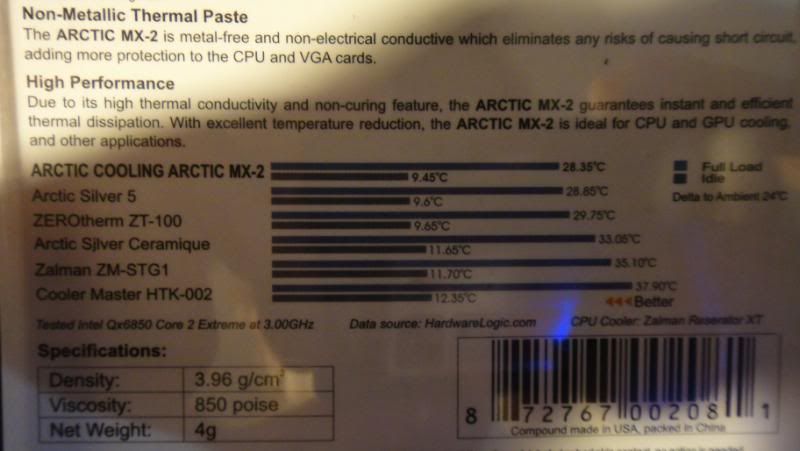
I had helpings of Arctic Silver 5, but have an unopened case of Arctic MX-2 that I have yet to try.

This was on the back of my MX-2:

user posted image

This post has been edited by This is a Lamp: Feb 22 2011, 08:40 PM
TSeugenechiuu
post Feb 23 2011, 02:15 AM

Gadget/Food Enthusiast
*******
Senior Member
2,909 posts

Joined: Jul 2009
From: London, United Kingdom or Kota Kinabalu, Sabah


http://benchmarkreviews.com/index.php?opti...1&limitstart=12

Hmm.. According to here, most of it are Aluminium Oxides... AS5 is polysynthetic silver.... I am guessing Silver is better??


Added on February 23, 2011, 6:16 amAnyways, I decided and went ahead to buy a IC Diamond 7 CPU Thermal Paste for £4.75 and Tuniq TR-1 CPU thermal paste remover cleaner for £3.99 from eBay... Hopefully it would be the right choice lol...

I hope someone could enlighten me with some guides though... Do I just put a rice grain size of the paste and that's it or I have to spread it myself?? Because there're quite a few different methods somehow, dunno how should it be... Any specific guides for Asus lappies?

This post has been edited by eugenechiuu: Feb 23 2011, 06:16 AM
This is a Lamp
post Feb 23 2011, 06:43 AM

Getting Started
**
Junior Member
189 posts

Joined: Jan 2011
QUOTE(eugenechiuu @ Feb 23 2011, 02:15 AM)
http://benchmarkreviews.com/index.php?opti...1&limitstart=12

Hmm.. According to here, most of it are Aluminium Oxides... AS5 is polysynthetic silver.... I am guessing Silver is better??


Added on February 23, 2011, 6:16 amAnyways, I decided and went ahead to buy a IC Diamond 7 CPU Thermal Paste for £4.75 and Tuniq TR-1 CPU thermal paste remover cleaner for £3.99 from eBay... Hopefully it would be the right choice lol...

I hope someone could enlighten me with some guides though... Do I just put a rice grain size of the paste and that's it or I have to spread it myself?? Because there're quite a few different methods somehow, dunno how should it be... Any specific guides for Asus lappies?
*
I do not know of any ASUS specific guides but think of it as a layer of thin cheese connecting to your burger.

I didn't use the grain of rice policy and only judged the amount of paste needed to cover the entire die. Use a card or something to spread evenly around so the paste easily becomes a "bridge" between the die and the heatsink.
AlexLai
post Feb 23 2011, 07:19 AM

Look at all my stars!!
*******
Senior Member
5,531 posts

Joined: Feb 2009
From: Kajang, Selangor


Personally I rather get a plastic glove and spread the thingy myself over the chip til there is a more or less even layer.


TSeugenechiuu
post Feb 23 2011, 07:24 AM

Gadget/Food Enthusiast
*******
Senior Member
2,909 posts

Joined: Jul 2009
From: London, United Kingdom or Kota Kinabalu, Sabah


QUOTE(AlexLai @ Feb 23 2011, 07:19 AM)
Personally I rather get a plastic glove and spread the thingy myself over the chip til there is a more or less even layer.
*
Have u applied any on ur laptop yet?

2 Pages  1 2 >Top
 

Change to:
| Lo-Fi Version
0.0168sec    0.60    5 queries    GZIP Disabled
Time is now: 6th December 2025 - 03:19 PM