Guys, i would like to share something good. Previously i had issues with my laptop because it tends to overheat a lot even just browsing the net. I did replaced the thermal paste and cleaned the vent but with no avail, the laptop still overheat. Then i looked into the backcase of my laptop, i see the fan kinda slow & sometimes stopped randomly. So i dis-assembled the laptop & gained access to the fan. What i did was, i try spinning the fan with my finger & it didn't spinned quite smooth. So i pull apart the fan & put some lubricant oil inside the the 'hole' & then i assembled back the fan & it was so licin (smooth) when i spinned it with my finger.

Then i repaste back the CPU & GPU & assembled the whole thing back. And the laptop not overheat again

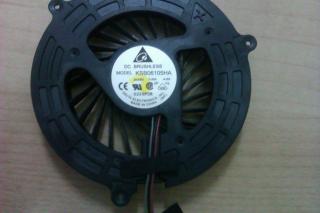
This is the picture of the fan. You hold this side of the fan, & then you pull the fan from the other side to gain access the 'hole'.
(Don't put too much lubricant & remember don't overflow it or your system will rosak)You can get the idea from this Youtube video:
http://www.youtube.com/watch?v=HAGP_ZCcMvk
This is my temperature right now, quite cool

Added on June 5, 2012, 11:54 pmQUOTE(skycrawler @ Jun 4 2012, 09:50 AM)
Hi guys , Im going to buy something from China this 15 June . I can help u guys get this internal fan . Dateline is 13 June . I will order on 15 June .
Its ok skycrawler, i think i fixed my fan already
This post has been edited by DayatXIII: Jun 5 2012, 11:54 PM 

 May 27 2012, 01:08 AM


 Quote
Quote

 0.0313sec
 0.66
0.66
 7 queries
 GZIP Disabled