


Added on February 21, 2011, 11:20 amnot sure about snaptu... not yet try
This post has been edited by sklchan: Feb 21 2011, 11:20 AM
Nokia N8 - V25 - [The King of Camera Phones], 12MP with 1/1.83″ sensor not enough?
|
|
 Feb 21 2011, 11:19 AM Feb 21 2011, 11:19 AM
|
 
Senior Member
6,357 posts Joined: Feb 2008 From: Penang  
|
i still only find the default social apps are more useful compare with socially...
Added on February 21, 2011, 11:20 amnot sure about snaptu... not yet try This post has been edited by sklchan: Feb 21 2011, 11:20 AM |
|
|
|
|
|
Feb 21 2011, 11:21 AM
|
 
Elite
11,861 posts Joined: Oct 2008 From: Bangalasia
|
» Click to show Spoiler - click again to hide... «  baby baby baby oh~ (this baby quite weird because all the way his face is like that lol, kinda cute... maybe he looking the things too hard?)  This post has been edited by Agito666: Feb 21 2011, 11:23 AM |
|
|
Feb 21 2011, 11:22 AM
|

Senior Member
587 posts Joined: Oct 2008 
|
Anyone can provide link to get Screenshot App from N8 set, so i can share my homescreen in here?
|
|
|
Feb 21 2011, 11:24 AM
|

Junior Member
128 posts Joined: Mar 2009
|
QUOTE(sklchan @ Feb 21 2011, 11:19 AM) i still only find the default social apps are more useful compare with socially... i think socially got facebook notification. you can set how frequent to check Added on February 21, 2011, 11:20 amnot sure about snaptu... not yet try  that's better than the default social app i think  Added on February 21, 2011, 11:25 am QUOTE(xgnesh93 @ Feb 21 2011, 11:22 AM) Anyone can provide link to get Screenshot App from N8 set, so i can share my homescreen in here? http://store.ovi.com/content/1540 or here http://www.smartphoneware.com/screen_snap-...an3-product.php This post has been edited by pappasera: Feb 21 2011, 11:26 AM |
|
|
Feb 21 2011, 11:27 AM
|
|
Senior Member
587 posts Joined: Oct 2008
|
QUOTE(pappasera @ Feb 21 2011, 11:24 AM) i think socially got facebook notification. you can set how frequent to check Thanks bro that's better than the default social app i think Added on February 21, 2011, 11:25 am http://store.ovi.com/content/1540 or here http://www.smartphoneware.com/screen_snap-...an3-product.php |
|
|
Feb 21 2011, 11:28 AM
|
|
Senior Member
6,357 posts Joined: Feb 2008 From: Penang
|
QUOTE(pappasera @ Feb 21 2011, 11:24 AM) i think socially got facebook notification. you can set how frequent to check socially don't have widget as of now right?? that's better than the default social app i think Added on February 21, 2011, 11:25 am http://store.ovi.com/content/1540 or here http://www.smartphoneware.com/screen_snap-...an3-product.php |
|
|
|
|
|
Feb 21 2011, 11:31 AM
|
|
Junior Member
128 posts Joined: Mar 2009
|
QUOTE(sklchan @ Feb 21 2011, 11:28 AM) socially don't have widget as of now right?? that's true. or maybe u can try gravity. that one have widget  |
|
|
Feb 21 2011, 11:36 AM
|

Junior Member
44 posts Joined: Nov 2006
|
@sklchan,
noticed that u were "furious" in the nokia discussion board, muehehehe.... can understand the frustration bro!  |
|
|
Feb 21 2011, 11:39 AM
|
|
Senior Member
587 posts Joined: Oct 2008
|
This is my Homescreen He He
Attached thumbnail(s) 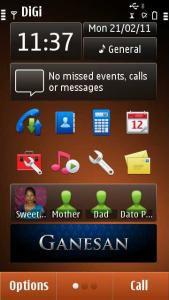
|
|
|
 Feb 21 2011, 11:49 AM Feb 21 2011, 11:49 AM
|
|
Senior Member
6,357 posts Joined: Feb 2008 From: Penang
|
 N8 Multiple Mods v5.00 Released (USE AT YOUR OWN RISK!!!) N8 Multiple Mods v5.00 Released (USE AT YOUR OWN RISK!!!) 01. KS Improvement - Improve on Kinetic Scrolling, now your list will be easier/faster/longer on kinetic scroll (you wil SURE feel the different) 02. UI Improvement - Experiment Mod - Experiment mods, changed the default FPS from 67FPS to 60FPS and max processing power from 75% to 95%. Need more users experience feedback on it's actual improvement (if it have any) 03. Camera Sound Mute - Enable the camera sound to be mute when warning tone been turn off. 04. Continuous AutoFocus - You will have an EXTRA option under Video Setting that enable the Continuous AF during video. For Mods #5,#6,#7,#8, ONLY select 1 option, if multiple options selected the top most option will be use. 05. Photo/Video (100/30FPS) - Photo quality change the compression ratio from original 85/75/60 to 100/85/75, video will change from 25FPS to 30FPS and the capture audio quality will change from 128kbps to 256kbps. 06. Photo/Video (097/30FPS) - Photo quality change the compression ratio from original 85/75/60 to 97/85/75, video will change from 25FPS to 30FPS and the capture audio quality will change from 128kbps to 256kbps. 07. Photo/Video (095/30FPS) - Photo quality change the compression ratio from original 85/75/60 to 95/85/75, video will change from 25FPS to 30FPS and the capture audio quality will change from 128kbps to 256kbps. 08. Photo/Video (097/25FPS) - Photo quality change the compression ratio from original 85/75/60 to 97/85/75, video remain 25FPS with capture audio quality will change from 128kbps to 256kbps. 09. Photo Gallery Folders - Photo Gallery Folders excluded lots of folders path, hopefully now it's will only show E:\Images\ & F:\Images\ contents. 10. Music Gallery Folders - Music Gallery Folders excluded lots of folders path, hopefully now it's will only show E:\Music\, E:\Sounds\, F:\Music\, F:\Sounds\, G:\Music\, G:\Sounds\ contents. For Mods #11,#12, ONLY select 1 option, if multiple options selected the top most option will be use. 11. Browser's Cache (D:\) - Change the default browser cache folder from C: to D: and set the amount to 32MB, actual effects need those HEAVY internet users feedback. 12. Browser's Cache (E:\) - Change the default browser cache folder from C: to E: and set the amount to 32MB, actual effects need those HEAVY internet users feedback. For Mods #13,#14,#15, ONLY select 1 option, if multiple options selected the top most option will be use. 13. Startup/Shutdown (C:\Animations) - Redirect the phone to look for the Startup.gif and Startup.mp3 during startup in C:\Animations folder and look for the Shutdown.gif and Shutdown.mp3 during shutdown in C:\Animations folder. If none are found then the phone won't play any startup/shutdown animations at all. 14. Startup/Shutdown (E:\Animations) - Redirect the phone to look for the Startup.gif and Startup.mp3 during startup in E:\Animations folder and look for the Shutdown.gif and Shutdown.mp3 during shutdown in E:\Animations folder. If none are found then the phone won't play any startup/shutdown animations at all. 15. Startup/Shutdown (F:\Animations) - Redirect the phone to look for the Startup.gif and Startup.mp3 during startup in F:\Animations folder and look for the Shutdown.gif and Shutdown.mp3 during shutdown in F:\Animations folder. If none are found then the phone won't play any startup/shutdown animations at all. 16. Voice Recorder (12H/256kbps/Stereo) - Set the default Voice Recorder to high quality recording (from 64kbps to 256kbps) and increase the max duration of the recording clip from 60mins to 720mins. 17. Music Player Volumn/Heap Mods (80%/32MB) - Experiment mods, no significant effect after the mods. 18. Context Data Object Maximum Size Mod - Experiment mods, no significant effect after the mods. 19. Light Sensor Disable - Totally disable the Light Sensor, LCD will have 100% brightness all the time (will dim ONLY in power safe mode) 20. Haptics Improvement - Lower the vibration and fine tune level 1/2/3 haptics feedback (not must different as i can tell) 21. Vibration Alert Improvement - Same goes with haptics mods, can't really feel big different 22. Camera Full Shutdown (RAM) - Camera apps will fully shutdown once you close the apps (won't remain in the memory), but the N8 have better camera apps as the total shutdown and without only make ~1Mb ram saving (not like what we see in 5800xm as it's camera apps are memory whore) 23. Fast Screen Rotation - Can feel "a bit" faster but not lighting fast as the delay seem not from the sensor but rather from the UI. 24. FM Transmitter RDS - The FM Transmitter now send RDS "Nokia N8" and not just "Nokia". 25. Video Call FPS Improvement - Slightly change the video call setting fps from original min/norm/max of 5/10/15 to 10/15/20. Not tested as not really use video call. 26. MSG/LOGS/CONT/CLK/CAL Shutdown (RAM) - Disable Messaging, Logs, Contacts, Clock, Calendar Apps from staying in the background after you exit them. 27. Database Max Record Count - Experimental mod, Increase database from 20 to 50. 28. Default Application Orientation State - Change default orientation from Landscape to Hardware Sensor. 29. HWRM Process Priority - Experimental mod, Hardware sensor priority change from background to foreground. 30. Music Player Equalizer - Add in additional 6 EQ presets, Flat/Speech/Enhance/Treble booster/Bass & Treble/ZigZag EQ Presets Overview » Click to show Spoiler - click again to hide... « Changelogs: v5.00 - PR 1.0 and PR 1.1 compatibility - Fine tune some of the mods to add stability v4.00 - Bugfixes for Video gallery scan folder - Extra EQ presets (lovely effects) - Fine tune some of the mods to add stability - Voice recorder duration changed to max 12 hours recording (can record for whole day event) - Fast screen rotation mod now only reduce it's sensor timing without changing it's original tilting setting v3.30 - Included lots of Symbian S60V5 Cenrep mods v3.00 - Included multiple choices during installation - Clean up most of the code within the cenrep files - All mods change back to .cre for better performance For CAF setting below the recommendation of usage: 1. For close up object (10cm~1m) enable the CAF. 2. For normal video capture (>30cm) disable the CAF. Just download the attachment and sign it with your cert then install. No hacked phone needed!! Installation steps: 1. Download the attachment. 2. Sign the . sis with your own cert. 3. Run the signed . sis. 4. Select the mods that you like to install. 5. REBOOT the phone. Uninstall the mods: 1. Use normal uninstall apps method. 2. REBOOT the phone. 3. All will back to original state. Modify or Re-select the mods: 1. Use normal uninstall apps method. 2. REBOOT the phone. 3. Run the signed . sis. 4. Select the mods that you like to install. 5. REBOOT the phone. Attachment: (updated to using multiple download sites) V5.00 http://www.multiupload.com/PJTLGH04HX This post has been edited by sklchan: Feb 21 2011, 12:01 PM Attached File(s)  sklchan_N8_mods_v5.00.zip ( 17.03k )
Number of downloads: 105
sklchan_N8_mods_v5.00.zip ( 17.03k )
Number of downloads: 105 |
|
|
Feb 21 2011, 11:54 AM
|

Junior Member
231 posts Joined: Jun 2005
|
sklchan, the file name was still a version 4.00 ?
|
|
|
Feb 21 2011, 11:54 AM
|
|
Junior Member
129 posts Joined: May 2010
|
 Thanks Mr.Chan,u r working ahead of nokia firmware update team Thanks Mr.Chan,u r working ahead of nokia firmware update team |
|
|
Feb 21 2011, 11:58 AM
|
|
Senior Member
587 posts Joined: Oct 2008
|
Well Done Mr Chan.. I think you should be in Nokia Software Division to oversee the Firmware update send to all users in time..
|
|
|
|
|
|
Feb 21 2011, 11:59 AM
|
|
Senior Member
6,357 posts Joined: Feb 2008 From: Penang
|
QUOTE(MaUi^ @ Feb 21 2011, 11:54 AM) sklchan, the file name was still a version 4.00 ? This post has been edited by sklchan: Feb 21 2011, 12:02 PM |
|
|
Feb 21 2011, 12:02 PM
|
|
Junior Member
128 posts Joined: Mar 2009
|
QUOTE(MaUi^ @ Feb 21 2011, 11:54 AM) sklchan, the file name was still a version 4.00 ? no lar. its correct. i downloaded version 5.00 |
|
|
Feb 21 2011, 12:13 PM
|
|
Newbie
3 posts Joined: Jan 2011
|
Nice!!!
 v5.00. v5.00.BTW, need to uninstall the previous v4.00 before installing this? Or will it auto overwrite? |
|
|
Feb 21 2011, 12:20 PM
|
|
Senior Member
6,357 posts Joined: Feb 2008 From: Penang
|
QUOTE(blitzzzz @ Feb 21 2011, 12:13 PM) Nice!!! 1. uninstall v5.00.BTW, need to uninstall the previous v4.00 before installing this? Or will it auto overwrite? 2. reboot 3. install latest 4. reboot |
|
|
Feb 21 2011, 12:21 PM
|

Senior Member
1,606 posts Joined: Oct 2007 From: Emirates Stadium ~
|
thanks sklchan!
|
|
|
Feb 21 2011, 12:37 PM
|

Junior Member
418 posts Joined: Feb 2009 From: Heaven 
|
QUOTE(sklchan @ Feb 21 2011, 11:49 AM) N8 Multiple Mods v5.00 Released (USE AT YOUR OWN RISK!!!) |
|
|
Feb 21 2011, 01:04 PM
|
|
Junior Member
231 posts Joined: Jun 2005
|
QUOTE(sklchan @ Feb 21 2011, 11:59 AM) |
|
Topic ClosedOptions
|
| Change to: |  0.0355sec 0.0355sec
 0.49 0.49
 6 queries 6 queries
 GZIP Disabled GZIP Disabled
Time is now: 10th December 2025 - 09:39 AM |
 Quote
Quote


