Welcome Guest ( Log In | Register )

Outline · [ Standard ] · Linear+

 i brick my samsung galaxy s!

views
     
TSunionnone
post Dec 27 2010, 12:55 PM, updated 15y ago

Getting Started
**
Junior Member
75 posts

Joined: Sep 2010
im so stupid that i flash the wrong rom!!!!! i flash to at&t captivative rom.......now that the 3 como button wont works....anyone can help me?

guide for making a homejig


Added on January 24, 2011, 6:21 pmThis guide is for the situation where your phone is not booting and the three-button combo for getting into download mode is not working for some reason, and you have tried all the other solutions in the FAQ. It won't help you if you can already get into download mode but something else is going wrong with the flashing process, for example you can't get Odin to communicate with the phone.

If the phone's bootloader is still intact, that is you see at least the white Galaxy S/Samsung/AT&T logo or the "PC ! Phone" logo on the screen, you should be able to force it into download mode by connecting a homemade jig that simulates the Samsung "Anyway" field test jig. You can make this jig using a micro USB plug and a resistor.

If your phone screen is always black, that is it does not display the white Galaxy S/Samsung/AT&T logo when you switch it on, then sorry, this jig will not help you.

If this helps you recover your bricked phone, please donate to the CyanogenMod developers: go to this thread and click the "Donate to Me" link under Aery's name. Thanks.

You will need:
1. a micro USB plug that you can solder onto. If you are not confident with soldering or you just want a tidy solution, buy this micro USB breakout board from Sparkfun.

Otherwise, get a cheap micro USB cable and cut the sleeving off the plug with a sharp knife. You cannot just wire onto the cable because this jig uses a normally-unused pin (pin 4) of the micro USB plug which will not be connected to the cable.

2. a 301k resistor. You can buy one from Digikey, or make one up by joining several resistors together in series, for example 3x100k and 1x1k. The resistor value does need to be fairly accurate (I would guess within 1% of 301k) to trigger download mode. 300K seems to work for everyone so far.

Procedure:
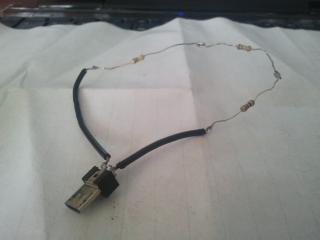
1. Solder the resistor across pins 4 and 5 of the micro USB plug. Do not do this with the plug plugged in to the phone as the heat could damage the phone's USB socket. The pins are shown in this diagram ("Micro-B"). On the Sparkfun micro USB breakout board they are labelled "ID" (pin 4) and "GND" (pin 5). When the plug is plugged in to the phone they will be the pins closest to the headphone socket.

2. Make sure the phone is fully switched off by pulling the battery, waiting 5 minutes, then replacing the battery. Do not switch the phone on.

3. Connect the rigged USB plug to the phone. Try not to touch the pins on the back of the plug or the resistor(s) as you are plugging it in, as your skin resistance could affect the resistor value seen by the phone. You do not need to press the power button. After a few seconds the phone should go into download mode.

4. Disconnect the rigged USB plug and connect a regular USB cable from your PC to the phone, then you should be able to flash using Odin.

from: http://forum.xda-developers.com/showthread.php?t=819551

This post has been edited by unionnone: Jan 24 2011, 06:26 PM
TSunionnone
post Dec 27 2010, 12:58 PM

Getting Started
**
Junior Member
75 posts

Joined: Sep 2010
the prob is cannot go in recovery mode and download mode.....
TSunionnone
post Dec 27 2010, 01:04 PM

Getting Started
**
Junior Member
75 posts

Joined: Sep 2010
well....it cannot connect to pc, cannot boot in recovery mode and also cannot boot in download mode...
TSunionnone
post Dec 27 2010, 01:09 PM

Getting Started
**
Junior Member
75 posts

Joined: Sep 2010
jig?? i've seen it in some forum... anyone sell it?


Added on December 27, 2010, 2:56 pmgood news!!!! i made a jig and it work!!! now try flashing my SGS!!!

This post has been edited by unionnone: Dec 27 2010, 02:56 PM
TSunionnone
post Dec 27 2010, 03:52 PM

Getting Started
**
Junior Member
75 posts

Joined: Sep 2010
QUOTE(KannaSai1 @ Dec 27 2010, 03:43 PM)
need soldiering... u did it ?
*
yup!!! it works like a charm!! i will upload some photo of it if i can^^
TSunionnone
post Dec 29 2010, 09:15 AM

Getting Started
**
Junior Member
75 posts

Joined: Sep 2010
Attached Image
this is a SGS lifesaver!!!!
TSunionnone
post Dec 29 2010, 10:32 AM

Getting Started
**
Junior Member
75 posts

Joined: Sep 2010
QUOTE(darude87 @ Dec 29 2010, 10:15 AM)
salute
this guy posted "my sgs is bricked!"

not long after that, his JIG is created, by any chance you are in electronic engineering field? laugh.gif
*
it tooks me an hour to made it(include buying the part) brows.gif
TSunionnone
post Dec 29 2010, 11:21 AM

Getting Started
**
Junior Member
75 posts

Joined: Sep 2010
QUOTE(jiidaineko @ Dec 29 2010, 10:47 AM)
i salute to the person in XDA who actually figured out a fix like this!
*
totaly agree wit you!!! they are my SGS lifesaver!!!

TSunionnone
post Dec 30 2010, 10:20 AM

Getting Started
**
Junior Member
75 posts

Joined: Sep 2010
you can find this jig in ebay, about RM 20++.but need a addition of RM20++ for the shipping fees:sweat:
TSunionnone
post Dec 30 2010, 04:28 PM

Getting Started
**
Junior Member
75 posts

Joined: Sep 2010
thumbup.gif >>> mengsuan
TSunionnone
post Jan 24 2011, 06:13 PM

Getting Started
**
Junior Member
75 posts

Joined: Sep 2010
QUOTE(roci @ Jan 18 2011, 09:05 PM)
haloo unionnone.. where i can find this jigs.. i dont hv talent to this on my own.. if sumone selling it locally i would like to buy one.. i also bricked my phone.. cant download & recovery modeĀ  rclxub.gif
*
fix it d?


Added on January 24, 2011, 6:23 pm

Added on January 24, 2011, 6:21 pmThis guide is for the situation where your phone is not booting and the three-button combo for getting into download mode is not working for some reason, and you have tried all the other solutions in the FAQ. It won't help you if you can already get into download mode but something else is going wrong with the flashing process, for example you can't get Odin to communicate with the phone.

If the phone's bootloader is still intact, that is you see at least the white Galaxy S/Samsung/AT&T logo or the "PC ! Phone" logo on the screen, you should be able to force it into download mode by connecting a homemade jig that simulates the Samsung "Anyway" field test jig. You can make this jig using a micro USB plug and a resistor.

If your phone screen is always black, that is it does not display the white Galaxy S/Samsung/AT&T logo when you switch it on, then sorry, this jig will not help you.

If this helps you recover your bricked phone, please donate to the CyanogenMod developers: go to this thread and click the "Donate to Me" link under Aery's name. Thanks.

You will need:
1. a micro USB plug that you can solder onto. If you are not confident with soldering or you just want a tidy solution, buy this micro USB breakout board from Sparkfun.

Otherwise, get a cheap micro USB cable and cut the sleeving off the plug with a sharp knife. You cannot just wire onto the cable because this jig uses a normally-unused pin (pin 4) of the micro USB plug which will not be connected to the cable.

2. a 301k resistor. You can buy one from Digikey, or make one up by joining several resistors together in series, for example 3x100k and 1x1k. The resistor value does need to be fairly accurate (I would guess within 1% of 301k) to trigger download mode. 300K seems to work for everyone so far.

Procedure:
1. Solder the resistor across pins 4 and 5 of the micro USB plug. Do not do this with the plug plugged in to the phone as the heat could damage the phone's USB socket. The pins are shown in this diagram ("Micro-B"). On the Sparkfun micro USB breakout board they are labelled "ID" (pin 4) and "GND" (pin 5). When the plug is plugged in to the phone they will be the pins closest to the headphone socket.

2. Make sure the phone is fully switched off by pulling the battery, waiting 5 minutes, then replacing the battery. Do not switch the phone on.

3. Connect the rigged USB plug to the phone. Try not to touch the pins on the back of the plug or the resistor(s) as you are plugging it in, as your skin resistance could affect the resistor value seen by the phone. You do not need to press the power button. After a few seconds the phone should go into download mode.

4. Disconnect the rigged USB plug and connect a regular USB cable from your PC to the phone, then you should be able to flash using Odin.

from: http://forum.xda-developers.com/showthread.php?t=819551


Added on January 24, 2011, 6:29 pm
QUOTE(fnf @ Jan 22 2011, 09:27 PM)
can this jig work on my galaxy 3? bricked my phone when try to upgrade. aisehh  sad.gif

TS, when ur phone brick u can boot the phone? any display?
*
shud be no.....just send back to samsung centre^^

This post has been edited by unionnone: Jan 24 2011, 06:29 PM


Change to:
| Lo-Fi Version
0.0193sec    0.64    7 queries    GZIP Disabled
Time is now: 6th December 2025 - 09:54 PM