Welcome Guest ( Log In | Register )

3 Pages  1 2 3 >Bottom

Outline · [ Standard ] · Linear+

 i brick my samsung galaxy s!

views
     
TSunionnone
post Dec 27 2010, 12:55 PM, updated 15y ago

Getting Started
**
Junior Member
75 posts

Joined: Sep 2010
im so stupid that i flash the wrong rom!!!!! i flash to at&t captivative rom.......now that the 3 como button wont works....anyone can help me?

guide for making a homejig


Added on January 24, 2011, 6:21 pmThis guide is for the situation where your phone is not booting and the three-button combo for getting into download mode is not working for some reason, and you have tried all the other solutions in the FAQ. It won't help you if you can already get into download mode but something else is going wrong with the flashing process, for example you can't get Odin to communicate with the phone.

If the phone's bootloader is still intact, that is you see at least the white Galaxy S/Samsung/AT&T logo or the "PC ! Phone" logo on the screen, you should be able to force it into download mode by connecting a homemade jig that simulates the Samsung "Anyway" field test jig. You can make this jig using a micro USB plug and a resistor.

If your phone screen is always black, that is it does not display the white Galaxy S/Samsung/AT&T logo when you switch it on, then sorry, this jig will not help you.

If this helps you recover your bricked phone, please donate to the CyanogenMod developers: go to this thread and click the "Donate to Me" link under Aery's name. Thanks.

You will need:
1. a micro USB plug that you can solder onto. If you are not confident with soldering or you just want a tidy solution, buy this micro USB breakout board from Sparkfun.

Otherwise, get a cheap micro USB cable and cut the sleeving off the plug with a sharp knife. You cannot just wire onto the cable because this jig uses a normally-unused pin (pin 4) of the micro USB plug which will not be connected to the cable.

2. a 301k resistor. You can buy one from Digikey, or make one up by joining several resistors together in series, for example 3x100k and 1x1k. The resistor value does need to be fairly accurate (I would guess within 1% of 301k) to trigger download mode. 300K seems to work for everyone so far.

Procedure:
1. Solder the resistor across pins 4 and 5 of the micro USB plug. Do not do this with the plug plugged in to the phone as the heat could damage the phone's USB socket. The pins are shown in this diagram ("Micro-B"). On the Sparkfun micro USB breakout board they are labelled "ID" (pin 4) and "GND" (pin 5). When the plug is plugged in to the phone they will be the pins closest to the headphone socket.

2. Make sure the phone is fully switched off by pulling the battery, waiting 5 minutes, then replacing the battery. Do not switch the phone on.

3. Connect the rigged USB plug to the phone. Try not to touch the pins on the back of the plug or the resistor(s) as you are plugging it in, as your skin resistance could affect the resistor value seen by the phone. You do not need to press the power button. After a few seconds the phone should go into download mode.

4. Disconnect the rigged USB plug and connect a regular USB cable from your PC to the phone, then you should be able to flash using Odin.

from: http://forum.xda-developers.com/showthread.php?t=819551

This post has been edited by unionnone: Jan 24 2011, 06:26 PM
sanosizo
post Dec 27 2010, 12:56 PM

Look at all my stars!!
*******
Senior Member
4,553 posts

Joined: Jan 2003
From: Shah Alam


just flash back to the right rom lah
TSunionnone
post Dec 27 2010, 12:58 PM

Getting Started
**
Junior Member
75 posts

Joined: Sep 2010
the prob is cannot go in recovery mode and download mode.....
mengsuan
post Dec 27 2010, 01:01 PM

9W2NNS
Group Icon
Staff
10,459 posts

Joined: Sep 2005
From: Puchong

Does your ROM comes with CWM Recovery and root?

If there is, find a way to put in a working CWM-flashable ROM into the internal memory. If it's rooted, download 'Terminal Emulator' from Market. Type 'su' and then 'reboot recovery'. Then you can flash.

Otherwise, if you think your USB port is still working for Odin flash, you can type "reboot download". Root is required, as always.

This post has been edited by mengsuan: Dec 27 2010, 01:02 PM
TSunionnone
post Dec 27 2010, 01:04 PM

Getting Started
**
Junior Member
75 posts

Joined: Sep 2010
well....it cannot connect to pc, cannot boot in recovery mode and also cannot boot in download mode...
pluginbaby
post Dec 27 2010, 01:04 PM

Look at all my stars!!
*******
Senior Member
2,661 posts

Joined: Apr 2007


QUOTE(mengsuan @ Dec 27 2010, 01:01 PM)
Does your ROM comes with CWM Recovery and root?

If there is, find a way to put in a working CWM-flashable ROM into the internal memory. If it's rooted, download 'Terminal Emulator' from Market. Type 'su' and then 'reboot recovery'. Then you can flash.

Otherwise, if you think your USB port is still working for Odin flash, you can type "reboot download". Root is required, as always.
*
im afraid if he say brick, he cant switch it on then.. so he cant turn it on to even download terminal emulator

i thought that 3 button combo is fixable via odin.. is it? if it is, flash the 3 button combo via odin and see if it works
mengsuan
post Dec 27 2010, 01:06 PM

9W2NNS
Group Icon
Staff
10,459 posts

Joined: Sep 2005
From: Puchong

Hmmm, I've seen people flashing the wrong ROM and it would boot, only button mappings and USB gone wrong.

If terminal emulator is not accessible, then there's nothing to do to trigger by software. ADB is also not possible.

Only way, is JIG.


Added on December 27, 2010, 1:06 pm
QUOTE(pluginbaby @ Dec 27 2010, 01:04 PM)
im afraid if he say brick, he cant switch it on then.. so he cant turn it on to even download terminal emulator

i thought that 3 button combo is fixable via odin.. is it? if it is, flash the 3 button combo via odin and see if it works
*
No download mode, no Odin, no 3 button fix.


Added on December 27, 2010, 1:08 pmRead JIG: http://forum.xda-developers.com/showthread.php?t=819551

This post has been edited by mengsuan: Dec 27 2010, 01:08 PM
TSunionnone
post Dec 27 2010, 01:09 PM

Getting Started
**
Junior Member
75 posts

Joined: Sep 2010
jig?? i've seen it in some forum... anyone sell it?


Added on December 27, 2010, 2:56 pmgood news!!!! i made a jig and it work!!! now try flashing my SGS!!!

This post has been edited by unionnone: Dec 27 2010, 02:56 PM
pluginbaby
post Dec 27 2010, 03:35 PM

Look at all my stars!!
*******
Senior Member
2,661 posts

Joined: Apr 2007


ahhh.. a good new information for me.. thanks for the share mengsuan smile.gif
aarondotcom
post Dec 27 2010, 03:38 PM

Casual
***
Junior Member
389 posts

Joined: Aug 2006
From: KL, Cheras
cool. jig, i will take note that. thank for sharing
pluginbaby
post Dec 27 2010, 03:42 PM

Look at all my stars!!
*******
Senior Member
2,661 posts

Joined: Apr 2007


QUOTE(aarondotcom @ Dec 27 2010, 03:38 PM)
cool. jig, i will take note that. thank for sharing
*
u got a SGS mate?
KannaSai1
post Dec 27 2010, 03:43 PM

Look at all my stars!!
*******
Senior Member
6,933 posts

Joined: Jun 2010
From: Today, 00:00 AM
QUOTE(unionnone @ Dec 27 2010, 01:09 PM)
jig?? i've seen it in some forum... anyone sell it?


Added on December 27, 2010, 2:56 pmgood news!!!! i made a jig and it work!!! now try flashing my SGS!!!
*
need soldiering... u did it ?
TSunionnone
post Dec 27 2010, 03:52 PM

Getting Started
**
Junior Member
75 posts

Joined: Sep 2010
QUOTE(KannaSai1 @ Dec 27 2010, 03:43 PM)
need soldiering... u did it ?
*
yup!!! it works like a charm!! i will upload some photo of it if i can^^
TSunionnone
post Dec 29 2010, 09:15 AM

Getting Started
**
Junior Member
75 posts

Joined: Sep 2010
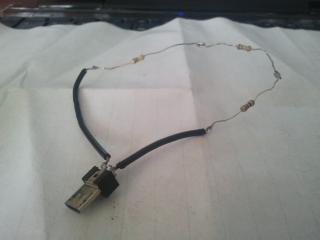
Attached Image
this is a SGS lifesaver!!!!
calmshot
post Dec 29 2010, 09:35 AM

My Name Is ...
*******
Senior Member
2,560 posts

Joined: Jan 2003
From: behind you


nice JIG, nice hack. well done.
darude87
post Dec 29 2010, 10:15 AM

hhhoooiii!!!
******
Senior Member
1,412 posts

Joined: Jun 2005


salute
this guy posted "my sgs is bricked!"

not long after that, his JIG is created, by any chance you are in electronic engineering field? laugh.gif
TSunionnone
post Dec 29 2010, 10:32 AM

Getting Started
**
Junior Member
75 posts

Joined: Sep 2010
QUOTE(darude87 @ Dec 29 2010, 10:15 AM)
salute
this guy posted "my sgs is bricked!"

not long after that, his JIG is created, by any chance you are in electronic engineering field? laugh.gif
*
it tooks me an hour to made it(include buying the part) brows.gif
anakrantau
post Dec 29 2010, 10:36 AM

Enthusiast
*****
Senior Member
753 posts

Joined: Dec 2004
QUOTE(unionnone @ Dec 29 2010, 10:32 AM)
it tooks me an hour to made it(include buying the part) brows.gif
*
nice..
you should put some illustrated guide and ask TT to put the guide on the 1st post of SGS thread.

jiidaineko
post Dec 29 2010, 10:47 AM

On my way
****
Senior Member
579 posts

Joined: Aug 2008


i salute to the person in XDA who actually figured out a fix like this!
silentser
post Dec 29 2010, 11:21 AM

OH MAH ANDROID
*******
Senior Member
3,177 posts

Joined: Sep 2006
From: subway FTW


huaaa, i also like to make a JIG, come on dude, post a guide how to make it

3 Pages  1 2 3 >Top
 

Change to:
| Lo-Fi Version
0.0194sec    0.66    6 queries    GZIP Disabled
Time is now: 5th December 2025 - 08:16 AM