Outline ·
[ Standard ] ·
Linear+
Samsung BX2231 problem, Black borders in any resolution AGH!
|
TSC-Fu
|
  Dec 12 2010, 12:50 AM, updated 16y ago Dec 12 2010, 12:50 AM, updated 16y ago
|

|
Guys, I got two Samsung BX2231 LED (backlighted, not LED monitor...yeah I got tricked  ) monitor connected to my ATI Radeon 6850. No matter what resolution I use, I can never get it to display fully without borders. Setting the resolution to 1920x1080 will shrink the whole image, black borders around it, 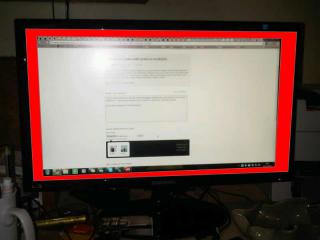
and 1680x1050 will result in borders at the sides. 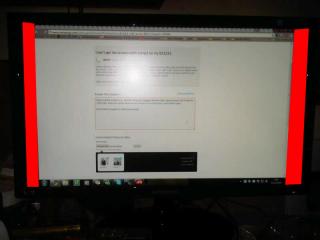
HDMI, or the supplied HDMI-to-DVI cable makes no difference (don't tell me I should use VGA!) What am I supposed to do? And I bought two of these!! |
|
|
|
|
|
smsseah5
|
Dec 12 2010, 01:04 AM
|
Getting Started

|
hahaha.... there is a setting inside catalyst can solve this prob  some games even come with it. |
|
|
|
|
|
techi5
|
Dec 12 2010, 01:05 AM
|
Getting Started
|
installed proper driver?
|
|
|
|
|
|
TSC-Fu
|
Dec 12 2010, 10:57 AM
|
|
|
everything's in order - catalyst, driver, etc.
tried with my HP 23" monitor and everything is fine.
Edit: oh right...... someone told me there's an overscan feature that I gotta enable in Catalyst. Well if I turn this on yeah I can scale it up to fit the whole screen, but then it means that my monitor isn't technically 1080p, right? overscan would scale it up and blur it a bit?
This post has been edited by C-Fu: Dec 12 2010, 11:03 AM
|
|
|
|
|
|
cjoenic
|
Dec 12 2010, 11:33 AM
|
|
|
ive never seen RED border with ATI GC. should be the monitor. have you playing around with the monitor setting?
|
|
|
|
|
|
netmatrix2
|
Dec 12 2010, 07:09 PM
|
|
|
How do u know this monitor is not LED lighted?
|
|
|
|
|
|
gkl83
|
Dec 12 2010, 07:29 PM
|
|
|
QUOTE(netmatrix2 @ Dec 12 2010, 07:09 PM) How do u know this monitor is not LED lighted? most of computer LED monitor wasn't 100% LED... http://forum.lowyat.net/index.php?showtopic=1548631the pure LED monitor's price should at least +70% from the LCD monitor's price example: 42" LCD RM2000, 42" LED RM3800 |
|
|
|
|
|
netmatrix2
|
Dec 12 2010, 08:21 PM
|
|
|
So u actually do not know that LED is only backlighting? U weren't conned man.
|
|
|
|
|
|
WebWalker
|
Dec 12 2010, 11:46 PM
|
|
|
Press the "Auto" button on the LCD monitor, and it should auto-adjust ...
|
|
|
|
|
|
TSC-Fu
|
Dec 14 2010, 01:02 AM
|
|
|
QUOTE(cjoenic @ Dec 12 2010, 11:33 AM) ive never seen RED border with ATI GC. should be the monitor. have you playing around with the monitor setting? its black, but i edited and coloured it to red so people can see it easily.  I scaled the display up a bit in catalyst, and the display managed to fill the entire screen. however, I noticed the texts and images to be slightly blurry. it doesn't really affect day-to-day use, but it's especially important when I do my video editing & VFX stuff. I'm gonna fiddle around a bit more to see if I can make the text (like the one in lowyat.net right now) sharper. This post has been edited by C-Fu: Dec 14 2010, 01:12 AM |
|
|
|
|
|
wan2911
|
Jan 9 2011, 01:46 AM
|
New Member
|
I'm facing the same problem,
how to solve it? help me please.
|
|
|
|
|
|
mynookieman
|
Jan 9 2011, 10:02 AM
|
New Member
|
This usually the fault of Ati Graphic card..got me stuck for hours after i bought my Samsung BX2350..try download latest ccc software n gc driver..max to highest resolution, 60hz refresh rate n try scaling again, overscan to 0%..
|
|
|
|
|
|
wan2911
|
Jan 11 2011, 12:14 AM
|
New Member
|
QUOTE(mynookieman @ Jan 9 2011, 10:02 AM) This usually the fault of Ati Graphic card..got me stuck for hours after i bought my Samsung BX2350..try download latest ccc software n gc driver..max to highest resolution, 60hz refresh rate n try scaling again, overscan to 0%.. problem solve  my default overscan not 0%, that why weird black frame menyemak..ahaha |
|
|
|
|
|
pang5_kiro
|
Jan 11 2011, 01:56 PM
|
|
|
what is the purpose of overscan?? mind to share??
|
|
|
|
|
|
mynookieman
|
Jan 12 2011, 11:19 PM
|
New Member
|
QUOTE(pang5_kiro @ Jan 11 2011, 01:56 PM) what is the purpose of overscan?? mind to share?? Overscan is extra image area (black boarders) around the four edges of a video image that may not be seen reliably by the viewer (x same size with led, lcd) So setting the overscan at ati's ccc to 0% meaning it will terminate the left space area(black boarders) and make use all the space size of ur lcd,led. This problem common to Ati's graphic card running with hdmi cable on led lcd..as i know of anyway.. |
|
|
|
|
|
Mr.CoMoT
|
Jan 13 2011, 09:25 AM
|
|
|
my fren also have lcd same like u..and also get same problem i think...
but know its already solve it..later i try ask him..
|
|
|
|
|
|
rayzel
|
Feb 13 2011, 08:19 PM
|
|
|
i had the same problem also man.. tried updating the driver for monitor n gpu... at last resorted to scaling.. sigh.. anyone managed to find the solution?
|
|
|
|
|
|
ImTheKidz
|
Mar 29 2011, 11:33 PM
|
New Member
|
i say man... i also having this monitor and same HD 6850 VGA, same problems with C-Fu
wan2911, can u giv a guide/step how to u manage to let it fit all screen? Howerver dont know y my monitor setting is [Locked]?
This post has been edited by ImTheKidz: Mar 29 2011, 11:33 PM
|
|
|
|
|
|
wandiana
|
Apr 21 2011, 06:02 PM
|
Getting Started
|
hi.. i just bought this monitor.. so far so good.. but i dont encounter what any of u guys had.. im using hdmi for console n vga for pc.. no black borders... =)
|
|
|
|
|
|
nazhif1
|
May 9 2011, 05:47 PM
|
New Member
|
QUOTE(rayzel @ Feb 13 2011, 08:19 PM) i had the same problem also man.. tried updating the driver for monitor n gpu... at last resorted to scaling.. sigh.. anyone managed to find the solution? open the Catalyst Control center and under My digital flat panel... select scaling option BTW i'm using HDMI This post has been edited by nazhif1: May 9 2011, 05:47 PM Attached thumbnail(s)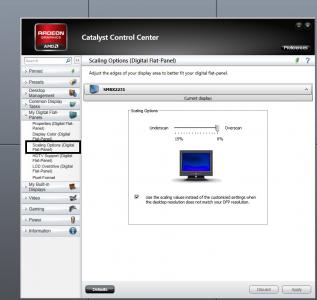
|
|
|
|
|
|
rayzel
|
May 9 2011, 05:52 PM
|
|
|
Yupp that's the only solution to this. Thanks anyway
|
|
|
|
|





 Quote
Quote


 0.0216sec
 0.55
0.55
 6 queries
 GZIP Disabled