Outline ·
[ Standard ] ·
Linear+
Samsung BX2231 problem, Black borders in any resolution AGH!
|
TSC-Fu
|
  Dec 12 2010, 12:50 AM, updated 16y ago Dec 12 2010, 12:50 AM, updated 16y ago
|

|
Guys, I got two Samsung BX2231 LED (backlighted, not LED monitor...yeah I got tricked  ) monitor connected to my ATI Radeon 6850. No matter what resolution I use, I can never get it to display fully without borders. Setting the resolution to 1920x1080 will shrink the whole image, black borders around it, 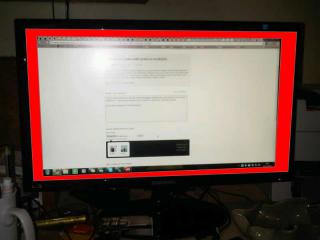
and 1680x1050 will result in borders at the sides. 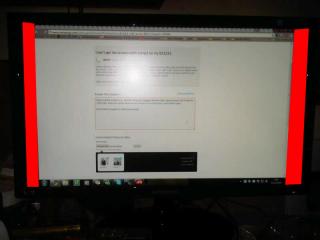
HDMI, or the supplied HDMI-to-DVI cable makes no difference (don't tell me I should use VGA!) What am I supposed to do? And I bought two of these!! |
|
|
|
|
|
TSC-Fu
|
Dec 12 2010, 10:57 AM
|
|
|
everything's in order - catalyst, driver, etc.
tried with my HP 23" monitor and everything is fine.
Edit: oh right...... someone told me there's an overscan feature that I gotta enable in Catalyst. Well if I turn this on yeah I can scale it up to fit the whole screen, but then it means that my monitor isn't technically 1080p, right? overscan would scale it up and blur it a bit?
This post has been edited by C-Fu: Dec 12 2010, 11:03 AM
|
|
|
|
|
|
TSC-Fu
|
Dec 14 2010, 01:02 AM
|
|
|
QUOTE(cjoenic @ Dec 12 2010, 11:33 AM) ive never seen RED border with ATI GC. should be the monitor. have you playing around with the monitor setting? its black, but i edited and coloured it to red so people can see it easily.  I scaled the display up a bit in catalyst, and the display managed to fill the entire screen. however, I noticed the texts and images to be slightly blurry. it doesn't really affect day-to-day use, but it's especially important when I do my video editing & VFX stuff. I'm gonna fiddle around a bit more to see if I can make the text (like the one in lowyat.net right now) sharper. This post has been edited by C-Fu: Dec 14 2010, 01:12 AM |
|
|
|
|





 Quote
Quote

 0.0189sec
 0.66
0.66
 7 queries
 GZIP Disabled