

http://forum.lowyat.net/topic/2277475
Pls help me =(
Dell XPS Series, Discuss everything about ur XPS
Dell XPS Series, Discuss everything about ur XPS
|
|
 Mar 23 2012, 11:53 AM Mar 23 2012, 11:53 AM
Return to original view | Post
#1
|
 
Senior Member
5,752 posts Joined: Jan 2012 
|
|
|
|
|
|
|
Apr 4 2012, 01:46 PM
Return to original view | Post
#2
|
|
Senior Member
5,752 posts Joined: Jan 2012
|
Jus got my XPS14z today!!! I am very happy ~~~~~~
BTW, where is the battery ??? I need to plug out the battery and connect to AC for long time usage And which Cooler pad u use for XPS 14z ~ |
|
|
Apr 12 2012, 06:18 PM
Return to original view | Post
#3
|
|
Senior Member
5,752 posts Joined: Jan 2012
|
QUOTE(cannavaro @ Apr 10 2012, 11:43 PM) I am close to getting the XPS 14z (basic RM3099). The beg is nice. After adding to cart, this is the only freebie/promo item: What's the best offer that you've seen so far, and where can I get discount/coupon codes?  Coupon ? I think no, coz the laptop is very new. And the battery is non-removeable. |
|
|
Apr 18 2012, 06:14 PM
Return to original view | Post
#4
|
|
Senior Member
5,752 posts Joined: Jan 2012
|
QUOTE(cannavaro @ Apr 17 2012, 12:28 AM) Haven't heard of this before. Sounds like good news! Also need answer from expert...Let me get this straight... if the above is true this means it is no longer necessary to remove the battery (to prolong battery life) when your laptop is plugged in? These newer laptops have some sort of automatically-detect-if-battery-is-full mechanism in place? Coz, Dell XPS 14z having built in battery. Cannot take out. |
|
|
Apr 18 2012, 06:26 PM
Return to original view | Post
#5
|
|
Senior Member
5,752 posts Joined: Jan 2012
|
Intel i7.
Maintained heat is around 47C. Min 41 Max 47 with work load. Is it high ? Using Notepal U2 |
|
|
Apr 18 2012, 06:51 PM
Return to original view | Post
#6
|
|
Senior Member
5,752 posts Joined: Jan 2012
|
QUOTE(vernon91 @ Apr 18 2012, 06:45 PM) mine one is old core i5 running around 50 at idle i think so, now surfing net also 41 oni. While HDD is 38. Hope this is maintained..i think urs is good |
|
|
|
|
|
Apr 18 2012, 07:05 PM
Return to original view | Post
#7
|
|
Senior Member
5,752 posts Joined: Jan 2012
|
QUOTE(vernon91 @ Apr 18 2012, 07:03 PM) i think ur core i7 on ur dell xps 14z has lower clock speed thats y yea...2.80Ghz only |
|
|
Apr 18 2012, 09:18 PM
Return to original view | Post
#8
|
|
Senior Member
5,752 posts Joined: Jan 2012
|
QUOTE(vernon91 @ Apr 18 2012, 08:00 PM) 2.80 is default or after turbo boost? default. After turbo boost is 3.50 Ghz |
|
|
Apr 20 2012, 09:10 PM
Return to original view | Post
#9
|
|
Senior Member
5,752 posts Joined: Jan 2012
|
^ is normal, it will change.
My order 26/3 got it 4/4 |
|
|
Apr 30 2012, 07:22 PM
Return to original view | Post
#10
|
|
Senior Member
5,752 posts Joined: Jan 2012
|
QUOTE(cannavaro @ Apr 28 2012, 09:12 AM) Received the 14z yesterday. Hey mate, try transfer file to ur 14z using normal external HDD. I am not fond of the keyboard... takes a while to get used to. I keep pressing the capslock button when I want to press 'A'. The 1TB 5400RPM HDD feels really slow since I am used to SSD... and upgrading the storage won't be an easy task judging from the videos on youtube.  If slow, PM me. We are on the same boat. FN + F6 is AWSOME. |
|
|
May 3 2012, 08:47 PM
Return to original view | Post
#11
|
|
Senior Member
5,752 posts Joined: Jan 2012
|
QUOTE(cannavaro @ May 3 2012, 05:25 PM) Transfer rate is normal, around 25MB/s - 30MB/s with a USB2.0 drive. Mine one really slow. I don't know what happen. Keep non responding when click the file on the HDD. there must be something wrong.The system is now faster after I removed most of the crap that was pre-installed by Dell. |
|
|
May 17 2012, 08:01 AM
Return to original view | Post
#12
|
|
Senior Member
5,752 posts Joined: Jan 2012
|
QUOTE(LightningFist @ May 12 2012, 06:52 PM) Hey guys... I'm on my (only one year old) Studio XPS 16, RGBLED, 7200rpm, i5-450M, ATI HD 5730... wait for Ivy Bridge ?? It is better i think.This thing still has 2 years of warranty on it but I'm thinking what should I do now... of course I will miss the power of my current laptop (graphics) as well as its huge 16 inch screen. If I buy a new laptop I could just give this to my brother or my mom. They don't need it, and I don't need a brand new laptop, but I might consider a new one that's only like 1.36 kg or 1.98 kg. I can't exactly trade up because I'd be downgrading on the screen, the graphics on the larger XPS laptops aren't very very good, and all of those are expensive while I got a decent deal on this laptop (such as cheap upgrade for the screen, but because this chassis is so sold, the processor was not new and certainly not the fastest). It'd be almost the same thing, with a worse screen, lighter by only a couple hundred grams, and heck more expensive. So I'm thinking if I should get the light XPS 13 Ultrabook or an XPS14z, more mobility, battery life. So what are your thoughts and comments? Ultrabook or 14z worth the money (considering no/crap graphics, not a great screen, small too)? Worth the weight trade-off? Anyone has used these laptops and can tell me about your experience? Realistic battery life? Thanks Added on May 12, 2012, 7:01 pmDell Australia has similar weird marketing as Dell Malaysia... Two versions, one with 4GB, one with 8GB RAM, both same price, except one shows a $200 discount. Strange. Added on May 12, 2012, 7:19 pmThese specs worth the price, RM4599? Windows® 7 Home Premium SP1 64bit Core i7-2640M processor (2.80 GHz with Turbo 2.0 up to 3.50 GHz) 3-year XPS Premier Service with 1-year CompleteCover Belkin Radius 15.6" Backpack 14.0" (35.6cm) HD WLED True-Life (1366x768) 8GB 1333MHz DDR3 SDRAM (2 x 4GB) 256GB Solid State Drive 9.5mm SATA Slot Load DVD+/-RW Intel® Centrino® Advanced-N 6230 with Bluetooth v3.0+HS 8 Cell Primary Battery NVIDIA® GeForce® GT 520M 1GB graphics Dell™Backlit Keyboard with Touchpad (English) High Definition Audio +Waves MaxxAudio® 3 |
|
|
Jun 2 2012, 11:20 AM
Return to original view | Post
#13
|
|
Senior Member
5,752 posts Joined: Jan 2012
|
QUOTE(same0917 @ May 26 2012, 12:39 AM) Im just become the owner of XPS 15z today, anyone can recommend me a cooler pad for it???? Cooler Master U3 |
|
|
|
|
|
Jun 30 2012, 04:05 PM
Return to original view | Post
#14
|
|
Senior Member
5,752 posts Joined: Jan 2012
|
TS can change the icon img to latest ?
Added on June 30, 2012, 4:05 pm QUOTE(chaosneo @ Jun 17 2012, 12:03 AM) here is a link to more info about the new XPS. more pictures too. click here Obviously XPS 14 is better. The 15 is way too big !the XPS 15 specs seems to be: i wouldn't agree with the "light" part though. 2.66kgs...  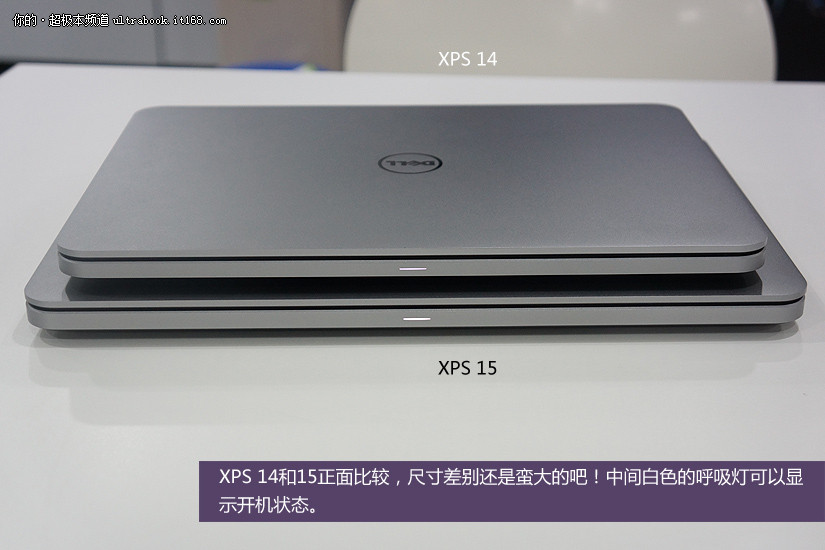 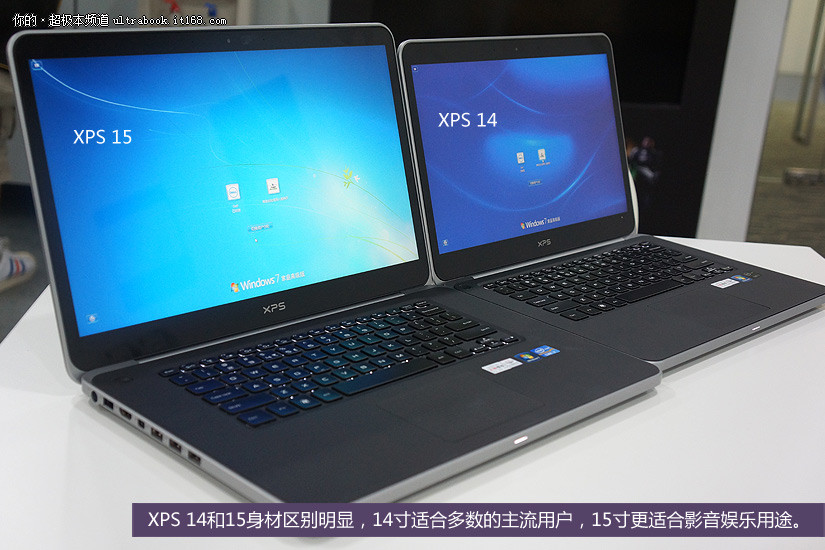 This post has been edited by [Ancient]-XinG-: Jun 30 2012, 04:05 PM |
|
|
Jul 20 2012, 07:51 AM
Return to original view | Post
#15
|
|
Senior Member
5,752 posts Joined: Jan 2012
|
I am using 14z currently. Whenever you guys plug in printer, your whole laptop will have some electric shock. This is real.
|
|
|
Jul 17 2013, 02:08 PM
Return to original view | Post
#16
|
|
Senior Member
5,752 posts Joined: Jan 2012
|
QUOTE(Mr.Zee @ May 25 2013, 11:28 AM) hi bros owning is XPS 14z pass 1 year. Very happy with it, and can't find any accessories tooxps14 owner reporting in joining the club just checking if anybody knows how to get accessories for xps14 here in malaysia i.e. laptop case, silicon cover for palm rest & keyboard etc http://www.amazon.com/iPearl-mCover-Shell-...ell+xps+14+case |
|
|
Aug 2 2013, 09:40 PM
Return to original view | Post
#17
|
|
Senior Member
5,752 posts Joined: Jan 2012
|
QUOTE(ConquerorX @ Jul 21 2013, 08:59 PM) Hi All, For gaming i will recommend Alienware. I'm currently researching on XPS 13 vs XPS 14. Can anyone of you share some of your knowledge and experience related to both? 1. Gaming capability? 2. Battery life? 3. Resolution? (I have a Dell 24" Ultrasharp LCD, and I'd like to make full use of its function with the secondary output of XPS 13 or XPS 14). Can either 13 or 14 generates the 1920 x 1080 FullHD output from its XPS 13 Displayport or HDMI from XPS 14? 4. Any pros and cons between the two that you can share? I'd mainly use the laptop for work purpose, but of course I'd also like the laptop to have decent gaming capability where I can play some decent/latest games with medium settings perhaps. Looking forward to your advice  But comparing XPS 14 or 13, my vote will go to 14 ^^ |
|
|
Nov 9 2013, 04:09 PM
Return to original view | Post
#18
|
|
Senior Member
5,752 posts Joined: Jan 2012
|
QUOTE(whyteaz @ Aug 5 2013, 03:39 PM) XPS 14 cant do a proper gaming unless u wanted to play 3 years or older series. BTW XPS 14 still have unsolved wifi and screen issue, I m not sure u want to have that anot. Go google up. I am not gaming type. But so far all working after 1 and half year usage. Only thing is don't know why the HDD spoiled so soon and changed to SSD 128 GB. |
|
|
Feb 18 2017, 08:39 AM
Return to original view | Post
#19
|
|
Senior Member
5,752 posts Joined: Jan 2012
|
still using my 14z
5 years already, Wow. haha beside battery life started to go low. others still doing great! Using SSD too |
| Change to: |  0.0769sec 0.0769sec
 0.57 0.57
 7 queries 7 queries
 GZIP Disabled GZIP Disabled
Time is now: 5th December 2025 - 10:44 PM |
 Quote
Quote