

QUOTE(StupidGuyPlayComp @ Dec 3 2010, 10:14 AM)
 Facebook and Gmail sync without problem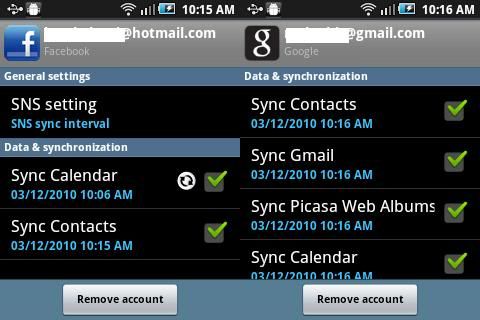

Samsung Galaxy 5 GT-I5503(V2 Froyo-ing Now), Froyo, pls come to papa
|
|
 Dec 3 2010, 10:17 AM Dec 3 2010, 10:17 AM
|
 
Junior Member
264 posts Joined: Sep 2008 
|
QUOTE(StupidGuyPlayComp @ Dec 3 2010, 10:14 AM) Facebook and Gmail sync without problem |
|
|
|
|
|
Dec 3 2010, 10:19 AM
|

Senior Member
3,140 posts Joined: Jan 2003
|
QUOTE(shadow111 @ Dec 3 2010, 10:04 AM) okie.. let me backup my contact first and try it later... tested the recovery mode.. doesn't nothing at all..maybe only can be used when the phone having problem gua..  |
|
|
Dec 3 2010, 10:20 AM
|

All Stars
13,681 posts Joined: Mar 2006 
|
QUOTE(shadow111 @ Dec 3 2010, 10:19 AM) tested the recovery mode.. doesn't nothing at all.. maybe only can be used when the phone having problem gua.. I think it only work on others Samsung modelAdded on December 3, 2010, 10:21 am Nice built in Task Manager, say bye bye to ATK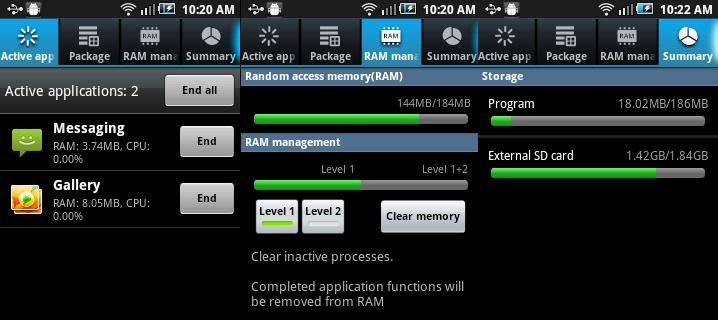 Added on December 3, 2010, 10:25 am QUOTE(ja3kass @ Dec 3 2010, 10:17 AM) try flash bro~  Unfortunately the flash still unable function............without the ARMv7 instruction set it still non workable Unfortunately the flash still unable function............without the ARMv7 instruction set it still non workableI will further test later 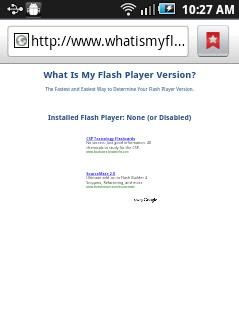 This post has been edited by StupidGuyPlayComp: Dec 3 2010, 10:25 AM |
|
|
Dec 3 2010, 10:37 AM
|

Junior Member
197 posts Joined: Jul 2006
|
Insya'Allah Ok guys, I received some PM regathering how to flash G5 to froyo. Instead of keep replying to all of the PM, I just thought it will be better if I posted here. So many people could read and try it. Thought I dont think is just about upgrading to froyo, but also to those having problem with G5 that can only resolve by DIY flashing. That can save you guys from being cheated to pay for flashing phone at shop like I had experianced.
Before starting to flash, I've to address some issue. 1) BACKUP BACKUP BACKUP , backup your contact, msg, file, anything thats is important. Can't stress out how important this is 2) I'm not an expert, I'm just a layman like you, so if some complicated things happen, I could not help you 3) This step by step guide is specific to I5500LUYJP2 firmware. Other firmware required a little twitch hear and there when using odin. 4) IS VERY HARD TO BRICK your phone, is very uncommon. But the possibility is there. So here the step by step guide Bismillah 1) Go to this webiste to download Odin v4.28 and Ops file, and this website to download I5500LUYJP2 2. Extract Odin v4.28 and Ops File.zip and I5500LUYJP2.rar, the password in the previous website 3. Open Odin v4.28, -Select OPS tab: EUROPA_I5508_v1.0.ops -Thick One Package, Auto Reboot and Protect OPS at the Option section -Select I5500LAROJP2.tar from where you have extracted the I5500LUYJP2 4. Turn off phone, remove battery for 5second, put it back 5. Hold "Volume Down, Center button & Power button" in the same time to enter Download Mode. Your are in download more when you see the yellow triangle with "!" sign in it and the word downloading on top of it. 5. Connect to PC with USB cable 6. When the data line and the phone connection is successful, com port shows yellow in Odin 7. Press Start on Odin 8. Waitin & Pray! and DONT PANIC. This section usually require 5-6 minutes. The phone will reboot it self and you just have to wait. 9. When odin said the flashing has PASS, you by now has FROYO!!. but wait is not done. 10. You have to do Hard reset after flashing by dialing *2767*3855# 11. And your done WELCOME TO THE G5 froyo familly.  Added on December 3, 2010, 10:39 amOther people that have flash to froyo welcome to edit my froyo flashing guide Added on December 3, 2010, 10:40 am QUOTE(StupidGuyPlayComp @ Dec 3 2010, 10:20 AM) I think it only work on others Samsung modelAdded on December 3, 2010, 10:21 am Nice built in Task Manager, say bye bye to ATKAdded on December 3, 2010, 10:25 am Unfortunately the flash still unable function............without the ARMv7 instruction set it still non workableI will further test later This post has been edited by qunox: Dec 3 2010, 10:40 AM |
|
|
Dec 3 2010, 10:48 AM
|
|
Junior Member
72 posts Joined: Nov 2010
|
QUOTE(ja3kass @ Dec 2 2010, 10:50 PM) gocke, i tried and calculated already... Since apps2sd is just splitting the apps, there is also a way of doing it on eclair just more complicated.e.g the game is 10 MB, show in system at 2MB after moving to SD...actually the 8MB are transferred to SD and remain 2MB in Phone. I haven't try it, but here is the guide I found on the internet. How to split apk |
|
|
Dec 3 2010, 10:52 AM
|
|
All Stars
13,681 posts Joined: Mar 2006
|
QUOTE(wshen6 @ Dec 3 2010, 10:48 AM) Since apps2sd is just splitting the apps, there is also a way of doing it on eclair just more complicated. I haven't try it, but here is the guide I found on the internet. How to split apk Every apps running such, better I go suicide.......Added on December 3, 2010, 10:54 am QUOTE(qunox @ Dec 3 2010, 10:37 AM) Insya'Allah Ok guys, I received some PM regathering how to flash G5 to froyo. Instead of keep replying to all of the PM, I just thought it will be better if I posted here. So many people could read and try it. Thought I dont think is just about upgrading to froyo, but also to those having problem with G5 that can only resolve by DIY flashing. That can save you guys from being cheated to pay for flashing phone at shop like I had experianced. Level 1 - Kill in inactive apps, remain the background apps like gmail(push email needed)........Before starting to flash, I've to address some issue. 1) BACKUP BACKUP BACKUP , backup your contact, msg, file, anything thats is important. Can't stress out how important this is 2) I'm not an expert, I'm just a layman like you, so if some complicated things happen, I could not help you 3) This step by step guide is specific to I5500LUYJP2 firmware. Other firmware required a little twitch hear and there when using odin. 4) IS VERY HARD TO BRICK your phone, is very uncommon. But the possibility is there. So here the step by step guide Bismillah 1) Go to this webiste to download Odin v4.28 and Ops file, and this website to download I5500LUYJP2 2. Extract Odin v4.28 and Ops File.zip and I5500LUYJP2.rar, the password in the previous website 3. Open Odin v4.28, -Select OPS tab: EUROPA_I5508_v1.0.ops -Thick One Package, Auto Reboot and Protect OPS at the Option section -Select I5500LAROJP2.tar from where you have extracted the I5500LUYJP2 4. Turn off phone, remove battery for 5second, put it back 5. Hold "Volume Down, Center button & Power button" in the same time to enter Download Mode. Your are in download more when you see the yellow triangle with "!" sign in it and the word downloading on top of it. 5. Connect to PC with USB cable 6. When the data line and the phone connection is successful, com port shows yellow in Odin 7. Press Start on Odin 8. Waitin & Pray! and DONT PANIC. This section usually require 5-6 minutes. The phone will reboot it self and you just have to wait. 9. When odin said the flashing has PASS, you by now has FROYO!!. but wait is not done. 10. You have to do Hard reset after flashing by dialing *2767*3855# 11. And your done WELCOME TO THE G5 froyo familly. Added on December 3, 2010, 10:39 amOther people that have flash to froyo welcome to edit my froyo flashing guide Added on December 3, 2010, 10:40 am I still dont get it with level 1 level 2 thing. What is it for?? Level 2 - Kill all apps This post has been edited by StupidGuyPlayComp: Dec 3 2010, 10:54 AM |
|
|
|
|
|
Dec 3 2010, 10:58 AM
|
|
Junior Member
264 posts Joined: Sep 2008
|
QUOTE(StupidGuyPlayComp @ Dec 3 2010, 10:52 AM) Every apps running such, better I go suicide.......Added on December 3, 2010, 10:54 am Level 1 - Kill in inactive apps, remain the background apps like gmail(push email needed)........ Level 2 - Kill all apps  , G5 - Froyo - we need you , G5 - Froyo - we need you  |
|
|
Dec 3 2010, 11:04 AM
|
|
Senior Member
3,140 posts Joined: Jan 2003
|
|
|
|
Dec 3 2010, 11:08 AM
|
|
All Stars
13,681 posts Joined: Mar 2006
|
QUOTE(shadow111 @ Dec 3 2010, 11:04 AM) Its need the network card which has ad-hoc function...........not all laptop can do it |
|
|
Dec 3 2010, 11:10 AM
|
|
Senior Member
3,140 posts Joined: Jan 2003
|
QUOTE(StupidGuyPlayComp @ Dec 3 2010, 11:08 AM) Its need the network card which has ad-hoc function...........not all laptop can do it oh.. me now hving meeting using my wireless.. cant test it out..hopefully it can works on my nb.. |
|
|
Dec 3 2010, 11:14 AM
|
|
All Stars
13,681 posts Joined: Mar 2006
|
QUOTE(gocke55014 @ Dec 2 2010, 10:51 PM) search using google widget. seems like the default touchwiz launcher might be the cause of the missing apps.. it somehow cant find the apps on sd, maybe this will be fixed in official release but i currently use launcher pro to fix it,, all aps are back yes, I face this issue, a fatal bug....... |
|
|
Dec 3 2010, 11:19 AM
|
|
Senior Member
3,140 posts Joined: Jan 2003
|
QUOTE(StupidGuyPlayComp @ Dec 3 2010, 11:14 AM) yes, I face this issue, a fatal bug....... |
|
|
Dec 3 2010, 11:21 AM
|
|
Junior Member
264 posts Joined: Sep 2008
|
do you see the right side of google search bar, a voice search icon...
how to use it? i try to download but not found。。。 |
|
|
|
|
|
Dec 3 2010, 11:21 AM
|
|
Junior Member
72 posts Joined: Nov 2010
|
QUOTE(shadow111 @ Dec 3 2010, 11:04 AM) wireless network without router for xp/vista user.Btw, any rooted user had tried LCD density app which can change the screen resolution of the android phone just like a computer? This post has been edited by wshen6: Dec 3 2010, 11:25 AM |
|
|
Dec 3 2010, 11:27 AM
|

Junior Member
287 posts Joined: Jan 2007
|
QUOTE(shadow111 @ Dec 3 2010, 11:19 AM) juz curious.. if clean install the app will also face same problem? Hmmm.. Not sure about that. Perhaps u could test it bro. No wonder the official release for froyo takes so long. Even in this leaked beta still a few major bugs to be fixed. |
|
|
Dec 3 2010, 11:29 AM
|
|
Senior Member
3,140 posts Joined: Jan 2003
|
QUOTE(wshen6 @ Dec 3 2010, 11:21 AM) wireless network without router for xp/vista user. thanks bro.. will try this too..Btw, any rooted user had tried LCD density app which can change the screen resolution of the android phone just like a computer? Added on December 3, 2010, 11:30 am QUOTE(gocke55014 @ Dec 3 2010, 11:27 AM) Hmmm.. Not sure about that. Perhaps u could test it bro. No wonder the official release for froyo takes so long. Even in this leaked beta still a few major bugs to be fixed. my phone is still virgin...  This post has been edited by shadow111: Dec 3 2010, 11:30 AM |
|
|
Dec 3 2010, 11:32 AM
|
|
All Stars
13,681 posts Joined: Mar 2006
|
QUOTE(ja3kass @ Dec 3 2010, 11:21 AM) do you see the right side of google search bar, a voice search icon... how to use it? i try to download but not found。。。 later i find it out.............Added on December 3, 2010, 11:32 am QUOTE(shadow111 @ Dec 3 2010, 11:19 AM) juz curious.. if clean install the app will also face same problem? clean install apps no such problem...This post has been edited by StupidGuyPlayComp: Dec 3 2010, 11:32 AM |
|
|
Dec 3 2010, 11:32 AM
|

Senior Member
3,200 posts Joined: Jan 2003 From: IPOH 
|
let us waiting d offical froyo release..
come to papa froyo |
|
|
Dec 3 2010, 11:33 AM
|
|
All Stars
13,681 posts Joined: Mar 2006
|
QUOTE(wshen6 @ Dec 3 2010, 11:21 AM) wireless network without router for xp/vista user. I tested the LCD Density, not work...........no effectBtw, any rooted user had tried LCD density app which can change the screen resolution of the android phone just like a computer? |
|
|
Dec 3 2010, 12:01 PM
|

Junior Member
430 posts Joined: Sep 2009
|
QUOTE(ja3kass @ Dec 3 2010, 10:13 AM) my alarm is not working, but i hv test last nite... Happened to me also dun hv why, i missed the class....   I'm using the default alarm Here's what I did. 1) After setting the time, press back and you should see 4 buttons below (alarm, gallery, music and home) 2) Leave your phone on this screen and go sleep. Works fine for me.  Added on December 3, 2010, 12:03 pmTo those that flashed their G5, Can we enlarge our contact's picture? This post has been edited by BlueSpark: Dec 3 2010, 12:03 PM |
|
Topic ClosedOptions
|
| Change to: |  0.0202sec 0.0202sec
 1.04 1.04
 6 queries 6 queries
 GZIP Disabled GZIP Disabled
Time is now: 1st December 2025 - 08:05 PM |
 Quote
Quote