

 Nov 21 2010, 02:19 PM, updated 16y ago


Go to Android Market on your phone and download and install this app called "Quadrant"
Overview of the lag fix process
Step 1: Root the phone & boot into recovery mode to apply update.zip
Step 2: Install Ext 2 Tools
Step 3: Apply lag fix
You can download and install it from the Android Market. Search for "One click lag fix".
The developer's name is RyanZA.
Below is how the interface of the RyanZA's One Click Lag Fix looks like.

Step 1: Root the phone
After you have downloaded and installed RyanZA's OCLF app, launch it.
Click on the first button called "Root Device 2.1"
Then it will ask you to boot into recovery mode to apply the update.zip file.
To boot into recovery mode, just follow the steps below:
Step 1. Turn your phone off.
Step 2. Hold down “Volume Up keys” +“Home” and press “Power” until the screen light ups.
Step 3. Press the three keys unlit green screen like below appears:
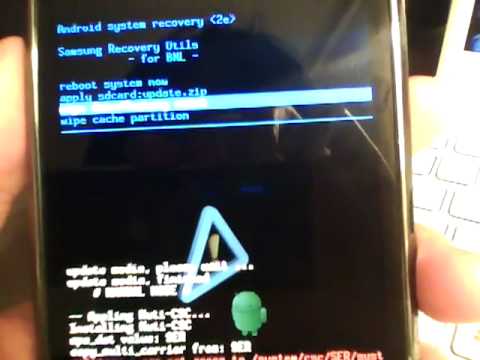
To navigate thru the menus, you would then use the volume rocker buttons (press + or -) to move up or down the menu.
To select an option in the menu, you would press the "home" button of your Galaxy S.
Select the option called "apply sdcard:update.zip"
It should reboot after that. If not, just select "reboot system now".
Step 2: Install Ext 2 Tools
After the phone reboot, launch back RyanZA's OCLF app.
Then in the app, click on the 2nd button which is called "Install EXT 2 Tools".
Note: It may say "Unavailable" but just ignore it and press that button and see how.
Step 3: Apply the lag fix
The after the EXT 2 Tools have been installed, proceed to press on the 3rd button which is called "OneClickLagFix".
After that, you are done. The lag fix has been applied to your Galaxy S.
Now run the Quadrant test again and be prepared to be surprised by the result.
How to make your Galaxy S perform even smoother like iPhone 4
Ditch the Samsung TouchWiz UI and use LauncherPro.
You can download the free version of LauncherPro from the Android market
Watch these 2 videos:
http://www.youtube.com/watch?v=n9svaxg-Vvo
http://www.youtube.com/watch?v=ujg2cpzZPBM
This post has been edited by pcphobic: Nov 21 2010, 02:41 PM
 Quote
Quote

 0.0178sec
 0.91
0.91
 6 queries
 GZIP Disabled