Welcome Guest ( Log In | Register )

Outline · [ Standard ] · Linear+

 One click lag fix for Galaxy S

views
     
TSpcphobic
post Nov 21 2010, 02:19 PM, updated 16y ago

Getting Started
**
Junior Member
287 posts

Joined: Jan 2007
Perform the Quadrant Test

Go to Android Market on your phone and download and install this app called "Quadrant"


Overview of the lag fix process

Step 1: Root the phone & boot into recovery mode to apply update.zip
Step 2: Install Ext 2 Tools
Step 3: Apply lag fix

You can download and install it from the Android Market. Search for "One click lag fix".
The developer's name is RyanZA.

Below is how the interface of the RyanZA's One Click Lag Fix looks like.

user posted image


Step 1: Root the phone

After you have downloaded and installed RyanZA's OCLF app, launch it.

Click on the first button called "Root Device 2.1"

Then it will ask you to boot into recovery mode to apply the update.zip file.

To boot into recovery mode, just follow the steps below:
Step 1. Turn your phone off.
Step 2. Hold down “Volume Up keys” +“Home” and press “Power” until the screen light ups.
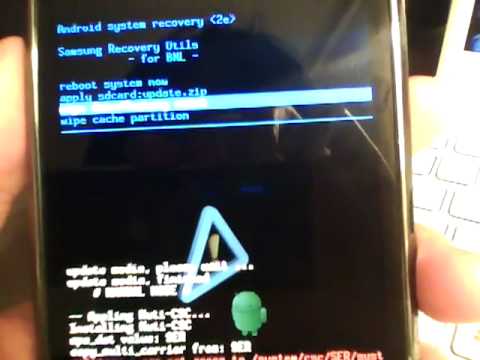
Step 3. Press the three keys unlit green screen like below appears:

user posted image

To navigate thru the menus, you would then use the volume rocker buttons (press + or -) to move up or down the menu.
To select an option in the menu, you would press the "home" button of your Galaxy S.

Select the option called "apply sdcard:update.zip"

It should reboot after that. If not, just select "reboot system now".


Step 2: Install Ext 2 Tools

After the phone reboot, launch back RyanZA's OCLF app.

Then in the app, click on the 2nd button which is called "Install EXT 2 Tools".

Note: It may say "Unavailable" but just ignore it and press that button and see how.


Step 3: Apply the lag fix

The after the EXT 2 Tools have been installed, proceed to press on the 3rd button which is called "OneClickLagFix".
After that, you are done. The lag fix has been applied to your Galaxy S.

Now run the Quadrant test again and be prepared to be surprised by the result.


How to make your Galaxy S perform even smoother like iPhone 4

Ditch the Samsung TouchWiz UI and use LauncherPro.
You can download the free version of LauncherPro from the Android market

Watch these 2 videos:

http://www.youtube.com/watch?v=n9svaxg-Vvo


http://www.youtube.com/watch?v=ujg2cpzZPBM


This post has been edited by pcphobic: Nov 21 2010, 02:41 PM
jujx
post Nov 21 2010, 02:20 PM

Regular
******
Senior Member
1,398 posts

Joined: Mar 2007
OCLF is one the lousiest lagfix for Galaxy S
TSpcphobic
post Nov 21 2010, 02:25 PM

Getting Started
**
Junior Member
287 posts

Joined: Jan 2007
QUOTE(jujx @ Nov 21 2010, 02:20 PM)
OCLF is one the lousiest lagfix for Galaxy S
*
This is the easiest for those total newbies. People who have no hacking background what-so-ever.

If u are helpful, then please write a step by step guide on using other lag fix for the benefit of all Galaxy S owners.

This post has been edited by pcphobic: Nov 21 2010, 02:33 PM
Andrew Lim
post Nov 21 2010, 02:29 PM

Just keep on keeping on
*******
Senior Member
2,844 posts

Joined: Nov 2007


QUOTE(jujx @ Nov 21 2010, 02:20 PM)
OCLF is one the lousiest lagfix for Galaxy S
*
Then please suggest alternatives.
pluginbaby
post Nov 21 2010, 06:12 PM

Look at all my stars!!
*******
Senior Member
2,661 posts

Joined: Apr 2007


QUOTE(pcphobic @ Nov 21 2010, 02:25 PM)
This is the easiest for those total newbies. People who have no hacking background what-so-ever.

If u are helpful, then please write a step by step guide on using other lag fix for the benefit of all Galaxy S owners.
*
true indeed.. works on stock rom and an acceptable improvement without having to flash your device or etc.. OCLF is indeed total noob proof rclxms.gif
GothFebrio
post Nov 21 2010, 06:18 PM

too long...did not read
******
Senior Member
1,304 posts

Joined: Jan 2009
From: Kuala Lumpur


QUOTE(jujx @ Nov 21 2010, 02:20 PM)
OCLF is one the lousiest lagfix for Galaxy S
*
some ppl prefer ext2 than ext4
jujx
post Nov 21 2010, 07:40 PM

Regular
******
Senior Member
1,398 posts

Joined: Mar 2007
QUOTE(pcphobic @ Nov 21 2010, 02:25 PM)
This is the easiest for those total newbies. People who have no hacking background what-so-ever.

If u are helpful, then please write a step by step guide on using other lag fix for the benefit of all Galaxy S owners.
*
Yea i agree OCLF is easiest for newbies to apply. But it does lag after some time of use or after you install alot of apps.

There's alot other lagfix in XDA forum and instructions are there, no need to write guide here.
MYstombox
post Nov 21 2010, 08:11 PM

Wired!
*******
Senior Member
2,240 posts

Joined: Mar 2007
From: Johor


quadrant test means nothing in terms of absolute value.

And can you or a mod merge this with the SGS tread that already exists?

This post has been edited by MYstombox: Nov 21 2010, 08:12 PM
g88
post Nov 21 2010, 10:05 PM

Regular
******
Senior Member
1,631 posts

Joined: Jan 2003
just install advance task killer will do la
ohmlawx
post Nov 21 2010, 10:38 PM

Enthusiast
*****
Senior Member
732 posts

Joined: Sep 2008
hi,

for me this thread is useful. Even tho i am no longer using OCLF, but the steps is clearly written.

In my first day having an android phone which is SGS, i am totally lost. Reading in XDA really confusing with all the terms and Android words..

Good job for the thread starter..

Maybe we can expand this thread with describing all those term for Androids..
jujx
post Nov 21 2010, 10:43 PM

Regular
******
Senior Member
1,398 posts

Joined: Mar 2007
QUOTE(Agusta Motors @ Nov 21 2010, 10:32 PM)
Not everyone will understand what those in xda has written down.

If you believe you have the knowledge, then translate it and help your fellow Malaysians, or else, its pointless.
*
I believe you don't need deep knowledge to understand it. Its not like asking you to write codes, basically jsut follow the steps given there.

Thousands of people can do it following the instruction given by XDA, i don't think we malaysian are that stupid isn't it? Is always better to read first.

No offense, just giving my opinion.
silentser
post Nov 22 2010, 04:10 AM

OH MAH ANDROID
*******
Senior Member
3,177 posts

Joined: Sep 2006
From: subway FTW


what with the fighting... Since we got our OFFICIAL(yeah bebey yeah!!) now, this voodoo is for froyo only

here is VOODOO, most of us have been pampered by this lagfix until no lag also will say got lag if you not install this babe.
the steps looks like many, but it takes about 5 minit only.

Ofiicial webpage:http://project-voodoo.org/

Tools
ODIN- Used to flash the files on your phone over USB.
Requires Samsung drivers to be installed on your PC, only works on windows.
Galaxy S Drivers - If you got Kies running and working, you don’t need this.

Voodoo Package
Voodoo5 pre6- Flashable kernel to be used in this guide.
Voodoo5 pre6 - update.zip for installation without using a PC

What does voodoo5 pre6 include?

* Lagfix,
*Sharpness, color and video color enhancments.
*It does not include the color temperature and brightness fix.
*su binary file, means you phone can be rooted just by installing superuser and busybox from the market.


PreRequisities

1.Backup your /efs folder. That folder contains IMEI and Product code.
2.This backup can be proved useful in-case of problems. It’s not mandatory, but strongly advised.
3.Make sure you know how Download Mode looks like, and that it is actually working on your phone.
4.No Download Mode = High Risk of a nice BRICK = Go replace your phone.
5.Download Mode Is NOT Recovery Mode.


Installation on Windows (For Voodoo on Android 2.2 AKA Froyo - Download links are at bottom)

1.Make sure you phone is charged, to be on the safe side, beyond 70% - Best would be 100%.

2.If you have previously installed voodoo on Eclair 2.1, disable it, since the new stock firmware can't access your data partition until you install Voodoo on Froyo 2.2 again. See the Voodoo Documentation
3.Install a supported Android 2.2 Firmware on your Galaxy S GT-i9000 (JPM/JP6/JPA)
4.After your phone is running and working, proceed.
5.If you have previously installed voodoo on Eclair 2.1, and have created the disable_lagfix folder/file to disable voodoo, remove it prior proceeding. For more info Click me!
6.Make sure Kies is not running. Also close the Kies Tray Agent.
7.If you don’t have Kies at all, make sure you have the Galaxy S drivers.
8.If your phone’s USB is connected, disconnect it.
9.Download and Open Odin3, press the PDA button and select the file you are going to flash.
10.Probably Voodoo-5-pre6-Froyo-GT-I9000-odin-pda.tar (Do NOT select any other options like re-partition or ANYTHING else - See the screenshot at bottom to be sure.)
11.Turn off your phone. You might also prefer to remove your external sdcard & simcard. (Better safe than sorry)
12.Put your phone into download mode using the three-button-combo:
13.Press and hold VolumeDown+Home+Power buttons till the phone enters Download mode.
14.Connect your phone using USB to your PC, if possible, use a USB port not shared by other devices such as printers, scanner or USB-hubs.
15.Odin should detect your phone at this point.
16.Press the “Start” button and wait, it should take around 20 seconds.
17.Do NOT reboot, unplug, or touch your phone at any point.
18.Your phone will reboot automatically when the process is done.
19.After the phone reboots automatically, it will go into the process of converting your existing RFS file system into EXT4, this might take some time - Depending on the amount of installed applications you had prior to installing voodoo. You can hear an audible progress indication from your phones speaker as it transitions between the installation steps.

Optional Steps :
Root - Install superuser app from market - Make sure to reboot after installing
Busybox - install busybox from market.
if busybox is not willing to install via market as expected, read the FAQ.
If using Titanium Backup, open, accept root then check for problems and install busybox.
Donate Supercurio via Paypal wink.gif

Uninstall


To temporarily disable voodoo :
1.Create a folder voodoo/disable_lagfix on internal sd.
2.Reboot (This will convert your EXT4 back into RFS, so it might take a while)
To remove voodoo completely, follow step 1 and then :
1.Flash another kernel.
2.Your previous kernel can be obtained from inside the PDA file you used to flash your firmware, it’s the zImage file.
3.Delete all the other files in that tar file, leave only the zImage file - and flash the tar as PDA, and you got your old kernel back.

CREDIT: Supercurio for making voodoo
People at XDA for making this guide, i just copy pasta

jiidaineko
post Nov 22 2010, 09:43 AM

On my way
****
Senior Member
579 posts

Joined: Aug 2008


even ifon4 lags if u leave apps running at the background or install too much crap (jailbroken) ... no amount of fix can solve stupidity of users lol

i believe most of us here are seasoned windows users. to keep smartphone smooth, you have to treat it like windows. dont install too much junk or multitask too much~
adliazaddin
post Nov 22 2010, 10:45 AM

Casual
***
Junior Member
329 posts

Joined: Jun 2007
From: behind you


QUOTE(silentser @ Nov 22 2010, 04:10 AM)
what with the fighting... Since we got our OFFICIAL(yeah bebey yeah!!) now, this voodoo is for froyo only

here is VOODOO, most of us have been pampered by this lagfix until no lag also will say got lag if you not install this babe.
the steps looks like many, but it takes about 5 minit only.

Ofiicial webpage:http://project-voodoo.org/

Tools
        ODIN- Used to flash the files on your phone over USB.
        Requires Samsung drivers to be installed on your PC, only works on windows.
        Galaxy S Drivers - If you got Kies running and working, you don’t need this.

Voodoo Package
        Voodoo5 pre6- Flashable kernel to be used in this guide.
        Voodoo5 pre6 - update.zip for installation without using a PC

What does voodoo5 pre6 include?

      * Lagfix,
        *Sharpness, color and video color enhancments.
        *It does not include the color temperature and brightness fix.
        *su binary file, means you phone can be rooted just by installing superuser and busybox from the market.
PreRequisities

    1.Backup your /efs folder. That folder contains IMEI and Product code.
    2.This backup can be proved useful in-case of problems. It’s not mandatory, but strongly advised.
    3.Make sure you know how Download Mode looks like, and that it is actually working on your phone.
    4.No Download Mode = High Risk of a nice BRICK = Go replace your phone.
    5.Download Mode Is NOT Recovery Mode.
Installation on Windows (For Voodoo on Android 2.2 AKA Froyo - Download links are at bottom)

    1.Make sure you phone is charged, to be on the safe side, beyond 70% - Best would be 100%.

    2.If you have previously installed voodoo on Eclair 2.1, disable it, since the new stock firmware can't access your data partition until you install Voodoo on Froyo 2.2 again. See the Voodoo Documentation
    3.Install a supported Android 2.2 Firmware on your Galaxy S GT-i9000 (JPM/JP6/JPA)
    4.After your phone is running and working, proceed.
    5.If you have previously installed voodoo on Eclair 2.1, and have created the disable_lagfix folder/file to disable voodoo, remove it prior proceeding. For more info Click me!
    6.Make sure Kies is not running. Also close the Kies Tray Agent.
    7.If you don’t have Kies at all, make sure you have the Galaxy S drivers.
    8.If your phone’s USB is connected, disconnect it.
    9.Download and Open Odin3, press the PDA button and select the file you are going to flash.
    10.Probably Voodoo-5-pre6-Froyo-GT-I9000-odin-pda.tar (Do NOT select any other options like re-partition or ANYTHING else - See the screenshot at bottom to be sure.)
    11.Turn off your phone. You might also prefer to remove your external sdcard & simcard. (Better safe than sorry)
    12.Put your phone into download mode using the three-button-combo:
    13.Press and hold VolumeDown+Home+Power buttons till the phone enters Download mode.
    14.Connect your phone using USB to your PC, if possible, use a USB port not shared by other devices such as printers, scanner or USB-hubs.
    15.Odin should detect your phone at this point.
    16.Press the “Start” button and wait, it should take around 20 seconds.
    17.Do NOT reboot, unplug, or touch your phone at any point.
    18.Your phone will reboot automatically when the process is done.
    19.After the phone reboots automatically, it will go into the process of converting your existing RFS file system into EXT4, this might take some time - Depending on the amount of installed applications you had prior to installing voodoo. You can hear an audible progress indication from your phones speaker as it transitions between the installation steps.
   
Optional Steps :
        Root - Install superuser app from market - Make sure to reboot after installing
        Busybox - install busybox from market.
        if busybox is not willing to install via market as expected, read the FAQ.
        If using Titanium Backup, open, accept root then check for problems and install busybox.
        Donate Supercurio via Paypal wink.gif

Uninstall


    To temporarily disable voodoo :
        1.Create a folder voodoo/disable_lagfix on internal sd.
        2.Reboot (This will convert your EXT4 back into RFS, so it might take a while)
    To remove voodoo completely, follow step 1 and then :
        1.Flash another kernel.
        2.Your previous kernel can be obtained from inside the PDA file you used to flash your firmware, it’s the zImage file.
        3.Delete all the other files in that tar file, leave only the zImage file - and flash the tar as PDA, and you got your old kernel back.

CREDIT: Supercurio for making voodoo
            People at XDA for making this guide, i just copy pasta
*
im officially announced you as android guru....
SquidKhaw
post Nov 25 2010, 03:19 PM

Getting Started
**
Junior Member
67 posts

Joined: Oct 2010
From: Singapore


is this work with HTC Desire?
silentser
post Nov 25 2010, 03:33 PM

OH MAH ANDROID
*******
Senior Member
3,177 posts

Joined: Sep 2006
From: subway FTW


QUOTE(SquidKhaw @ Nov 25 2010, 03:19 PM)
is this work with HTC Desire?
*
nope
yen223
post Nov 25 2010, 04:47 PM

Enthusiast
*****
Senior Member
777 posts

Joined: Jul 2005
From: mars


QUOTE(SquidKhaw @ Nov 25 2010, 03:19 PM)
is this work with HTC Desire?
*
The HTC Desire doesn't suffer from the same lag problem as the Samsung Galaxy S.
TSpcphobic
post Nov 25 2010, 04:54 PM

Getting Started
**
Junior Member
287 posts

Joined: Jan 2007
We may not need to write a guide, but at least we can be more helpful by sharing the link to where newbies can find more info.

We all need more helpful members like silentser here.

silentser, thank you for sharing.

Fornx
post Nov 25 2010, 05:53 PM

Zenith
*****
Senior Member
758 posts

Joined: Jun 2009
Im on dxjpa n voodoo pre 6 n z4root. Any addons to smoothen the phones perfomance?
silentser
post Nov 25 2010, 05:59 PM

OH MAH ANDROID
*******
Senior Member
3,177 posts

Joined: Sep 2006
From: subway FTW


QUOTE(Fornx @ Nov 25 2010, 05:53 PM)
Im on dxjpa n voodoo pre 6 n z4root. Any addons to smoothen the phones perfomance?
*
kernel k9?

2 Pages  1 2 >Top
 

Change to:
| Lo-Fi Version
0.0214sec    0.16    5 queries    GZIP Disabled
Time is now: 5th December 2025 - 04:48 PM